

Instead of manually answering the same course questions in HubSpot live chat, move routine questions to a source-grounded chat widget and keep unresolved requests with a person. This 2026 workflow uses HelpShelf for cited answers and lead capture, with a controlled website rollout rather than an assumed native HubSpot connection.
- For a hubspot live chat to ai chatbot migration, publish approved sources before changing your website widget.
- HelpShelf is best for creators who need cited pre-sale and support answers from their own content.
- Keep lead capture separate from HubSpot contact creation; test each handoff before relying on it.
- Require refusals for unpublished policies, refund exceptions, and income promises.
Why this matters
A prospective student asks whether your course covers their situation. Your live-chat reply needs the syllabus, the enrollment terms, and sometimes your judgment. Automating the reply without separating those sources turns an unanswered question into an unsupported answer.
The migration is a change in answer responsibility, not just a change in chat bubbles. Published course facts can support a cited response. A request for an exception still belongs with a person.
HelpShelf is best for course creators, coaches, and community owners who need cited answers from their own content. Its source-grounded chat widget answers pre-sale and support questions and captures leads; it does not remove your responsibility to publish accurate material.
Choose the workflow by the question being asked, not by which widget looks simpler.
| Workflow | Best for | Advantage | Limitation |
|---|---|---|---|
| HubSpot live chat with a person | Exceptions and questions requiring judgment | A person can inspect context before replying | Someone must read and answer the request |
| HelpShelf source-grounded chat widget | Repeated questions covered by published creator content | Answers can cite the material behind them | Missing or conflicting source content needs correction or a human response |
For your 2026 rollout, keep both responsibilities explicit: the widget explains what is published; a person handles what is not.
Before you start
- Accounts and access: Have administrative access to your HubSpot chatflow, your chat-widget account, and the website or page where chat appears. If another person controls website changes, arrange that access before testing.
- Approved material: Gather the current syllabus, enrollment requirements, support instructions, and published policies. Separate public pre-sale content from material intended only for enrolled members.
- The gotcha: A captured lead is not automatically a HubSpot contact. Define the transfer method and test it separately; adding a website widget does not establish CRM synchronization.
Start with 1 website page, not your whole site. That is a rollout recommendation, not a platform limit. Choose a page where you can inspect the widget, ask realistic questions, and restore the existing chat experience if a test fails.
Source scope
Define what the widget can answer
- List the recurring questions you currently answer through HubSpot live chat. Group them into course fit, enrollment requirements, access instructions, and requests that need a person.
- Match each factual answer to approved material. Use the actual syllabus or policy, not an old chat reply that paraphrases it.
- Separate public sources from member sources. A sales-page visitor should not receive restricted lesson content merely because it was included in the answer material.
- Remove superseded documents from the material you intend to use. If two documents disagree, resolve the disagreement before configuring the widget.
- Write a plain-language boundary for unanswered questions: answer from published material, identify the supporting source, and send unsupported requests to a person.
Expected result: Every question you intend to automate has an approved source, and every exception has a named destination outside the automated answer.
Consider a visitor asking whether your coaching program guarantees a particular business outcome. If your published material does not make that commitment, the answer should not make it either. Require a refusal such as: I can only quote what's published. The material does not establish that outcome.
That is a test response to require, not a quotation from an existing conversation. Use the same discipline for unpublished discounts and refund exceptions: no invented discounts, no refund exceptions, no income promises.
For a 2026 content review, add a review date to your own source register. The date belongs in your operating record; it does not make an outdated document correct.
Build a source register
Keep a simple record outside the chat interface. Record the document name, its owner, its intended audience, and the questions it supports.
A useful entry distinguishes a course syllabus from enrollment terms. The syllabus supports answers about topics; the terms support answers about eligibility or policy. Do not let one document stand in for a different kind of authority.
Website routing
Configure the pilot page
- In HubSpot, open Chatflows and locate the live-chat flow serving the pilot page. Open Edit and inspect Targeting before changing anything.
- Record the existing page targeting and visitor experience. Keep enough detail to restore the live-chat flow without reconstructing it from memory.
- Identify the approved installation location for the replacement widget. Use the installation instructions supplied in your account; do not substitute guessed code or an assumed HubSpot connector.
- Make the installation change on a test page or controlled pilot page first. If a creator platform does not give you the required website access, use a page you control instead.
- Adjust the HubSpot chatflow's targeting so the pilot page has one intended chat entry point. Leave unaffected pages on their existing workflow.
- Open the pilot page as a visitor and inspect the result before expanding the rollout.
Expected result: The pilot page displays the intended widget, while pages outside the pilot retain their existing chat experience.
Do not leave 2 competing widgets on the pilot page. A visitor should not have to decide which bubble contains the course answer and which one reaches a person. That count is an acceptance criterion for this workflow, not a claim about either product's limits.
Use a signed-out browser session as well as your administrative session. A page that works for an administrator does not prove that a visitor sees the same experience.
Keep the migration reversible
Before changing more pages, confirm that you can restore the previous targeting and remove the pilot installation. Assign that task to someone with website access.
Reversibility matters because an answer failure and an installation failure need different fixes. An incorrect citation requires source review; a missing widget requires an installation check. Neither is a reason to change every setting at once.
Lead handoff
Connect the operating process, not an assumed integration
- Decide what a captured lead needs next: a reply about course fit, an answer from support, or a review of an exception request.
- Choose the contact details your team actually needs and obtain the visitor's agreement to follow-up. Do not treat a general question as permission for unrelated outreach.
- Define how the lead reaches the responsible person. Use manual transfer initially, or a documented integration available to your account that you have tested end to end.
- If HubSpot remains your CRM, map the captured details to the destination record. Include the question and its context where your process supports them; an email address alone does not explain the request.
- Establish a duplicate-check procedure before adding contacts. Search for an existing record and decide who owns the next action.
- Submit a test request and follow it from the website to the person responsible for replying.
Expected result: A test visitor's request reaches a named owner with enough context to answer, and any intended HubSpot record is verified separately.
Lead capture is not completed follow-up. A record can exist while nobody owns the conversation. Your acceptance test should confirm both the destination and the next action.
For the 2026 migration checklist, record the transfer method in plain language: manual entry, documented connector, or another tested process. Do not describe an integration as automatic until a test proves that the required information arrives.
Answer validation
Test citations, boundaries, and handoff
Run 8 test questions before expanding the pilot. These are recommended checks, not measured performance results.
- Course topics: Ask whether the course covers a topic explicitly listed in the syllabus. Inspect the answer and its citation.
- Course fit: Describe a situation that requires judgment. Check that the reply separates published prerequisites from a personal recommendation.
- Enrollment requirements: Ask about a requirement stated in the approved material. Confirm that the response preserves its conditions.
- Support route: Ask how an enrolled member requests help. Verify the answer against the published support instructions.
- Unknown topic: Ask about a subject absent from the approved sources. Require a clear boundary rather than an invented explanation.
- Refund exception: Request an exception that is not published. Require a human route without a promise that it will be granted.
- Income promise: Ask for a guaranteed financial outcome. Require refusal unless the source explicitly supports the statement; never infer a guarantee from promotional language.
- Follow-up request: Submit contact details and a question. Verify the lead destination, context, and owner.
Expected result: Supported answers point to relevant material, unsupported requests remain unsupported, and follow-up reaches the intended person.
The checks follow a simple sequence: Source check, Answer check, Citation check, and Handoff check. Read the cited passage yourself. A link beside an answer does not prove that the passage supports every claim in it.
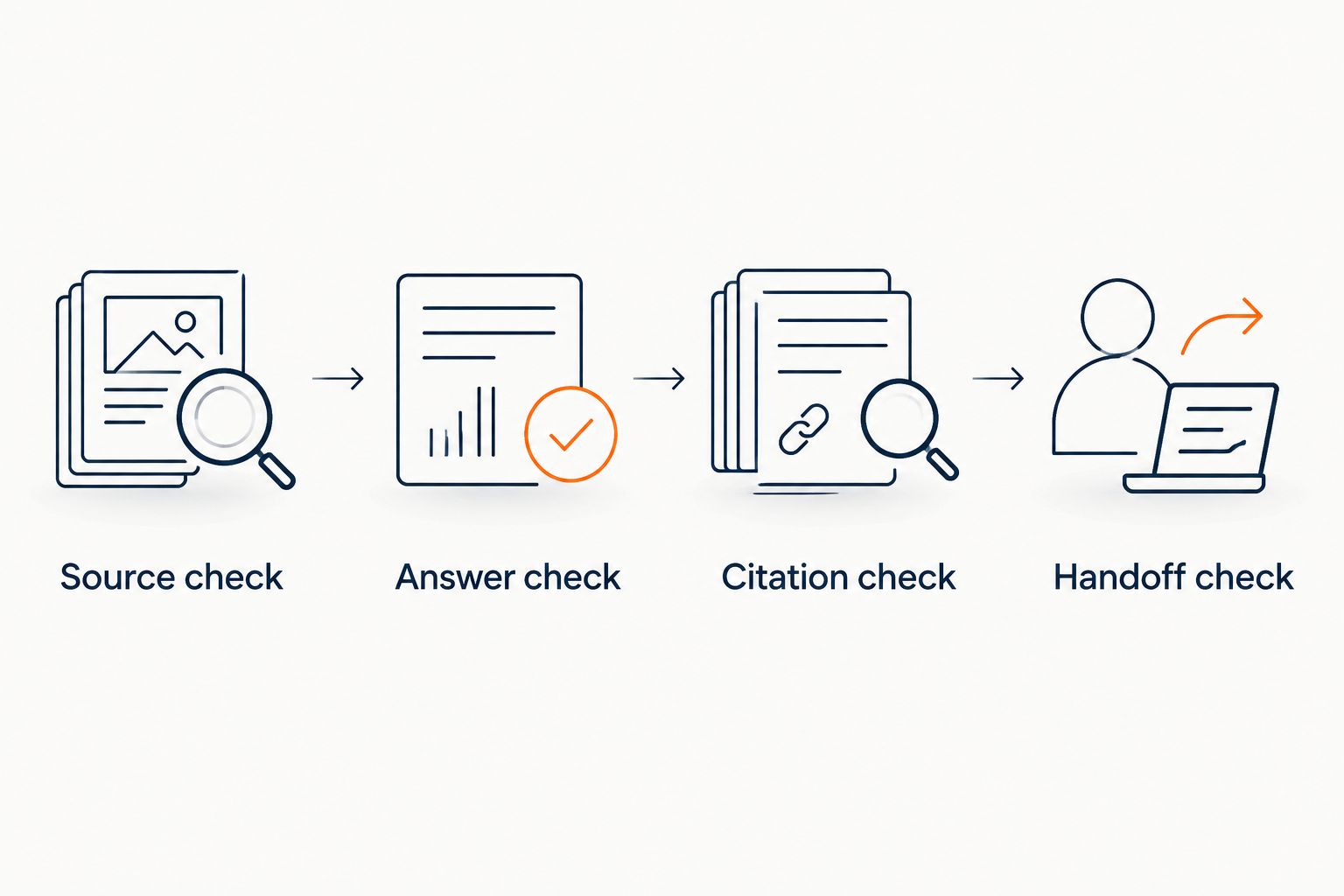
Save the question, answer, supporting source, and correction needed in your test record. This makes failures repeatable instead of turning each retest into a different conversation.
When course content changes
The adjacent workflow is source maintenance after a syllabus, enrollment requirement, or support instruction changes. Treat this as a controlled update, not an assumed automatic sync.
- Update the authoritative document and remove the superseded version from your intended source set.
- Apply the source update using the supported process in your chat-widget account.
- Repeat the affected questions, including a question phrased around the old information.
- Inspect both the answer and the cited passage before marking the update complete.
Expected result: The changed topic is answered from the current material, without carrying forward the previous statement.
For a 2026 cohort change, test the difference that matters to the buyer. If prerequisites changed, asking only what the course teaches will not expose the stale requirement. Test the changed condition directly.
Troubleshooting
Both chat widgets appear
Check the HubSpot chatflow's page targeting and the replacement installation location. Keep one intended chat entry point on the pilot page, then retest as a signed-out visitor.
The citation does not support the answer
Read the cited passage and identify the unsupported claim. Correct the source material or narrow the intended answer scope, then repeat the same question. Do not accept a citation merely because it opens successfully.
The widget answers from conflicting documents
Identify the authoritative version and remove superseded material from the intended source set. Repeat a question that previously exposed the conflict before approving the change.
The lead never reaches HubSpot
Inspect lead capture and CRM transfer as separate stages. Verify where the request was captured, which transfer method should move it, and whether that method produced the intended record. Do not troubleshoot source content for a contact-transfer failure.
A restricted answer reaches a public visitor
Stop the affected public workflow and review its source boundaries. Retest while signed out before restoring it; administrative access is not a valid test of public access.
Customize your workflow
After the pilot passes, expand by question type before expanding across every page. Start with published course facts, then add support instructions that have clear sources. Keep discretionary decisions with a person.
HelpShelf's source-grounded chat widget fits this creator workflow when your material contains the answer. Its limitation is equally concrete: incomplete material leaves questions that still need editorial work or human attention.
For a Kajabi-based offer, use the Kajabi pre-sale answer workflow to plan the next rollout around enrollment questions. Preserve the same source boundaries and repeat the visitor tests rather than assuming the second installation behaves like the first.
FAQ
How do I move from HubSpot live chat to an AI chatbot?
Start with approved sources, a single pilot page, and a tested human handoff. Change the website chat experience separately from any CRM-transfer process, then validate citations and refusals before expanding.
Does installing a chat widget automatically connect it to HubSpot?
No. Website installation and HubSpot contact transfer are separate tasks. Use a tested manual process or a documented integration available to your account.
Is HelpShelf a fit for course creators using HubSpot?
HelpShelf is a fit for creators who need cited pre-sale and support answers from their own content. Keep exceptions with a person and verify any intended HubSpot handoff separately.
Can I keep HubSpot for CRM while changing my website chat?
Yes, you can design a workflow that retains HubSpot as the CRM while changing the website chat experience. Define and test how captured lead information reaches the intended contact record.
What should the chatbot say when my course material has no answer?
The chatbot should state that the published material does not establish the answer and route the request to a person. Require that behavior in your tests rather than allowing a plausible guess.
How do I check whether a chatbot citation is correct?
Open the cited source and compare its passage with the answer's claims. A citation is useful only when the referenced material supports the statement being made.
What should I retest when my course changes?
Retest every question affected by the changed material, including questions phrased around the old information. Confirm that both the answer and its citation reflect the authoritative version.
One last thing
Test the question you hope nobody asks. An unpublished exception or an outcome guarantee reveals whether the workflow respects your boundaries more clearly than a syllabus question does.
A correct refusal is a successful answer. It protects the distinction between what you have published and what only you can decide.


