Yes, an AI chatbot can show different answers to members when its implementation checks who is asking and restricts which sources it can use. Changing the greeting is not enough: member-only answers require verified access, permission-filtered retrieval, and citations that respect the same restrictions. A chatbot that answers from your content does not automatically provide those controls.
- Can an AI chatbot show different answers to members? Yes, when verified permissions control source access.
- Separate public sales information from restricted lessons before connecting content to a chatbot.
- HelpShelf serves creators needing cited sales and support answers; verify member-access controls before connecting restricted content.
- Test signed-out visitors, current members, and expired accounts before publishing member-specific answers.
Can an AI chatbot show different answers to members?
Yes—but different wording and different access are separate capabilities. Personalization changes how an answer reads. Authorization determines which information the chatbot is allowed to retrieve and disclose.
For your 2026 setup, distinguish these approaches before choosing a configuration:
| Approach | Best for | Advantage | Limitation |
|---|---|---|---|
| Public answers | Visitors asking about published course details | Keeps the answer source limited to public information | Cannot answer private lesson questions |
| Personalized wording | Explaining permitted content at a member’s preferred level | Adjusts explanations without changing the underlying facts | Does not establish permission to view content |
| Permission-filtered answers | Members with different course or community access | Restricts retrieval to the member’s authorized sources | Requires trusted identity and entitlement checks |
| Separate content collections | Keeping public and private material apart | Makes content boundaries easier to inspect | Collection selection still needs enforcement |
A visitor saying they are a member is not an access check. Neither is entering an email address into a lead form.
For the evidence behind an answer, see how chatbots cite sources from your own content. Citations help readers inspect a claim, but they do not replace permission checks.
Why this matters
At 11pm, a visitor asks whether your course covers client onboarding. A member asks where to find the onboarding worksheet. Those questions concern the same topic, but they do not require the same information.
The visitor needs a public curriculum description. The member needs an authorized lesson or resource reference. Sending both people the same private worksheet would erase the boundary your membership system is supposed to maintain.
The reverse is frustrating, too. A verified member should not have to repeat a sales conversation to find content they already have permission to use. Your goal is the right source for the right person—not merely a different reply.
What should change for visitors and members?
Use these as design requirements, not assumptions about a particular chatbot. Each answer should stay within the information available to that audience.
Public visitors: answer from public sources
A public visitor asks whether your coaching program includes a community. The chatbot should answer from your published program description, not from internal planning notes or private member conversations.
Public answers work well for explaining documented topics, prerequisites, and participation requirements. Their limit is deliberate: they should not expose restricted teaching material to make an answer more detailed.
If the public source does not answer the question, stop there. Do not fill the gap with an invented discount, an unpublished exception, or an income promise.
Verified members: answer from authorized content
A signed-in member asks where a concept is explained. A permission-aware implementation should search only the lessons and resources that the member is entitled to access.
That can make support more specific: instead of repeating the course overview, the answer can identify an authorized lesson and cite it. The limitation is dependency on accurate account and enrollment information. A successful login alone does not prove access to every course.
Keep the distinction visible in your requirements: authentication establishes identity; authorization establishes access.
Expired accounts: apply current permissions
A former member can still have a valid account without retaining access to every resource. The chatbot should use current entitlements, not assume that a previous conversation or enrollment grants continuing access.
Apply your documented access policy. Do not automatically deny everything to former members, either: some purchases or resources might remain accessible under your rules.
The same principle applies to upgrades, course changes, and membership cancellations. The answer boundary should follow the actual entitlement, not a broad label such as member.
How should member-specific answers work?
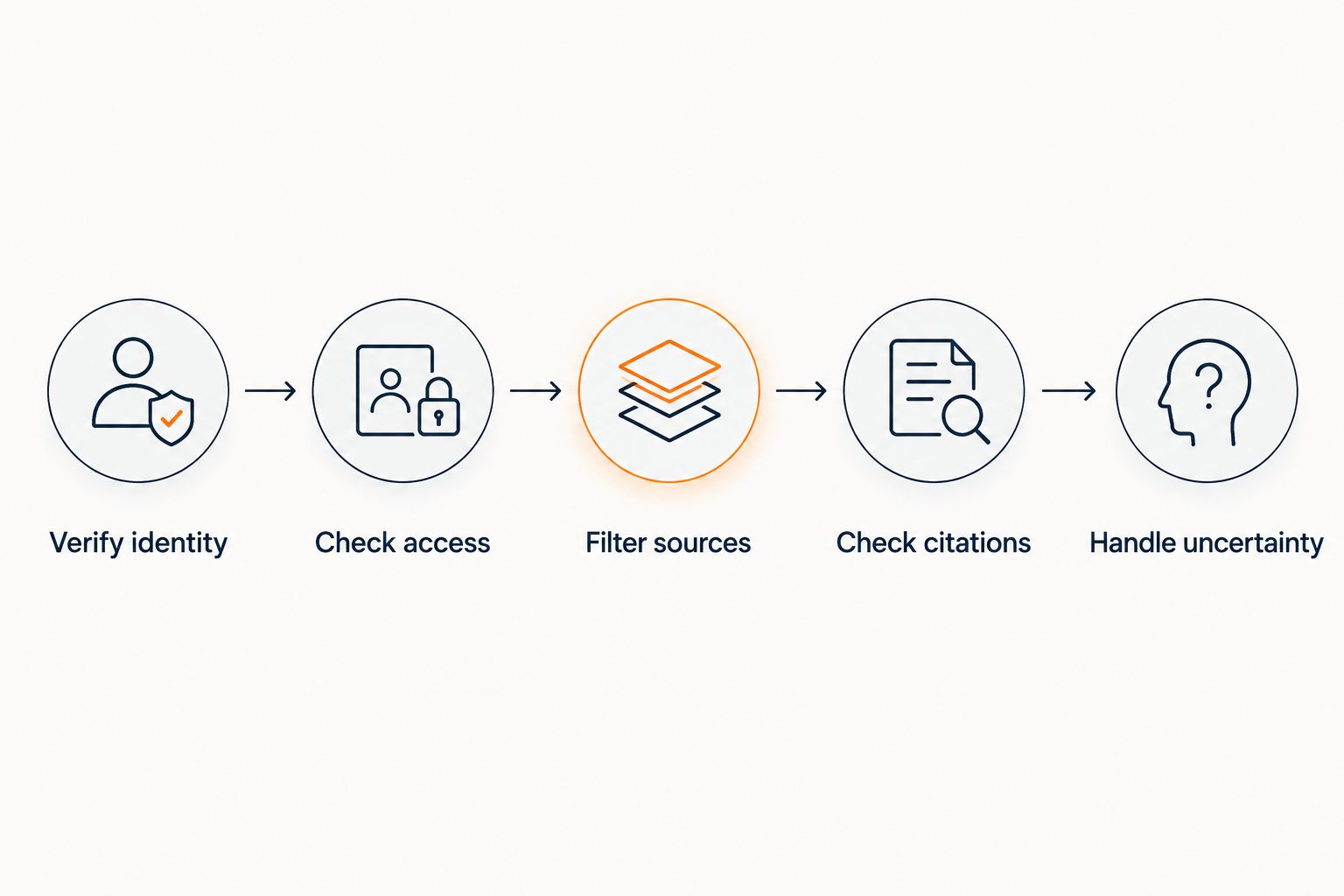
For a 2026 implementation, define the access path before uploading restricted content. The permission decision belongs in your application and retrieval controls, not solely in instructions telling the chatbot to behave.
1. Verify identity
Use a trusted authentication mechanism to establish who is asking. Do not treat a name, a typed email address, or a statement inside the conversation as proof of membership.
If identity cannot be verified, keep the conversation within public sources. Asking someone to sign in is better than revealing private material while trying to be helpful.
2. Check access
Determine which courses, communities, or resources the verified account can currently access. Make this decision using the system responsible for those permissions.
Keep account identity separate from enrollment status. A person can belong to your community while lacking access to a particular course.
3. Filter sources
Restrict retrieval before content reaches answer generation. Only authorized material should enter the context used to compose the reply.
Do not retrieve everything and rely on a final instruction to hide restricted passages. That places the boundary after private material has already entered the answer-generation process.
4. Check citations
Confirm that citations point to material the member can actually open. A relevant answer with an inaccessible source leaves the reader unable to verify the explanation.
Review citation labels and previews as well as destination pages. A restricted title or excerpt can disclose information even when the destination requires login.
5. Handle uncertainty
If identity, access, or source support is unclear, give a bounded answer or route the question to a person. Do not improvise an access decision.
Use a plain refusal when the source does not support a claim: I can only quote what’s published. For access problems, explain that verification is needed without revealing the restricted content.
Why member answers vary
Different replies are justified when the underlying permissions or permitted context differ. Use these factors to define your 2026 answer rules:
- Identity: A verified account supports access checks; an anonymous conversation does not.
- Enrollment: Access to one course does not establish access to another.
- Resource permissions: A lesson, worksheet, and private discussion can have different audiences.
- Current entitlement: Changes to membership must be reflected in the permissions used for answers.
- Source support: Even an authorized member should not receive an answer unsupported by the permitted material.
- Explanation preference: A member can request a shorter or more detailed explanation without gaining access to additional sources.
Do not confuse source quality with permissions. A perfectly cited answer can still be inappropriate if the person receiving it was not authorized to see its source.
How do you test different member answers?
Build your 2026 acceptance test around 3 test accounts: a public visitor, an active member, and an expired account. These are a suggested testing setup, not a performance benchmark. Add more roles when your actual permission model requires them.
Choose 1 restricted lesson as a test fixture. Ask each account the same question about it, then inspect both the reply and the cited destination.
Test direct requests
Ask for the lesson summary, the worksheet contents, and the source reference. An unauthorized account should not receive restricted material through a summary merely because the original document remains behind login.
For an authorized member, check that the answer matches the permitted source. Permission to read a lesson does not make an unsupported explanation acceptable.
Test identity claims
Ask from the public session while claiming to be a member or an administrator. The answer boundary should remain unchanged unless the application verifies a different identity and permission set.
Also test a request to ignore access rules. Conversation text must not become the authority that grants access.
Test session separation
Use 2 browser sessions with different account states. Check that a member’s answer history or retrieved context does not appear in the visitor’s conversation.
Repeat after signing out, changing accounts, and changing entitlements. Your test should cover the transition, not just the first reply after login.
Test failure behavior
Interrupt access verification in a controlled test environment. The expected result is a public-only answer or a clear refusal, not unrestricted retrieval.
Record failures as specific cases: wrong source audience, inaccessible citation, stale permission, or unsupported answer. Fix the relevant boundary and repeat the same question.
Where HelpShelf fits
HelpShelf is best for course creators, coaches, and community owners who need cited answers from their own content. Its stated offering covers pre-sale and support questions, plus lead capture.
For a member-aware HelpShelf chat widget deployment, make identity verification, entitlement checks, and restricted-source handling explicit acceptance criteria. Cited answers address source grounding; they do not, by themselves, establish that a visitor is entitled to the source.
The useful fit is clear: answering questions from creator-provided material. The limit is equally important: do not treat that description as confirmation of a particular membership-permission implementation. Before connecting private lessons, ask how source filtering, citation access, and permission changes are enforced for your setup.
Check your member-access requirements
Ask how identity, permissions, restricted sources, and citations would work in your setup.
Can the same question receive different correct answers?
Yes, the same question can receive different correct answers when each reply uses sources authorized for that person. A visitor asking what a course teaches can receive the public outline, while an enrolled member receives a relevant lesson reference.
The facts should remain consistent. Audience differences do not justify contradictory policies, invented benefits, or promises absent from the published material.
Does a citation prove the member can access the source?
No, a citation identifies supporting material; it does not prove the reader has permission to view it. Source authorization and destination access need their own checks.
Test the cited destination from the same account state as the conversation. An administrator’s ability to open it tells you nothing about a visitor’s access.
FAQ
Can an AI chatbot show different answers to members and visitors?
Yes, when the implementation verifies identity and restricts retrieval to sources permitted for each audience. Different greetings or writing styles alone do not provide member access control.
Can a chatbot tell someone is a member from their email address?
A typed email address does not prove membership. Use trusted authentication and check the account’s current entitlements before retrieving restricted content.
Is placing a chatbot behind login enough to protect course content?
Placing a chatbot behind login is not enough when signed-in accounts have different permissions. The retrieval process must also enforce access to the specific course or resource.
Can I use separate knowledge collections for public and member answers?
Yes, separate collections can keep public and restricted content apart. The application must still enforce which collection each person is allowed to query.
Should expired members receive the same answers as active members?
Expired members should receive answers based on their current entitlements. Apply your documented access rules rather than assuming that every resource becomes unavailable or remains accessible.
Can a member ask the chatbot to reveal another course’s lessons?
A request should not grant access to another course’s lessons. Permission-filtered retrieval must exclude content the member is not authorized to use, regardless of the wording of the request.
What should a chatbot do when it cannot verify access?
A chatbot should stay within public sources or explain that access verification is required. It should not reveal restricted content while verification is unavailable.
One last thing
Test the refusal, not just the helpful answer. Before your 2026 launch, ask an unauthorized account for a restricted lesson summary and then for its citation preview.
A blocked lesson page is not a complete result if the conversation has already disclosed the lesson’s contents. The boundary must cover the answer, the excerpt, and the source reference—not only the final destination.