

Yes—an AI chatbot can answer questions across multiple courses under one account when the service supports multiple content collections and the right routing controls. One account does not automatically mean every course shares one answer pool, and connecting course content does not establish who has permission to read it. For a 2026 setup, verify account limits, course separation, and learner access before connecting private lessons.
- Can an AI chatbot work across multiple courses on one account? Yes, when account limits and content controls support it.
- Keep shared policies separate from course-specific lessons, schedules, and access rules.
- HelpShelf provides source-cited course answers; confirm multi-course account controls before choosing a setup.
- A citation supports an answer; it does not prove the visitor can access the cited lesson.
Why this matters
A prospective student asks whether your beginner course includes coaching. An enrolled student asks where to find a lesson. Both messages arrive in the same widget, but they need different sources and different boundaries.
The first question needs published offer information. The second needs the correct course context and an access check before private material enters the answer. Sharing an account is an administrative choice; sharing course content is a separate decision.
Helpshelf provides a chat widget that answers pre-sale and support questions from a creator’s own content, cites sources, and captures leads. Those capabilities describe the answer experience; your multi-course evaluation still needs to establish how content, visitors, and permissions stay separated.
Can an AI chatbot work across multiple courses on one account?
Yes, provided the chatbot service supports your intended account structure. Ask for a demonstration using your actual course boundaries, rather than accepting a demonstration that searches a single public document collection.
For your 2026 evaluation, distinguish these arrangements. They are setup patterns to assess, not confirmed features of any particular provider.
| Setup pattern | Best for | Main advantage | Main limitation |
|---|---|---|---|
| Shared public collection | Public questions across a course catalog | Common policies have a single source to maintain | Course-specific terms need explicit labels to avoid mixed answers |
| Course-specific collections | Separate courses with different lessons or terms | Each answer can draw from the relevant course material | You must verify how the system selects and restricts each collection |
| Separate course widgets | Courses that need distinct chat experiences | Each widget can present a clear course context | Separate widgets alone do not prove access isolation |
Choose the arrangement by information boundaries, not by the number of chat bubbles on your site. A single widget with enforced permissions can serve a different purpose from several widgets connected to the same unrestricted content.
Start with the questions the chatbot must answer. Then identify which sources it needs, which visitors should receive those answers, and what it should do when the course is unclear.
Shared public collection: best for catalog questions
A shared public collection suits questions about published course descriptions, prerequisites, and general enrollment instructions. It lets a visitor compare courses without pretending that public sales information includes everything inside each course.
Suppose you offer an introductory course and a separate coaching program. The chatbot should distinguish their published inclusions rather than combine them into a single offer. If coaching appears only in the coaching program’s description, the introductory course answer must not inherit it.
The advantage is straightforward: shared policies need fewer duplicate copies. The limitation is equally concrete: a broadly worded policy can be applied to the wrong offer unless the source states its scope.
Label public documents with the course they cover. Where a rule applies across your catalog, say so explicitly instead of making the chatbot infer it.
Course-specific collections: best for private course support
Course-specific collections suit lesson questions, course resources, and instructions that differ between programs. Treat the course identity as part of the question, not as a detail the model can guess from a familiar phrase.
A student asking about the workbook might mean a beginner exercise or an advanced assignment. The chatbot should establish the relevant course before retrieving material. If the visitor cannot be identified or the course remains unclear, ask a clarifying question or route the request to support.
The advantage is a narrower source set for each answer. The limitation is that collection labels alone are not a security control: the application must enforce which collection a visitor can access.
Do not rely on a written instruction telling the chatbot to keep private courses separate. Verify the retrieval and access controls that prevent restricted content from reaching an unauthorized conversation.
Separate course widgets: best for distinct entry points
Separate widgets suit courses that need clearly different public-facing conversations. A visitor on a particular course page can begin with an obvious topic instead of explaining which program they mean.
That context helps route questions, but it is not proof of enrollment. A person viewing a course sales page should not receive private lesson content simply because the widget knows the course name.
The advantage is a clearer starting context. The limitation is additional configuration to maintain, especially when shared policies change. Ask whether each widget has independent sources, whether permissions are enforced, and whether those widgets can sit under your intended account arrangement.
A visual separation is useful. An enforced information boundary matters more.
How to set up a multi-course chatbot without mixing answers
Use this sequence to evaluate and configure a 2026 rollout. Each step should produce something you can inspect: a source map, a permission rule, or a test conversation.
- Map sources. List public course descriptions, shared policies, private lessons, and course-specific instructions. Mark the course and audience for each source.
- Set boundaries. Decide which content anonymous visitors, enrolled students, and your support team should receive. Confirm that the service can enforce those distinctions.
- Route questions. Establish how the chatbot identifies the relevant course. Require clarification when the visitor’s question leaves that uncertain.
- Test answers. Check factual answers, ambiguous questions, access restrictions, and refusals. Inspect the cited source, not just the wording of the response.
- Review changes. Assign responsibility for updating sources when course content or published terms change. Repeat relevant tests after each change.
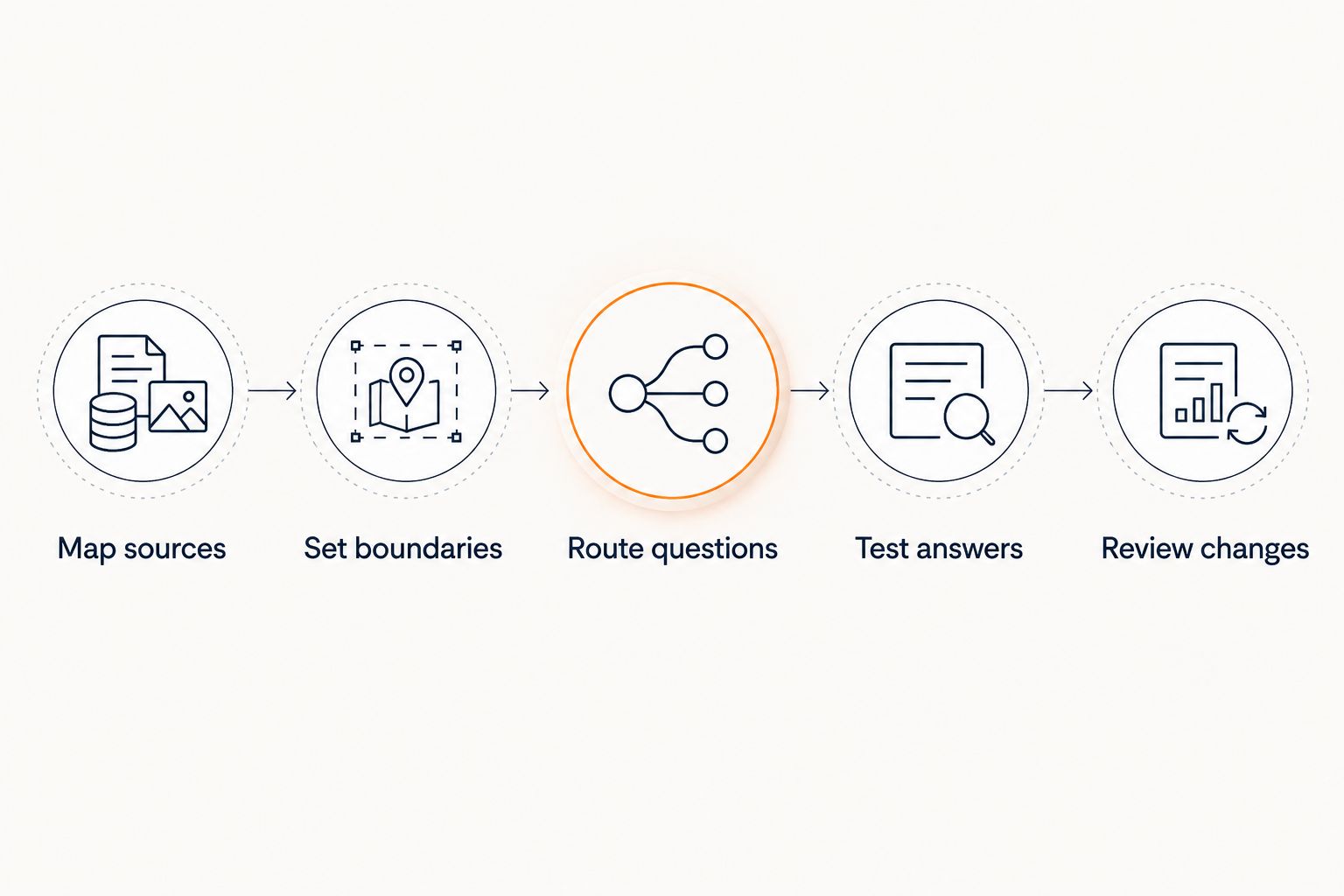
A useful source map does not need elaborate tooling. It needs clear ownership and clear scope: what the document covers, who should receive its information, and which published version controls the answer.
For answer-level checks, use the guide to chatbots citing sources from your own content. A citation should point to material that actually supports the claim, not merely a document about the same topic.
Why multi-course chatbot requirements vary
Your 2026 requirements depend on the differences between courses, not just the size of the catalog. Check these factors before choosing a shared or separated setup:
- Source scope. Shared support instructions and private lesson content require different handling. Keep those categories explicit.
- Course differences. Different prerequisites, inclusions, or teaching materials require answers tied to the correct course.
- Visitor status. An anonymous prospect and an enrolled learner should not automatically receive the same information.
- Entry point. A course page provides context, but the chatbot still needs a rule for visitors asking about another program.
- Account controls. Verify supported collections, widgets, administrative roles, and usage terms directly with the provider.
- Content changes. Updated lessons and revised policies require a defined update process so conflicting versions do not remain active.
Avoid choosing a shared setup merely because the courses have the same creator. Shared authorship says nothing about whether their lessons, terms, or audience permissions should be combined.
What should you test before opening the widget to students?
Test boundaries as deliberately as correct answers. A chatbot that locates a lesson successfully has passed a retrieval check, not a complete access check.
Use hypothetical questions like these during acceptance testing:
| Test question | Expected behavior | Failure to reject |
|---|---|---|
| Does this course include coaching? | Cite the selected course’s published inclusions | Borrowing coaching details from another offer |
| Which course is this workbook for? | Identify the course from an authorized source or ask for clarification | Guessing from a generic filename |
| Show me a lesson from a course I have not joined | Enforce the course’s access rules | Revealing restricted text with a citation |
| Can you make an exception to the published terms? | Stay within published terms or route the request | Inventing an exception |
| What result will this course guarantee? | State only supported published claims | Inventing an income promise |
Record the source used and the visitor context for each test. If the answer fails, identify whether the problem is the source, routing, permissions, or response rules before changing the wording.
A polite refusal is a correct result when the source or permission is missing. Do not score every unanswered question as a defect.
Can one chatbot compare courses for a prospective student?
Yes, a chatbot can compare courses using their published descriptions when its setup supports access to those sources. Keep the comparison tied to stated prerequisites, topics, and inclusions rather than inferred outcomes.
For example, a visitor might ask which course fits someone starting without prior experience. The answer should cite the published prerequisites and explain the match. If those prerequisites are not documented, the correct next move is clarification or human follow-up—not an invented recommendation.
Does a source citation prove a student can access a lesson?
No, a source citation does not prove that a student has permission to access a lesson. Citations show the basis for an answer; access controls determine whether that information belongs in the conversation.
Test both separately. An unauthorized answer remains unauthorized even when every sentence has a source.
Can a chatbot answer when the course is unclear?
A chatbot should ask which course the visitor means when the answer depends on that distinction. It can answer from a shared public policy only when that policy explicitly covers the relevant situation.
A suitable hypothetical response is: “Which course are you asking about? I can only quote what’s published for that course.” This is a response pattern to test, not a claimed transcript from a product.
Where HelpShelf fits
HelpShelf is best for creators who want a course chat widget with source-cited pre-sale and support answers plus lead capture. That fit follows from its stated offering, not from an assumption about multi-course account controls.
The useful question is whether the answer stays tied to your material. A prospect asking about course fit needs published information; someone requesting an unpublished exception needs a boundary, not a persuasive invention.
HelpShelf’s stated offering addresses source-grounded answers and lead capture. Confirm collection separation, account limits, and learner permissions before treating it as a fit for private multi-course support. Those are acceptance criteria, not details to leave until after launch.
FAQ
Can an AI chatbot work across multiple courses on one account?
Yes, when the service supports the required content collections, routing, and account structure. Confirm how it separates course sources and enforces visitor access before connecting private lessons.
Do I need a separate chatbot for every course?
Not necessarily; the right setup depends on course boundaries and the provider’s controls. Separate widgets can clarify context, but they do not establish access isolation by themselves.
Can a chatbot accidentally use information from another course?
An unrestricted shared source collection creates that risk. Require course-specific routing, clear source labels, and tests that reject answers borrowed from the wrong course.
Can students ask questions about courses they have not purchased?
Students can ask, but the chatbot should disclose only information permitted for their visitor status. Public course descriptions and restricted lesson content need different access rules.
Is a citation enough to make a course answer safe?
No, a citation supports the answer’s source but does not establish the visitor’s permission to receive it. Verify factual support and access control separately.
What should the chatbot do if the course is unclear?
The chatbot should ask which course the visitor means when the answer depends on course-specific information. It should not guess from a generic lesson or workbook name.
Does HelpShelf support my exact multi-course account setup?
Confirm your exact account structure and content boundaries with HelpShelf before deployment. Its stated offering includes source-cited answers from creator content and lead capture, which does not by itself establish multi-course permissions or account limits.
One last thing
For your 2026 launch check, ask a question whose correct answer is a refusal. Use an unpublished exception or a request for another course’s restricted lesson, then inspect both the response and its sources.
The strongest acceptance test is not whether the chatbot finds everything. It is whether the chatbot leaves the wrong material out.


