Yes, an AI chatbot can answer questions from recorded video lessons when the lesson content is made available in a form it can process, such as a transcript. A transcript-based chatbot cannot recover an unspoken demonstration, read a missing slide, or verify a claim that never appears in its sources. The useful test is whether its answer matches the lesson and points you back to supporting material—not whether it sounds like your teaching voice.
- Can an AI chatbot learn from recorded video lessons? Yes, through accessible lesson content such as transcripts.
- Transcripts capture speech, not every diagram, demonstration, or on-screen instruction.
- HelpShelf serves creators who need source-cited answers from their course, coaching, or community content.
- Test lesson citations, missing information, and member access before publishing a course chatbot.
Why this matters
A member watches your lesson at 11pm, gets stuck, and asks where you explained the next step. Your answer already exists, but it is buried in a recording. A useful chatbot connects that question to the relevant passage instead of producing a plausible explanation from general knowledge.
HelpShelf is best for course creators, coaches, and community owners who need source-cited sales and support answers from their own content. The HelpShelf chat widget also captures leads. For recorded lessons, confirm the supported source format before choosing a workflow; source-grounded answers do not establish direct video-upload support.
For your 2026 setup, separate two decisions: how to turn recordings into usable sources, and which sources each visitor is allowed to query. A public sales question should not become a shortcut into paid lessons.
Can an AI chatbot learn from recorded video lessons?
Yes. A common approach is to transcribe the recording, organize the text into searchable passages, retrieve passages relevant to a question, and generate an answer using those passages. This is called retrieval-augmented generation, or RAG.
In this workflow, learn does not necessarily mean retraining the underlying model. It means giving the answering system access to your material. That distinction matters when you replace a lesson: the searchable source needs updating, not necessarily the model itself.
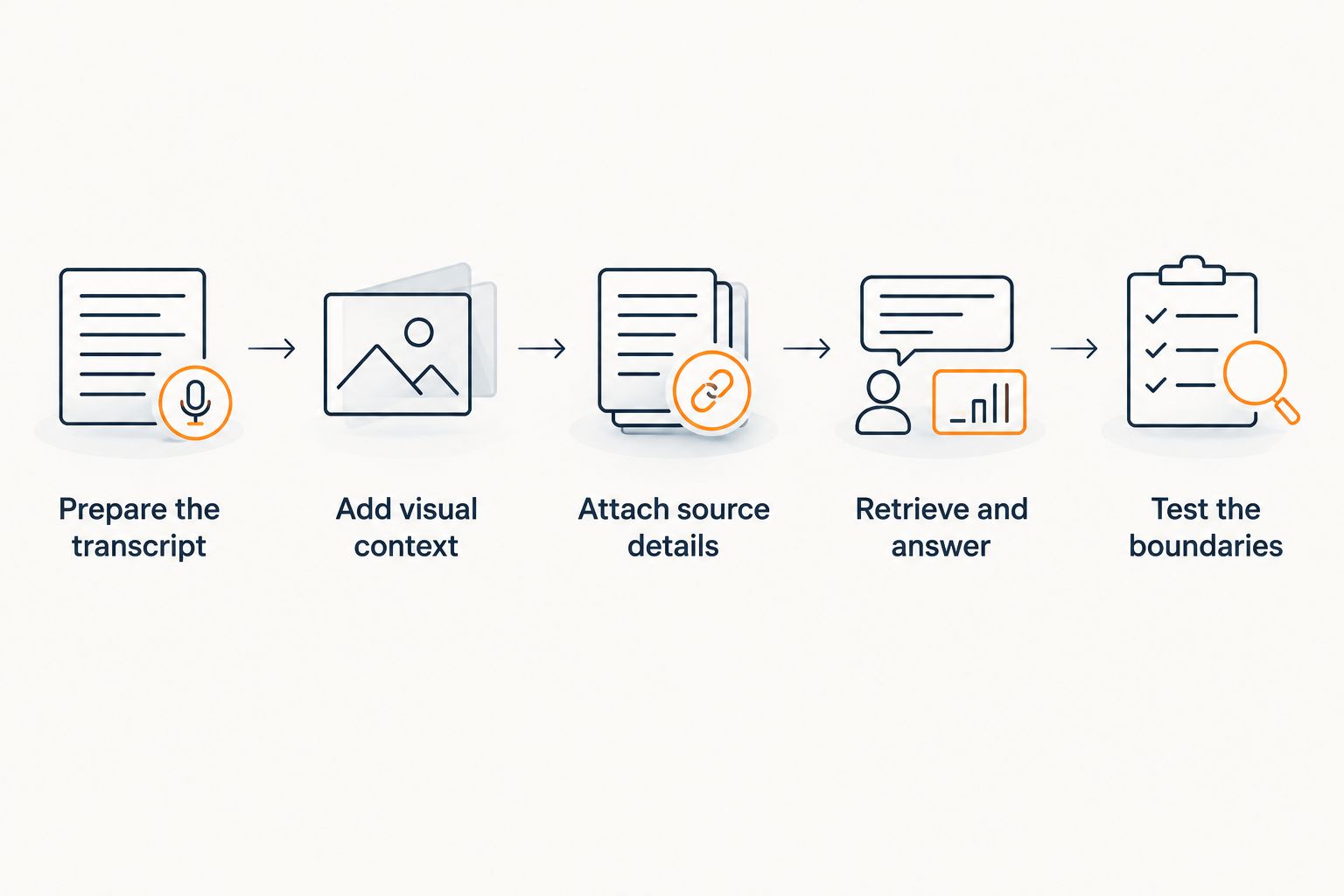
A practical lesson-to-answer workflow
- Prepare the transcript. Extract the spoken content and correct terms that transcription missed. Keep lesson titles and speaker identities where they affect meaning.
- Add visual context. Describe essential diagrams, on-screen settings, and demonstrated actions that the narration leaves unexplained.
- Attach source details. Preserve the course, module, lesson title, and any verified timestamps. Keep member-only material separate from public sources.
- Retrieve and answer. Have the system find relevant passages, answer within their scope, and cite the material that supports the response.
- Test the boundaries. Ask questions with clear answers, questions requiring visual context, and questions the lesson cannot answer.
Consider a hypothetical lesson about preparing a coaching intake form. If the recording explains which questions to include, a transcript-based chatbot can use that explanation. If you silently select a setting on screen, the transcript alone does not tell the chatbot which setting you selected.
Give the chatbot the missing instruction; do not ask it to infer the demonstration. That small editorial step is more useful than treating every recording as a complete knowledge source.
Which lesson source should you use?
Choose the source format around what the recording contains. Spoken explanations, screen demonstrations, and diagrams leave different gaps when reduced to text.
| Source option | Best for | What it contributes | Limitation |
|---|---|---|---|
| Corrected transcript | Spoken explanations and discussions | Detailed wording from the lesson | Misses unspoken visual information |
| Transcript with visual notes | Screen tutorials and demonstrations | Spoken content plus descriptions of essential actions | Requires editorial review of the recording |
| Written lesson guide | Clear procedures and recurring questions | Explicit steps, definitions, and boundaries | Can omit nuance or drift from the recording |
| Multimodal video processing | Tasks requiring inspection of images and speech | Access to visual and audio information, depending on the system | Video support, citations, and access controls still need verification |
Corrected transcripts: best for spoken teaching
A corrected transcript is a sensible starting point when your lesson explains the reasoning aloud. It retains the detail that a short summary would discard. Check names, specialist terms, negations, and speaker changes before adding it to the answering system.
Its weakness is silence. Phrases such as click here or use this version depend on what the viewer sees, so they need accompanying context.
Transcripts with visual notes: best for demonstrations
Add a short written explanation wherever the screen carries an essential instruction. Name the control, action, or diagram relationship rather than describing it as something visible above or over there.
This format supplies context a plain transcript lacks, but someone must check the notes against the recording. An incorrect visual note becomes an incorrect source.
Written lesson guides: best for repeat questions
A lesson guide makes procedures and definitions easier to state explicitly. It is useful when members repeatedly ask the same practical question in different words.
The trade-off is maintenance. When you revise the recording, check the guide too. For a 2026 course refresh, treat the recording and its written companion as related sources rather than independent documents.
Why answer quality varies
A fluent response is not evidence that the chatbot understood your lesson. Answer quality depends on what the system can retrieve and whether the retrieved material supports the question.
- Transcript accuracy. A missing not can reverse an instruction. Correct meaning-changing errors before ingestion.
- Visual coverage. A transcript cannot explain a chart relationship that nobody describes aloud. Add that relationship as text or verify suitable visual processing.
- Passage context. A definition separated from its exception can produce an incomplete answer. Keep related qualifications available together.
- Source identity. Similar lesson titles across courses can create ambiguity. Preserve course and module context alongside each passage.
- Source freshness. An older procedure can conflict with your current lesson. Remove or clearly distinguish superseded material.
- Access boundaries. Paid coaching examples and public curriculum summaries serve different audiences. Restrict retrieval before generating the answer.
These are separate checks. A clean transcript does not prove access control works, and an accurate answer does not prove its citation supports every sentence.
What should a lesson citation actually prove?
A useful citation lets the reader check the claim against the source. A lesson title identifies a destination; a supporting passage explains why that destination is relevant. If the system offers timestamps, verify that each timestamp lands near the material being cited.
Do not add guessed time offsets to make a response look precise. A timestamp is a location claim, not decoration. When timing information is unavailable, use an accurate lesson reference rather than fabricated precision.
For your 2026 acceptance check, read the cited passage before judging the answer. Ask whether it supports the instruction, the qualification, and the promised outcome. A citation supporting the first sentence does not automatically support everything that follows.
The guide to citing sources from your own content covers the same distinction: an answer needs a checkable source, not just a source-shaped label.
How should you test a recorded-lesson chatbot?
Start with a small test you can inspect yourself. Use 3 question types per lesson: a direct question, a visual-context question, and an unsupported question. This is a practical starting checklist, not an accuracy benchmark.
For the direct question, choose something the instructor explicitly explains. For the visual-context question, choose an action shown on screen. For the unsupported question, ask for a conclusion the lesson never provides.
Then run 2 access checks: one as a public visitor and one as an enrolled member. Ask both the same question about member-only content. The public response must not reveal restricted lesson material merely because the question is phrased well.
Finish with 1 source-change test. Correct a lesson instruction, update the source through the supported process, and ask the question again. Inspect the citation as well as the answer to confirm which version supplied it.
Check refusals, not just successful answers
Use hypothetical prompts that invite invention: an unpublished discount, an exception to a refund policy, or a guaranteed income result. These are boundary tests, not offers your business makes.
An acceptable sample refusal is: I can only quote what's published. This lesson does not state a guaranteed income result. The response should stop at the source boundary rather than completing the answer with general assumptions.
No invented discounts, no refund exceptions, no income promises. A lesson about business growth is not permission to promise a buyer a result. Your 2026 test set should include these refusals alongside ordinary curriculum questions.
Can a chatbot understand diagrams and screen demonstrations?
A transcript-only chatbot cannot inspect visual information that is absent from its text sources. It can answer from a written description of the diagram, but that is different from seeing the recording.
For a screen tutorial, record the relevant control names and actions in the lesson notes. For a diagram, explain the relationship the diagram teaches. If you choose a system with video or image processing, test it against those same details rather than assuming visual input guarantees a correct explanation.
Does the chatbot need retraining when you update a lesson?
A retrieval-based chatbot generally needs its source material refreshed when you update a lesson; that is different from retraining the underlying model. The exact update process depends on the product and source connection.
Check whether the old passage remains searchable after replacement. If both versions stay accessible without clear labels, the system has conflicting instructions rather than a clean update.
Can you use paid lessons to answer pre-sale questions?
Use approved public descriptions for pre-sale answers, not unrestricted access to paid lesson transcripts. A buyer can ask about prerequisites, curriculum scope, or intended audience without receiving the course itself.
HelpShelf provides a sales and support chat widget with cited answers from creator content. When assessing it for your recordings, confirm source-format support and audience separation directly; those details determine whether your intended workflow fits.
FAQ
Can an AI chatbot learn from recorded video lessons without a transcript?
Yes, some systems can process audio or video, but direct recording support depends on the product. A text-based retrieval workflow needs a transcript or another written representation of the lesson.
Does learning from my videos mean training a new AI model?
No, answering from your videos does not necessarily require training a new model. A retrieval-based system searches prepared lesson content and uses relevant passages to produce an answer.
What's the best source format for a screen-recorded tutorial?
A corrected transcript with verified visual notes is a practical choice for a screen-recorded tutorial. Include essential control names and actions that the narration does not explain.
Can a chatbot cite the exact moment in a video lesson?
A chatbot can cite a video moment when its source data and citation features support verified timestamps. Test the destination; a lesson title alone does not establish timestamp accuracy.
Will a chatbot reveal my paid lessons to public visitors?
A chatbot must be configured so public visitors cannot retrieve restricted lesson material. Test access boundaries with member-only questions before publication rather than relying on an instruction to keep content private.
Can HelpShelf answer questions from my course content?
HelpShelf answers pre-sale and support questions using creator content with cited sources and captures leads. Confirm the supported input format before planning a recorded-video workflow.
What should the chatbot say when a lesson does not answer the question?
The chatbot should state that the available lesson does not answer the question rather than inventing a response. A useful refusal identifies the missing information and directs the visitor to an appropriate human contact when available.
One last thing
A lesson can be excellent for a viewer and still be incomplete as a text source. Pointing at a diagram works on camera; it becomes this goes here in a transcript.
Before uploading your whole library in 2026, review one demonstration-heavy lesson with the video hidden. If the transcript no longer explains the action, write the missing context. The first improvement is often clearer source material, not a different chatbot.