

Yes, you can use one AI chatbot across Kajabi, Skool, and Whop if your chatbot supports the required placements and keeps each audience’s content separate. A shared answer source does not automatically mean a native installation inside every platform, shared login access, or permission to reveal member-only lessons. For a 2026 setup, verify those requirements separately before treating one chatbot as a replacement for three support workflows.
- Can I use one AI chatbot across Kajabi, Skool, and Whop? Yes, subject to placement and access checks.
- HelpShelf answers creator sales and support questions from your content with citations and captures leads.
- Separate public buyer answers from member-only material, even when you maintain a shared source collection.
- Test installation, source access, citations, and human follow-up separately on each platform.
Why this matters
Someone asks whether your course covers their situation at 11pm. Another person needs help finding a lesson. Both messages look like support, but the first person needs public sales information and the second needs an answer appropriate to their membership.
One chatbot should not mean one unrestricted pool of answers. The useful consolidation is consistent information, not identical access everywhere.
HelpShelf is an AI sales and support chat widget for course creators, coaches, and community owners who want cited answers from their own content and lead capture. That describes the answer-and-follow-up function; installation and access controls still need checking against your intended setup.
Can I use one AI chatbot across Kajabi, Skool, and Whop?
Yes, provided the deployment supports each location where you want people to ask questions. Start with a placement check across the 3 platforms, then check which sources each audience can use. Do not treat a platform name on a shortlist as proof that every page, member area, and app supports the same installation.
For your 2026 evaluation, use this table as a verification worksheet rather than a statement of platform compatibility.
| Platform | Placement to verify | Content boundary to verify | What counts as a useful test |
|---|---|---|---|
| Kajabi | Your intended sales page or learner-facing location | Public course information versus restricted teaching material | A buyer gets a supported answer without receiving restricted lesson content |
| Skool | Your intended community-facing location or separate support destination | Visitor questions versus member questions | The answer uses material appropriate to the person asking |
| Whop | Your intended buyer-facing or member-facing location | Published offer details versus restricted content | A question about an offer receives the correct source-backed response |
A chatbot displayed on a separate page is not the same as a chatbot embedded inside a community. Likewise, answering questions about a platform’s content is not the same as reading that content automatically.
Define what “across” means before choosing a setup: shared information, shared administration, an embedded interface, or a continuous conversation. Those are different requirements.
Shared public chatbot: best for pre-sale questions
A shared public chatbot is the simplest pattern to evaluate when buyers ask about the same offer from different places. You supply approved descriptions, prerequisites, published policies, and other material intended for prospective customers.
The advantage is a clear public information boundary. The limitation is equally clear: a public answer source is not a substitute for private member support.
Suppose someone asks whether your coaching offer includes individual feedback. The chatbot should answer only from the published description. If that description does not resolve the question, the answer should stop rather than infer an inclusion from a related offer.
An illustrative refusal is: I can only quote what’s published. The supplied description does not confirm individual feedback. This is an example response, not a claim about a particular product setting.
For a 2026 launch, make the boundary explicit in your source material. Do not expect a public chatbot to infer which unpublished details you consider sensitive.
Separated answer spaces: best for different member audiences
Separate answer spaces are a pattern to evaluate when different audiences have different content rights. Shared administration is useful only if the chosen system can enforce the separation you require.
The advantage is a clearer boundary between offers or memberships. The limitation is additional configuration and testing; a separate label alone does not prove that retrieval or citations are restricted.
For example, a public question about a course outline and a member question about an exercise should not automatically search the same material. A buyer should not receive a paid lesson excerpt simply because that excerpt provides a relevant answer.
Ask the provider to demonstrate the boundary, including the citation destination. A response that hides private text but links visitors to a restricted resource still needs examination: what does the link reveal, and who can open it?
Do not approve member support based only on a successful public sales demo. Test the actual audience separation your business needs.
Shared support destination: best for consistent access instructions
A separate support destination is another pattern to evaluate when you want a common place for questions. You direct people there from the locations you control, subject to each platform’s rules and your own access requirements.
The advantage is a consistent destination. The limitation is that people leave their original context, and a separate page does not automatically know their membership, purchase history, or previous conversation.
Compare the patterns before deciding which kind of consolidation matters:
| Setup pattern | Best for | Main advantage | Main limitation |
|---|---|---|---|
| Shared public chatbot | Pre-sale questions | A common source for approved buyer information | Not sufficient for restricted member answers |
| Separated answer spaces | Different member audiences | Audience-specific information boundaries | Requires verified separation and configuration |
| Shared support destination | Consistent question routing | One destination to explain and maintain | Does not automatically carry identity or conversation context |
These are deployment patterns, not confirmed capabilities of any named platform or chatbot. Choose the pattern first, then require a demonstration of the necessary functions.
Why cross-platform chatbot setups vary
The practical differences come from where the chatbot runs, what it can read, and what it is allowed to disclose. For a 2026 rollout, check these factors before connecting your full content collection:
- Placement: Confirm the exact page or interface where visitors will open the chatbot. A separate support page and an embedded widget are different experiences.
- Source access: Confirm how approved course, coaching, or community material reaches the answer system. Do not assume automatic reading or synchronization.
- Audience permissions: Identify which material is public and which requires membership. Require a demonstration of any claimed access enforcement.
- Citation access: Check that the cited source supports the answer and that the intended reader can open it appropriately.
- Conversation continuity: Verify whether a conversation persists between locations. Shared content does not establish shared conversation history.
- Follow-up: Decide what happens when the published material cannot answer the question. Lead capture and resolving an account-specific request are different tasks.
How do I set up a shared chatbot without mixing answers?
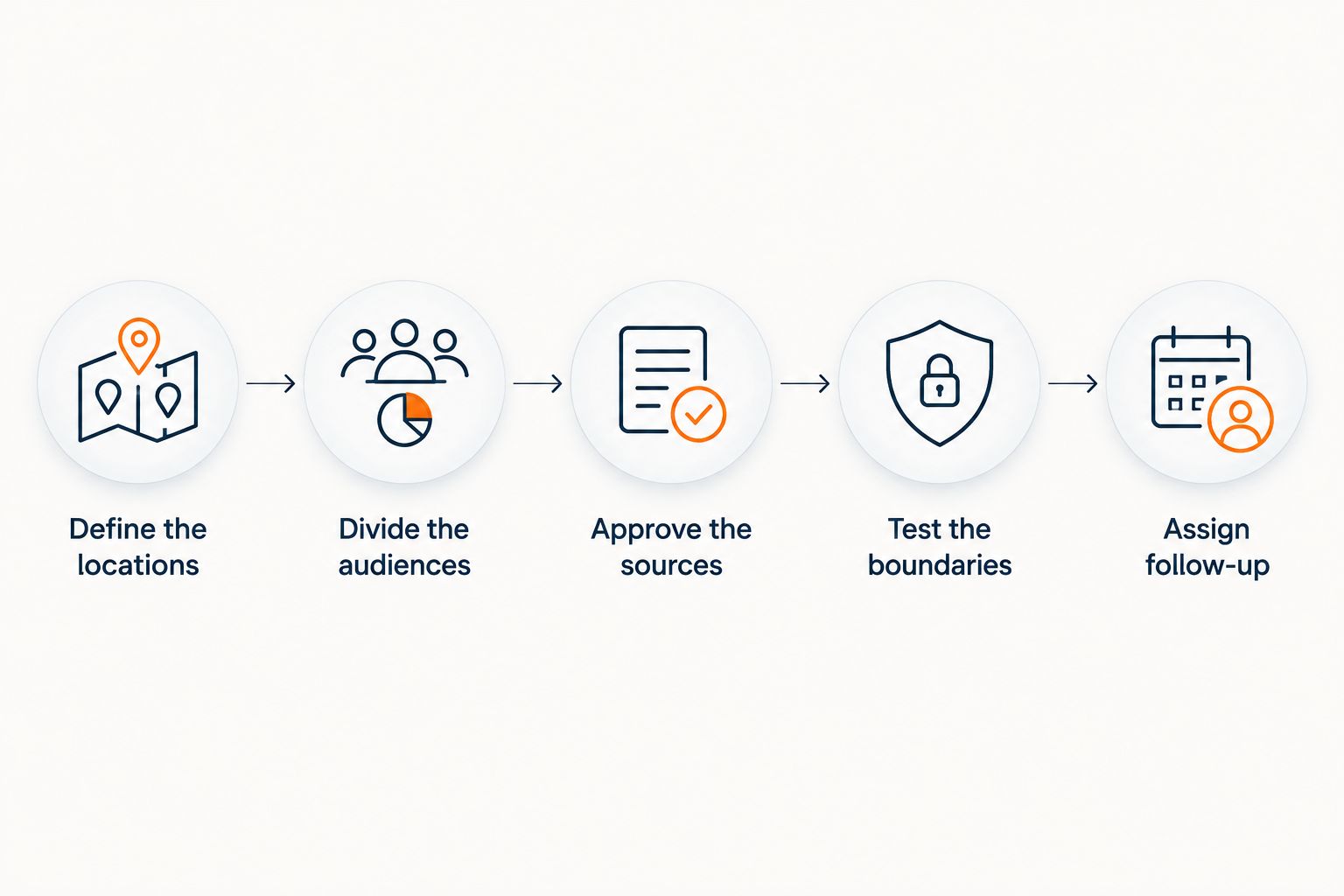
Use the following sequence as an acceptance process. It specifies what your setup must demonstrate without assuming a particular integration method.
Define the locations
Write down where people should ask questions on Kajabi, Skool, and Whop. Name the actual intended location, not just the platform.
For each location, record whether the experience must be embedded or whether a separate destination meets your needs. This prevents a technically working installation from becoming the wrong customer experience.
Divide the audiences
Start with 2 audiences: public buyers and current members. Add further groups only when their access genuinely differs.
List what each audience may learn from the chatbot. Include exclusions as well as approved material; access to one offer should not silently become access to everything you teach.
Approve the sources
Choose the documents or content that should support answers. Check that they describe the correct offer and do not contradict another source in the collection.
For policy questions, supply the published policy rather than an informal discussion of an exception. For teaching questions, decide whether the answer may summarize the lesson or should direct the member to it.
Test the boundaries
Run 3 test questions in every intended location: an answerable public question, a restricted-content request, and a question the sources cannot resolve. Treat these as test cases, not a promise of complete coverage.
Check both the response and the citation. A fluent answer is not enough if it uses the wrong offer, reveals restricted material, or cites a page that does not support its claim.
Assign follow-up
Decide who receives unresolved questions and what information they need. Ask only for information appropriate to that follow-up, and explain the next step without promising a response time you have not established.
Repeat the test from a visitor’s perspective. An administrator’s successful session does not demonstrate the experience of a person without the same access.
What should the chatbot do when the sources do not answer?
The chatbot should state the limit and offer an appropriate next step. Missing information is not permission to invent a discount, create a refund exception, or promise an income outcome.
Use these illustrative response boundaries when reviewing your 2026 setup:
- Unpublished discount: State that the supplied material does not establish a discount. Do not generate a code or imply approval.
- Refund exception: Explain only the published policy. Send requests for an exception to a person authorized to decide.
- Income outcome: Describe what the course teaches if the sources support that description. Do not turn curriculum information into an earnings promise.
- Private lesson request: Keep the response within the requester’s permitted material. Do not use restricted content just because it answers the question well.
HelpShelf’s cited-answer approach is relevant here: its AI chat widget answers from a creator’s content and provides cited sources. A citation gives the reader something to inspect; your acceptance test still needs to check whether the source actually supports the answer.
Will members keep the same conversation across all three platforms?
A shared chatbot does not by itself establish a shared conversation. Treat cross-location history as a separate requirement from using the same content.
Ask for a demonstration that matches your intended journey, including what happens when the person changes location or is not signed in. Do not describe the experience to members as continuous until that behavior has been verified.
Can a shared chatbot answer private billing questions?
A shared chatbot can explain supplied, published billing information; that does not establish access to an individual’s account. Knowing the general policy is different from knowing whether a particular payment succeeded.
Keep account-specific decisions with an authorized process. The chatbot should not claim to have checked a transaction, changed a subscription, or approved a refund unless the relevant action and permissions are actually established.
FAQ
Can I use one AI chatbot across Kajabi, Skool, and Whop?
Yes, if the chatbot supports your intended placements and required content boundaries. Verify installation, audience access, citations, and follow-up separately rather than assuming one setup works identically everywhere.
Does one chatbot mean one installation for all three platforms?
No. Shared answer content and installation are separate requirements, so confirm the exact location and installation method for each platform.
What's the best setup for answering pre-sale questions?
A shared public chatbot is a suitable pattern when answers come only from approved public offer information. Keep private lessons and member-only discussions outside that public answer boundary.
Can a public chatbot use paid course lessons to answer buyers?
A public chatbot should not disclose restricted lesson content without an explicit decision that the material is public. Relevance to a question is not permission to reveal it.
Will the chatbot remember a member moving between Kajabi and Skool?
Do not assume that shared content provides shared conversation history. Require a demonstration of the exact cross-location experience you want members to have.
Can HelpShelf answer questions from my own content?
HelpShelf answers pre-sale and support questions using a creator’s own course, coaching, or community content with cited sources. It also captures leads; verify the deployment and access requirements for your intended locations separately.
What should a chatbot say when my refund policy does not cover a request?
The chatbot should state what the published refund policy says and leave an unresolved exception request to an authorized person. It should not invent an exception or imply approval.
One last thing
The most revealing test is a question the chatbot should not answer. A correct public answer demonstrates retrieval; a restricted-content request tests whether your setup respects the boundary you intended.
Before approving the shared deployment, ask for an unpublished discount and a private lesson from a public visitor’s session. Check the response, the citation, and the follow-up path. Keep the setup limited until each behaves as intended.


