

Instead of manually answering the same course-access and curriculum questions, connect HelpShelf to Bolt by adding the provider-issued chat widget to your Bolt-built web app and grounding answers in approved content. Treat this as a website-embed workflow, not an assumed native connector: install the supplied code, test cited answers, and keep account-specific requests with a person.
- Connect HelpShelf to Bolt through a website-embed workflow; do not assume a native connector exists.
- HelpShelf fits creators who need cited answers from their own course, coaching, or community content.
- Separate public sales sources from member-only material before adding a chat widget.
- Test citations, navigation, refusals, and lead capture before publishing changes.
Why this matters
A prospective student asks whether your course covers a particular topic. A member asks where to find an onboarding lesson. Neither question needs a fresh explanation if you already have an approved answer and a source the visitor can open.
HelpShelf is best for course creators, coaches, and community owners who need a chat widget that answers from their own content with citations. The useful boundary is just as clear: a content answer is not permission to change someone's subscription, grant access, or make a refund exception.
For your 2026 setup, judge the HelpShelf installation by those boundaries rather than whether a chat bubble appears. A visible widget proves that something loaded. It does not prove that answers are supported, that private lessons stay private, or that follow-up reaches the right person.
Before you start
- Accounts and access: Have access to your Bolt project, permission to edit and publish its code, and access to the chat widget's installation materials. Use the exact installation code supplied for your account, not a script generated from a description.
- Approved materials: Prepare your public curriculum, onboarding instructions, published policies, and a real support destination. Keep credentials, private customer conversations, and unpublished promises out of the source material.
- The gotcha: A widget on a signed-in page does not, by itself, establish permission to reveal member-only content. Start with public sources unless you have verified how the widget enforces access for each visitor.
Keep a copy of the working app before editing. If another person maintains your app's deployment or security settings, involve that person before changing scripts or content-access rules.
Configuration unit: approved answer sources
The first configuration task happens before you touch the app. Decide which questions the widget should answer and which requests need human review.
Prepare the source set
- Collect the current, approved documents for the audience you intend to serve. For a public course page, use public course descriptions and published policies rather than private lesson transcripts.
- Remove contradictory drafts. If an old onboarding document disagrees with the current instructions, correct or exclude the old version before using it as an answer source.
- Add the approved material through the source-management method provided in your account. Preserve clear document titles and identifiable lesson names.
- Write a small acceptance sheet. Include 10 questions drawn from real support topics, the document that should support each answer, and whether the visitor should receive an answer or a handoff.
- Include an unsupported request, such as a request for an unpublished discount. Your acceptance criterion is a refusal to invent an offer, not a creative attempt to close the sale.
An acceptable refusal can follow this pattern: explain that only published terms can be quoted, then direct the visitor to a person for exceptions. No invented discounts. No refund exceptions. No income promises.
Expected result: Every planned answer has an approved source, and every exception request has an owner. Your 2026 acceptance sheet becomes the reference for later changes.
For a closer look at that distinction, use the guide to citing sources from your own content.
Configuration unit: shared widget placement
Install the widget where your intended audience can reach it. For a Bolt-built app, that means editing the generated website code using the provider's actual installation instructions, not asking the builder to invent an integration.
Add the supplied installation code
- Obtain the exact widget installation code from your account or the provider's installation instructions. Preserve the supplied identifiers and initialization requirements.
- Open the Bolt project that produces the website visitors actually use. Confirm that you are editing the intended project rather than a duplicate or an abandoned prototype.
- Identify the shared application entry point or layout appropriate to the supplied instructions. Ask Bolt to explain the proposed insertion point before making the edit.
- Give Bolt a constrained instruction: add the supplied widget code according to its installation requirements, avoid duplicate initialization, and leave authentication and payment logic unchanged.
- Review the resulting code changes. Reject invented package names, guessed script addresses, placeholder identifiers, or unrelated rewrites.
- Run the app and check the browser's Console and Network panels for script-loading errors. Compare any failing resource with the supplied installation code.
Do not paste a private API credential into client-side code. Browser-delivered code is visible to visitors; use only the client-side identifiers explicitly intended for the widget installation.
Expected result: The intended page loads the widget without a script error, and the code change does not alter unrelated app behavior. This is an installation check, not yet an answer-quality check.
Configuration unit: answer and handoff checks
A chat widget should make the next step clearer. Test both the answer and what happens when the answer is not enough.
Validate the visitor experience
- Open the app as a visitor, not only through your editing session. Use 2 separate browser sessions to check the signed-out experience and, where relevant, the signed-in experience.
- Ask each question from your acceptance sheet. Read the complete answer and open its citation rather than accepting a familiar-sounding summary.
- Confirm that the citation supports the specific claim. A curriculum page is not evidence for a refund decision, and a general policy is not proof of an individual customer's account status.
- Try the unsupported request. Require a clear boundary and an appropriate human destination instead of an invented exception.
- Test lead capture with details you control. Confirm where the submission arrives and what the visitor is told about follow-up; do not assume that displaying a form completes the handoff.
- Navigate between the pages where the widget should appear. Check that it remains usable and does not open duplicate instances after navigation.
Expected result: Supported questions receive supported answers, citations open for the intended visitor, and unresolved requests have a tested next step. Record failures before publishing.
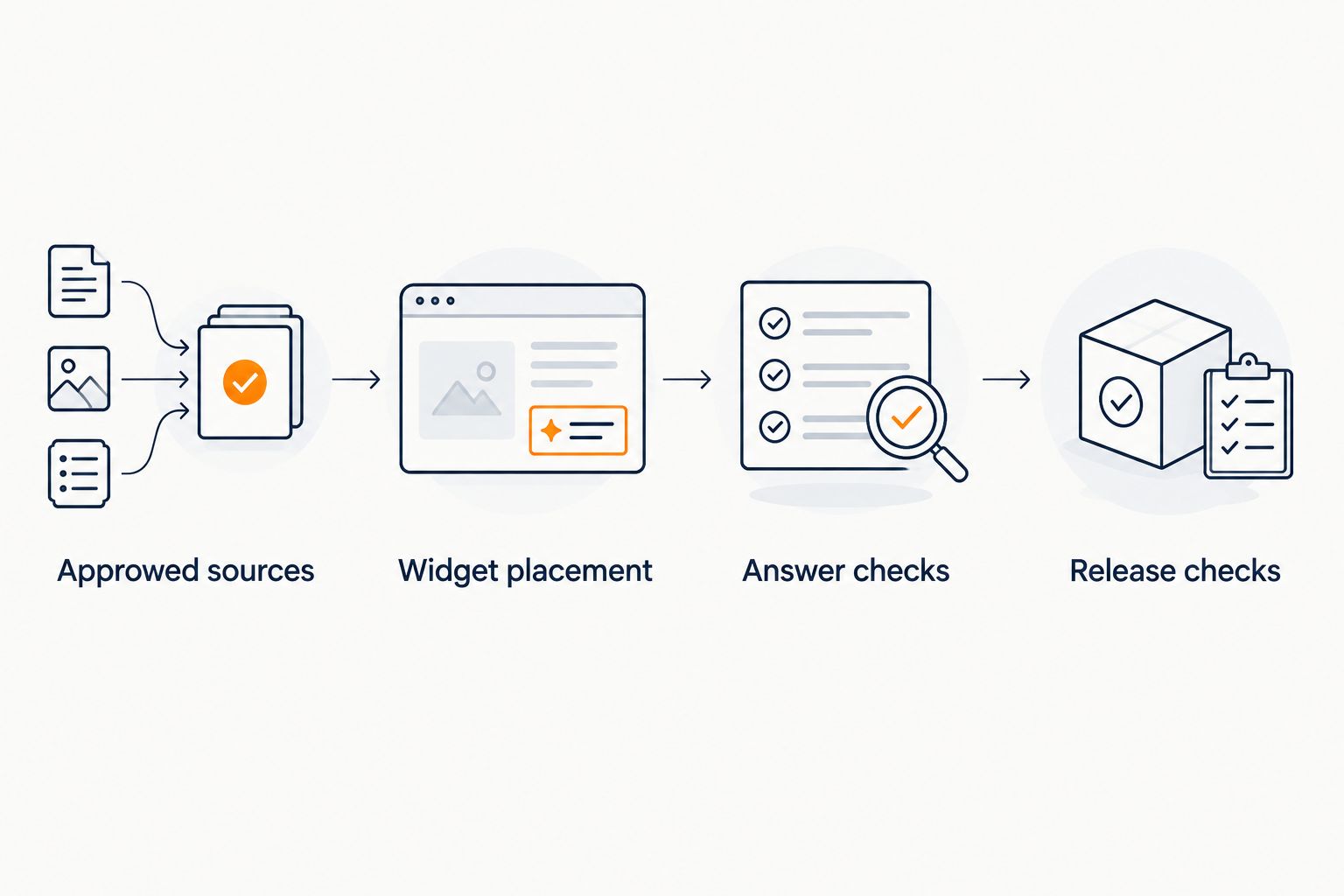
The diagram's final stage matters because a preview and a published site are different environments. Repeat the checks on the actual deployment before directing visitors to it.
Configuration unit: release checks
Publish a narrow workflow before extending it across every course page. Your first release should have a clear audience, a known source set, and an owner for unanswered questions.
Release and measure the workflow
- Publish the reviewed app changes using your normal deployment process. Open the deployed site in a fresh browser session and repeat the critical installation and citation checks.
- Check the widget on a phone-sized screen. Confirm that it does not cover navigation, form controls, or the action a visitor came to complete.
- Record the support topics included in the release. Keep unrelated requests out of the initial ticket-reduction comparison.
- Choose a baseline window and a matching review window. For example, use 7 days before release and 7 days after release as a starting measurement plan, not a promised time to results.
- Compare repeat tickets for the covered topics alongside visitor activity and unresolved requests. Keep the classification consistent across both windows.
Expected result: You have a functioning deployment and a defined way to evaluate it. A 2026 support report should distinguish fewer repeated questions from fewer visitors; those are not the same outcome.
Do not count a conversation as resolved merely because the visitor stopped replying. Review whether the answer was supported and whether the visitor still needed help.
Second workflow: update answers when your content changes
The adjacent workflow is source maintenance. When onboarding instructions or curriculum descriptions change, review the answer source and rerun the affected questions. Do not assume a website deployment automatically refreshes the widget's knowledge.
| Workflow | Best for | Advantage | Limitation |
|---|---|---|---|
| Public pre-sale answers | Creators answering curriculum and published-policy questions | Uses material prospective students can inspect | Cannot establish private account status or authorize exceptions |
| Member support answers | Creators explaining approved onboarding and lesson guidance | Keeps recurring instructions close to the question | Requires verified content-access boundaries before private material is used |
For your 2026 content review, use this sequence:
- Update the authoritative document first.
- Update or refresh the corresponding widget source through the method provided in your account.
- Ask the affected acceptance questions again.
- Open the citations and confirm that the answers reflect the revised document.
- Retire contradictory material rather than leaving both versions active without explanation.
The advantage of source-grounded support is traceability; the limitation is dependence on the source set. If your published instructions are incomplete, correct them instead of expecting the widget to supply missing business rules.
Troubleshooting
The widget appears in preview but not on the published site
Check that the deployed version contains the installation change. Then inspect the published site's Console and Network panels for blocked or failed requests. If the app uses a Content Security Policy, have its maintainer compare that policy with the widget's documented requirements rather than disabling protections broadly.
The widget opens twice after page navigation
Inspect whether the installation code runs in both a shared layout and individual pages. Also check whether route changes repeat initialization without the cleanup required by the provider's instructions. Keep the installation in the appropriate shared location and follow the documented lifecycle behavior.
The answer sounds right, but the citation does not support it
Mark the answer as a failed acceptance test. Check for conflicting documents, missing context, or an overly broad question. Correct the source set and retest; do not treat the presence of a citation as proof that the claim is supported.
A citation opens a login screen or exposes private material
Test the cited destination while signed out. If the answer depends on restricted content, confirm how access is enforced before keeping that source in a public workflow. Remove the source from public use until the boundary is verified.
A lead submits details, but no follow-up reaches the owner
Repeat the submission with contact details you control and trace its destination. Check the configured recipient or connected destination, any relevant filters, and the visitor-facing confirmation. An instruction to contact support is not the same as a completed lead submission.
Customize your workflow
Once the public workflow passes, expand by question type rather than adding every document at once. Add onboarding guidance, test it, and then decide whether another topic belongs in the same source set.
Assign an owner to unanswered questions. That person should distinguish missing documentation from requests that always need judgment, such as a disputed account charge. Only the first category belongs in a documentation-fix queue.
For 2026 maintenance, keep installation changes separate from policy changes in your records. If an answer breaks after an edit, that separation makes it easier to identify whether the problem is the page, the source, or the intended response boundary.
FAQ
How do I connect HelpShelf to Bolt?
Use the provider-issued website installation code in your Bolt-built app, then test the deployed widget. Treat the setup as an embed workflow unless your account's instructions explicitly provide another connection method.
Does this require a native Bolt integration?
This workflow does not depend on a native connector. It depends on being able to edit the app's website code and follow the widget's actual installation requirements.
Can the widget answer questions from private course lessons?
Do not use private lessons in a public workflow until you have verified visitor-level access controls. Placing the widget on a signed-in page does not by itself prove that its answer sources enforce those permissions.
Will adding a widget automatically cut support tickets?
Installation alone does not establish a reduction in support tickets. Compare repeat questions for the covered topics before and after release, and review unresolved requests as well.
What should happen when someone asks for a refund exception?
The answer should stay within the published policy and direct exception requests to a person. A content-based answer must not invent authorization to approve an exception.
How do I know a cited answer is correct?
Open the citation and check that it supports the specific claim in the answer. Also confirm that the intended visitor can access the source and that it reflects current instructions.
Do I need to test again after changing course content?
Yes, rerun the questions affected by the content change. Confirm the updated source is in use and that old, contradictory material no longer drives the answer.
One last thing
Your most useful test question is one the widget should not answer. Ask for an unpublished exception, then check that the response holds the boundary and gives the visitor a real next step. A refusal is part of a working support workflow, not evidence that the installation failed.


