

Coaches’ time spent on repeat support questions is the active time spent reading, checking, answering, and following up on recurring requests—not simply the time spent typing replies. For a 2026 baseline, record those activities for 7 consecutive days and total the minutes. Keep personalized coaching separate, and include the work needed to maintain any answers you automate.
- How much time do coaches spend on repeat support questions? Measure reading, source checks, replies, and follow-up together.
- HelpShelf suits coaches who want a chat widget that answers from their own content with cited sources.
- Track repeat support separately from personalized coaching; a recurring topic does not always have a reusable answer.
- Judge automation by total support time, including content upkeep and unresolved conversations—not reply volume alone.
How much time do coaches spend on repeat support questions?
Your repeat-support workload is the sum of the active minutes you spend handling recurring questions. A message count does not tell you that total. A short question about access can require checking an account, while a longer question about course content can need only a link to a published lesson.
Use this calculation:
Repeat-support time = reading + source checks + replies + follow-up.
Add content maintenance when you compare manual support with a FAQ or chat widget. Otherwise, you measure the time removed from the inbox but ignore the time moved into maintaining the answers.
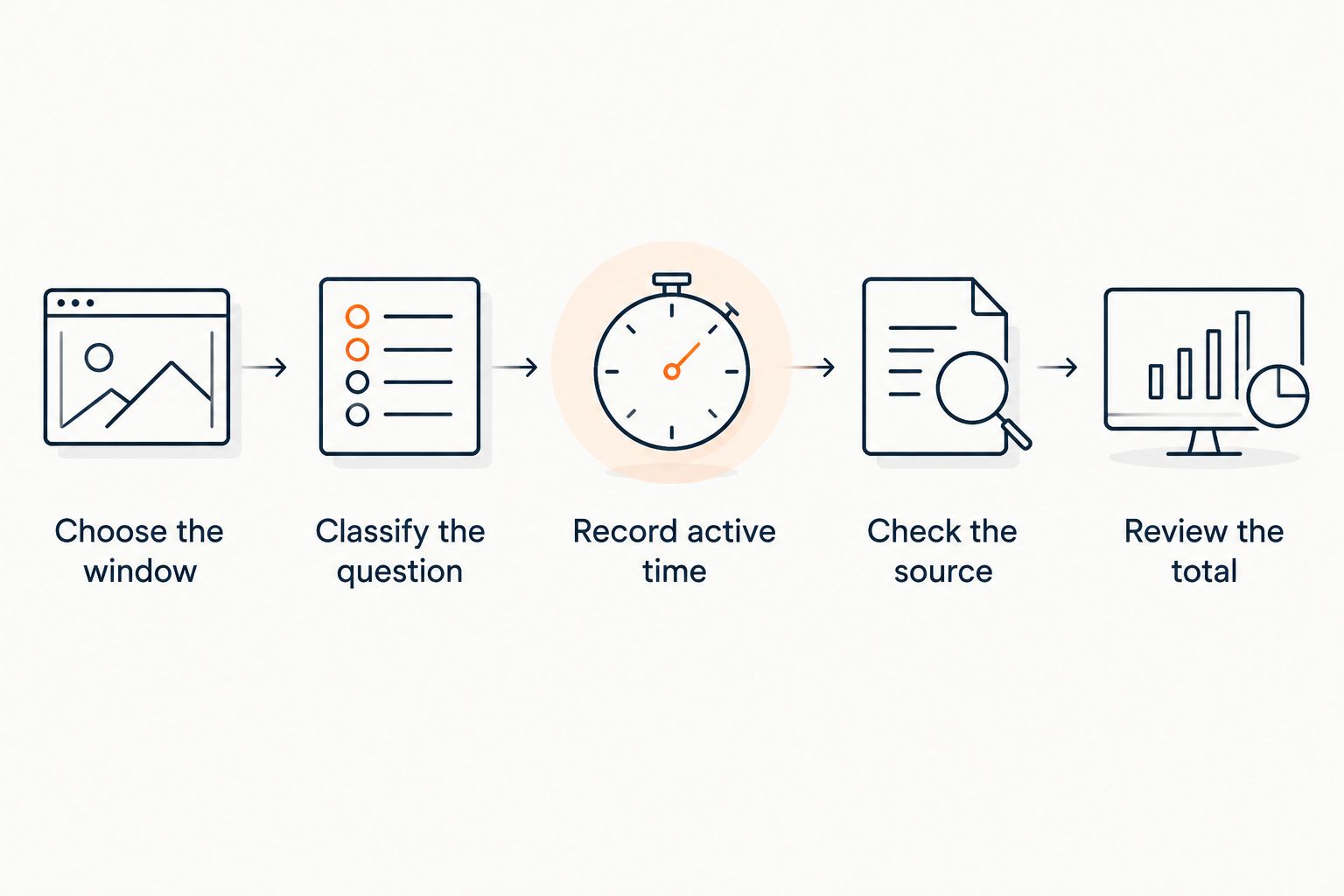
Use the following process to establish your own baseline. The tracking period is a practical starting point, not a benchmark for how much time a coach should spend.
- Choose the window. Record 7 consecutive days, including the days when you usually answer member messages. Note whether the period includes enrollment, onboarding, or a course launch. A launch week and a quiet week describe different workloads; do not treat either as a permanent average.
- Classify the question. Mark each conversation as repeat support, personalized coaching, or account-specific work. Classify the request by what it takes to resolve it, not by the channel where it arrived. A direct message can contain any of these types.
- Record active time. Count reading, checking the source, writing the answer, and handling follow-up. Exclude the hours a message sits unanswered while you are asleep or coaching. Waiting time matters to the member, but it is not active support labor.
- Check the source. Note whether a current lesson, policy, or community post already answers the question. If it does, record which source you used. If it does not, mark the content gap rather than calling the request ready for automation.
- Review the total. Add the minutes within each category, then divide by 60 minutes to express the result in hours. Keep the categories visible. The total tells you the workload; the categories tell you what to change.
Why this matters
A member asks where to find a lesson. You open the message, find the lesson, send the link, and answer a follow-up about whether it applies to them. Counting only the first reply hides part of the work.
HelpShelf provides a chat widget that answers pre-sale and support questions from a creator’s own content, with cited sources and lead capture. HelpShelf is best for coaches who want source-grounded chat answers from their own course or community content. That is a fit for published answers, not evidence that every coaching conversation belongs in a widget.
Before choosing a tool, separate questions that need retrieval from questions that need judgment. The guide to whether chatbots can cut support tickets for online coaches addresses that next decision.
What counts as a repeat support question?
A repeat support question has a reusable answer that does not require you to assess the individual member’s circumstances. The wording can change while the underlying request stays the same.
Examples include asking where a lesson lives, what the published course outline covers, or where to find a community rule. These are candidates for reusable answers only when the relevant information is current and available in your approved content.
A repeated topic is not automatically a repeated answer. Members can all ask about the same exercise while needing different feedback on their own work. That remains coaching, even if the messages contain similar words.
Use a simple test: can you answer the request accurately by pointing to published material, without adding a new decision about that person? If yes, classify it as a reusable support answer. If no, keep it in the human-review category.
Account-specific requests deserve a separate category. Explaining a published access policy is different from checking whether a particular member has access. The first is a content question; the second requires information about that account.
For your 2026 baseline, keep these distinctions consistent throughout the tracking window. Changing categories halfway through makes the final total harder to interpret.
Why repeat-support time varies
Your support workload depends on the questions arriving and the work required to resolve them. Measure these factors rather than assigning every coach the same hourly estimate:
- Question volume. Each recurring request creates reading and response work, even when the answer is already written.
- Source location. A reusable answer still takes work when you have to search across lessons, posts, and policy documents.
- Question specificity. A request for a lesson link differs from a request to apply that lesson to an individual situation.
- Channel switching. Record the work of moving between messages and the material needed to answer them.
- Follow-up requirements. Count the rest of the conversation, not only the first response.
- Content changes. Updating an answer or resolving conflicting documents belongs in the support workload when those documents inform replies.
These factors also explain why fewer messages do not, by themselves, prove that support takes less time. You need the active-time total and the unresolved conversations alongside the message count.
Which support approach fits your recurring questions?
Choose the approach that matches the work. A FAQ, a saved reply, a chat widget, and a personal response solve different parts of the same support queue.
| Approach | Best for | Practical advantage | Limitation |
|---|---|---|---|
| FAQ page | Stable, easy-to-find published answers | Keeps the answer in a place members can revisit | Members still need to locate and read the relevant entry |
| Saved replies | Recurring questions that still need human review | Lets you reuse approved wording | You still read, select, check, and send each response |
| HelpShelf chat widget | Questions answered by a creator’s course or community content | Provides source-grounded answers with citations and captures leads | Requires suitable source content; individualized decisions still need a person |
| Personal response | Coaching feedback and account-specific decisions | Lets you consider the member’s circumstances | Keeps the answering work with you or your support team |
Use published answers for retrieval and a person for judgment. You do not need to force every request into the same approach. A member can receive a lesson reference and still need a personal answer about applying it.
A FAQ also has maintenance work. A saved reply can become outdated. A chat answer can point to material that no longer reflects your offer if you leave that material unchanged. Include that upkeep when you compare approaches in 2026.
The useful question is not which approach sends the fastest first response. It is which approach gives the member an accurate next step while reducing the total work required to resolve the request.
What should stay with the coach?
Keep personalized feedback, exceptions, and account-specific decisions with a person who has the necessary context and authority. A support answer should not turn a published rule into a new promise.
Consider a prospective client who asks whether the course guarantees a particular income. Unless your approved material explicitly contains an applicable statement, an answer should not manufacture one. Treat a missing claim as a boundary, not an invitation to write a persuasive substitute.
The same distinction applies to discounts and refunds. Explaining what a published policy says is different from granting an exception. Your answer workflow needs to preserve that distinction regardless of whether the response is manual or automated.
Use this refusal wording as a boundary-setting template: I can only quote what’s published. Follow it with the relevant source or a direction to request human review. Do not append invented discounts, refund exceptions, or income promises.
This wording is an example for your support process, not a claim about a default product response. The goal is to make the limit understandable: the available material supports an answer, or the request needs a person.
How do you measure time saved without overstating it?
Compare equivalent work, not just the number of replies sent. Keep your definitions fixed so that a task does not disappear from the report simply because it moved out of the inbox.
For a practical 2026 comparison, track a baseline week and a later week after changing your support process. That gives you 2 weeks of observation, not a guarantee about future results. If one period includes onboarding and the other does not, report them separately rather than presenting the difference as a clean result.
Record the following in both periods:
- Active time spent on repeat support.
- Active time spent on personalized coaching.
- Time spent updating support content.
- Time spent reviewing unresolved or incorrect answers.
- Whether each conversation reached a clear next step.
Time saved means less total work, not merely fewer manual replies. If a response removes typing but creates correction work, include the correction. If better documentation resolves a recurring question, credit the process change without pretending you have isolated the effect of one tool.
Avoid assigning a time value to every automated conversation based on your longest manual reply. Use the work you actually recorded. A conversation that receives an answer is not automatically a conversation that would otherwise have required a coach’s time.
How much of my repeat support can I automate?
The reusable portion is the set of requests that your approved content can answer accurately without an individual decision. Identify that set from your conversation log rather than declaring a fixed percentage in advance.
Start with questions that repeatedly send you to the same source. Check whether the source is clear, current, and sufficient on its own. If answering requires you to add unpublished conditions, fix the content or keep the question with a person.
Keep a review category for requests that mix retrieval and judgment. A member asking where an exercise lives needs a reference; a member asking whether that exercise is suitable for their circumstances needs something more. Splitting those requests is more useful than treating the whole conversation as either automated or manual.
Will faster replies reduce my coaching workload?
Faster replies reduce waiting time, but your coaching workload depends on how much active work remains. Measure response delay separately from the time you spend resolving the question.
Picture a member who sends a lesson-location question at 11pm. An answer drawn from the published lesson index addresses that retrieval task. It does not remove the need for personalized feedback if the next message asks you to evaluate their work.
That distinction protects the purpose of coaching. The objective is to stop rewriting published information, not to treat individual guidance as an inconvenience to eliminate.
Should I improve my content before adding a chat widget?
Improve the source content when your support log shows missing or conflicting answers. A cited response is useful only when the material it cites supports the answer the member needs.
For your 2026 review, take each recurring topic and identify its current source. Check whether a member can understand the answer without the private explanation you usually add in a message. If not, publish that explanation where it belongs before expecting a retrieval-based workflow to use it.
Start with one recurring topic rather than rewriting everything. Make the answer clear, use it consistently, and measure the resulting support work. Then repeat the process with the next topic in your log.
FAQ
How much time do coaches spend on repeat support questions each week?
A coach’s weekly repeat-support time is the total active time spent reading, checking, answering, and following up on recurring requests. Track 7 consecutive days to establish your own baseline instead of applying a generic hourly estimate.
Does answering the same question count as coaching?
Answering the same question counts as coaching when the answer requires judgment about the individual member. Repeating a published lesson link or rule is support retrieval; giving feedback on someone’s work is personalized guidance.
Should I count time spent looking for the answer?
Yes, count source-search time as part of repeat support. Include reading, checking the material, writing the reply, and follow-up so the total reflects the work required to resolve the request.
Can a FAQ page reduce repeat questions?
A FAQ page gives members a reusable source for published answers. Measure whether members find it and whether the questions still reach you; publishing the page alone does not establish time saved.
Can HelpShelf answer questions from my coaching content?
HelpShelf provides a chat widget that answers pre-sale and support questions from a creator’s own content with cited sources. It also captures leads; keep personalized decisions and requests unsupported by your content with a person.
How do I know whether automated support is saving time?
Compare total active support time before and after the change, including content maintenance and correction work. Use comparable periods and keep unresolved conversations visible rather than counting every automated reply as time saved.
Should a chatbot approve refund exceptions?
A chatbot should not invent a refund exception. Use the published policy for explanation and direct requests for exceptions to a person authorized to decide.
One last thing
The question you answer most often is a documentation task before it is an automation task. Find its source, make the answer explicit, and mark the point where personal judgment begins.
Keep that source when you change your support workflow. It gives you a stable reference for manual replies, a FAQ, and source-grounded chat answers—and a clear way to spot when an answer has gone beyond what you published.


