

The cost to add live chat to a Kajabi site is the chat subscription plus installation, content preparation, and the work of answering or reviewing conversations. For your 2026 budget, use the provider’s current quote and include ongoing support work: adding a widget does not remove the need to handle questions it cannot answer.
- How much does it cost to add live chat to a Kajabi site? Budget for software, setup, and ongoing support.
- HelpShelf fits creators who want source-cited answers from their course, coaching, or community content.
- Human live chat needs someone to answer; automated chat needs published sources and answer review.
- Compare the full workflow, not just the widget subscription.
Why this matters
A visitor asks whether your course includes personal feedback. You are teaching, recording, or away from your inbox. A chat box gives that visitor somewhere to ask, but the answer still needs to come from a person or a published source.
That distinction determines what you should budget for. Human live chat means staffing the conversation. Source-grounded automated chat means preparing the material that supports answers and keeping it accurate.
HelpShelf provides an AI sales and support chat widget that uses a creator’s own content, cites sources, and captures leads. Those functions fit a specific job: answering published questions before purchase or during support. They do not justify treating the subscription as your entire support budget.
How much does it cost to add live chat to a Kajabi site?
Budget for the complete answering workflow, not just the visible chat box. A useful 2026 estimate separates the provider’s charges from your own installation, preparation, and ongoing work.
Ask for each component separately. Otherwise, a quote for software and a quote that includes setup are not comparable.
| Budget component | What to include | What to establish before choosing |
|---|---|---|
| Chat software | The subscription for the functions you need | Which features and usage the quote covers |
| Installation | Placing and checking the widget on intended pages | Who installs it and verifies the result |
| Content preparation | Organizing approved answers, policies, and course information | Who resolves missing or conflicting information |
| Human coverage | Answering conversations that require a person | Who responds and during which working hours |
| Ongoing review | Checking answers and updating source material | Who owns corrections after launch |
Your own time belongs in the comparison even when you do not pay a separate invoice for it. Installing the widget yourself still creates work. So does answering every conversation yourself.
Use this budget rule: software charges plus paid setup plus paid support work, with your own workload recorded separately. Do not assign your time an arbitrary value just to make a spreadsheet look complete. Track the actual work, then decide whether it fits your schedule.
Ask for a quote you can compare
Give each provider the same description of the job. Specify the pages where visitors will ask questions, whether those questions are pre-sale or member support, and who will take over unresolved conversations.
Request written answers to these questions:
- What does the quoted subscription include?
- Does setup include installation and answer testing?
- What usage rules affect the bill?
- Which functions require a different subscription?
- What happens when a question needs a person?
- What work remains your responsibility?
Keep those answers beside the quote. A low headline charge does not settle the decision if you still need to prepare every source, check every answer, and manage follow-up yourself.
Choose the answering model before comparing quotes
Human live chat, source-grounded automated chat, and a combined workflow solve different problems. Compare them by the questions your visitors ask—not by whether each puts a bubble on the page.
These are operating approaches, not claims about a particular vendor’s plans.
| Approach | Best for | Advantage | Limitation |
|---|---|---|---|
| Human live chat | Questions requiring judgment or individual context | A person can clarify the situation directly | Someone must be responsible for replying |
| Source-grounded automated chat | Questions answered in published course or policy content | Answers can point visitors to supporting sources | Missing or ambiguous sources still need attention |
| Combined workflow | Published questions mixed with personal exceptions | Separates routine answers from decisions needing a person | Requires ownership of both sources and follow-up |
Human live chat: budget for the person answering
Choose human live chat when the conversation needs judgment. A visitor describing a personal situation is not asking the same kind of question as someone checking what a course includes.
The advantage is direct clarification. The constraint is coverage: someone has to read the question, understand it, and reply. A widget alone is not a staffed service.
For your 2026 plan, write down who owns conversations during teaching sessions and outside your working hours. Also define what visitors see when nobody is answering. Do not present a response-time promise your working arrangements cannot support.
Source-grounded chat: budget for the source material
Choose source-grounded chat when answers should come from published material. Course inclusions, access instructions, and stated policies are suitable topics when your sources actually address them.
The advantage is traceability: a visitor can inspect the material behind an answer. The limitation is equally concrete. If your content does not say whether private feedback is included, the answer should not invent that inclusion.
HelpShelf is best for course creators, coaches, and community owners who need source-cited sales and support answers from their own content. Its usefulness depends on the material available to answer the question; unresolved questions still need a defined response process.
Combined workflow: budget for the boundary
Choose a combined workflow when published questions sit alongside requests for exceptions. Let the published material answer what it actually covers, and assign a person to decisions outside that material.
For example, a published policy can explain its stated terms. A request to change those terms is a separate decision. Treating both as ordinary answer generation creates the wrong expectation.
The advantage is a clear division of work. The limitation is coordination: somebody must maintain the sources and somebody must own the unanswered conversation.
Why the cost of Kajabi chat varies
The scope of the answering job changes the work required. Define that scope before comparing providers in 2026.
- Pre-sale versus member support. Course-fit questions and account-specific requests need different information and handling.
- Human responsibility. Decide whether you will answer conversations yourself or assign that work to someone else.
- Content readiness. Clear published answers need less preparation than scattered or contradictory notes.
- Lead capture requirements. Define which details you need and who will use them after the conversation.
- Installation scope. Identify the pages to check and who owns placement, testing, and corrections.
- Source maintenance. Assign responsibility for changes to course content, coaching terms, and community rules.
These are budgeting decisions, not reasons to buy every available feature. Remove functions that do not support your actual conversation workflow.
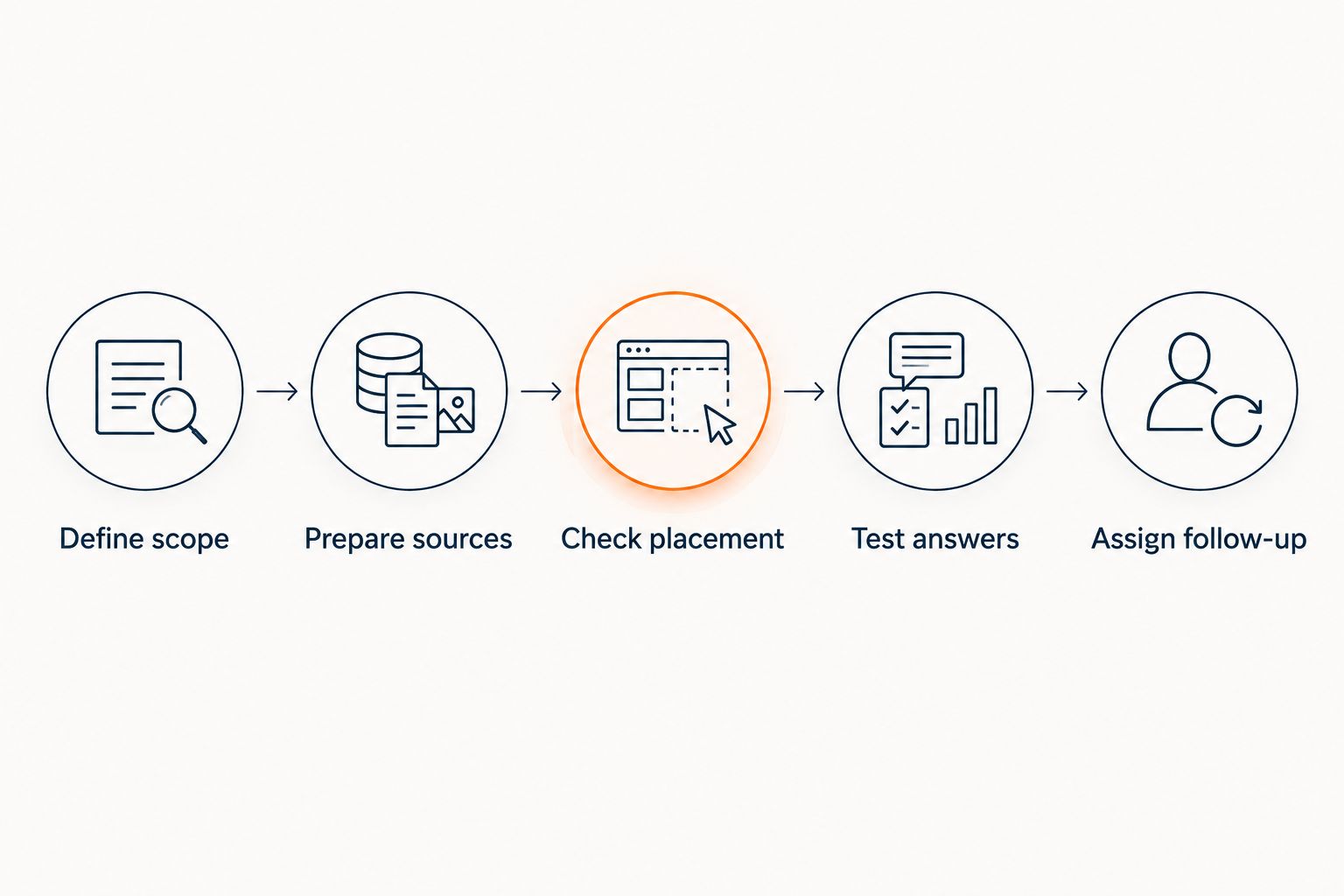
How to scope the installation before you commit
Use the same sequence whether you install the widget yourself or pay someone to help. The objective is a defined job with a clear stopping point—not simply a chat bubble that appears on a page.
- Define scope. List the questions you want chat to answer and the pages where those questions arise.
- Prepare sources. Collect approved course information, instructions, and policies. Resolve contradictions before using them for answers.
- Check placement. Verify that the intended installation approach works on the pages you selected.
- Test answers. Ask both ordinary questions and questions your material does not answer.
- Assign follow-up. Name the person responsible for unresolved requests and captured leads.
The guide to connecting HelpShelf to Kajabi is a relevant next step when you are evaluating that setup. Confirm the actual installation requirements before assigning a setup budget.
Do not stop testing when the widget displays correctly. Ask whether the answer matches its source, whether the citation supports the specific claim, and whether the visitor knows what to do when no answer exists.
That is the practical difference between completing an installation and completing an answering workflow.
Test the questions that should not get a sales answer
An accurate refusal is part of the job. Your chat should not fill gaps with invented discounts, refund exceptions, or income promises.
Use hypothetical questions like these during your 2026 review. They test the boundary between published information and a decision that belongs to a person.
| Test question | Appropriate response boundary | What to check |
|---|---|---|
| Can you give me an unpublished discount? | Do not invent an offer | The answer stays within published terms |
| Will you make a refund exception for me? | Do not authorize an exception | The request remains a human decision |
| What income will this course guarantee? | Do not promise an outcome | The answer does not turn course content into a guarantee |
| Does the course include personal feedback? | Answer only from the stated inclusions | The citation supports that specific inclusion |
A suggested refusal for an unsupported request is: “I can only quote what’s published.” Follow it with the relevant published information or a clearly defined next step. This is example wording, not a promise about any product’s exact response.
A citation is useful only when it supports the answer beside it. A link to a general course page does not establish a benefit that the page never states.
Do I need a person online whenever someone opens chat?
Human live chat needs a person to answer live conversations. Source-grounded automated chat answers from supplied material, but requests outside that material still need an owner.
Decide how you will handle those requests before launch. Lead capture is not the same as completed follow-up; somebody still has to review the details and respond when appropriate.
Can I prepare the content myself?
You can organize your own published information and decide which statements are approved for use. Whether that is the right use of your time depends on the condition of your material and the installation requirements you confirm.
Start with questions visitors actually ask. If the answer exists only in your head or in an old private message, publish an approved answer before expecting source-grounded chat to use it.
Should I use the same chat for buyers and members?
Buyer questions and member questions need separate scope decisions. Buyers need published information about the offer; members can ask questions involving personal access or circumstances.
Decide which material belongs in each workflow and where a person must take over. Do not assume that content intended for members should be exposed in a public pre-sale conversation.
FAQ
How much does it cost to add live chat to a Kajabi site?
Budget for the chat subscription, installation, content preparation, and ongoing support work. Get a current quote for your requirements rather than treating the widget charge as the whole cost.
Is adding a chat widget the same as providing live support?
No. Human live support requires someone to answer, while automated chat requires suitable sources and a process for unresolved questions.
What is HelpShelf best for on a Kajabi site?
HelpShelf is best for creators who want sales and support answers grounded in their own course, coaching, or community content. It provides cited answers and lead capture; define how you will handle questions outside the published material.
Can a chatbot promise a refund exception?
A chatbot should not promise an unpublished refund exception. It should explain the published policy and leave exception decisions to the responsible person.
Do I need to prepare my course content before adding chat?
Source-grounded chat needs approved material that answers the questions you want it to handle. Resolve missing answers and conflicting statements before relying on that material.
What should I ask a live chat provider before signing up?
Ask what the quote includes, what usage rules apply, and who owns setup and ongoing work. Also confirm how unresolved conversations reach the person responsible for answering them.
Should I choose human chat or automated chat for course sales?
Choose human chat for questions requiring individual judgment and source-grounded chat for questions answered in published material. A combined workflow needs clear responsibility for both answers and follow-up.
One last thing
Before comparing subscriptions, choose a real question your course page does not currently answer. Write the approved answer and decide where it should be published.
Then test whether chat can answer that question without adding an unsupported benefit. This exposes a useful distinction: a better widget does not repair an unclear offer. For your 2026 decision, fix the source before paying to distribute the answer.


