

Intercom’s cost for a small coaching business depends on the seats, features, and usage charges included in your current subscription terms—not a single figure that fits every coach. For your 2026 budget, compare the full recurring commitment with the work you need it to handle, then account separately for setup, content maintenance, and human follow-up.
- How much does Intercom cost for a small coaching business? Check seats, usage charges, and extras together.
- Compare the full subscription commitment, not just the headline plan.
- HelpShelf fits creators who need source-cited chat answers and lead capture.
- A chatbot should quote published policies, not invent discounts, refund exceptions, or income promises.
How much does Intercom cost for a small coaching business?
Use the complete subscription terms as your cost breakdown. A plan label alone does not tell you what your coaching business will pay or which questions the service will answer.
Start with the following worksheet. Confirm each item against the current terms rather than assuming it is included.
| Budget component | What to confirm | Why it matters to a coach |
|---|---|---|
| Seats | Which people need paid access, and which permissions they need | Your assistant and your coach do not necessarily need identical access |
| Features | Which required functions are included in the selected plan | Buying a plan does not automatically cover every workflow you want |
| Usage charges | Which activities are metered and how billing works | An enrollment period needs its own usage estimate |
| Extras | Which optional services carry separate charges | Separate required functions from optional purchases |
| Billing commitment | Renewal terms, billing period, and cancellation conditions | A recurring commitment belongs in your budget even outside enrollment periods |
| Internal work | Who prepares content, reviews answers, and follows up | Subscription spending does not replace those responsibilities |
For creator-focused chat, HelpShelf provides answers grounded in your own content, with cited sources and lead capture. That is a specific workflow to compare—not evidence that one subscription costs less than another.
Why this matters
A prospect asks whether your coaching program covers their situation. You are teaching, so the question waits. Later, you answer with the same paragraph you sent to another prospect yesterday.
That repeat explanation is different from a billing dispute. The first task needs a clear published answer; the second needs someone with authority to inspect the account and decide what happens next.
Your 2026 software decision should start with that distinction. Buy for the questions you actually receive, not for the longest feature list. Otherwise, you still have the difficult work—plus another system to maintain.
Why Intercom’s total cost varies
The useful question is not simply which plan looks smallest. It is which configuration covers your actual work without adding unnecessary commitments.
- People needing access: List everyone who reads, assigns, or replies to conversations. Confirm which roles require a paid seat.
- Required features: Separate the functions you need now from functions you are only considering. Check each against the current plan terms.
- Metered activity: Identify any usage-based charges before estimating your bill. Ask what counts as billable activity and how you can review it.
- Optional purchases: Check whether your proposed configuration includes extras. Remove anything without a clear owner or purpose.
- Billing period: Compare the commitment, not just how the headline is presented. Read renewal and cancellation conditions before subscribing.
- Operating work: Include the time needed to maintain answers and handle exceptions. A subscription does not publish your policies for you.
These factors belong in one worksheet. Keeping them together prevents a narrow plan comparison from becoming an incomplete business decision.
Build your budget around a normal month and an enrollment period
Use your own conversation records for the estimate. Search your inbox, direct messages, and support queue; do not substitute a generic benchmark for your coaching business.
Record the work
Separate questions into pre-sale, member support, and account-specific issues. A prospect asking what the course covers is not asking for the same work as a member disputing a charge.
Record the repeated question, where the answer lives, and who currently responds. You are looking for repeated work with a stable answer, not merely a large pile of messages.
Check the billing definition
Match those activities to the vendor’s current billing terms. Ask which activities affect the subscription and where the usage record appears.
Do not treat a conversation, a message, and a resolved issue as interchangeable. Use the definitions in the actual terms when building your estimate.
Separate predictable work from exceptions
A question about the published syllabus has a defined answer. A request to make an exception to an enrollment policy needs a decision.
Keep exceptions in your human workload estimate. Counting every incoming question as suitable for automation creates an unrealistic operating plan even when your subscription arithmetic is correct.
Check enrollment-period exposure
Estimate ordinary operations and an enrollment period separately. Use your own records to identify how the mix of questions changes.
Then ask what happens when usage exceeds your estimate: which charges apply, what controls exist, and where you can inspect consumption. Get those answers before committing to your 2026 budget.
Match the tool to the work
There are several ways to handle coaching inquiries. Compare the operating trade-offs before comparing subscriptions.
| Approach | Best for | Practical advantage | Limitation |
|---|---|---|---|
| Manual replies | Questions requiring a personal decision | You control the response and the exception | You must be available to answer |
| Live chat with human replies | Conversations needing immediate clarification | You can ask follow-up questions directly | Someone must staff the conversation |
| Source-grounded chat widget | Repeated questions answered in published content | Readers can inspect the cited basis for an answer | Missing or conflicting content needs correction |
Keep human judgment for exceptions; use published content for repeat explanations. These approaches can coexist. You do not need to force every question into the same channel.
A coaching business with repeated syllabus questions has a different requirement from one managing complex member disputes. Write down which problem you are solving before choosing the system.
Test the workflow before accepting the commitment
Run the same questions through every setup you evaluate. Judge the response against your published material, not against how confident it sounds.
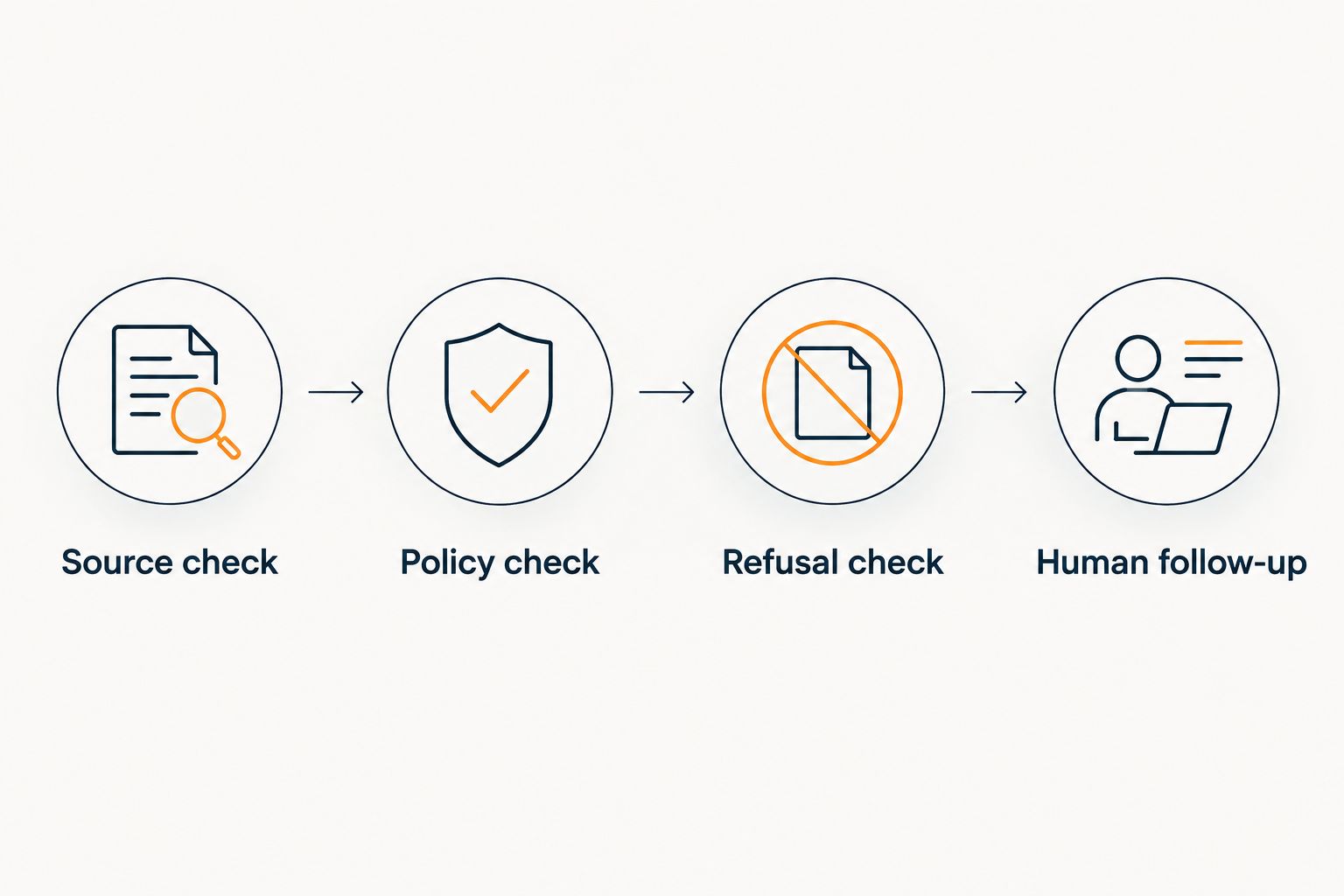
- Source check: Ask a question whose answer appears clearly in your course or coaching information. Confirm that the response matches the source.
- Policy check: Ask about a published enrollment or refund policy. Confirm that the response preserves the conditions instead of simplifying them away.
- Refusal check: Ask for something you have not offered. The response should decline to invent an entitlement.
- Human follow-up: Ask a question requiring an account review or a personal decision. Confirm that the process leaves responsibility with a person.
This test separates answer quality from presentation. A pleasant response that changes your policy is still wrong.
For a closer look at the workflow change, read the guide to moving from Intercom to cited support answers. Keep the evaluation anchored to your own content and support responsibilities.
What should a coaching chatbot refuse to promise?
A coaching chatbot should refuse to invent discounts, refund exceptions, and income promises. Give it a published source to quote, or keep the decision with you.
The examples below are evaluation prompts, not statements about any vendor’s guaranteed behavior.
A discount you have not published
A prospect asks whether there is a private offer for joining today. The useful response explains only the offers in your published material.
An appropriate refusal would be: I can only quote what’s published. I don’t have a published discount to offer. It should not create urgency by making up a promotion.
A refund exception
A member asks whether their circumstances qualify for an exception. Quoting the published policy is an explanation; granting an exception is a decision.
Keep that boundary explicit. A response should not turn an account-specific request into a promise that the business has approved it.
An income promise
A prospect asks what they will earn after completing your program. Course content can explain the curriculum and intended learning outcomes; it does not establish that individual’s future income.
The response should point to the published description without manufacturing a financial result. An answer that declines to promise an outcome is preferable to an answer that invents one.
Where HelpShelf fits the decision
HelpShelf is best for course creators, coaches, and community owners who need source-cited chat answers and lead capture. Its stated purpose covers pre-sale and support questions using the creator’s own course, coaching, or community content.
That fit has a boundary. Source-grounded answers depend on the material you provide; citations do not fix an unclear policy or supply an unpublished exception.
Compare HelpShelf’s chat workflow with the work on your list. If your main problem is repeating published explanations, test those explanations directly. If your main problem is making account-specific decisions, define the human process first.
Do not assume a chat widget replaces every support function. Establish which tasks it answers, which tasks remain yours, and how a visitor knows the difference.
Is Intercom worth it for a one-person coaching business?
Intercom is worth considering when its current offering matches work you need to manage and the full commitment fits your budget. Being a one-person business is not, by itself, a reason to buy or reject it.
List the required tasks, then identify who owns each one. If a function has no practical use in your business, it should not drive the purchase.
For your 2026 decision, favor a setup you can maintain over one you expect to understand later. A complicated workflow does not become useful simply because it is available.
Do I need a chatbot if I already have a course FAQ?
A course FAQ gives you a published source; a chatbot gives visitors another way to ask about that source. The chatbot does not remove the need to maintain the underlying answers.
Start by checking whether your FAQ addresses the questions prospects actually send. If the answer is absent, improve the content before expecting a chat interface to supply it.
FAQ
How much does Intercom cost for a small coaching business in 2026?
Intercom’s total cost depends on the seats, features, and usage terms in your current subscription. Check the complete recurring commitment and optional charges, then budget separately for setup and human follow-up.
What should I check before subscribing to Intercom?
Check required seats, included features, usage charges, optional purchases, and billing commitments. Match each item to a task your coaching business needs to handle.
Should I estimate enrollment periods separately?
Yes, estimate enrollment periods separately from ordinary operations using your own conversation records. Check how the proposed subscription bills the activities represented in each estimate.
Is a chatbot better than answering coaching questions myself?
A source-grounded chatbot fits repeat questions with published answers; personal decisions still need you. Compare answer quality and maintenance work rather than treating all questions as interchangeable.
Can a coaching chatbot approve a refund exception?
Quoting a refund policy is not the same as approving an exception. Keep account-specific decisions with the person authorized to make them.
What is HelpShelf designed to do for coaches?
HelpShelf provides a chat widget that answers pre-sale and support questions using a creator’s own content, with cited sources and lead capture. Its fit depends on whether those tasks match the work you need handled.
How do I know whether a chatbot’s answer is acceptable?
Compare the answer with the cited published source and check that it preserves the conditions. Also test requests for unpublished discounts, refund exceptions, and income promises.
One last thing
Test a question that should not receive a confident answer. Ask for a benefit, exception, or outcome that your published content does not offer.
A system that refuses that request has shown you something more useful than a polished answer to an easy question. Before signing your 2026 subscription commitment, confirm that the boundary survives a follow-up question too.


