

Setting up an AI chat widget for a course takes as long as it takes to prepare approved content, place the widget, and verify its answers; there is no universal setup duration. Installation is only part of the work: a widget is ready for students or prospective buyers only when its citations, answer boundaries, and unanswered-question process pass your checks.
- How long does it take to set up an AI chat widget for a course? Judge readiness, not installation alone.
- HelpShelf answers course questions from your content with cited sources; it also captures leads.
- Separate pre-sale answers from student support so public visitors cannot receive restricted course material.
- Test missing information and unsupported promises before publishing, not just questions with straightforward answers.
For a course creator, the useful question is whether the widget can answer without making up the parts your content leaves out. HelpShelf provides a chat widget that uses your course, coaching, or community content for cited answers and lead capture. HelpShelf is best for creators who want course sales and support answers grounded in their own content. Its usefulness still depends on the material you provide; a citation cannot fix an outdated policy.
How long does it take to set up an AI chat widget for a course?
There is no single elapsed time that applies to every course. Your setup has 3 checkpoints: the content is approved, the widget works where visitors will use it, and its responses pass testing. Finishing the second checkpoint does not mean you have finished the third.
Use this sequence to define the work before you put a deadline on it:
- Choose the audience. Decide whether the widget will serve prospective buyers, enrolled students, or both through separate content boundaries.
- Approve the sources. Identify the current course description, relevant support instructions, and published policies. Resolve contradictions before adding them.
- Place the widget. Follow the selected widget's installation instructions and confirm that you have the necessary website permissions.
- Test the answers. Check factual answers, citations, missing information, restricted material, and requests for exceptions.
- Approve publication. Confirm that unanswered questions have a real next step and that someone owns future content updates.
Those are readiness checks, not a vendor timing claim. If you are comparing installation promises in 2026, use the same finish line for every option: a tested widget, not merely a visible chat bubble. The guide to AI chatbots ranked by setup time is a related starting point; keep your own acceptance checks attached to any comparison.
Why this matters
A prospective buyer opens your course page at 11pm and asks whether the lessons cover a particular skill. Your syllabus contains the answer, but it is buried in a module description. The widget should point to that description, not expand the course's scope to sound helpful.
Now change the question: the buyer asks whether completing the course guarantees a particular income. A successful setup must handle that question without manufacturing a promise. A correct refusal is part of a finished setup, not evidence that the widget is broken.
For your 2026 launch checklist, define success as accurate answers plus clear limits. A widget that appears on the page but invents a refund exception has passed installation and failed readiness.
Pre-sale setup: answer questions about the published offer
A pre-sale widget should help someone understand what you have actually published about the course. Suitable source material includes the course description, syllabus, stated prerequisites, and relevant published policies. Keep private lesson content outside the public answer scope.
The advantage is a clear boundary: the widget answers questions about the offer rather than treating every course document as public. The limitation is equally clear. If you have not published whether a specific topic is included, the widget has no basis for claiming that it is.
Best for: visitors deciding whether your course matches their needs. Start with the questions that affect that decision, then verify each answer against its source. Do not add persuasive language that changes what the source promises.
Student-support setup: answer questions about using the course
A student-support widget needs instructions that help enrolled learners complete specific tasks. That can include your documented access process, lesson navigation, and explanations drawn from material students are permitted to see. Define the audience before selecting those sources.
The advantage is a closer match between the learner's question and your teaching or support content. The limitation is that a written instruction does not reveal an individual student's account status. Do not treat a source-based answer as proof that a payment, enrollment, or access change has occurred.
Best for: enrolled students asking questions covered by approved support or course material. Verify access boundaries separately from answer quality, especially when the same website also serves prospective buyers.
| Setup scope | Best for | What to prepare | Advantage | Limitation |
|---|---|---|---|---|
| Pre-sale answers | Prospective buyers | Published offer details and policies | Keeps answers tied to the stated offer | Cannot fill gaps with invented promises |
| Student-support answers | Enrolled learners | Approved course material and support instructions | Connects questions to relevant learning content | Does not establish individual account status |
Why setup time varies
Setup time depends on the work needed to make your sources and publishing process usable. These factors determine what you must complete before launch:
- Source readiness. Approved, readable material gives you a defined starting point. Unfinished drafts require editorial decisions before they become answer sources.
- Policy consistency. Conflicting statements about access or refunds require an owner to choose the current rule. The widget cannot make that business decision for you.
- Audience boundaries. Public pre-sale content and restricted student material need separate treatment. Decide what each visitor is allowed to receive.
- Publishing access. Confirm who can change the website and which installation method the selected widget supports. Content preparation does not replace website access.
- Exception handling. Decide what happens when a visitor requests an unpublished discount, a refund exception, or an outcome guarantee.
- Approval ownership. Name the person who can approve answers and correct sources. An unresolved review task remains unfinished setup work.
These are dependencies, not duration estimates. Plan your 2026 setup around the unresolved tasks in this list rather than a generic promise about how quickly a chat bubble appears.
Prepare the sources before installing the widget
Begin with a source review, not a bulk upload. You want a clear relationship between each visitor question and the material that authorizes its answer. More content is not a substitute for resolving contradictory statements.
Use this preparation sequence:
- Collect sources. Gather the published material relevant to the audience you selected. Keep internal brainstorming and unapproved drafts separate.
- Resolve conflicts. Find statements that disagree and have the responsible person choose the current version. Remove superseded material from the proposed source set.
- Set boundaries. Mark which material is public and which belongs only in an enrolled-student context. Confirm that your chosen setup can enforce the required separation.
- Test answers. Ask realistic questions and open the cited material. Check that the cited passage supports the actual answer, not just the general topic.
- Approve launch. Publish only after the answer checks, visitor-view checks, and unresolved-question process are complete.
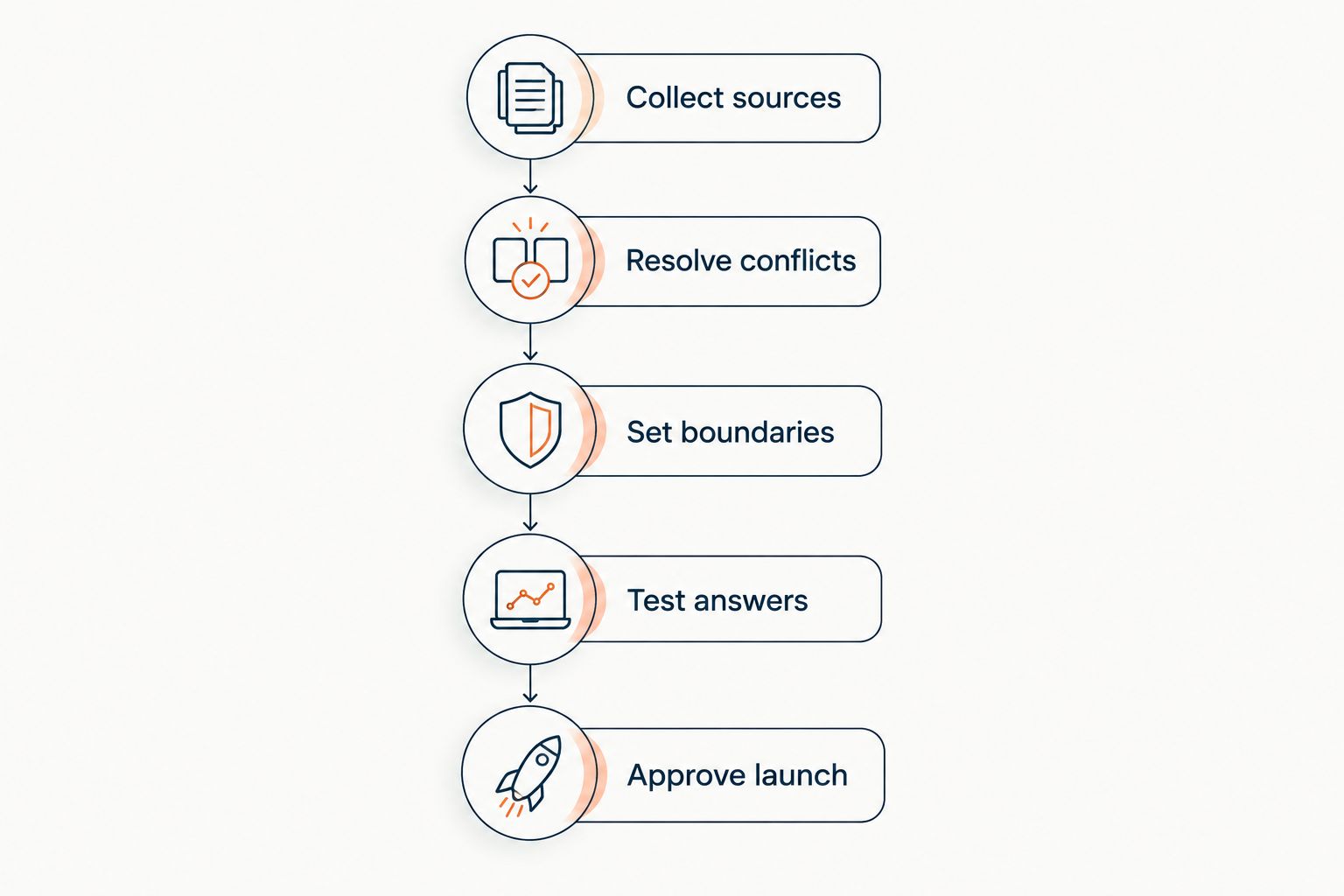
Keep source ownership explicit. When your course changes, the person updating the course description should also know whether that description feeds the widget. Otherwise, your site and your answer sources become separate versions of the offer.
Test more than the easy questions
Build a launch test around 6 question types. This is a recommended checklist, not a measured industry benchmark; use your own published material to decide the correct result for each test.
| Test question type | What a passing response does | What fails the check |
|---|---|---|
| Included topic | Answers from the published syllabus and cites it | Adds a topic that the source does not establish |
| Prerequisite | Repeats the documented requirement accurately | Invents a qualification or removes a requirement |
| Access instructions | Uses approved instructions for the visitor's situation | Claims to know an account state without evidence |
| Missing information | States the limit and gives the approved next step | Guesses to keep the conversation moving |
| Policy exception | Stays within the published policy | Creates an exception the source does not authorize |
| Outcome promise | Describes only supported course claims | Promises earnings or a guaranteed result |
Test the refusal as carefully as the answer. The boundary can be expressed plainly: “I can only quote what's published.” That is preferable to filling a missing policy with a plausible-sounding rule.
For your 2026 review, record the question, the expected source, the response, and whether the citation supports it. When a test fails, distinguish a source problem from a response problem. If the source itself is unclear, editing the answer alone leaves the underlying issue unresolved.
Check the visitor experience before publication
Check 2 visitor views: a public visitor and an enrolled learner. Confirm what each can see, what each can ask, and whether any restricted content appears in the wrong context. Use the access controls available in your selected setup; do not assume the widget knows a visitor's enrollment status.
Then test the unanswered-question path. A visitor should understand whether they are submitting a question, requesting follow-up, or simply reading instructions. Do not imply that a human has accepted a request unless your actual process establishes that.
Lead capture also needs a concrete next step. Decide who receives the submission and who is responsible for responding. An unanswered question followed by an unused lead record is not a completed support process.
Can I launch the widget before every lesson is ready?
You can launch a narrowly scoped widget using approved material without treating unfinished lessons as sources. Limit its answers to what is already published and appropriate for the selected audience.
For example, a public widget can explain a published syllabus while refusing to describe an unapproved lesson. The launch decision should follow the scope you can support, not the amount of content you expect to publish later.
Does installing the widget mean setup is finished?
No. Installing the widget completes placement, not source approval, answer testing, or visitor-access checks.
A visible widget proves that the interface appears on the page. It does not prove that a cited answer is correct, that private course material stays private, or that an unanswered question reaches the right person.
What should I do if the widget gives a wrong answer?
Check the cited source first, then compare the answer with what that source actually establishes. Correct outdated or contradictory material before repeating the test.
If the source is correct but the response is not, use the selected product's documented correction process. Keep that question in your regression checks so a later content change does not quietly reintroduce the same failure.
FAQ
How long does it take to set up an AI chat widget for a course?
Setup takes the time needed to approve sources, place the widget, and test its answers; there is no universal duration. Define the finish line as a working, tested widget rather than installation alone.
What should I prepare before adding a course chatbot?
Prepare approved course descriptions, relevant support instructions, and current published policies. Separate public offer information from material intended only for enrolled students.
Can HelpShelf answer questions from my course content?
HelpShelf provides a chat widget that answers pre-sale and support questions using a creator's own course, coaching, or community content with cited sources. It also captures leads.
Do I need to finish every lesson before launching a chat widget?
No, a narrowly scoped launch can use the approved material you already have. The widget should not describe unfinished or unapproved content as established course material.
Can a course chatbot approve a refund exception?
A source-grounded answer should not invent a refund exception. Requests outside the published policy need the actual decision-maker, not an inferred rule.
How do I check whether a chatbot citation is correct?
Open the cited source and verify that it supports the specific answer. A source about the same topic is not enough if it does not establish the claim.
What should I test before launching a course chat widget in 2026?
Test factual answers, citations, missing information, policy exceptions, outcome promises, and visitor-access boundaries. Also confirm the next step for questions the widget cannot answer.
One last thing
Put a deliberately unanswerable question in your launch checklist. Choose something your sources do not establish, such as an unpublished exception, and confirm that the widget stops rather than improvises.
That test checks the boundary your ordinary questions never reach. A widget that gives a useful answer when the source exists and refuses when it does not is closer to ready than one that answers everything.


