

You want an AI chatbot live before your next launch, not after a six-week onboarding call. This ranks six AI chatbots by how fast you can actually get one answering questions on your site in 2026 — from a single embed script to a multi-week platform rollout.
Best overall for creators: HelpShelf. Best for a basic live chat widget: Tidio. Best for B2B sales chat: Drift. Best for enterprise support orgs: Zendesk.
- HelpShelf is the easiest AI chatbot to set up for creators: one embed script, connect your content, done.
- Tidio installs fast too but answers from scripted flows, not your actual course or community content.
- Zendesk, Intercom and Freshdesk need agent seats, ticket routing and SSO before the bot answers anything.
- Drift sits in between — sales chat setup is quick, meeting-routing rules add configuration time.
- Setup speed and answer quality are separate questions; the fastest install isn't always the best fit.
Why this matters
A student messages your Skool community about a refund policy at 11pm. If your chatbot can't answer from what you've actually published, it either invents something or the student DMs you and waits until morning. By the time you reply, they've moved on to a competitor's course.
Setup time isn't a vanity metric here. A tool that takes three weeks to configure is a tool you install after the launch window closes, not before it. HelpShelf was built around that constraint — a chat widget that answers from a creator's own course, coaching, or community content with cited sources, and captures a lead when it genuinely doesn't know.
The six tools below get ranked the same way: how much configuration stands between you and a bot that answers correctly, in 2026, without a dev on payroll.
What makes the best AI chatbot to set up
- Embed method — one script tag versus a guided implementation project with a kickoff call
- Content connection — pulls answers from docs, courses, or community posts you already have versus requires you to write FAQ scripts from scratch
- Team and seat setup — a solo creator can configure it alone versus it needs agent roles and permissions before launch
- Integration requirements — SSO, CRM sync, or help center migration required before go-live
- Maintenance burden — what breaks or goes stale when your content changes next month
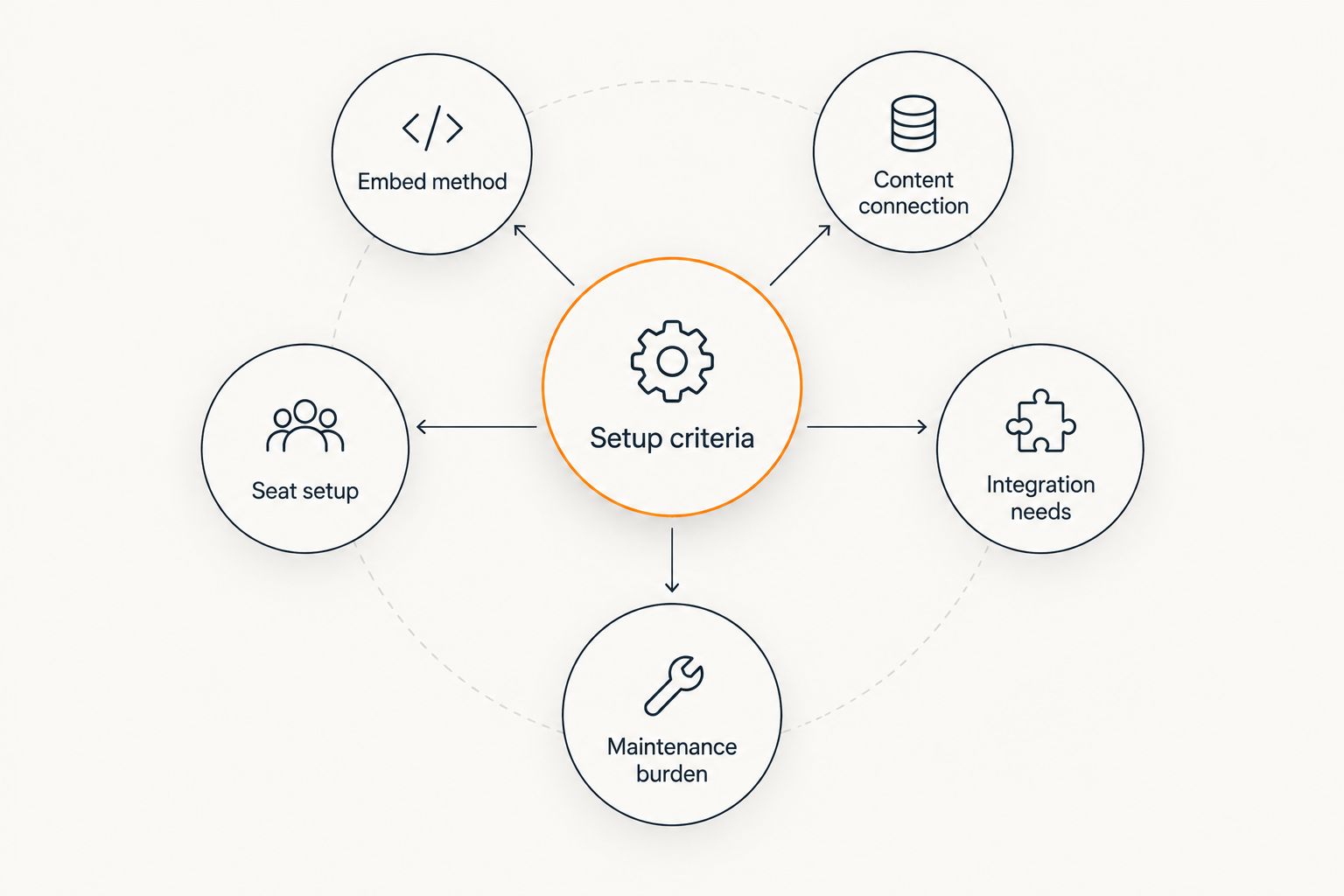
AI chatbots ranked by setup time in 2026: at a glance
| Tool | Best for | Standout feature | Key limitation |
|---|---|---|---|
| HelpShelf | Course creators, coaches, community owners | Answers pull from your course, coaching, or community content with citations | Not a full help desk — no ticketing queue for human-agent handoffs |
| Tidio | Small sites wanting a basic live chat widget | Drag-and-drop chat flows with minimal setup | Answers come from scripted flows, not your actual content — can't cite sources |
| Drift | B2B teams tying chat to sales meetings | Routes qualified visitors straight into a rep's calendar | Meeting-routing and lead-scoring rules take real configuration time |
| Freshdesk | Support teams that need ticketing plus chat | Ticketing, SLAs, and chat in one platform | Agent seats, SLA policies, and routing rules all need setup before go-live |
| Intercom | Product-led SaaS running chat, email, and help center together | One workspace covering chat, email campaigns, and a help center | Multi-channel setup means configuring several products, not one widget |
| Zendesk | Enterprise support orgs with multiple departments | Enterprise-grade ticket routing across teams | Admin roles, SSO, and department routing add the most setup work on this list |
1. HelpShelf: easiest AI chatbot to set up for course creators and coaches
HelpShelf embeds as a single script and connects to a creator's existing course, coaching, or community content — Kajabi modules, Skool posts, Whop resources — then answers pre-sale and support questions with a cited source attached to each answer. When it doesn't have a published answer, it says so and captures the visitor as a lead instead of guessing.
HelpShelf pros:
- One embed script, no dev required to go live
- Cites the exact page an answer came from — no invented policies, no invented discounts
- Captures leads automatically when it can't answer from what's published
HelpShelf cons:
- No ticketing queue for handing off complex cases to a human support team
- Answer quality depends on how much you've actually published — thin content means thin answers
- Built for creator platforms, not enterprise multi-department support desks
HelpShelf verdict: Buy if you sell a course, coaching program, or run a paid community and want answers grounded in what you've actually written, not what a generic bot assumes.
See HelpShelf on your content
Connect your course or community content and check the citations yourself.
2. Tidio: best AI chatbot for a basic live chat widget
Tidio installs quickly and gives small sites a drag-and-drop chat widget with pre-built flows. It's built for simple e-commerce and small business sites, not for answering from a creator's course or community library.
Tidio pros:
- Fast install, minimal configuration
- Visual flow builder for common questions
- Works well for basic order-status or FAQ-style chat
Tidio cons:
- Answers come from scripted flows you write, not your actual published content
- No source citation — you can't point to where an answer came from
- Limited fit for course, coaching, or community-specific pre-sale questions
Tidio verdict: Buy for a simple website widget. Skip if you need answers grounded in course or community content — this is scripted, not source-grounded.
3. Drift: best AI chatbot for B2B sales chat tied to meeting booking
Drift is built for B2B sales teams who want chat to qualify visitors and route them straight into a rep's calendar. Setup is faster than a full help desk but slower than a plain widget because meeting-routing and lead-scoring rules need to be configured before it does anything useful.
Drift pros:
- Strong meeting-booking and calendar routing once configured
- Built-in lead scoring for sales teams
- Good fit for demo-request-heavy B2B sites
Drift cons:
- Routing and scoring rules take real setup time before launch
- Overkill for a solo creator or coach who just wants support questions answered
- Not built to cite course or community content
Drift verdict: Buy for a B2B sales team running demo requests. Skip for course creators — this solves a different problem.
4. Freshdesk: best AI chatbot for teams that need a full ticketing system
Freshdesk pairs a chat widget with a full help desk: ticketing, SLA policies, and multi-agent routing. That's the point and the cost — none of it works until you've set up agent seats and routing rules first. See how it stacks up against creator-focused tools on the Freshdesk alternatives for online educators page.
Freshdesk pros:
- Full ticketing system alongside chat
- SLA tracking for support teams with response-time commitments
- Multi-agent routing across a support team
Freshdesk cons:
- Agent seats, SLA policies, and routing rules all need configuration before go-live
- Heavier than what a solo creator or small coaching business needs
- Not built to cite specific course or community content by default
Freshdesk verdict: Buy if you run a support team with a ticket queue. Skip if you're a solo creator — the setup overhead outweighs what you need.
5. Intercom: best AI chatbot for product-led SaaS running chat, email, and help center together
Intercom bundles chat, email campaigns, and a help center into one workspace. Setup means configuring several connected products at once, which is exactly why it fits SaaS teams already running multi-channel support and drags for anyone who just wants a single widget live fast. The Intercom alternatives for creators page breaks down where creators get more from a lighter tool.
Intercom pros:
- Chat, email, and help center in one connected workspace
- Strong fit for SaaS teams already running multi-channel support
- Mature integration ecosystem
Intercom cons:
- Multi-channel setup means configuring several products, not one widget
- Slower to launch than a single-purpose chat tool
- Not built around citing a creator's course or community content specifically
Intercom verdict: Hold. Buy if you're already running Intercom's other channels. Skip if you just need one widget answering questions fast.
6. Zendesk: best AI chatbot for enterprise support orgs with multiple departments
Zendesk is built for enterprise ticket routing across departments, and the setup reflects that — admin roles, SSO, and department-level routing all get configured before the bot answers a single question. Course creators and solo coaches rarely need this much structure. The Zendesk alternatives for course creators page covers what a lighter setup looks like instead.
Zendesk pros:
- Enterprise-grade ticket routing across teams and departments
- Strong audit trail and admin controls
- Handles high-volume, multi-department support well
Zendesk cons:
- Admin roles, SSO, and routing rules add the most setup work on this list
- Far more platform than a solo creator or small coaching business needs
- Slowest path to a live, answering chatbot of the six tools here
Zendesk verdict: Buy for a multi-department enterprise support org. Skip for a solo creator — setup overhead outweighs the benefit.
How we ranked these
The order above tracks the five criteria listed earlier, in this priority: embed method first, content connection second, then team setup, integrations, and maintenance burden. A tool that needs one script tag and pulls from existing content outranks one that needs agent seats configured before it can answer anything, regardless of how polished the end result is once it's running.
“If the tool needs its own onboarding call before you can ask it a question, it's not a chatbot — it's a project.”
Which AI chatbot should you choose in 2026?
If you sell a course, run coaching calls, or manage a paid community on Kajabi, Skool, or Whop, HelpShelf is the easiest AI chatbot to set up — one script, your existing content, cited answers. If you just need a basic widget on a small site, Tidio is faster to click through but can't cite your content. If you're running a B2B sales motion, Drift earns its extra setup time. If you're an enterprise support org with departments and SLAs, Zendesk is worth the longer rollout — everyone else on this list is paying for structure they don't use.
FAQ
What is the easiest AI chatbot to set up in 2026?
HelpShelf is the easiest AI chatbot to set up for course creators, coaches, and community owners in 2026 — it embeds as one script and connects to content you've already published. General-purpose widgets like Tidio also install fast but can't cite your specific content.
How long does setup take for a full help desk like Zendesk or Freshdesk?
Zendesk and Freshdesk require configuring agent seats, ticket routing, and often SSO before the chatbot answers anything, which takes longer than a single-widget install. That's the tradeoff for the ticketing and multi-department routing they provide.
Is HelpShelf easier to set up than Intercom?
Yes for a single-purpose use case — HelpShelf is one embed script connected to your content, while Intercom setup means configuring chat, email, and help center as connected products. Intercom makes more sense if you're already running its other channels.
Can Tidio answer questions from my own course or community content?
No. Tidio answers from flows you script manually, not from your actual course, coaching, or community content, and it doesn't cite sources the way a content-grounded tool does.
Do I need a developer to install an AI chatbot?
For widget-based tools like HelpShelf or Tidio, no — installation is a single script tag. Platform tools like Zendesk, Intercom, and Freshdesk usually need more configuration around agent roles and integrations, which benefits from technical help.
Is Zendesk overkill for a solo course creator?
Usually, yes. Zendesk's setup time goes toward department-level ticket routing and admin controls that a solo creator or small coaching business doesn't need.
What's the difference between a chat widget and a full help desk?
A chat widget like HelpShelf or Tidio answers questions on your site with minimal setup. A full help desk like Zendesk or Freshdesk adds ticketing, SLAs, and multi-agent routing, which requires more configuration before launch.
How does an AI chatbot avoid making up answers about pricing or refunds?
A source-grounded tool only answers from content you've published and cites the page it pulled from, refusing to guess when nothing published covers the question — for example, saying it can only quote what's published rather than inventing a discount or refund exception.
One last thing
The chatbot that installs fastest isn't automatically the one that stops students from DMing you at 11pm — it's the one that can actually answer from what you've published. Six tools on this list install in minutes; only some of them can point to a source when they answer. Check which category you actually need before you pick based on setup speed alone.


