

Instead of manually answering the same course and coaching questions through Help Scout Beacon, set up a source-grounded chat workflow that answers published questions and sends exceptions to a person. This 2026 help scout beacon to ai chatbot guide shows how to prepare your content, introduce cited answers, test lead capture, and keep account-specific support separate.
- HelpShelf fits creators who need an AI chatbot for cited course answers and lead capture.
- A help scout beacon to ai chatbot workflow starts with approved sources, not an assumed native connector.
- Keep billing disputes, private account questions, and unpublished exceptions with a human.
- Test citations and follow-up before replacing your existing support entry point.
Why this matters
A prospective student asks whether your course covers their situation. You are teaching, coaching, or asleep. The question waits alongside an existing member's login problem, even though those requests need different answers.
HelpShelf is best for course creators, coaches, and community owners who need source-cited answers and lead capture. Its useful role here is answering from your own content—not making decisions about someone's account.
Start with HelpShelf as the answer layer and define what your human support process must retain. Treat the migration as a change in how visitors get answers, not as proof that conversations, customer records, or inbox assignments automatically transfer between systems.
For your 2026 rollout, separate published information from private decisions. A course outline can answer a curriculum question. It cannot establish whether a particular student qualifies for a refund exception.
Before you start
- Accounts and access: Have access to your Help Scout setup, your chat-widget account, and the website or platform settings where the visitor-facing widget will appear. Confirm that you can change the existing installation before scheduling a switch.
- Approved materials: Gather the current course outline, coaching scope, community rules, onboarding instructions, and published policies. Assign a content owner who can resolve contradictions before those materials become answer sources.
- The deployment gotcha: An embedded widget does not establish access to private course content, identity verification, or inbox synchronization. Confirm the permitted placement and source-access method first; do not assume that a visible chat window has authenticated the visitor.
Keep a record of the existing installation and support destination. That gives you a concrete rollback path if the new entry point obscures the route to human help.
Choose the answer boundary
You have two adjacent workflows: keep human-led support as the primary route, or introduce source-grounded answers before human escalation. Compare the workflows by responsibility, not by promises about response speed.
| Workflow | Best for | Advantage | Limitation |
|---|---|---|---|
| Help Scout Beacon-led support | Requests requiring a person to review context | Keeps your established support process central | Repeated published questions still need an answer path |
| HelpShelf source-grounded chat | Course, coaching, and community questions covered by your content | Answers with cited sources and captures leads | Published content does not authorize private account decisions |
Keep human review for decisions; use cited answers for published information. This boundary prevents a curriculum answer from becoming an account-service promise.
Write down the intended scope before changing the widget. For example, the answer layer can explain what the published syllabus includes, while your support team handles a request to change a student's enrollment.
Approved source set
The first configuration unit is the material the chat is allowed to use. A source-grounded answer is only useful when its source is current, relevant, and appropriate for the visitor.
- Collect the authoritative documents. Select the current course description, participation requirements, coaching boundaries, and support instructions. Exclude internal notes containing tentative decisions or private member details.
- Resolve contradictions. Compare duplicated policies and onboarding instructions. Choose the authoritative version and remove superseded material from the proposed source set.
- Separate public and member-only content. Mark which materials can support a pre-sale answer and which belong behind an authenticated learning experience. Do not expose restricted lessons merely to make public answers more detailed.
- Prepare the approved material for the supported source workflow. Use the content-entry or source method available in your account. Preserve meaningful titles and section boundaries so a citation points to a recognizable explanation.
Expected result: Every proposed answer topic has an approved source, and every excluded topic has a reason for exclusion.
Use a simple source register with these headings: document, owner, audience, current version, and permitted answer topics. These are your working-document headings, not assumed product interface labels.
For a 2026 launch, distinguish a document's revision date from a cohort's actual dates. Renaming an old schedule does not make its instructions current. Check the substance before admitting it to the source set.
Answer and exception rules
The next configuration unit defines what a satisfactory answer looks like. Write these acceptance rules before testing; otherwise, a fluent answer can pass even when its underlying claim is unsupported.
- Define the supported question types. Include curriculum coverage, published participation requirements, community rules, and documented onboarding steps where your approved sources answer them.
- Require a relevant citation. Open the cited material during testing and verify that it supports the actual answer. A citation to a broadly related page is not enough.
- Define the refusal boundary. Reject invented discounts, refund exceptions, and income promises. Also reject answers that imply access to account records when no verified account context exists.
- Assign an escalation destination. Identify the person or existing support route responsible for questions outside the source set. Test the destination rather than assuming a connection to your Help Scout inbox.
Expected result: Supported questions receive source-backed explanations; unsupported requests receive a clear boundary and an actionable route to a person.
Use this published boundary statement as a model: “I can only quote what's published.” Follow it with the relevant policy or a support route, not a newly invented exception.
A visitor asking whether a course includes feedback needs a citation to the course's published scope. A visitor asking for extra private coaching needs a human decision. Those questions share vocabulary but not authority.
The process should keep those paths separate:
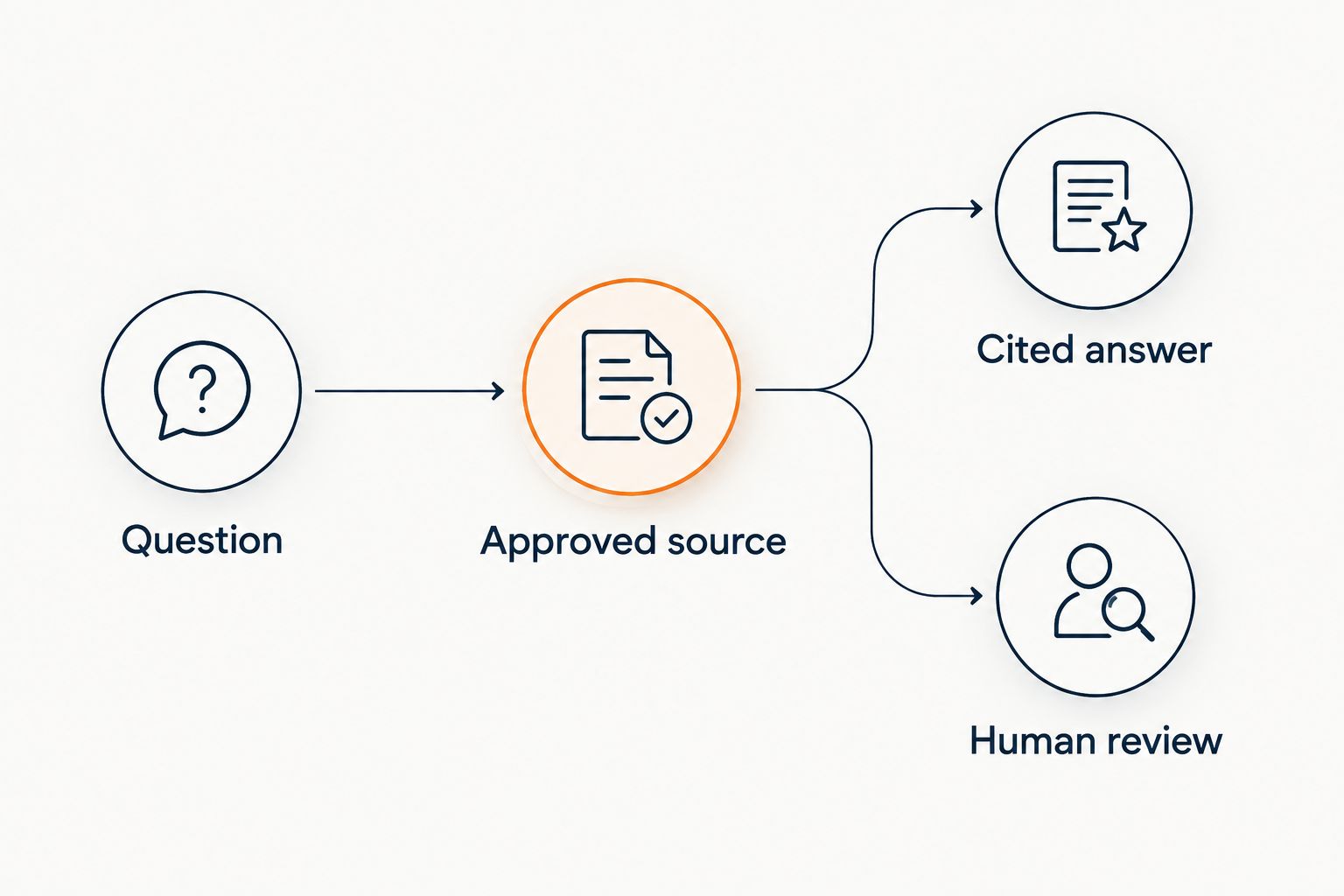
Widget placement and follow-up
Introduce the new answer layer where its source boundary matches the visitor's task. Public pre-sale chat and private member support should not accidentally become the same experience.
- Choose a single pilot page. Start with 1 public page containing a clear course or coaching explanation. Confirm that its platform permits the intended installation method before changing the existing widget.
- Install through the supported method. Follow the installation instructions supplied in your account and the host platform's rules. Change only the intended page or placement scope during the pilot.
- Check overlapping entry points. If both widgets appear, decide which one owns published questions and which one owns human support. Remove unnecessary overlap only after the replacement route works.
- Configure and test lead capture. Request the contact information needed for a defined follow-up. Check where the captured lead appears, who can access it, and how your team receives the question's context.
Expected result: A visitor can get a cited answer, request follow-up, and find human support without guessing which widget to use.
Do not describe lead capture as a booked call or a resolved support case. Those are separate outcomes. A submitted contact detail establishes a follow-up opportunity; your team still needs to act on it.
For creator-specific placement questions, use the AI chatbot guide for cohort-based course creators to keep the workflow focused on enrollment and member questions.
Acceptance tests and cutover
A visible widget is not a completed migration. The final configuration unit checks the answer, its evidence, the visitor's permissions, and the human route.
- Prepare 6 test questions. Include a curriculum question, a participation requirement, a documented onboarding question, an unpublished discount request, a refund-exception request, and an income-promise request.
- Test in 2 browser sessions. Use a signed-out session for public questions and a signed-in session for any intended member placement. Check that the public experience does not reveal restricted material.
- Inspect every supported answer. Open its citation, confirm the source supports the wording, and check that no additional commitment has appeared in the response.
- Complete a follow-up test. Submit a test request, locate it at the intended destination, and verify that the responsible person can understand what the visitor asked.
- Switch only after the boundary holds. Expand placement once answers, refusals, citations, and follow-up pass. Retain the installation record needed to restore the previous entry point.
Expected result: You can demonstrate a supported answer, a correct refusal, and a usable human follow-up path before wider deployment.
Keep the 2026 acceptance questions as a reusable test set. Run them after source changes or placement changes. Passing once does not establish that a later content revision preserved the same boundaries.
Refresh answers whenever your content changes
The second workflow is source maintenance rather than visitor routing. Use it when you revise a syllabus, community rule, onboarding instruction, or coaching scope.
- Update the authoritative document first.
- Retire the superseded material from the answer source set.
- Refresh the material through the supported source workflow.
- Ask the changed question again and inspect the citation.
- Repeat an exception test to confirm that the update did not introduce a new promise.
Expected result: The answer reflects the approved revision, and its citation identifies the material supporting it.
Do not assume a document edit triggers an automatic refresh. Confirm the refresh behavior for your chosen source method and test the resulting answer. The maintenance workflow is complete when the visitor-facing response changes correctly—not when the document is saved.
For a new 2026 cohort, review onboarding instructions separately from general course descriptions. A current syllabus can sit beside an outdated joining instruction unless someone owns both.
Troubleshooting
The answer cites the wrong policy
Check for duplicated, superseded, or ambiguously titled documents. Remove the conflict, refresh the approved source set, and repeat the exact question. Do not fix a source conflict by adding another contradictory paragraph.
The chat answers an exception as if it were policy
Inspect the cited material for informal language that sounds like a general promise. Remove internal discretion notes from public sources and rerun the refusal test. Keep the decision with the person authorized to make it.
Visitors see two competing widgets
Inspect where each installation is applied. A site-wide installation and a page-specific installation can overlap. Assign clear responsibilities or remove the redundant placement after confirming the remaining human support route.
A lead is captured but nobody follows up
Check the actual destination, access permissions, and named owner. Complete another test submission and have that owner locate it. Do not treat a visitor confirmation message as evidence that your team received the request.
The answer is correct but the citation is inaccessible
Open the citation from the same visitor context used in the test. If a public visitor cannot access it, use an approved public source or move the question into the appropriate member-support workflow. Do not solve the problem by publishing restricted content.
Customize your workflow
Expand by question type before expanding across your entire site. Add another published topic only when you have an authoritative source, a tested citation, and a clear exception boundary.
Keep sales and support goals distinct. A pre-sale visitor needs to understand the published offer; an existing member needs the next documented step or a person who can inspect their situation.
For your 2026 review, record where answers fail by cause: missing source, conflicting source, inaccessible citation, or human decision. That record tells you whether to improve content or change routing. Adding more documents does not fix an authorization problem.
FAQ
How do I move from Help Scout Beacon to an AI chatbot?
Prepare approved sources, define answer boundaries, install a pilot widget, and test citations and human follow-up before switching your main entry point. Treat inbox migration and account synchronization as separate tasks that require their own verification.
Is HelpShelf a fit for course creators using Help Scout?
HelpShelf fits course creators who need cited answers from their own content and lead capture. Keep private account questions and discretionary decisions in a human support process.
Does this workflow automatically connect the chatbot to my Help Scout inbox?
This workflow does not establish automatic inbox synchronization. Verify the available connection or follow-up method and complete a test request before relying on it.
Can the chatbot answer refund questions?
The chatbot should explain only what the published refund policy supports. An exception request needs human review; a cited policy is not permission to invent an exception.
Can I use private course lessons for public pre-sale answers?
Use only material approved for the public audience in public pre-sale answers. Keep restricted lessons separate and verify permissions before using them in a member-facing workflow.
What should I test before removing Beacon?
Test supported answers, citations, refusals, visitor permissions, lead capture, and the human support route. Keep a record of the previous installation so you can restore the entry point if the replacement fails.
What should happen when I update my course content?
Update the authoritative document, refresh the approved source set, and retest the affected answer. Confirm the citation and refusal boundary rather than assuming the saved edit has reached the widget.
One last thing
Test the question your content cannot answer. A polished curriculum explanation tells you less about the boundary than a request for an unpublished exception.
Your final launch check should include an unsupported request followed by a request for human help. The answer layer must stop at the published facts, and the visitor must still have somewhere useful to go.


