

No—an AI chatbot does not inherently need admin access to your course platform to answer questions from approved content. An administrator might need to authorize installation or a connection, but that is different from giving the chatbot ongoing permission to change courses, manage members, or issue refunds.
- Does an AI chatbot need admin access to a course platform? Not inherently; permissions depend on its tasks.
- Separate widget installation, content access, and account actions before approving any connection.
- HelpShelf serves creators who want source-grounded answers; confirm the permissions required for your specific setup.
- A citation supports an answer. It does not authorize disclosure of private lessons or member records.
Does an AI chatbot need admin access to a course platform?
An answering task needs access to relevant information, not automatic control over your course business. A chatbot using an approved curriculum summary has a different job from a system that changes enrollments. Decide which job you want before deciding which permissions to grant.
Start with these 3 permission checks:
- Installation: Who must add the widget or authorize the connection?
- Reading: Which pages, files, lessons, or records can the chatbot retrieve?
- Actions: Can the connection change anything, or only return information?
For the practical installation question, see the guide to installing an AI chat widget without a developer. Installation access and ongoing data access still need separate checks.
| Setup approach | Best for | Useful boundary | Limitation to check |
|---|---|---|---|
| Approved content supplied separately | Public pre-sale questions | Keeps the answer material separate from platform administration | Content changes need an update process |
| Read-only connection | Retrieving approved platform content | Separates reading from changing records | Read access can still expose sensitive information |
| Action-enabled connection | Defined account tasks | Can support a specific authorized change | Requires stronger identity and permission checks |
These are setup patterns, not claims about a particular platform's available roles. Check the actual permission screen and documentation for the connection you intend to use.
Why this matters
At 11pm, a prospective buyer asks whether your course covers a topic. Answering from your published syllabus does not require permission to edit the course or inspect another student's account. The source should answer the question without bringing unrelated records into the conversation.
A member asking why their payment failed presents a different problem. A public policy explains general rules; it does not establish what happened to that member's transaction. A chatbot's ability to explain a policy is not authority to inspect or change an account.
For your 2026 setup, write down the task before approving access. A request framed as “connect your course platform” is too broad to evaluate until you know what the connection reads and what it can do.
Approved content: answering without platform control
Best for: public questions about your curriculum, prerequisites, and published policies. You can design an answering workflow around material you deliberately approve, rather than treating your entire course account as its knowledge source.
For example, prepare a buyer-facing syllabus, a description of who the course serves, and your current support policy. The chatbot's job is to answer from that material. It should not infer private lesson details or invent an exception when the supplied source does not resolve the question.
This approach creates a clear content boundary, but it also creates maintenance work. When you change the syllabus, the approved answer material needs to change too. A separate copy that nobody maintains is not a reliable substitute for a current source.
Ask the provider how updates enter the answer system and how removed content stops appearing. Do not assume that editing a course page automatically updates every copy previously supplied to another service.
Read-only access: less control, not unrestricted disclosure
Best for: answering from approved content that needs a maintained connection. Read-only access separates retrieving information from editing it. It does not, by itself, decide which visitor is entitled to receive that information.
Imagine a public visitor asking for the full text of a paid lesson. A connection might be able to read that lesson, but the visitor has not necessarily earned access to it. The content boundary must account for the audience as well as the connection's technical permissions.
Check whether the connection can read only selected material or a broader collection. Also ask whether public visitors and authenticated members receive answers from the same sources. A source-grounded answer can still disclose something to the wrong person.
For a 2026 permission review, check both what the system can retrieve and what each audience can receive. Those are separate questions, even when the answers appear in the same chat window.
Action-enabled access: only for a defined task
Best for: a workflow that genuinely needs an account change. Changing an enrollment is not the same operation as explaining how enrollment works. An action-enabled connection needs a specific purpose and an authorization boundary around that purpose.
Before enabling an action, describe its allowed input, expected result, and refusal conditions. If a visitor asks for a refund exception, a published refund policy does not authorize the chatbot to invent one. If the system cannot establish the person's identity or authority, route the request to a human.
Avoid granting broad administration simply because a connection requests it. Ask which operation requires each permission and whether a narrower setup is supported. If the provider cannot explain the scope, do not approve the connection until the question is resolved.
Why chatbot permission requirements vary
The right permissions follow the work, not the label “AI chatbot.” Use these factors to assess the request:
- Answer location: A public sales page and a private member area serve different audiences. Define where each answer is allowed to appear.
- Source location: Material supplied separately and material retrieved from a restricted platform require different access arrangements.
- Account specificity: General curriculum questions do not require the same information as questions about a particular member's enrollment.
- Requested actions: Explaining a process is different from performing it. Separate each action from the answering function.
- Update method: A maintained connection and a manually updated source need different operating procedures. Confirm how additions and removals reach the chatbot.
Do not infer the answer from the platform name. For Kajabi, Skool, Whop, or another course environment, inspect the particular installation method and permission request rather than assuming every connection works alike.
How do I check permissions before connecting a chatbot?
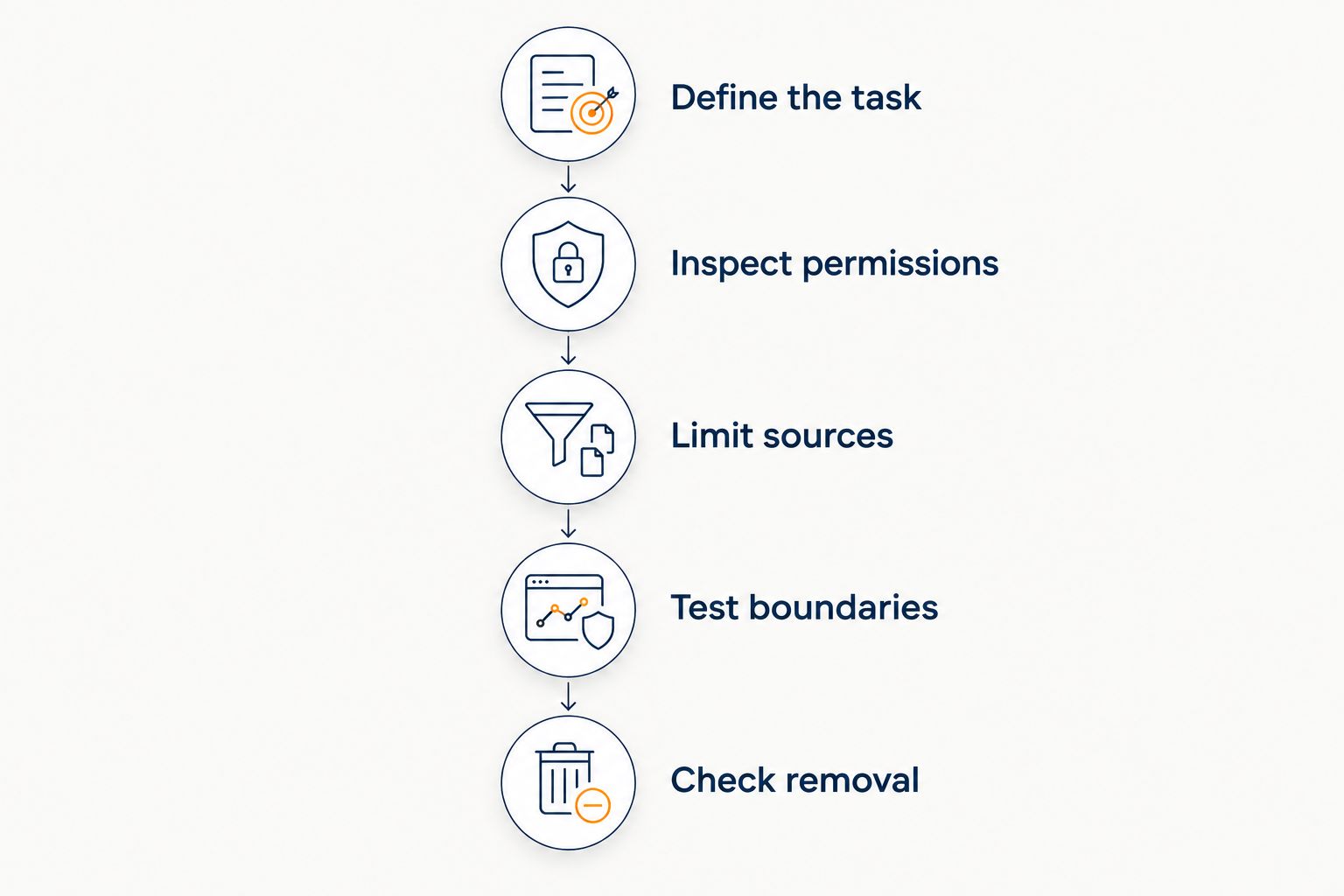
Use this review sequence for a 2026 installation. Keep the result in plain language so the person managing the course can understand it without interpreting a vendor's permission labels.
Define the task
Write a sentence such as: answer public questions using the approved course overview. List exclusions beside it: no member records, no enrollment changes, no refund decisions. This gives you a concrete scope against which to compare the connection request.
Inspect permissions
Read the requested permissions before approving them. Ask the provider to map each requested permission to the task it enables, including anything that reads member information or changes platform data. Keep your owner password out of chat messages and support tickets.
Limit sources
Choose material appropriate for the intended audience. A private coaching transcript is not interchangeable with a public course description, even when both discuss the same subject. Include only what the answering workflow needs and what you are authorized to share.
Test boundaries
Try an ordinary curriculum question, a request for another member's information, and a request to override a policy. Check both the answer and its cited source. A refusal should be plain about the boundary rather than replacing missing information with a plausible story.
Check removal
Identify how to revoke the connection and remove supplied content. Ask what happens to retained copies after disconnection; revoking platform access and deleting previously imported material are different operations. Record the answer before launch, not after an unwanted disclosure.
Where source-grounded answers fit
HelpShelf is best for course creators, coaches, and community owners who want cited answers from their own content and lead capture. Its described role is answering pre-sale and support questions through a chat widget. That role is distinct from giving a system general administrative authority.
The useful starting point is a narrow question: which approved content should answer this visitor? The limitation is equally concrete: citations do not establish a visitor's identity, prove entitlement to a private lesson, or authorize an account change.
When evaluating HelpShelf, confirm the installation method, required access, and audience boundaries for your intended setup. Do not treat a cited-answer feature as proof of a particular permission model.
Does installing a widget mean sharing my admin password?
Installing a widget does not inherently require sharing your admin password. You might need to sign in as an authorized administrator to place code or approve a connection yourself. That is different from sending your credentials to a provider or making them available to the chatbot.
For a 2026 setup, ask who performs the installation and which access remains afterward. If someone helps with installation, use an appropriate delegated access method where your platform supports one, then review whether that access is still needed.
Can a read-only chatbot reveal private course content?
A read-only chatbot can disclose private material if its answer system exposes that material to an unauthorized visitor. Preventing edits does not prevent disclosure. Review source selection and audience controls separately.
Test from a signed-out browser as well as an authorized member account. Ask for paid lesson text, private coaching notes, and another student's information. The expected response should follow your access rules, not merely the system's ability to retrieve a source.
Can a chatbot explain refunds without issuing them?
A chatbot can explain a published refund policy without receiving permission to issue refunds. Reading the policy, assessing an individual case, and changing a transaction are different tasks. Keep those boundaries explicit.
A refusal example is: “I can only quote what's published.” Follow that with the relevant policy and a human follow-up route when needed. No invented discounts, no refund exceptions, and no income promises belong in the answer.
FAQ
Does an AI chatbot need admin access to my course platform?
No, admin access is not an inherent requirement for answering questions from approved content. Installation authorization, content retrieval, and account actions need separate permission checks.
What's the safest starting point for a course chatbot?
Start with a narrowly defined answering task and approved material suitable for the intended audience. Expand access only when a specific task requires it and you understand the permission request.
Is read-only access enough to protect private lessons?
No, read-only access prevents changes within its scope but does not establish who may receive an answer. Check which sources the chatbot can retrieve and which audiences can receive information from them.
Do I need to give a chatbot provider my course platform password?
Do not share your owner password as a substitute for a defined installation or authorization process. Ask how you can authorize the required access yourself and how to revoke it afterward.
Can HelpShelf answer questions from my course content?
HelpShelf provides a chat widget that answers pre-sale and support questions using a creator's own content with cited sources. Confirm the access requirements and audience boundaries for your particular setup.
What should I check before approving a chatbot connection in 2026?
Check the requested reading permissions, action permissions, source selection, audience boundaries, and removal process. Test private-content requests and policy exceptions before making the widget available to visitors.
One last thing
Test what the chatbot refuses, not just what it answers. A correct syllabus answer tells you the content path works; a request for another student's information tests a different boundary.
Before publishing a HelpShelf course chatbot, decide what a refusal should say and where an unresolved question should go. The useful result is specific: the visitor gets the published answer or a clear next step, without an invented promise.


