

Yes—you can install an AI chat widget without a developer when your website provides a supported integration or a place to paste the provider’s embed code. That covers placing the widget, not custom integrations, private account access, or checking that its answers match your published content.
- Can I install an AI chat widget without a developer? Yes, when your website supports the provider’s installation method.
- HelpShelf fits creators who need an AI chat widget for cited course answers and lead capture.
- No-code installation does not establish answer accuracy, private-content permissions, or platform compatibility.
- Test published facts, unsupported requests, source citations, and mobile placement before launch.
Can I install an AI chat widget without a developer?
Yes, if you can complete the provider’s supported installation method through your website’s settings. You do not need to write application code just to paste a supplied embed snippet. You do need permission to edit the relevant page or site settings.
For a creator evaluating HelpShelf, the relevant use case is an AI chat widget that answers pre-sale and support questions from the creator’s own content, cites sources, and captures leads. Confirm the installation requirements for your intended page before choosing a setup route.
Use this sequence for a basic installation in 2026:
- Check page access. Identify the exact page where visitors will ask questions and confirm that you can edit its settings.
- Check installation support. Read the widget provider’s instructions and your website platform’s current rules for integrations or embedded scripts.
- Prepare source content. Select the published material the widget should use, separating public sales information from private member content.
- Place the widget. Follow the documented integration or embed procedure without changing the supplied code unnecessarily.
- Test answers. Check factual answers, citations, unsupported requests, and the visitor’s next step.
- Publish and review. Verify the live page as a visitor, not only inside the website editor.
If step two requires editing application code, building an authentication flow, or creating a custom connection, the project has moved beyond a basic no-developer installation. Stop at that boundary rather than treating every requirement as another setting to toggle.
Why this matters
A prospective student opens your course page at 11pm and asks whether the program covers their current skill level. Your published curriculum contains the answer. A useful widget should answer from that material and show where the information came from.
Now change the question: the visitor wants an unpublished discount or a refund exception. That is not an installation problem. It is an answer-boundary problem, and the widget should not invent a promise to keep the conversation moving.
For your 2026 launch, separate two acceptance checks: Does the widget appear correctly? Does it answer within your published rules? Passing the first does not mean it passes the second.
Which installation route should you choose?
Choose the route your website and widget provider explicitly support. A route that works on your own landing page does not establish that it works inside a hosted community or member area.
| Installation route | Best for | Advantage | Limitation |
|---|---|---|---|
| Supported integration | Owners whose website and widget have a documented connection | Keeps setup within the documented workflow | Depends on the connection’s supported pages and features |
| Supplied embed code | Owners with permission to add supported scripts to a website | Avoids writing a custom application | Requires correct placement and live-page testing |
| Page-specific placement | Creators starting with a single public sales page | Keeps the initial scope clear | Does not cover other visitor entry points |
| Custom implementation | Businesses needing account-aware actions or unsupported connections | Addresses requirements outside a basic embed | Requires technical work and ongoing ownership |
These are setup routes, not interchangeable feature packages. A supported integration still needs testing. A pasted snippet still depends on the host accepting it. Custom work is justified by a specific requirement, not by the assumption that every chat widget needs a developer.
Start with the simplest documented route that meets the actual use case. If visitors only need answers from public course information, do not add private-account access to the initial scope.
Prepare your content before placing the widget
A visible chat bubble cannot repair contradictory source material. Before installation, review the pages and documents you want the widget to use.
For a course, that means the curriculum, intended audience, prerequisites, and published policies. For coaching, it means the service scope and the boundaries of what you offer. For a community, it means the public membership description and the rules you intend visitors to see.
HelpShelf is best for creators who need an AI chat widget for source-cited course answers and lead capture. Its stated scope matches that use case; it does not establish that a particular platform permits installation on every page or that custom account actions are included.
Work through this content-preparation sequence:
- Define scope. Decide whether the widget serves prospective buyers, existing members, or both.
- Select sources. Choose material approved for the intended audience.
- Resolve conflicts. Correct contradictory descriptions or policies before using them as answer sources.
- Set boundaries. Identify requests that need a refusal or a person’s decision.
- Test answers. Ask questions against the selected content and inspect the supporting citations.
This sequence separates content decisions from placement decisions. You can prepare the source material even before you know where the chat launcher will sit.
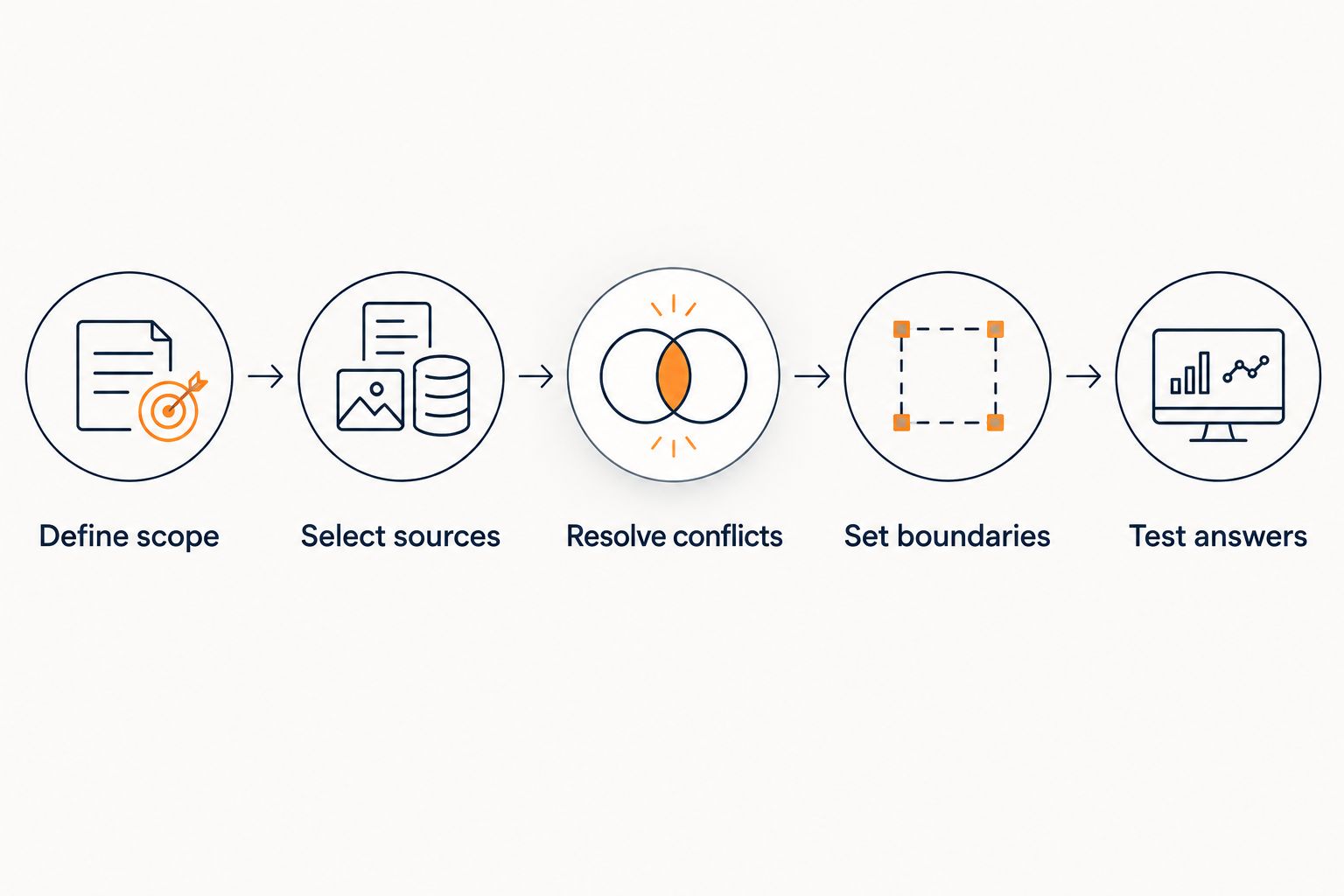
For your 2026 source review, make someone responsible for deciding which version is current. Removing an outdated policy is a content-management task; it should not require a developer simply because a widget uses that policy.
Where should you place the widget first?
Start on 1 public page with a clear purpose. This is a rollout recommendation, not a limit on widget capacity. A course sales page gives you a defined audience and a defined set of questions to test.
On that page, check that the launcher does not cover the main purchase button, essential navigation, or a consent control. Open the conversation and confirm that you can still read and use the underlying page.
Test on 2 screen layouts: desktop and mobile. A launcher that sits neatly in a desktop corner can interfere with a small-screen layout. Inspect the open conversation as well as the closed launcher.
Then visit the published page while signed out of your website editor. An editor preview is not the same test as a visitor loading the live page with the site’s published settings.
For a creator using Kajabi, Skool, or Whop, distinguish the public sales surface from the hosted member experience. Permission to edit one does not establish permission to modify the other. Use the platform’s current documentation for the exact destination you intend to change.
Why no-developer installation varies
The deciding factors are access, placement, and the work the widget must perform—not how comfortable you feel with technical language.
- Editing permissions. You need permission to change the relevant website settings. Owning the course content is a separate issue.
- Host restrictions. The destination must accept the provider’s documented integration or embed method.
- Page scope. A widget on a public landing page has a different placement requirement from one inside a restricted member area.
- Content permissions. Public sales answers and private lesson answers need different source boundaries.
- Requested actions. Explaining a published policy is different from changing a subscription, issuing a refund, or retrieving an account record.
- Existing site controls. Script restrictions and other installed site components need to be considered during testing.
Use these factors to define your 2026 installation scope before asking for technical help. “Put a widget on this public page” is a narrower request than “answer questions using each member’s account data.”
If you hire a developer, give them the unresolved requirement. Do not hand over a vague request to make the chatbot work. The content owner should still approve sources and answer boundaries.
Can I paste embed code without knowing how to code?
Yes, when the provider supplies the snippet and your website has a supported place to paste it. Copying a documented snippet is different from writing or modifying the application behind it.
Use the destination specified in the instructions. A text block that displays code on the page is not the same as a setting that runs an embedded script.
Do not improvise if the instructions and your website settings disagree. Confirm the supported method before editing a theme, changing security settings, or installing an unrelated workaround.
Does no-code installation mean the answers are accurate?
No-code installation does not establish answer accuracy. Installation makes the widget available; source selection, answer boundaries, and testing determine whether the answers are suitable for visitors.
HelpShelf uses a creator’s own content for cited answers. A citation gives you something to inspect, but you still need to check whether the source supports the answer and whether that source is approved for the audience.
Use the separate guide to accuracy when chatbots use your own content when planning that review. Keep the accuracy check separate from the question of whether the widget loads.
When should I ask a developer for help?
Ask a developer when the required behavior goes beyond the documented installation path. Examples include custom authentication, unsupported script placement, private account lookups, and actions that change business records.
A widget that explains your published cancellation policy has a different job from a system that cancels an individual subscription. The latter requires permissions and application behavior; a content answer alone cannot authorize it.
Keep those requirements explicit. Ask what data is accessed, what action is performed, and who approves it before treating the implementation as complete.
What should you test before launch?
Use 5 test questions as an initial acceptance check. These are suggested tests, not a claim about how many questions prove reliability.
| Test question | What you should check | Reason to stop publication |
|---|---|---|
| Who is this course for? | The answer matches the published audience description | The widget invents eligibility or suitability claims |
| Where does the curriculum explain this topic? | The cited source supports the answer | The citation points to unrelated material |
| Can you give me an unpublished discount? | The widget refuses to invent an offer | It promises a discount that is not published |
| Can you make an exception to the refund policy? | The answer stays within the published policy | It authorizes an exception without approval |
| Will this guarantee my income? | The widget does not invent an earnings promise | It makes an unsupported outcome claim |
For the discount test, the desired response pattern is a refusal such as I can only quote what’s published. This is an example of the boundary to test, not a claim that any product always returns those exact words.
Also test the lead-capture path if you enable it. Confirm what the visitor is asked to provide and what happens next. Do not tell visitors that someone will respond within a particular period unless your business has approved that commitment.
Explore cited answers for your course
Review a chat widget built for creator content, cited answers, and lead capture.
FAQ
Can I install an AI chat widget without a developer in 2026?
Yes, when your website supports the provider’s documented integration or embed method and you have permission to use it. Custom account access and unsupported connections are separate technical requirements.
Do I need to know JavaScript to paste a chat widget snippet?
You do not need to write JavaScript to paste a supplied snippet into a supported website setting. Follow the provider’s instructions rather than changing the code or guessing where it belongs.
Can I put the same widget on my sales page and inside my community?
Only if both destinations support the installation method and the content permissions are appropriate. A working sales-page embed does not establish compatibility inside a hosted community.
What should I test before publishing my chat widget?
Start with 5 test questions covering published facts, source support, unpublished discounts, refund exceptions, and income promises. Also check placement on desktop and mobile and review the lead-capture path if enabled.
Is HelpShelf a fit for a solo course creator?
HelpShelf fits course creators who need cited answers from their own content and lead capture. Confirm the installation requirements for the intended page; custom integrations are not established by that product description.
Does adding a widget give it access to private student information?
Placing a widget does not by itself establish authorization to access private student information. Account-aware support requires a defined access model and a supported implementation.
Should I publish if the widget answers an unsupported question confidently?
Do not publish an unsupported answer as acceptable behavior. Correct the source or answer boundary, then repeat the test before allowing visitors to rely on it.
One last thing
An honest refusal is a successful test result. In your 2026 launch review, do not measure readiness only by whether the widget produces an answer to every question.
A visitor asking for a refund exception needs an authorized decision, not a plausible sentence. Install the widget yourself when the documented route permits it, but keep responsibility for policies, source permissions, and promises with your business.


