

Yes, Kajabi creators can add an AI chatbot without writing custom code when the chosen widget supports an installation method their Kajabi page accepts. In 2026, the important distinction is between placing a widget and connecting useful content: you still need to select sources, set answer boundaries, and test what visitors receive.
- Can Kajabi creators add an AI chatbot without code? Yes, when the widget and page support compatible installation.
- HelpShelf fits creators who need source-grounded pre-sale answers and lead capture from their own content.
- No-code installation does not remove the need to check citations, refusals, and unanswered questions.
- Keep public sales answers separate from private course content and account-specific support.
Why this matters
A prospective student opens your course page at 11 p.m. and wants to know whether the lessons cover their situation. They send you a DM, then leave before you respond. A chat widget gives that question somewhere to go while the visitor is still reading.
That does not make every answer safe to automate. Your published curriculum can support a question about lesson topics; it cannot justify an invented discount, refund exception, or income promise. The Kajabi pre-sale answers setup guide addresses the relevant workflow: answering from your content rather than improvising a sales pitch.
Can Kajabi creators add an AI chatbot without code?
Yes, provided the chatbot's installation method works on the Kajabi surface where you want it to appear. No-code means you do not write the chatbot's application logic. It does not necessarily mean you never copy an installation snippet.
For a 2026 setup, check the actual installation instructions before choosing a tool. A website widget, a course lesson, and a checkout are different surfaces; confirming placement on one does not establish compatibility with the others.
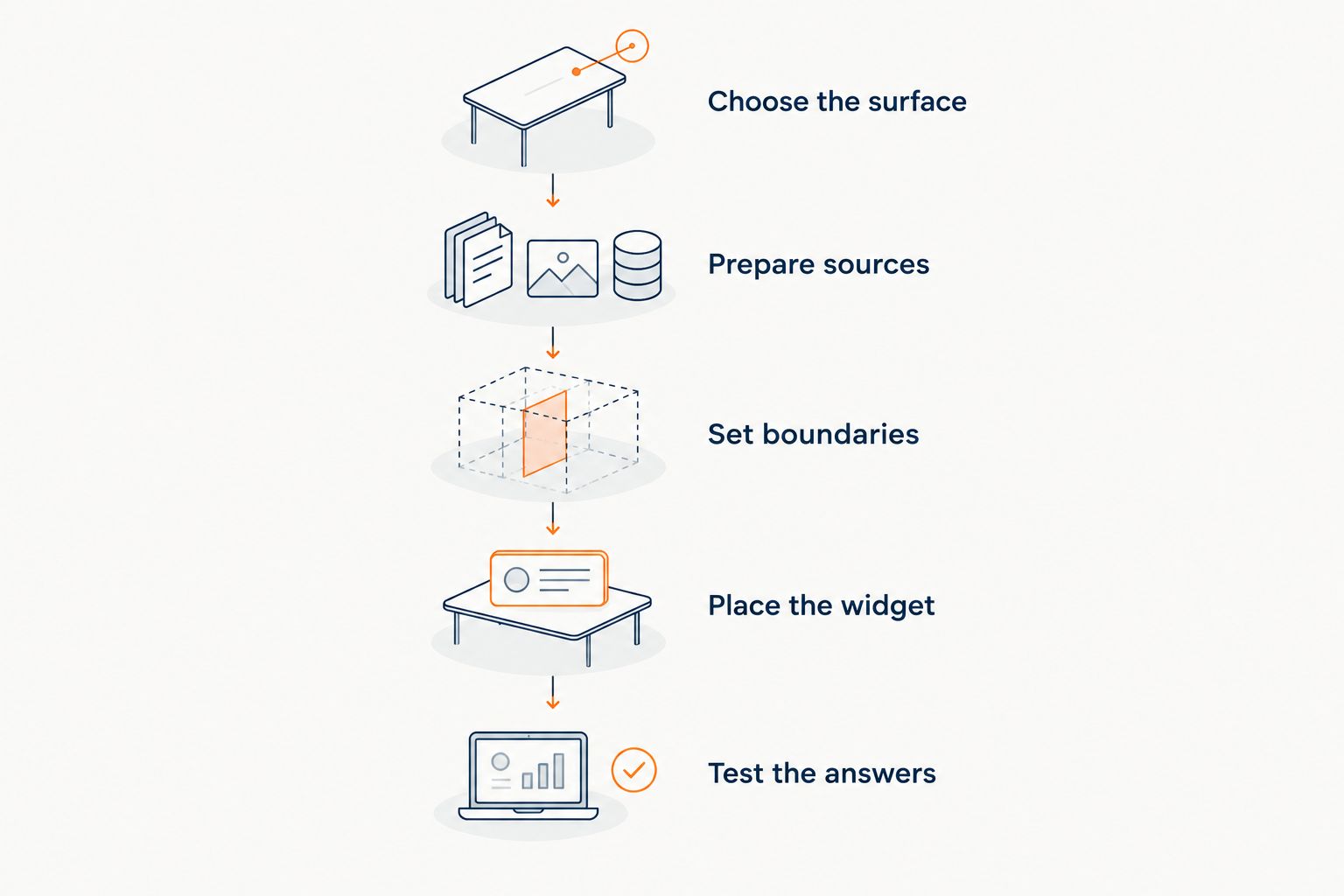
Use this sequence to separate installation from answer quality.
1. Choose the surface
Start with the page where the question arises. For pre-sale questions, that is the page explaining the offer. For enrolled-student support, identify the area where students need help and check whether the installation method works there.
Do not assume a widget appears everywhere because it appears on one page. Check the intended page in a browser, including its mobile layout, and confirm that visitors can reach the content underneath the chat interface.
2. Prepare sources
Select the content the chatbot should use: your published course outline, coaching description, community rules, and support instructions. Choose material that answers real questions, not every document you have ever written.
Keep private teaching material out of a public sales knowledge collection unless you intend to disclose it. Also check how your chosen tool receives content. A widget's ability to answer from sources does not establish that it imports every Kajabi lesson automatically.
3. Set boundaries
Write down which questions the widget should answer and which require you. Published lesson topics belong in the answerable group. Requests for an unpublished concession, an individual refund decision, or a guaranteed business result do not.
A suitable refusal is: “I can only quote what's published.” Follow that boundary with your approved next step rather than letting the conversation end with a fabricated policy. Define that next step before publishing.
4. Place the widget
Follow the provider's documented installation method and Kajabi's instructions for the selected surface. If installation requires pasting a supplied snippet, use it as supplied rather than rewriting it. Verify the permitted placement before changing a live page.
HelpShelf provides a chat widget for creators that answers pre-sale and support questions from their own content with cited sources and captures leads. That describes its purpose; confirm the installation requirements for your particular Kajabi page before treating placement as settled.
5. Test the answers
Test a question your sources answer, a question they do not answer, and a question that asks for an exception. Check both the response and its citation. An answer that sounds right but cites unrelated material fails the test.
Then test the next step for an unanswered question. Check what a visitor submits, what they understand will happen next, and where you receive it. A visible widget is not the same as a finished support workflow.
The setup has two separate checks: can visitors use the widget, and can they trust the answer's source? Complete both before making the chat interface part of your sales page.
Which questions should a Kajabi chatbot handle?
Choose the workflow before choosing how much content to connect. A public visitor and an enrolled student do not have the same access rights or the same questions.
| Workflow | Best for | Useful source material | Limitation |
|---|---|---|---|
| Pre-sale answers | Visitors checking whether an offer fits | Published curriculum, offer description, prerequisites | Cannot justify unpublished promises or exceptions |
| Support answers | Students asking about documented processes | Approved help instructions and access guidance | Public chat is not proof of a student's identity |
| Human review | Personal decisions and unresolved issues | The question and relevant context | Requires someone to assess and respond |
HelpShelf is best for course creators, coaches, and community owners who need cited answers from their own content and lead capture. Its role is relevant when the visitor's question has an answer in your materials. You still need a process for questions the published content cannot settle.
For a pre-sale widget, start narrowly. Answer what the course covers, who the published description addresses, and what prerequisites you have stated. Do not let the widget convert a prospect's personal situation into an assurance that your offer will produce a particular result.
For support, distinguish instructions from account actions. Explaining your published access process is different from changing someone's access. Do not assume a source-grounded chat widget can verify purchases, reset accounts, or approve refunds unless the provider explicitly documents those functions.
What does a source-grounded answer look like?
A source-grounded answer states only what the selected material supports and identifies that material. The citation lets the visitor inspect the basis for the answer. It is not a substitute for checking whether the answer follows the source.
Consider a hypothetical course outline that names a lesson on preparing a client proposal. A visitor asks whether the course covers proposals. The chatbot should describe the published lesson and cite the outline; it should not turn that lesson into a promise that the visitor will win clients.
Now consider a prospect who asks for an exception to a published policy. The response should preserve the boundary rather than invent permission. The same rule applies to discounts and refund requests: a confident sentence is not evidence of authorization.
Your 2026 answer checks should include these cases:
- Direct match: The source explicitly answers the visitor's question. Check that the response keeps the original meaning.
- Partial match: The source covers only part of the question. Check that the response separates supported information from the unresolved part.
- No match: The selected material does not answer the question. Check that the response declines to invent an answer.
- Conflicting sources: Two documents disagree. Resolve the content conflict rather than asking the widget to conceal it.
Source quality matters before the first conversation. Remove outdated drafts, distinguish separate offers, and make policy language clear enough that a visitor can understand it without interpretation.
Why no-code chatbot setup varies
No-code removes the need to build the chatbot application yourself. It does not remove decisions about placement, content, privacy, and follow-up. Those decisions determine what you need to prepare.
- Page placement: Confirm the provider's instructions cover the Kajabi surface you intend to use, not just a generic website.
- Source format: Check how the tool accepts your content. Do not assume a direct connection or automatic import.
- Audience access: Decide what public visitors can receive and what belongs behind student access.
- Policy clarity: Settle contradictory or incomplete source material before using it for answers.
- Lead handling: Decide what information you request and how you follow up with someone who needs help.
- Ongoing maintenance: Review answers again when your curriculum, offer description, or policies change.
For a 2026 launch, choose the smallest useful scope you can verify. A widget that answers your published pre-sale questions is a clearer starting point than one expected to resolve every sales and student-support issue immediately.
Does no-code mean I never paste code?
No. A no-code setup can include copying a provider's installation snippet into a supported setting without writing or modifying the code yourself.
Ask the provider to identify the exact installation method and supported page placement. If the instructions require custom scripting, undocumented workarounds, or changes you cannot maintain, that setup does not meet your no-code requirement.
Can the chatbot use my Kajabi course content?
A chatbot can answer from course content when its supported source method accepts that material. That does not establish an automatic connection to every Kajabi course or permission to expose lessons publicly.
HelpShelf uses a creator's own content for cited answers. Before connecting material, decide whether the audience should receive the full teaching content, a public summary, or only support instructions.
Can a chatbot replace my student-support inbox?
A chatbot can handle questions supported by the material you provide, but it does not eliminate personal decisions or account-specific work. Keep a human route for identity issues, individual complaints, and questions your sources do not answer.
Judge the workflow by what happens when the chatbot cannot answer. If the visitor has no clear next step, the inbox has not been replaced; the unanswered question has simply moved.
What should you check before publishing?
Check the refusal path as carefully as the successful answer. A straightforward curriculum question shows whether the widget can find information. An exception request shows whether it respects your boundaries.
Use this pre-launch checklist:
- Ask about a lesson that appears in your published outline and inspect the citation.
- Ask about a lesson that is not listed and check that the response does not add it.
- Request an unpublished discount and check that the widget does not create one.
- Ask for a refund exception and check that the response preserves the published policy.
- Ask for a guaranteed income result and check that no promise appears.
- Submit an unanswered question and inspect the follow-up process.
- Open the page on mobile and check that chat does not block essential content.
Repeat relevant checks after changing the sources. Keep the test questions in a simple document so you can compare behavior against the same expectations rather than relying on whether the widget seems helpful.
FAQ
Can Kajabi creators add an AI chatbot without code?
Yes, when the selected widget provides an installation method supported by the intended Kajabi page. You still need to prepare sources and test answers before publishing.
Do I need a developer to install a Kajabi chatbot?
You do not need a developer when the documented setup consists of supported settings or pasting a supplied snippet. A setup requiring custom scripts does not meet that same no-code standard.
Will the chatbot automatically read all my Kajabi lessons?
Do not assume the chatbot automatically reads all your Kajabi lessons. Confirm its supported content connection or import method, then select what the intended audience is allowed to receive.
Can a chatbot cite my own course content?
HelpShelf provides cited answers based on a creator's own content. Check that each citation supports the actual response rather than merely mentioning a related topic.
Can a chatbot promise that my course will increase someone's income?
Do not configure a chatbot to invent income promises. Keep its answers within your published material and refuse requests for unsupported guarantees.
Can I use the same chatbot for prospects and enrolled students?
Only use a shared setup after confirming that its content-access controls match both audiences. Public prospects should not receive private lessons simply because those lessons are useful support sources.
How should a chatbot handle a refund exception?
A chatbot should not invent a refund exception. It should preserve the published policy and direct the individual request to your approved human-review process.
One last thing
Before publishing in 2026, deliberately ask a question your sources cannot answer. Then ask the same question in a more persuasive way.
A useful widget should not become more willing to invent because a visitor insists. The strongest launch check is not whether chat sounds confident; it is whether the answer stays inside the evidence when confidence would be easier.


