

Yes, adding an AI chat widget can slow down a course website when its scripts, network requests, or interface updates compete with the page’s main content. The impact depends on how the widget loads and behaves, so test page loading, button responsiveness, and layout stability—not just how quickly the chatbot answers.
- Does an AI chat widget slow down website loading? It can; test the embed before publishing.
- Compare the same course page with chat disabled, enabled, and open on mobile.
- Google’s Core Web Vitals measure loading, interaction responsiveness, and layout stability—not chatbot answer speed.
- HelpShelf suits course creators who need cited answers from their own content; performance needs a separate check.
Does adding an AI chat widget slow down a course website?
A chat widget adds browser work; whether visitors notice depends on when that work happens. A small launcher can still load scripts behind the scenes. An asynchronous script can still execute while a visitor tries to open your curriculum or select an enrollment button.
Treat your 2026 installation as a page change that needs testing, not just a snippet that needs pasting. The guide to embedding a chat widget on a membership site covers the installation question; performance checks establish what the installation changes.
These loading approaches describe implementation choices, not confirmed features of any particular vendor:
| Loading approach | Best for | Advantage | Limitation |
|---|---|---|---|
| Parser-blocking script | Legacy installations under review | Predictable execution at its position in the document | Can delay HTML parsing while it loads and runs |
| Asynchronous script | Independently initialized widgets | Downloads without blocking HTML parsing | Execution can interrupt other browser work |
| Deferred script | Widgets that initialize after HTML parsing | Avoids parser-blocking execution during document parsing | Still adds execution work before the page finishes initializing |
| Interaction-triggered loading | Pages prioritizing the initial reading experience | Postpones the full chat interface until requested | The visitor waits for initialization after opening chat |
Do not choose an approach from the label alone. Confirm that the widget supports it, that initialization works, and that your enrollment flow remains usable.
Why this matters
A prospective student opens your course page on a phone. They want to read the syllabus, check prerequisites, and find the enrollment button. If opening chat makes those actions unresponsive, the support channel is interfering with the purchase path.
The opposite problem matters too: delaying chat until interaction protects the initial page from some work, but makes the visitor wait when they ask a question. Your job is to measure both moments rather than move the delay out of sight.
For a 2026 course-site review, keep page performance and answer quality as separate acceptance checks. A fast page does not establish accurate answers, and cited answers do not establish a fast page.
What should you measure before and after installation?
Google’s Core Web Vitals provide established reference points. They are not chatbot-specific benchmarks, but they help you detect whether adding chat changes the experience people have on your course page.
| Metric | What it measures | Google’s good threshold | What to inspect around chat |
|---|---|---|---|
| Largest Contentful Paint, or LCP | When the largest visible content element renders | 2.5 seconds or less | Whether widget work delays your main course content |
| Interaction to Next Paint, or INP | Responsiveness to interactions | 200 milliseconds or less | Whether opening chat or using page controls creates delays |
| Cumulative Layout Shift, or CLS | Unexpected visual movement | 0.1 or less | Whether inserted elements move existing content |
For a 2026 audit, apply Google’s thresholds at the 75th percentile of page visits, separating mobile and desktop. CLS is a unitless score; it is not a time measurement.
These thresholds describe a good overall experience. They do not give a widget permission to consume whatever margin your page has left. Record the change from your own baseline, including regressions that remain inside a good threshold.
Use lab tests to investigate and real-user measurements to validate. Lighthouse helps inspect controlled page loads. Chrome DevTools helps trace requests and browser work. Neither a single Lighthouse result nor a single phone session proves what every visitor experiences.
How do you test a chat widget on a course website?
Keep the page, device settings, and test conditions consistent. If you change the hero video, analytics configuration, and widget together, you lose the ability to attribute the difference to chat.
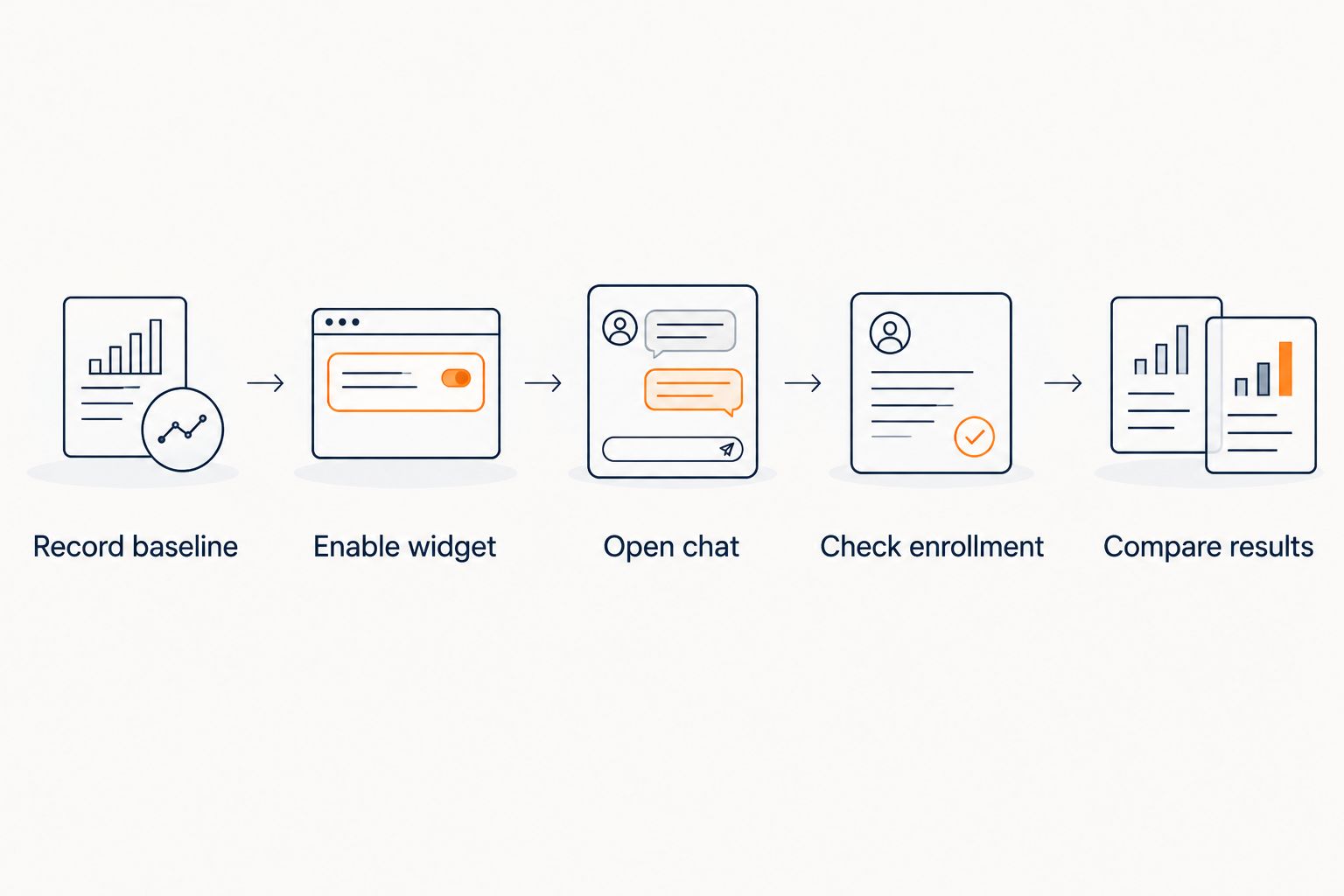
1. Record baseline
Test the course page with the widget disabled. Save the performance report and note what happens when you open the curriculum, use the menu, and select the enrollment button.
Use a representative mobile configuration as well as desktop. A fast computer on a strong connection can hide work that becomes noticeable on a slower device.
2. Enable widget
Enable the embed without changing other page components. Repeat the same loading test and compare the network requests, script execution, and main content rendering.
Check the installation locations. A page builder, a global code area, and a tag manager can accidentally introduce duplicate initialization if you add the same integration in several places.
3. Open chat
Open the launcher, type a question, and submit it. Observe the surrounding page as well as the chat panel: can you still scroll, close the panel, and reach the course content?
Distinguish the time needed to display the interface from the time needed to return an answer. Those waits have different causes and need different fixes.
4. Check enrollment
Complete the normal path from reading the course details to reaching the enrollment destination. Test with the panel closed and open, including keyboard focus and the mobile on-screen keyboard.
Look for controls covered by the launcher, unexpected scrolling, and focus that becomes trapped. These are usability defects even when a speed score looks acceptable.
5. Compare results
Repeat the controlled tests rather than trusting an isolated result. Save the test conditions alongside the reports so later changes remain comparable.
If the widget introduces a regression, disable it to confirm that the regression disappears. Then change one relevant setting or installation detail and test again.
The sequence keeps the question narrow: what changed when chat was added, and what changed again when it was removed?
Why chat widget performance varies
The word AI does not identify the browser workload. Inspect what the embed downloads, executes, and changes on the page.
- Script loading and execution. Downloading without blocking HTML parsing does not eliminate execution work. Inspect when scripts run, not just their loading attributes.
- Network competition. Widget requests share the visitor’s connection with course images, fonts, video resources, and other page assets. Timing and request priority affect the result.
- Initialization timing. Loading the full interface immediately and loading it after interaction place work at different points in the visit. Test the initial view and the opening action.
- Interface updates. Animations, resizing, message rendering, and inserted content can create browser work or move page elements. Observe what happens during an actual conversation.
- The existing page. A widget joins the scripts already present. Video embeds, analytics, consent controls, and other integrations belong in the same investigation.
Fix the observed bottleneck, not the category name. If a recording shows a delayed hero image, investigate its request and rendering path. If a long script task delays a tap, investigate execution. If the launcher covers enrollment, change placement or page coverage where supported.
Is asynchronous loading enough to protect website speed?
No. Asynchronous loading allows a script to download without blocking HTML parsing, but the script still needs to execute. That execution can compete with interactions or rendering.
Also distinguish async from defer. For classic external scripts, deferred execution waits until HTML parsing finishes; asynchronous execution occurs when the script becomes ready. Neither attribute promises an unnoticeable widget.
Ask the vendor which installation method it supports before editing the embed. Changing attributes without understanding initialization dependencies can break the widget rather than improve it.
Does a slow chatbot answer mean the website is slow?
No. Chatbot answer latency and website responsiveness measure different things: a page can remain responsive while a remote service prepares an answer.
Test whether you can scroll, close chat, and use page controls during that wait. A visible waiting state is different from a frozen interface. Record both problems separately if both occur.
Do not infer a vendor’s architecture from the presence of a chat bubble. Use browser traces for page behavior and vendor documentation for claims about where processing happens.
Should you load chat only after someone opens it?
Interaction-triggered loading is useful when protecting initial page loading is the priority. Its trade-off is a wait after the visitor asks to open chat.
For your 2026 decision, compare the initial page and that first opening action under the same mobile conditions. Choose a supported implementation that keeps the course readable and the requested help usable.
Avoid hiding the trade-off behind a faster initial score. A visitor who actively asks for help still needs the interface to respond.
Where HelpShelf fits in the decision
HelpShelf is for course creators, coaches, and community owners who need cited answers from their own content. Its chat widget answers pre-sale and support questions and captures leads. Those capabilities address what happens inside the conversation; they do not establish a page-speed result.
Consider a visitor asking whether a lesson covers a prerequisite. Your acceptance test should check whether the answer points to the relevant published content. For an unsupported request, define an expected refusal such as: I can only quote what’s published. This is a test example, not a promised response transcript.
Keep the content boundary explicit: no invented discounts, no refund exceptions, no income promises. Then test the embed’s effect on the same page separately.
Review HelpShelf for the product’s stated scope. Choose HelpShelf for source-grounded creator support, not an unmeasured speed claim. The limitation is straightforward: product fit does not replace performance validation on your installation.
FAQ
Will an AI chat widget slow down website loading on mobile?
An AI chat widget can slow down mobile loading when its requests or script execution compete with the page’s main content. Compare the same mobile page with chat disabled and enabled, then test opening the panel separately.
What is a good loading target for a course website in 2026?
Google’s good Largest Contentful Paint threshold is 2.5 seconds or less, assessed at the 75th percentile of visits. Use it alongside responsiveness and layout stability rather than treating loading time as the only performance measure.
What responsiveness target should I check after adding chat?
Google’s good Interaction to Next Paint threshold is 200 milliseconds or less. Test the chat controls and the course page controls, because a responsive launcher does not establish a responsive enrollment flow.
Can a chat bubble cause layout shifts?
A chat interface can cause layout shifts if inserting or resizing it moves existing page content. Google’s good Cumulative Layout Shift threshold is 0.1 or less; a launcher covering a button is a separate usability issue.
Does async mean a chat widget has no performance impact?
No, async does not mean zero performance impact. An asynchronous script downloads without blocking HTML parsing, but its execution still requires browser work.
Does HelpShelf guarantee that my course page will stay fast?
A page-speed guarantee is not established by HelpShelf’s stated product scope. Test the widget on your course page and assess its cited answers and lead capture separately from browser performance.
Should I remove chat if my performance score falls?
Investigate a repeatable regression before deciding whether to remove chat. Disable the widget to confirm attribution, inspect the affected metric, and test a supported adjustment without changing unrelated page elements.
One last thing
A launcher that never moves page content can still cover your enrollment button. That defect does not require a layout shift, so a good CLS score does not rule it out.
For your final 2026 check, use the actual mobile enrollment path with chat open. Keep the course readable, keep enrollment reachable, and make chat earn its place beside them.


