

Instead of manually answering the same course questions in Crisp, build a source-grounded workflow that answers published questions with citations and sends exceptions to a person. For a crisp ai chatbot integration in 2026, separate content, answers, and follow-up before attempting any automated connection between systems.
- Build your crisp ai chatbot integration around approved content, cited answers, and a defined human follow-up path.
- HelpShelf suits course creators who need source-grounded support answers and lead capture from their own content.
- Keep account-specific decisions and unpublished exceptions with a person, not an automated answer.
- Treat this as a workflow guide, not confirmation of a native Crisp connector or automatic transcript sync.
Why this matters
A prospective student asks whether your course covers a particular topic. The answer exists in your curriculum, but you are away from the inbox. A useful workflow answers from that curriculum and shows the supporting source; it does not turn a missing detail into a promise.
HelpShelf is best for course creators, coaches, and community owners who need cited support answers from their own content. Its support chat widget also captures leads. Neither capability removes your responsibility to publish accurate material or decide what requires personal follow-up.
The boundary matters more than the widget. A published refund policy can support an explanation of that policy. It cannot authorize an exception, verify a payment, or establish what happened inside a customer's account.
Before you start
- Access: Have permission to review the relevant Crisp conversations, edit your approved support content, and manage the website where you intend to place the chat experience. Confirm the current installation requirements before changing a live page.
- Materials: Gather your curriculum, onboarding instructions, support contact details, and published policies. Assign 1 content owner to resolve contradictions before those documents become answer sources.
- The gotcha: Content useful to members is not automatically suitable for prospects. Separate public information from private lessons and customer details before preparing sources. A correct answer can still disclose information to the wrong audience.
Use the following steps as an operational setup, not a click-by-click connector installation. Exact interface labels, supported connections, and synchronization behavior must come from the current documentation for the products you deploy. Do not invent a connection by assuming that two chat tools exchange messages.
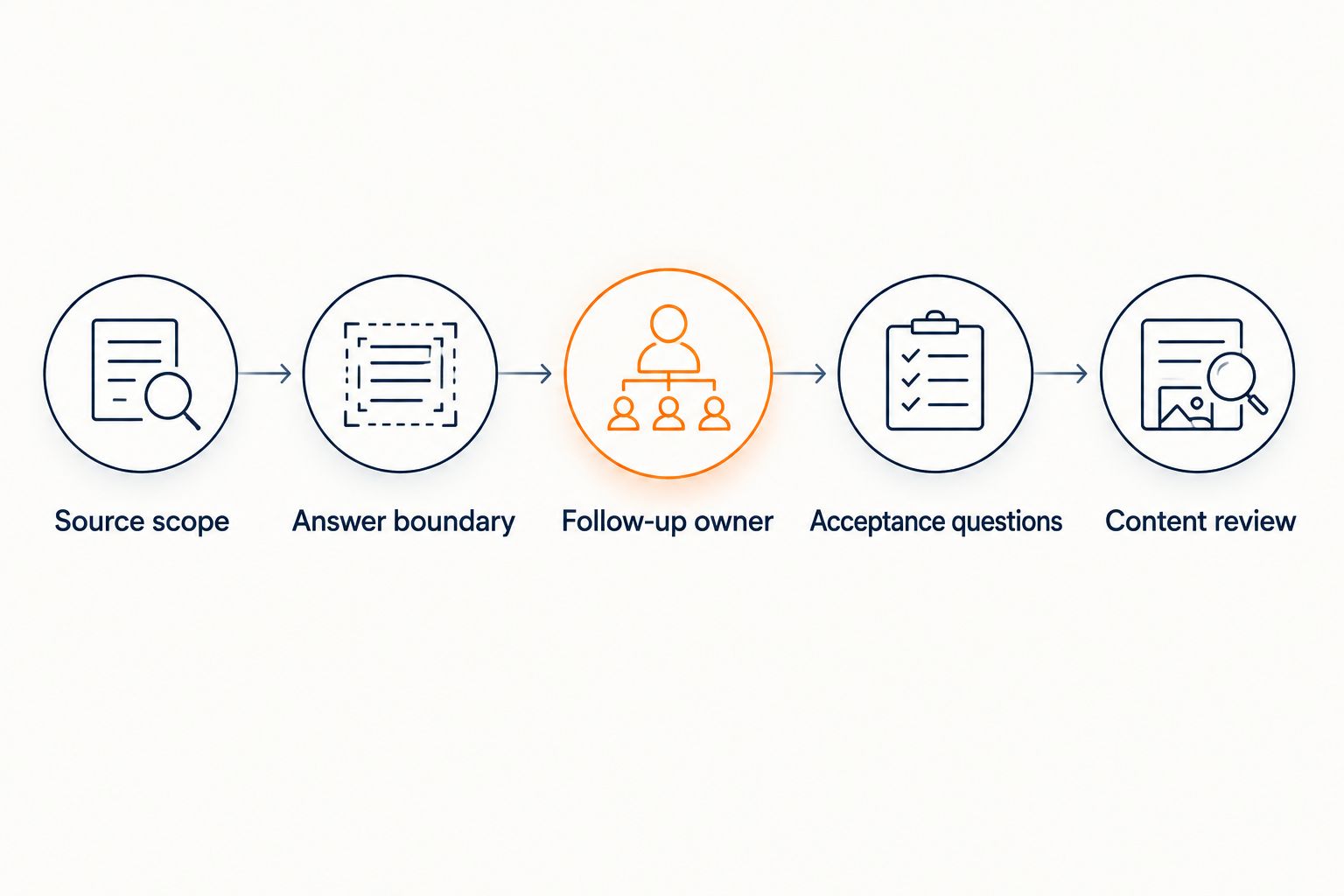
Source scope
Build the approved answer set
- Review recurring questions. Read the conversations you are authorized to access. Record the question and the underlying topic without copying personal details into your source material.
- Find the authoritative answer. Match each topic to a published curriculum page, onboarding document, or policy. Where no approved answer exists, mark the topic for human follow-up rather than drafting a plausible response.
- Resolve contradictions. If two documents disagree, ask the content owner to settle the discrepancy. Keep the approved wording and remove superseded material from the answer set.
- Separate audiences. Create distinct editorial lists for public questions and member-only questions. Do not assume a public widget verifies membership or enforces access to private material.
Expected result: Every topic approved for an automated answer has an identifiable source and an intended audience. Unresolved topics stay outside the answer set.
For your 2026 review, start with a narrow scope: curriculum coverage, published participation requirements, and onboarding instructions. These give you concrete questions to test without making account access or financial decisions part of the first release.
A source should answer a question without requiring the assistant to infer your intentions. If your curriculum says a lesson covers planning, that does not establish that students receive individual plan reviews. Publish that distinction before asking the widget to explain it.
Answer and follow-up boundaries
Define what the workflow handles
- Set the answer boundary. Permit explanations supported by approved content. Require a citation that supports the actual claim, not merely a related page.
- Define the refusal. Use the supplied response pattern, “I can only quote what's published,” when a visitor asks for an unpublished exception or promise. Follow it with a clear next step for contacting a person.
- Choose the follow-up owner. Name the person or team responsible for unanswered questions. Write down how they receive the question and how they know it still needs a response.
- Keep lead capture explicit. Explain why you are asking for contact details. Collect only what your follow-up process needs, and do not describe a submitted detail as a resolved support request.
Expected result: A visitor either gets a supported answer or understands what happens next. Your team can distinguish an unanswered question from a completed conversation.
The following comparison concerns workflow choices, not a verified feature comparison between vendors.
| Workflow choice | Best for | Advantage | Limitation |
|---|---|---|---|
| Human-first replies | Account questions, disputed facts, individual decisions | A person can investigate context before deciding | Each question requires human attention |
| Source-grounded answers | Repeated questions covered by approved content | Answers can point back to their supporting material | Missing or contradictory sources restrict what can be answered |
| Source-grounded answers with human follow-up | Public questions with occasional exceptions | Separates routine explanations from unresolved cases | Someone must own the follow-up process |
Use source-grounded answers for published information; keep individual decisions with a person. HelpShelf's support chat widget fits the cited-answer and lead-capture parts of that design. Do not treat those capabilities as evidence of automatic delivery into Crisp.
Deployment and acceptance checks
Test the complete visitor journey
- Confirm the deployment method. Use the current installation instructions for the selected widget and your website. Establish which pages will show it before making changes.
- Prepare the approved content. Supply only material supported by the product's documented content methods. Preserve clear titles and enough context to distinguish similar courses or policies.
- Check the visible chat experience. Inspect the selected pages on desktop and mobile. If multiple chat launchers appear, decide which experience belongs on each page rather than leaving visitors to choose between competing entry points.
- Run the acceptance questions. Test both answerable questions and requests the workflow must decline. Open every cited source and inspect the supporting passage.
- Verify follow-up separately. Submit an unresolved question through your chosen process. Confirm that the responsible person receives the necessary context. If that transfer is manual, document it as manual.
Expected result: You can demonstrate a cited answer, an appropriate refusal, and a follow-up that reaches its owner. A working chat bubble alone does not pass this check.
Use 6 test questions across 3 categories. These are suggested acceptance checks, not measured product results:
- Published answers: Ask about a topic explicitly covered by the curriculum, then ask about a documented onboarding step.
- Missing answers: Ask about an unpublished participation rule, then ask about a topic absent from the course outline.
- Restricted decisions: Request a refund exception, then request a guaranteed income outcome.
For each test, record the answer, its source, and whether follow-up was required. The restricted-decision tests should not produce invented discounts, refund exceptions, or income promises.
Your 2026 acceptance record should also identify the source version used during testing. Otherwise, a later content change makes it difficult to tell whether an answer was wrong or the underlying policy changed.
A citation passes only when the visitor can use it and the cited material supports the answer. A link to a private lesson is not a useful public explanation if the prospective student cannot open it. Keep public answers grounded in public material.
Variant: review answers whenever content changes
A second workflow starts with a content update rather than a visitor question. Use it when you revise a curriculum, change onboarding instructions, or publish a new policy.
- Identify the changed source. Record what changed and which questions depend on it. Avoid replacing your entire answer set when only one document needs review.
- Retire conflicting material. Remove or clearly supersede the previous wording in the source collection you maintain. Confirm the product's documented update process rather than assuming an edit is immediately reflected in answers.
- Repeat the affected tests. Ask the original question and a differently worded version. Check the answer and its citation against the newly approved content.
- Close the loop. Tell the follow-up owner which explanation changed so that personal replies and automated answers do not contradict each other.
Expected result: Your published explanation, cited answer, and human response agree after the update.
This is an editorial change workflow; it does not imply an automatic content-change trigger or a Crisp synchronization feature. For more on preparing material, read the guide to training an AI chatbot on your content.
For a 2026 course launch, make this review part of publishing the revised curriculum. Do not wait for a visitor to discover that the support answer still describes the previous version.
Troubleshooting
The answer cites a source but adds an unsupported detail
Fix the scope of the claim, not just the link. Compare each factual statement with the cited passage. Remove unsupported material from the expected answer and revise ambiguous source wording before retesting.
A curriculum topic does not prove that personal coaching is included. The answer needs evidence for that additional claim or must leave it out.
The citation opens a page the visitor cannot access
Match the source to the audience. Replace a public-facing answer's private reference with an approved public explanation. Do not expose member material merely to make the citation accessible.
Test the destination outside your administrator session. Your own access does not establish what a prospective student can see.
The answer repeats an old policy
Check for competing source versions. Review the source collection and follow the documented update process. Repeat the affected acceptance question after the corrected material is ready.
Do not assume that editing the original document also updates every system that uses it. Verify the answer itself.
The visitor submits details but nobody responds
Inspect the delivery path and ownership separately. Confirm where the details were recorded, who monitors that location, and how the unresolved question is identified.
Lead capture is not the same as a completed human response. If your team needs the question in Crisp, verify a supported transfer method or assign a manual transfer step.
Customize your workflow
Expand by question type before expanding by channel. Add another approved topic, test it, then decide whether another page needs the same experience. This makes incorrect source assumptions easier to isolate.
For 2026, keep a short operating record with the source owner, approved audience, acceptance questions, and follow-up owner. Update that record whenever responsibilities or content change. No invented performance target is needed to establish whether the workflow answers correctly.
If you use Kajabi, Skool, or Whop, assess the actual placement and access requirements for the surface you intend to use. Serving creators on those platforms does not mean every private page supports the same installation or permission model.
FAQ
What is a crisp ai chatbot integration for cited support answers?
It is a workflow that connects your support process with answers grounded in approved content and supported by citations. This guide describes the operating process, not a verified native connector between Crisp and HelpShelf.
Can I automatically send every Crisp conversation into the chatbot?
Do not enable blanket conversation ingestion without a verified method and a privacy review. Prepare approved answers from recurring topics instead of treating private conversations as public knowledge.
What content should I prepare first?
Start with your published curriculum, onboarding instructions, and policies. Resolve conflicting versions and separate public information from member-only material before using them as answer sources.
Can the chatbot approve a refund exception?
Keep refund exceptions with an authorized person. A source-grounded answer can explain a published policy, but that explanation does not authorize a different outcome.
How do I know whether a citation is useful?
Open the cited source as the intended visitor and check that it supports the actual answer. An inaccessible page or a loosely related passage does not pass the acceptance check.
Does lead capture mean the question reaches Crisp?
No, lead capture alone does not establish delivery into Crisp. Verify the supported delivery method or document a manual transfer and assign someone to complete it.
Should I remove human support after adding cited answers?
Keep human support for unresolved questions, account investigation, and individual decisions. Expand automated answers only when approved sources and acceptance tests support the added scope.
One last thing
Test the question you least want the widget to answer confidently. Ask for an unpublished exception or an outcome your course does not promise. A clear limit protects the meaning of every answer the workflow does provide.


