

Yes—an AI chatbot can serve a Circle community through a supported on-page installation, a separate linked chat page, or a connection built around permitted data access. These are different integration levels: before choosing one in 2026, verify where the chatbot can appear, which content it can read, and whether it respects each member’s access rights.
- Can an AI chatbot integrate with Circle communities? Yes, but placement, content access, and member permissions need separate checks.
- HelpShelf fits creators seeking source-cited sales and support answers; verify Circle-specific compatibility before choosing an installation method.
- A linked chatbot page serves members without claiming a native Circle integration.
- Keep public pre-sale answers separate from private community content, and test both answer text and citations.
Can an AI chatbot integrate with Circle communities?
Yes, but a working chat window is not proof of a complete Circle integration. You need to distinguish the interface from the content connection and the access controls. A chatbot that opens from your community can still require manually supplied content and a separate permission system.
HelpShelf provides a chat widget that answers pre-sale and support questions from a creator’s own content, includes cited sources, and captures leads. For a Circle project, evaluate the installation and content-access requirements separately rather than treating those features as confirmation of a Circle connector.
Use this comparison to define the integration you actually need. The approaches describe implementation choices, not a claim that every Circle configuration or chatbot supports them.
| Approach | Best for | Main advantage | Main limitation | What to verify |
|---|---|---|---|---|
| On-page widget | Questions at the point of use | Keeps the chat near the content, if installation is supported | Placement alone does not provide content access | Supported installation location and signed-in behavior |
| Linked chat page | A separate help destination | Separates the chat interface from community-page installation | Members leave the community view; identity still needs attention | Page access, member authentication, and source visibility |
| Connected content workflow | Answers drawn from changing community material | Can connect the answer process to approved source content | Requires explicit decisions about synchronization and permissions | Permitted data access, updates, deletion, and audience restrictions |
Choose the smallest approach that meets your use case. If members only need answers from an approved onboarding guide, do not start by giving a chatbot access to every discussion.
Why this matters
Imagine a member opens your community at 11pm and asks where to begin. A useful answer points to the correct onboarding material. An unhelpful answer confidently describes a lesson that does not exist.
Now imagine a prospective buyer asks the same question outside the community. That visitor needs public information about joining, not excerpts from a paid member discussion. The question looks similar; the permitted answer is different.
For a Circle chatbot in 2026, the central question is not just whether it connects. It is whether the right person receives an answer from the right source. Installation solves visibility. Source selection and permissions determine what the assistant should say.
On-page widget: keep help near the question
An on-page widget is the right approach when you want people to ask questions without leaving the page they are reading. First confirm that your chosen Circle surface supports the provider’s installation method. Do not assume instructions for a separate website also apply inside the community.
Then check the difference between a visible widget and a member-aware widget. A chat box appearing on a signed-in page does not, by itself, establish that its backend knows who the member is or which spaces the member can access.
Ask the provider to demonstrate the intended placement using your actual configuration. Check desktop and mobile behavior, whether the chat obscures important controls, and what happens after the visitor signs out.
Best for: questions tied to the page a member is already using. Limitation: a convenient interface can still have an incomplete content or identity connection.
Linked chat page: use a separate help destination
A linked chat page is a distinct option when an embedded interface is unnecessary or the intended installation location does not support it. You send members to a separate help destination instead of placing the chat directly in their community view.
That approach changes placement, not confidentiality. If the page answers from private content, it still needs an appropriate access check. A hard-to-guess address is not a substitute for authentication.
Make the destination’s purpose explicit. A member-help page should explain that it answers from approved support material; a public sales page should use only information intended for prospective buyers.
Best for: a clearly defined help destination with a narrow content scope. Limitation: members change context, and private answers still require an access-control design.
Connected content workflow: define the source boundary
A connected content workflow addresses where answers come from. It can involve approved exports, supported connectors, or permitted API access, depending on what the platform and provider actually support.
Do not treat these mechanisms as interchangeable. A manually supplied document does not demonstrate automatic synchronization. An API connection does not demonstrate that every member restriction is preserved in the chatbot’s search process.
Specify which source types belong in the answer collection. Published onboarding guidance and approved policies have different purposes from informal replies, drafts, and personal coaching discussions.
Best for: an answer collection that needs a defined relationship with community content. Limitation: access rules, source conflicts, edits, and deletions must be handled explicitly rather than assumed.
Why Circle chatbot integration requirements vary
The correct integration depends on your intended workflow, not just the chatbot’s feature list. These factors should shape your implementation brief:
- Placement: decide whether people need help inside a community page or at a separate destination. Each location needs its own installation check.
- Audience: distinguish anonymous visitors, signed-in members, and people with restricted access. Their answer collections should not be assumed identical.
- Source scope: identify the exact documents or content categories the chatbot is allowed to use. Exclude material that should remain human-only.
- Update handling: define what happens when you edit, replace, or remove a source. A citation to an outdated policy is still an outdated answer.
- Answer authority: distinguish explaining published guidance from approving account changes. A source-grounded response does not authorize a refund exception.
- Human follow-up: specify where unresolved questions go and what information the visitor agrees to share. Capturing a lead is different from resolving a support issue.
Turn each factor into a question the provider can demonstrate. In your 2026 evaluation, request evidence for your configuration instead of accepting a general statement that the chatbot works with communities.
How do you test a Circle chatbot before members use it?
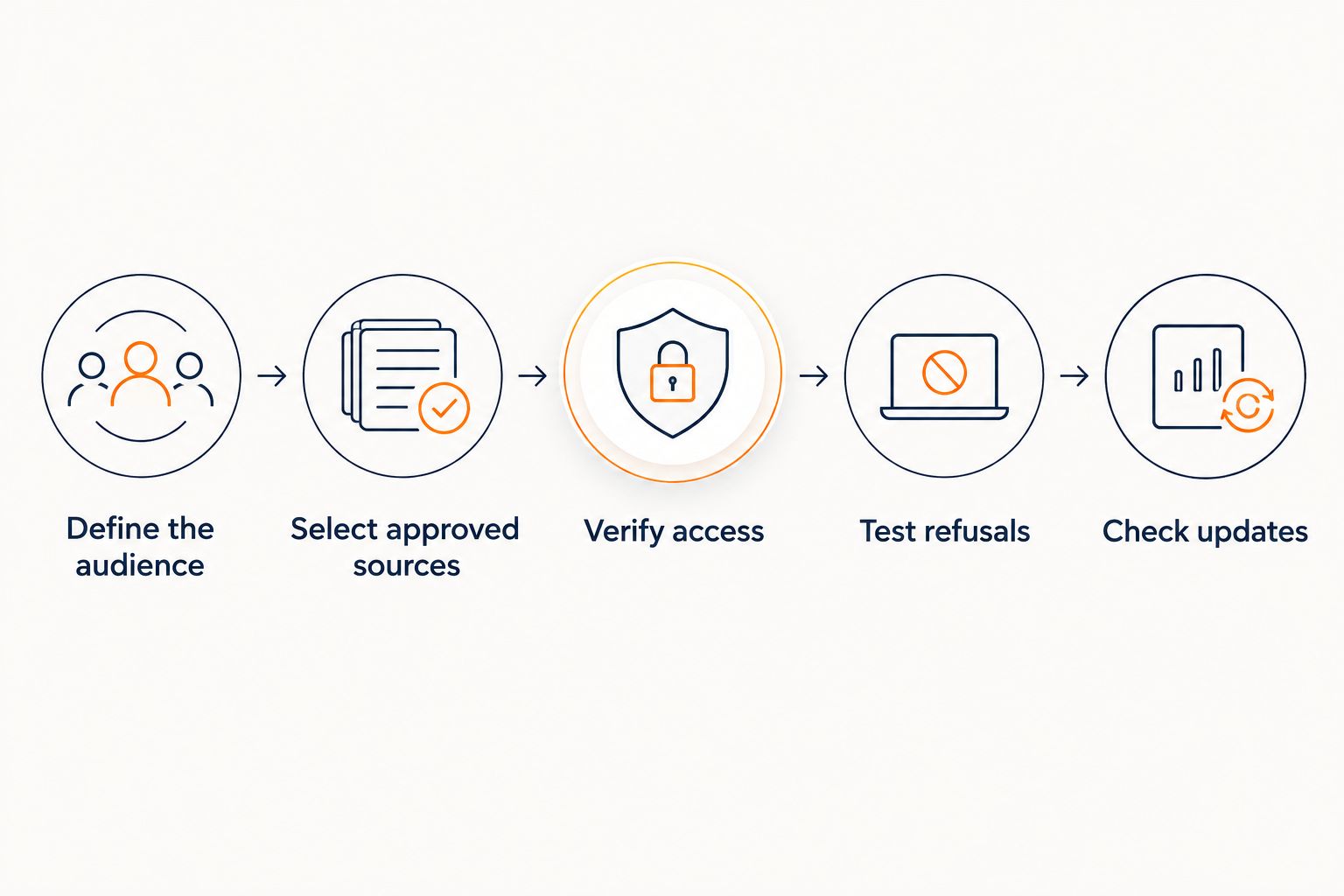
Use a small acceptance test that covers placement, source accuracy, and permission boundaries. Start with approved content rather than a large community archive; a narrow collection makes failures easier to identify.
Define the audience
Write down who the chat serves and which questions it should answer. For example, separate a prospective buyer asking about published course requirements from a member asking where to find onboarding instructions.
State what the chatbot must not do. Your brief should prohibit invented discounts, refund exceptions, and income promises. Those are answer rules, not claims about your current offers or policies.
Select approved sources
Choose material you are comfortable treating as an answer source. Label its intended audience and identify who maintains it. If two documents disagree, resolve the conflict before adding both to the answer collection.
Build a few questions with answers you can locate directly in those sources. The purpose is to test whether the response reflects the material, not whether the chatbot can produce convincing prose.
Verify access
Use 2 test accounts with different permissions, plus a signed-out session. Ask each session the same question about restricted material. Check the response itself and any linked citation.
Do not stop at checking whether the source page opens. The chatbot must not reveal a restricted excerpt to an unauthorized visitor even if the citation later leads to an access-denied page.
Test refusals
Ask about information that is absent from the approved sources. Include a request for an unpublished discount, a refund exception, and a guaranteed outcome.
A suitable refusal can say, in this hypothetical example: I can only quote what’s published. I don’t have a published discount to cite. That is a model response to test, not a promise that a particular product uses those exact words.
Check updates
Change an approved test document and check the answer again after the provider’s documented update process completes. Remove another test source and confirm that its content no longer appears in answers.
Record the expected result for each test. For a 2026 launch, keep that record with your configuration so later content changes can be checked against the same boundaries.
What should a source-grounded answer look like?
A source-grounded answer should make its supporting material inspectable. The response needs to match the cited source, and the reader needs permission to view that source.
Suppose your approved onboarding guide explains where members should start. The chatbot should answer from that guide and cite the relevant material. It should not fill a gap by inventing a welcome call or an unpublished coaching entitlement.
A citation is evidence to inspect, not a guarantee of correctness. It can point to irrelevant material, an old policy, or a source whose wording does not support the answer. The guide to accuracy when chatbots use your own content explains the related evaluation problem.
HelpShelf is best for creators who need source-cited sales and support answers from their own content. Its stated features match that use case; Circle placement, identity handling, and content synchronization still need their own compatibility checks.
Can a Circle chatbot answer pre-sale questions?
A Circle-related chatbot can answer pre-sale questions from material approved for public use. Give it published descriptions, requirements, and policies that you intend prospective buyers to read.
Keep member-only discussions outside that public answer collection. A helpful sales response explains what is published; it does not use private member experiences to promise an outcome.
If you use lead capture, explain what information you are requesting and why. Collecting contact details should not be presented as proof that a question has been resolved or that a purchase is suitable.
Can a Circle chatbot handle member support without a human?
A chatbot can answer documented support questions, but it should not be treated as the authority for every member request. Finding an onboarding guide is different from reviewing a disputed charge or deciding a policy exception.
Define a human route for questions that require judgment, account investigation, or information absent from the approved sources. The assistant should describe the boundary plainly rather than inventing a resolution.
For example, a hypothetical response could say: I can explain the published policy, but I can’t approve an exception. This needs a person to review it. That refusal gives the member a clear next step without pretending the decision has been made.
FAQ
Can an AI chatbot integrate with Circle communities in 2026?
Yes, through an installation or connected workflow that your Circle configuration and chatbot provider support. Verify placement, content access, and member permissions separately; a visible chat window does not establish all three.
Does a chatbot need direct access to every Circle discussion?
No. Start with approved material that supports the questions you want it to answer, and exclude private discussions or informal replies that should not become authoritative guidance.
Can I put a chatbot on a separate page for Circle members?
A separate chat page is an implementation option, provided the chosen provider supports that deployment. If it answers from private material, it still needs appropriate authentication and access controls.
Will a chatbot automatically know which Circle spaces a member can access?
Do not assume it will. Require a demonstration that the implementation identifies the member and applies the correct restrictions before retrieving content or generating an answer.
Can a chatbot cite my community content?
A source-citing chatbot can provide references to approved content, but the integration must support the relevant sources. Check that each citation supports the answer and that the reader is permitted to view it.
Is HelpShelf a fit for a creator who uses Circle?
HelpShelf fits creators seeking cited pre-sale and support answers from their own content, with lead capture. Confirm the proposed Circle installation and data-access workflow before treating it as a Circle-specific solution.
Can a Circle chatbot approve refunds or offer unpublished discounts?
Do not give the chatbot authority to invent discounts or approve refund exceptions. It should explain published guidance and direct decisions outside that guidance to a person.
One last thing
Test the citation and the answer separately. A blocked source link does not protect private information if the chat has already repeated it.
Before opening your Circle chatbot in 2026, run 1 signed-out session against a restricted-content question. Inspect the full reply, not just the destination of its links. This small check tests the boundary your members actually experience.


