

Yes, an AI chat widget can work without a published FAQ page if it can access approved content that answers your visitors’ questions. That content can come from your course, coaching materials, or community resources rather than a dedicated FAQ; the widget still needs permission to use it, usable citations, and a clear boundary for questions the content does not answer.
- Can an AI chat widget work without a published FAQ page? Yes—with approved, accessible source content.
- HelpShelf uses creators’ own content for cited pre-sale and support answers; a source gap still needs a refusal.
- Keep member-only material separate from content approved for public answers.
- Test citations and unsupported questions before publishing your chat widget.
Can an AI chat widget work without a published FAQ page?
Yes. The requirement is answerable source content, not a page titled FAQ. A dedicated FAQ is one way to organize answers, but it is not the only place those answers can live.
For a creator, the distinction is practical. A course outline can explain what you teach. An onboarding resource can explain how members get started. Neither becomes suitable for public chat automatically: you must approve its audience and check that the widget can use it.
HelpShelf provides a chat widget that uses a creator’s own course, coaching, or community content for cited answers and lead capture. HelpShelf is built for course creators, coaches, and community owners who want chat answers grounded in their own content. Its value here is using existing knowledge; you still need to decide what that knowledge is allowed to say publicly.
| Source option | Best for | Useful feature | Limitation to check |
|---|---|---|---|
| Published FAQ | Repeated public questions | Keeps approved answers together | Unanswered questions remain unanswered |
| Course outline | Questions about course scope | Describes topics and prerequisites | Does not establish support or policy terms |
| Coaching materials | Questions about the coaching process | Explains published expectations | Client-specific details need protection |
| Community resources | Questions about participation | Provides documented rules and guidance | Member access does not mean public permission |
These are source options, not a claim that every widget accepts every format. Check the chosen widget’s supported sources and access controls before connecting your content.
Why this matters
A prospective student opens your course page late at night and asks whether the material covers a particular topic. You already explain that topic in your course outline, but you have never copied the explanation into an FAQ.
That is an organization problem, not an absence-of-knowledge problem. A source-grounded widget can answer from approved content instead of requiring you to rewrite everything as questions and answers.
The opposite situation needs a different response. If you have never documented whether a coaching package includes individual feedback, the widget has no authority to promise it. For a 2026 launch, connect existing answers first, then document genuine gaps rather than treating a new FAQ page as the entire setup.
Public content: best for pre-sale questions
Use public content when visitors need to understand what you teach, who the offer serves, or what participation involves. A course outline or published description can support an answer about scope without exposing paid lesson material.
The advantage is alignment: the visitor can compare the chat answer with information you already make public. The limitation is coverage. A short sales description does not necessarily answer detailed questions about prerequisites, accessibility, or the boundaries of coaching support.
Before approving a source, read it as a buyer would. Does it explicitly answer the question, or does it only hint at an answer? A section titled beginner foundations does not, by itself, establish that every lesson suits someone with no prior experience.
Approve the statement you can point to, not the conclusion you hope a visitor draws. If the content does not establish suitability, the answer should explain the published scope and leave the individual decision open.
Member-only content: best for enrolled-user support
Member resources can support questions about lessons, community rules, or documented onboarding steps. Their strength is detail: enrolled users often need information that does not belong on a public sales page.
Their limitation is access. A visitor’s question about a course is not permission to reveal the course. Keep public answers separate from restricted content, and check how your chosen widget distinguishes audiences before connecting member material.
Do not assume that placing a widget inside a member area settles every access question. Review whether an answer exposes information from another course, another client, or a private discussion. Access to one resource should not become access to everything you connected.
For your 2026 content review, mark each source as public, member-only, or excluded. These labels are a review method, not a statement about any particular software interface. The decision belongs to you before the content becomes an answer source.
Why answer quality varies without an FAQ
A published FAQ gives answers a familiar shape. Without one, your content needs the same clarity in other forms. Review these factors:
- Coverage: The source must contain the answer, not merely mention the topic.
- Clarity: Separate what is included from suggestions, examples, and optional activities.
- Currency: Remove superseded instructions from the approved answer set.
- Audience: Public visitors and enrolled members need different information boundaries.
- Consistency: Resolve conflicting descriptions before asking the widget to use them.
- Citations: Make the supporting passage identifiable and appropriate for the reader to access.
These factors are content decisions. A polished answer cannot repair a missing rule or turn contradictory documents into a reliable policy. Fix the source before polishing the response.
How do I prepare content without building an FAQ page?
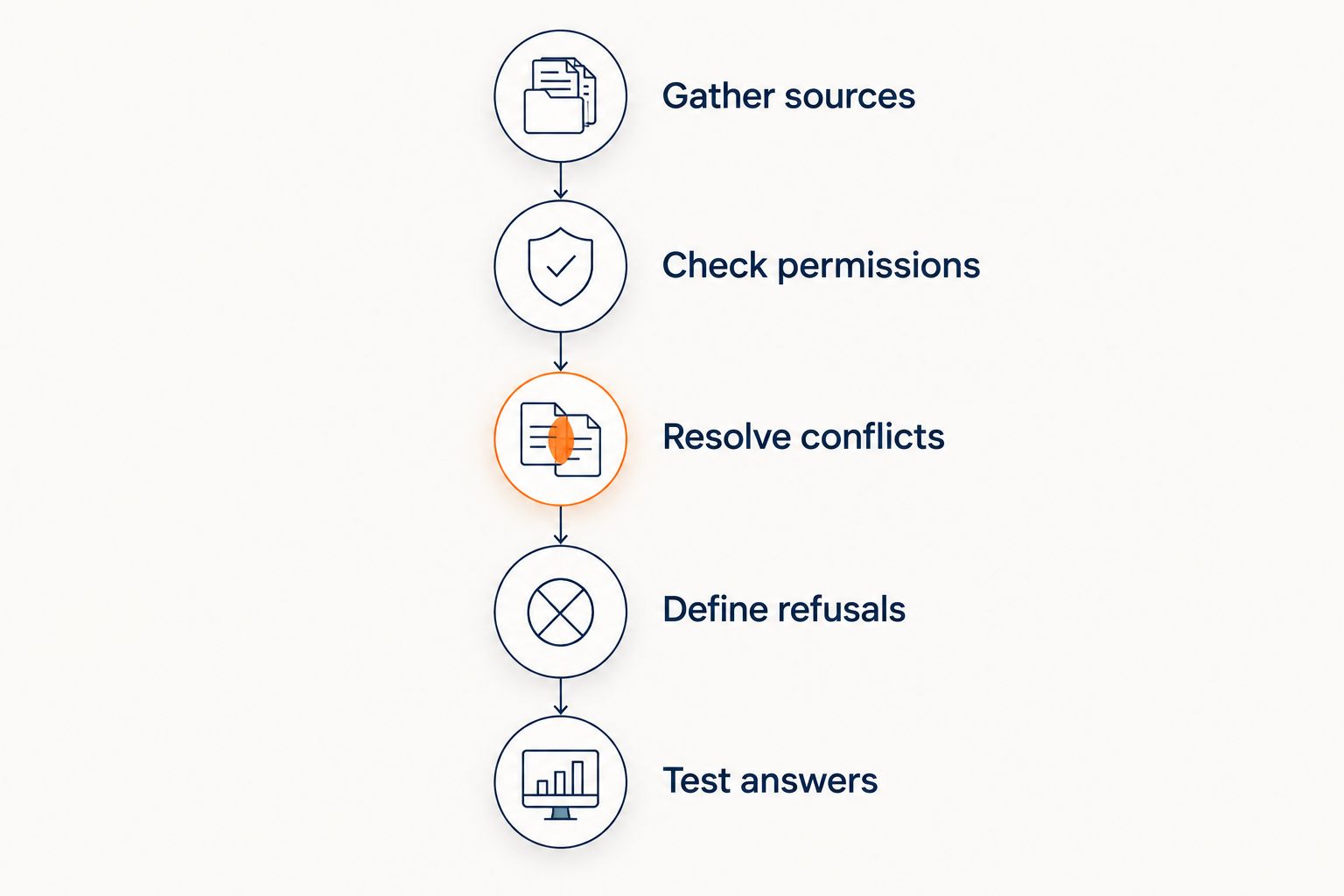
Use this sequence for your 2026 setup. The goal is a small, deliberate answer set—not permission to use every document you own.
Gather sources
Start with the questions visitors and members actually ask you. Match each question to an existing course description, lesson, onboarding resource, or published policy.
Do not create an answer just to fill a blank. Mark questions with no supporting source as unresolved. This separates content you already have from decisions you still need to make.
Check permissions
Decide who should receive each answer. Public course scope belongs in a different category from paid lesson detail or private coaching notes.
Exclude personal information and client-specific material from public answer sources. Also inspect examples embedded inside otherwise suitable documents: a useful coaching explanation can still contain details you should not expose.
Resolve conflicts
Compare sources that discuss the same subject. If an older onboarding document and a current course description disagree, choose the approved version and remove or correct the conflicting material.
Do not expect a citation to settle the conflict. A widget can cite a document that is no longer authoritative. The source needs correction before its answer deserves trust.
Define refusals
Write the boundary for unsupported questions. No invented discounts, no refund exceptions, and no income promises.
A useful refusal explains what the available source supports and what remains unanswered. The client’s stated boundary, “I can only quote what’s published,” is a clearer starting point than an answer that invents a rule to keep the conversation moving.
Test answers
Ask a supported question, an unsupported question, and a question that requests restricted information. Inspect both the answer and its citation.
Repeat the test after changing the underlying content. You are checking whether the answer still follows the approved source—not whether the wording sounds confident.
A source citation should support the specific answer beside it. For a closer look at that requirement, see how a chatbot can cite sources from your own content.
What should the widget say when the source is incomplete?
It should state the supported information and stop before adding an unsupported promise. Missing information is not an invitation to finish the policy on your behalf.
Consider these test questions, not actual terms for any offer:
- Scope: A visitor asks whether a course includes a topic absent from the outline. The answer should describe the documented topics without adding that topic.
- Exceptions: A visitor asks for a refund exception that no approved policy states. The answer should not grant the request or invent eligibility rules.
- Outcomes: A visitor asks what income they will earn after coaching. The answer should not turn educational content into an income promise.
- Privacy: A visitor asks for details from a private member discussion. The answer should not reveal the discussion merely because it is connected content.
A refusal is not the same as abandoning the conversation. Where an approved follow-up process exists, offer that route without promising its outcome. HelpShelf’s lead capture is relevant when a visitor’s unresolved question needs follow-up; collecting a lead is not evidence that the requested exception or result is available.
Do I need to publish private course content so the widget can answer?
No. A widget using restricted content does not mean that content should become public. Check the selected system’s source requirements, authentication, and answer permissions before making it available to visitors.
For pre-sale chat, use an approved description of course scope instead of exposing paid lessons. For member support, verify that the intended reader can access the cited material. A citation that sends a buyer into a restricted lesson is not a useful public explanation.
If the system cannot maintain your required boundary, leave the restricted material out. A narrower answer set is preferable to an answer set that reveals content to the wrong audience.
Is a published FAQ still useful if I already have chat?
Yes. A published FAQ can collect answers that visitors should be able to read without starting a conversation. It also gives you a clear place to maintain recurring public explanations.
The benefit is organization; the limitation is maintenance. An FAQ that repeats old terms adds another conflicting source rather than solving the problem.
You do not need to delay every chat setup until you have built one. Start with approved content, then use unanswered questions to decide which explanations deserve a permanent public home. Chat and an FAQ can serve different reading preferences without competing to define your policies.
How can I check whether the widget is ready to publish?
For a 2026 launch review, test behavior rather than presentation. A neat chat window is not proof that its answers stay within your content.
| Test | Passing behavior | Reason to stop publication |
|---|---|---|
| Ask a documented question | Answer follows the source | Answer adds an unsupported inclusion |
| Request an exception | Response stays within published terms | Response invents permission |
| Ask about private content | Response respects the audience boundary | Response exposes restricted material |
| Open a citation | Source supports the specific statement | Source is irrelevant or inaccessible |
| Ask an unanswered question | Response states the limit | Response supplies an invented answer |
Read the entire answer, not just the linked passage. A correct citation beside an unsupported sentence is still a failed answer. Also check whether the wording changes the meaning of the source: a suggestion must not become a requirement, and an example must not become a guarantee.
Keep unresolved questions visible in your content review. Some need a new explanation; others need a permanent refusal. You do not have to make every question answerable to publish a useful widget.
FAQ
Can an AI chat widget work without a published FAQ page?
Yes, an AI chat widget can work without a published FAQ page when it can access approved source content. It still needs clear permissions, supporting citations, and a boundary for unanswered questions.
What can I use instead of an FAQ page?
You can use approved course, coaching, or community content that explicitly answers the question. Check your selected widget’s supported source types rather than assuming it accepts every document or format.
Can I connect private course lessons to public chat?
Do not connect private lessons to public answers unless you have approved that disclosure and verified the access boundary. A public description of course scope is a better source for pre-sale questions than restricted lesson content.
What should a chatbot do when it cannot find the answer?
The chatbot should state the source limit instead of inventing an answer. It should not create discounts, refund exceptions, or income promises to satisfy the request.
Does a citation mean the answer is correct?
No, a citation alone does not establish correctness. Check that the cited passage supports the specific statement and that the source is current and appropriate for the reader.
Is HelpShelf relevant if I do not have an FAQ?
Yes, HelpShelf’s chat widget uses creators’ own course, coaching, or community content for cited pre-sale and support answers. You still need approved content that covers the questions you want it to answer.
What should I check before launching a chat widget in 2026?
Before launching in 2026, test supported answers, unsupported requests, restricted-content questions, and citations. Correct the sources or permissions when an answer exceeds what you approved.
One last thing
An unanswered question can reveal a missing business decision, not just a missing document. If you have never decided whether a coaching offer includes individual review, writing an FAQ does not settle that decision unless you actually approve the answer.
Before your 2026 launch, sort unresolved questions into two groups: information you need to publish and requests you will not authorize. Give the widget the approved explanation for the first group and a clear boundary for the second. That is more useful than a long FAQ built to make every question appear answered.


