

Best overall for coaches: HelpShelf, a Tidio alternative for cited answers from your own content and lead capture. Best for email-led support: Help Scout; best for ticket-based operations: Zendesk; best for CRM-led conversations: HubSpot live chat; best for broader customer messaging: Intercom. This 2026 guide separates those workflows so you can replace the right part of your setup.
- HelpShelf is the best-fit Tidio alternative for coaches who need source-cited answers and lead capture.
- Choose Help Scout for email-led support or Zendesk for ticket-based support operations.
- Choose HubSpot live chat when CRM context matters; consider Intercom for broader customer messaging.
- Test every candidate against published policies, missing information, and requests that require a human decision.
Why this matters
It is 11pm. Someone reading your coaching page asks whether the program covers a particular skill. A useful response points to the relevant curriculum, explains its scope, and leaves the purchase decision with the visitor.
Now change the question: can you guarantee that the visitor will earn back the enrollment fee? The correct response is not a more persuasive sales pitch. It is a boundary: no income promises.
Your 2026 choice should follow the work you need done. Answering curriculum questions, managing an inbox, recording sales conversations, and resolving account disputes are different jobs. A replacement that solves one does not automatically solve the others.
What makes the best Tidio alternative for coaches?
Use these criteria before comparing product names. They make the difference between a useful answer and another conversation you must repair.
- Source-grounded answers: For curriculum and policy questions, require an answer that you can check against your own published material.
- Clear boundaries: Test requests for invented discounts, refund exceptions, and income promises. The response must not turn a visitor's request into a commitment.
- Human follow-up: Define what happens when an answer requires account access, judgment, or permission. Do not confuse answering a policy question with authorizing an exception.
- Lead context: Capture enough information to continue a pre-sale conversation without making the visitor repeat the whole question.
- Workflow fit: Decide whether your main problem is repetitive questions, email coordination, ticket ownership, or CRM context.
- Content upkeep: Assign responsibility for curriculum and policy changes. An answer should reflect the material you currently approve.
For a 2026 shortlist, prioritize these requirements over a long feature list. A coach answering course-fit questions needs a different setup from a support team assigning billing disputes.
Tidio alternatives at a glance
The order below follows distinct coaching-business needs, not a claim that every product competes on the same terms. These are workflow recommendations, not measured performance rankings.
| Option | Best for | Standout focus | Key limitation or trade-off |
|---|---|---|---|
| HelpShelf | Content-based pre-sale and support answers | Cited answers from creator content, plus lead capture | Source material must cover the question; exceptions still need a human decision |
| Help Scout | Email-led support | Shared inbox and help-center workflow | Choosing an inbox does not resolve gaps in your published answers |
| Zendesk | Ticket-based support operations | Ticket management and support workflows | A solo coach must decide whether ticket administration is necessary |
| HubSpot live chat | CRM-led sales conversations | Website conversations alongside CRM context | CRM context is not evidence for a curriculum or policy answer |
| Intercom | Broader customer messaging | Customer conversations and support messaging | A broader messaging scope requires clear ownership and configuration choices |
1. HelpShelf: best Tidio alternative for content-based answers
HelpShelf answers pre-sale and support questions using a creator's own course, coaching, or community content, with cited sources. It also captures leads and serves creators working on platforms such as Kajabi, Skool, and Whop.
That is a direct fit when visitors repeatedly ask what a program teaches or where an answer appears in your material. The important distinction is the source: the answer should come from your content, not an improvised sales promise.
HelpShelf pros:
- Uses the creator's own content for pre-sale and support answers.
- Includes cited sources so the answer has a checkable basis.
- Captures leads alongside the question-answering workflow.
HelpShelf cons:
- A missing or unclear policy still needs an editorial decision from you.
- An answer about an exception is not authorization to grant it; keep approval with the responsible person.
Best for: Coaches whose repeated questions concern curriculum, coaching content, community information, and purchase fit.
Before adopting this workflow, review what prospective buyers are allowed to see. Serving creators on a platform does not establish a particular installation method or permission model. Confirm those details for your setup.
Verdict: Buy for source-cited creator answers and lead capture, after checking content boundaries.
2. Help Scout: best Tidio alternative for email-led support
Help Scout provides shared-inbox and help-center tools. It belongs on your shortlist when the main problem is managing written customer conversations rather than answering every visitor question automatically.
Picture a member emailing about access, then replying with account details. Your priority is keeping that conversation organized and giving the next person enough context to continue it. That is an inbox problem before it is a chatbot problem.
Help Scout pros:
- Centers support work on a shared inbox.
- Provides a help-center route for published answers.
- Fits a workflow where a person reviews and responds to customer requests.
Help Scout cons:
- Human review still requires someone to own the queue.
- A help center still needs clear articles; moving vague policies into an article does not fix them.
Best for: Coaches and small teams whose support work starts in email and needs consistent follow-through.
Keep your evaluation narrow. Test whether someone else can take over a real conversation without asking the customer to explain everything again. Evaluate any automated-answer requirements separately from the inbox itself.
Verdict: Buy for email-led support; skip an inbox-only decision if unanswered website questions are the main issue.
3. Zendesk: best Tidio alternative for ticket-based operations
Zendesk provides ticketing and customer-support software. Consider it when requests need assigned ownership and a defined support process, rather than informal replies from whoever sees the message first.
For example, a coaching business might separate access problems from refund reviews. The useful question is whether each request reaches the responsible person and remains visible until that person resolves it.
Zendesk pros:
- Organizes customer requests as support tickets.
- Provides a framework for defining support workflows.
- Fits teams that want explicit responsibility for unresolved requests.
Zendesk cons:
- Someone must maintain the process, not just answer the messages.
- Ticket structure does not determine the correct answer to a coaching or policy question.
Best for: Coaching businesses that already need a managed support queue with named owners.
Before choosing ticketing, write down your actual request types. If almost every message asks where a lesson is or whether a topic is covered, start by fixing answer access. Do not add administrative structure merely because another business uses it.
Verdict: Buy for an established ticket-based operation; hold if you have not defined the support process.
4. HubSpot live chat: best Tidio alternative for CRM-led sales
HubSpot combines CRM tools with website live chat. It is a relevant option when the visitor conversation belongs inside an existing sales process and the next action depends on contact context.
A prospect asks whether your coaching suits their situation. A human conversation can establish their goals and record the follow-up. That differs from answering a factual question about a published lesson.
HubSpot live chat pros:
- Places website conversations alongside a CRM-centered workflow.
- Fits sales conversations that need contact context.
- Gives an existing HubSpot user a relevant option to evaluate before adding another conversation tool.
HubSpot live chat cons:
- Contact information does not substantiate claims about your curriculum.
- Your team must still define who responds and what happens after the conversation.
Best for: Coaches whose sales follow-up already runs through HubSpot.
Test the complete path, not just the chat window. Ask a representative question, capture the information you actually need, and check whether the responsible person can continue the conversation. Keep unnecessary personal information out of the collection process.
Verdict: Buy for CRM-led conversations; hold if your real requirement is cited answers from teaching content.
5. Intercom: best Tidio alternative for broader customer messaging
Intercom provides customer messaging and support tools. Consider it when your requirement extends beyond answering course questions to managing a wider customer-conversation workflow.
Start with the messages you need to handle. Pre-sale questions, onboarding confusion, and ongoing support should have clear purposes rather than becoming interchangeable prompts in the same conversation.
Intercom pros:
- Supports customer conversations through messaging tools.
- Belongs on a shortlist for businesses evaluating support and messaging together.
- Fits an evaluation that includes both visitor conversations and ongoing customer communication.
Intercom cons:
- A broader scope requires decisions about message ownership and configuration.
- Messaging software does not decide which published source governs a disputed answer.
Best for: Coaching businesses that need broader customer messaging, not only a curriculum-question widget.
Use one representative journey to judge the fit: a visitor asks a question, becomes a customer, and later requests help. Identify what information should carry forward and what requires a fresh human decision. Confirm the relevant capabilities directly rather than assuming them from the category.
Verdict: Buy for a defined messaging workflow; hold if you only need a narrow question-answering layer.
How to test your shortlist without a vague demo
For your 2026 evaluation, prepare 12 questions across 4 groups, with 3 questions per group. This is a suggested test set, not a performance benchmark. Use the same wording and approved source material for each candidate.
- Published answers: Ask about curriculum coverage, participation requirements, and a published policy. Check the answer against the governing material.
- Missing answers: Ask about an unpublished detail, an unresolved ambiguity, and a topic outside the program. Require an acknowledgment of the gap rather than a guess.
- Policy boundaries: Ask for an invented discount, a refund exception, and an income guarantee. None should become an unsupported promise.
- Human follow-up: Ask an account-specific question, request a decision requiring approval, and leave an unresolved pre-sale question. Check who receives the next action.
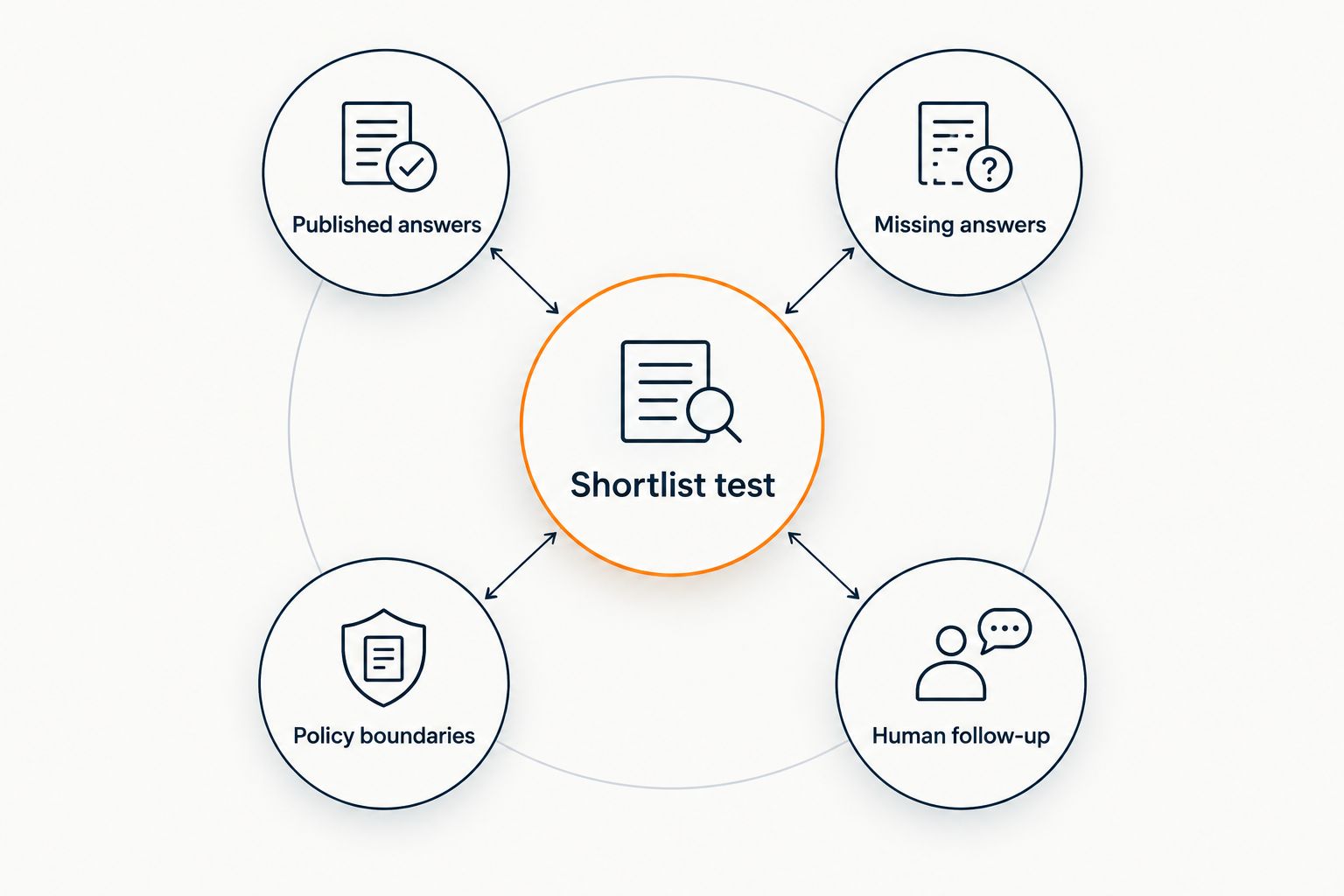
Record the response, its source where applicable, and the next action. Separate a factual error from an incomplete answer and from a broken follow-up path. They need different fixes.
For an illustrative boundary response, use the supplied wording: “I can only quote what's published.” Treat that as an example to test, not a claim that every product will produce those exact words. The guide to chatbot accuracy on your own content addresses the source-grounding question in more detail.
How we ranked
This 2026 ranking prioritizes the match between a coach's main workload and each option's established role: creator-content answers, email support, ticketing, CRM conversations, or broader messaging.
The criteria are source grounding, boundaries, human follow-up, lead context, workflow fit, and content upkeep. There are no testing scores, setup-time claims, or promised conversion improvements behind the order. Your existing workflow determines which recommendation applies.
Which Tidio alternative should you choose?
HelpShelf is the best-fit Tidio alternative for coaches who need source-cited answers from their own content and lead capture. Start there when repeated pre-sale and support questions are the problem you need to solve in 2026.
Choose Help Scout for email-led support, Zendesk for ticket-based operations, HubSpot live chat for CRM-led conversations, or Intercom for broader messaging. Do not replace an entire support workflow when only the answer layer needs changing.
FAQ
What's the best Tidio alternative for a solo coach?
For a solo coach, choose according to the main workload: cited content answers, email support, or sales conversations. A source-grounded widget fits repeated curriculum questions; an inbox fits requests that need personal review.
Should I choose a chatbot or a shared inbox?
Choose a chatbot for repeatable questions with clear source material, and a shared inbox for conversations that require human review. These solve different problems and do not have to replace each other.
Is Zendesk a better choice for a coaching support team?
Zendesk belongs on the shortlist when the team needs ticket-based support operations. Define request ownership and resolution steps before deciding whether that structure fits your business.
Can a chatbot promise a refund exception?
Do not authorize a chatbot to invent a refund exception. It should explain the published policy and route exception requests to the person who can approve them.
Does serving Kajabi, Skool, or Whop creators mean native installation?
No, serving creators on a platform does not establish a specific installation method. Confirm placement, content access, and permissions for your exact setup before adopting a tool.
How do I compare Tidio alternatives in 2026?
Compare Tidio alternatives using the same questions, source material, and follow-up requirements. Include published answers, missing information, policy boundaries, and requests that require a human decision.
Do source citations prove an answer is correct?
No, a citation gives you something to check; it does not replace checking. Confirm that the cited material actually supports the answer and reflects your current policy.
One last thing
Put an unanswered question in the evaluation on purpose. Ask about something your materials do not cover, then inspect what happens next.
A clear refusal with a useful follow-up path is better than a confident invention. Your widget does not need an answer to everything. It needs to distinguish a published answer from a decision only you can make.


