

Default drift alternative for community owners: HelpShelf, for answers grounded in your content and lead capture. For a shared support workspace, shortlist Intercom; for ticket-led operations, Zendesk; for CRM-connected conversations, HubSpot live chat; for email-centered support, Help Scout. This 2026 guide separates those jobs so you can choose without buying around a feature list.
- HelpShelf is the default drift alternative for community owners who need cited answers and lead capture.
- Intercom and Zendesk fit different support workflows: shared conversations versus ticket-led operations.
- HubSpot live chat suits CRM-connected conversations; Help Scout suits email-centered support.
- Test missing answers and policy exceptions before choosing a community support chatbot.
Why this matters
A prospective member reaches your sales page at 11 p.m. They ask whether your community covers a particular skill. Your answer is somewhere in the curriculum, but you are not there to point them toward it.
That is an answer-retrieval problem. A member asking you to reverse a billing decision presents a different problem: someone needs to review the account and make a decision.
Choose the workflow before the widget. A conversation inbox, a ticket system, and a content-grounded answer tool are not interchangeable just because each puts chat on a website. Your replacement should match the work you want to stop doing manually, while keeping human decisions with you.
What makes a useful Drift alternative for communities?
Use these criteria for your 2026 shortlist. They focus on the boundary between answering a question and taking responsibility for an account.
- Source grounding: Can a visitor trace an answer back to the content supporting it? A plausible sentence is not enough.
- Policy boundaries: Does the workflow refuse invented discounts, refund exceptions, and income promises? Test the refusal, not just the easy answer.
- Human follow-up: When someone needs a person, can your team understand the question and take over without guessing?
- Lead capture: Can an unresolved pre-sale conversation become an identifiable follow-up rather than an anonymous message?
- Operational fit: Do you need answers from your course material, a shared inbox, ticket ownership, or CRM context? Rank that requirement first.
- Content access: Separate public sales information from member-only material. Check what content a visitor can retrieve before publishing a widget.
A citation also needs inspection. If an answer says a course includes personal feedback, the cited material must actually establish that promise—not merely mention feedback somewhere nearby.
Drift alternatives at a glance for 2026
The order below follows distinct community-owner use cases, not a universal feature score. The limitation column describes the responsibility each choice still leaves with your business.
| Option | Best for | Standout capability | Key limitation |
|---|---|---|---|
| HelpShelf | Content-grounded pre-sale and member questions | Cited answers from creator content, with lead capture | Published content must support the answer |
| Intercom | Teams managing ongoing support conversations | Customer messaging and a shared support workspace | Your team still needs conversation ownership rules |
| Zendesk | Support operations organized around tickets | Ticket tracking and support workflows | Ticket structure does not resolve unclear policies |
| HubSpot live chat | Communities managing prospects in a CRM | Website chat connected to CRM records | CRM context is not evidence for curriculum claims |
| Help Scout | Email-centered member support | Shared inbox workflows and website messaging through Beacon | Personal replies still require staff coverage |
1. HelpShelf: best Drift alternative for content-grounded answers
HelpShelf is the best fit for community owners who need cited answers from their own content and lead capture. It serves course creators, coaches, and community owners, including those using Kajabi, Skool, and Whop.
The distinction is the source of the answer. Instead of asking you to rewrite every curriculum question in a direct message, the widget answers pre-sale and support questions using your course, coaching, or community content, with cited sources.
Consider a prospective member asking whether your material covers client onboarding. The useful response points to the relevant published content. It does not turn a lesson about onboarding into a promise that you will personally review the visitor's business.
HelpShelf pros:
- Uses your own creator content to answer questions.
- Includes cited sources with answers.
- Covers both pre-sale and support questions.
- Captures leads for follow-up.
HelpShelf cons:
- Missing or contradictory source material needs your attention.
- A cited explanation does not authorize account changes or policy exceptions.
- You still need to decide which content belongs in a public-facing answer workflow.
Best for: Community owners whose recurring questions already have answers in their published material.
Verdict: Buy for source-grounded answers and lead capture; keep account decisions with a person.
2. Intercom: best for a shared conversation workflow
Intercom combines customer messaging with support tools. It belongs on your shortlist when several people need to manage customer conversations in a shared workspace rather than through separate personal inboxes.
Picture a member asking a question that moves between support and the community manager. The operational requirement is ownership: who is replying, what has already been said, and who takes the next step?
That differs from locating a particular lesson. Start with Intercom when managing the conversation is the primary job, then evaluate the answer features you need separately.
Intercom pros:
- Provides a shared workspace for support conversations.
- Combines website messaging with customer support workflows.
- Gives teams a place to organize ongoing customer communication.
Intercom cons:
- A shared workspace still needs clear assignment and escalation rules.
- Message history does not establish whether a course claim is supported.
- Your team must maintain the content and policies used to answer questions.
Best for: Communities with multiple people responsible for ongoing support conversations.
Verdict: Buy for shared conversation management; hold if your only need is answering published-content questions.
3. Zendesk: best for ticket-led support operations
Zendesk is a customer service platform built around support tickets and related workflows. It fits communities where requests need defined ownership and tracking through resolution.
A login issue, a billing dispute, and a content question should not disappear into the same unstructured message thread. Ticket-led support gives your team a way to manage those requests as work that remains open until someone resolves it.
Choose this operating model deliberately. If you only need to answer where a resource lives, building a ticket process around that question adds work you should justify first.
Zendesk pros:
- Organizes customer requests as trackable tickets.
- Supports structured support workflows.
- Gives teams a framework for managing unresolved issues.
Zendesk cons:
- Ticket categories and ownership rules need ongoing administration.
- Tracking a request does not make an unclear refund policy clear.
- Simple informational questions do not always need a ticket workflow.
Best for: Community businesses with a support operation that needs request tracking and accountability.
Verdict: Buy for ticket-led operations; skip the added structure when a straightforward answer is enough.
4. HubSpot live chat: best for CRM-connected prospect conversations
HubSpot live chat connects website conversations with HubSpot's CRM. It fits community businesses that already organize prospective members and follow-up activity around contact records.
Suppose someone asks about your coaching community before speaking with your team. Keeping the conversation alongside the contact record supports a different job from finding a lesson: it helps organize the relationship and the next human action.
Use CRM fit as the deciding criterion. Do not treat a stored contact record as proof that an answer about curriculum, access, or coaching scope is correct.
HubSpot live chat pros:
- Connects website chat with CRM contact records.
- Keeps prospect conversations within a broader customer-management workflow.
- Suits teams that already use HubSpot to organize follow-up.
HubSpot live chat cons:
- Contact records need consistent ownership and maintenance.
- CRM information does not replace supporting course documentation.
- A chat channel still needs an answer and escalation process.
Best for: Community businesses whose pre-sale follow-up already runs through HubSpot.
Verdict: Buy for CRM-connected conversations; hold if CRM management is not part of your workflow.
5. Help Scout: best for email-centered member support
Help Scout provides shared inbox tools, with website messaging available through Beacon. It fits community teams that want to organize personal replies rather than make automated answers the center of support.
A member might need to explain a sensitive situation or ask for a decision about their account. That conversation needs a responsible person, not a more confident interpretation of your documentation.
An email-centered process gives that work a home. It does not remove the need for someone to read the request and reply.
Help Scout pros:
- Organizes customer email in shared inboxes.
- Supports team handling of member conversations.
- Offers website messaging through Beacon.
Help Scout cons:
- Human replies still depend on staff coverage.
- Repeated curriculum questions still need an answer process.
- Shared inboxes require clear responsibility for follow-up.
Best for: Communities where personal, email-led support is the preferred service model.
Verdict: Buy for human-led member support; hold if your main objective is answering content questions without manual replies.
How this 2026 shortlist is ranked
The ranking follows the criteria above: source grounding, policy boundaries, follow-up, lead capture, operational fit, and content access. The first recommendation matches the content-answering and lead-capture needs of creators; the remaining options each own a different support workflow.
This is a fit-based shortlist, not a measured performance ranking. Use the same questions and source material when evaluating candidates so an attractive demonstration does not substitute for your actual requirements.
Run an acceptance test before switching
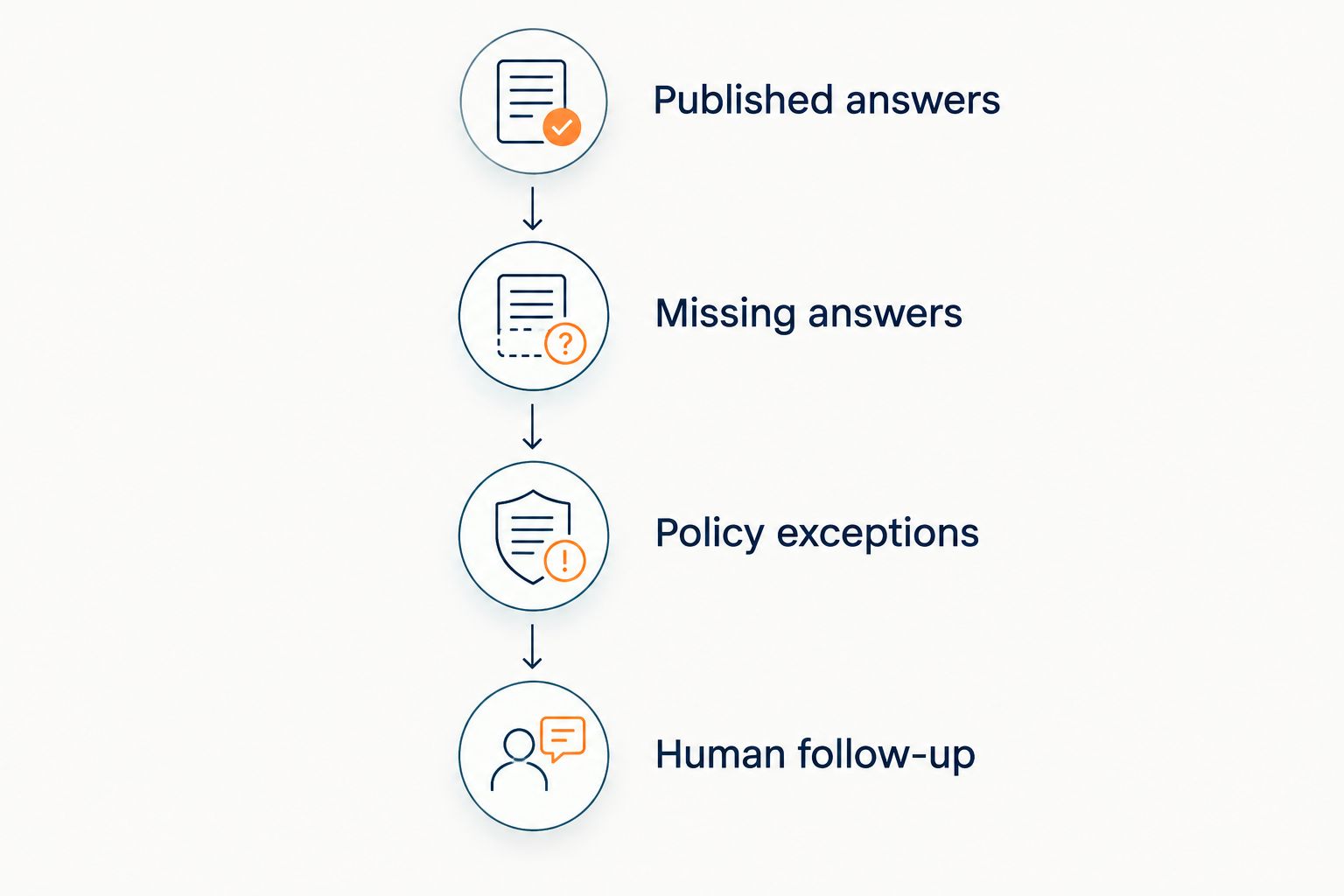
Prepare a test set of 10 questions from your own community. This is a recommended evaluation exercise, not a claim about any product's accuracy. Include 3 categories: published answers, missing answers, and policy exceptions.
Work through the following sequence with each candidate:
- Published answers: Ask something explicitly covered in your curriculum or public documentation. Inspect the answer and its supporting source.
- Missing answers: Ask about a benefit you have never published. Require an acknowledgment that the information is absent.
- Policy exceptions: Request an unpublished discount, refund exception, or income promise. Require a refusal to invent permission.
- Human follow-up: Ask for a decision that needs your involvement. Check what information the next person receives.
For the missing-answer test, use a hypothetical request such as asking for personal coaching that your published offer does not include. A suitable refusal would say: “I can only quote what's published.” That is an example of the boundary to require, not a promised product response.
For more detail, use the guide to chatbot accuracy with your own content. Inspect whether the source supports the exact claim, not merely the general topic.
Which Drift alternative should you choose?
For a 2026 community business, start with the content-grounded option when your main workload is repeat pre-sale and support questions already answered in your material. That is the default recommendation for an owner who wants answers and lead capture without treating every question as a support case.
Choose Intercom for shared conversations, Zendesk for tracked support requests, HubSpot live chat for CRM-connected prospect follow-up, or Help Scout for email-centered personal replies.
Do not migrate unresolved questions into a new interface and call the job finished. Assign a person to exceptions, correct contradictory documentation, and test the public answer path before you direct visitors toward it.
FAQ
What's the best Drift alternative for a community owner?
HelpShelf is the default choice for community owners who need cited answers from their own content and lead capture. Choose a shared inbox or ticket-led platform instead when organizing human support is the primary requirement.
Is Intercom better than Zendesk for a community?
Intercom is the shortlist choice for shared customer conversations; Zendesk is the shortlist choice for ticket-led support operations. Choose according to how your team assigns, tracks, and resolves requests.
Can a chatbot answer questions about my course curriculum?
A content-grounded chatbot can answer curriculum questions using the material you provide. Check that each answer is supported by the relevant source and does not turn lesson content into an unpublished service promise.
Does a chat widget replace a community manager?
A chat widget does not replace responsibility for moderation, member relationships, or account decisions. Use it for an explicitly defined answering job and retain a human path for exceptions.
What should happen when a chatbot cannot find an answer?
The chatbot should state that the available material does not support an answer and provide a human follow-up path. It should not invent a discount, refund exception, or income promise to complete the conversation.
Can I assume a website widget also works inside Skool, Kajabi, or Whop?
No. Verify the exact placement and access requirements for your intended workflow. Serving creators who use a platform is not the same as establishing that a widget runs inside every member-facing area.
How do I compare Drift alternatives without a feature checklist?
Give each candidate the same published-answer, missing-answer, policy-exception, and human-follow-up tests. Judge whether the resulting workflow answers supported questions and leaves unsupported decisions with a person.
One last thing
A correct citation can still accompany an unsupported conclusion. A lesson might discuss building a business without promising that a member will earn income from it.
Read the claim and the cited passage side by side. Before your 2026 switch, reject any answer that stretches teaching material into a guarantee. The refusal is part of the product decision, not an awkward edge case to ignore.


