

Best overall for cited course-content answers: HelpShelf. Best for a shared customer-messaging workflow: Intercom. Best for ticket-led support: Zendesk. This 2026 Chatbase alternative guide compares five options by the work you need done: answering course questions, capturing leads, or organizing human support.
- HelpShelf is the Chatbase alternative for course creators who need cited content answers and lead capture.
- Intercom and Zendesk suit broader customer messaging and ticket-management workflows, respectively.
- Help Scout fits email-centered support; Tidio fits website live chat.
- Test source citations, refusal behavior, and human follow-up before replacing your current chatbot.
Why this matters
A prospective student asks whether your course covers their situation. It is late, you are offline, and the answer sits inside a curriculum document rather than on the sales page. A chat widget is useful only if it can answer from the right material without stretching what that material says.
Now change the question: the student wants a refund exception. That is not a content-retrieval problem. Your system needs a boundary and a route to someone authorized to decide.
Choose the workflow before choosing the widget. A source-grounded answer tool, a live-chat inbox, and a help desk solve different parts of the same conversation. In 2026, your shortlist should reflect which part is actually failing.
What makes the best Chatbase alternative for creators?
Use these six criteria before comparing product names:
- Content fit: Can you supply the course, coaching, or community material that should govern answers? Check supported inputs rather than assuming a platform connection exists.
- Citation quality: Can the visitor inspect the source behind an answer? Check whether the cited passage actually supports the whole response.
- Refusal behavior: Does the system stop when the material is silent? Test unpublished discounts, refund exceptions, and promised outcomes.
- Lead capture: Can an interested visitor leave details for follow-up? Separate collecting an address from answering the original question.
- Human workflow: Where does an unresolved conversation go, and who owns it? An inbox is useful only when someone monitors it.
- Maintenance: Who removes outdated material and checks changed answers? A correct response depends on a current source.
Do not let a polished demonstration replace these checks. Bring questions from your own inbox, including the awkward ones that require a refusal rather than a sales answer.
Chatbase alternatives at a glance
The order below prioritizes a creator's content-answering problem first, then broader messaging and support workflows. It is not a ranking of every feature each vendor offers.
| Option | Best for | Standout capability | Key limitation for this decision |
|---|---|---|---|
| HelpShelf | Cited answers from creator content | Course, coaching, and community answers with citations and lead capture | Unpublished policies and exceptions still need a human decision |
| Intercom | Shared customer messaging | Customer conversations and automated support in a broader messaging platform | You must evaluate the wider workflow, not just the answer widget |
| Zendesk | Ticket-led support operations | Ticket management and help-center workflows | Ticket organization does not establish course-answer accuracy |
| Help Scout | Email-centered personal support | Shared inbox and knowledge-base workflows | A staffed reply workflow still needs an owner |
| Tidio | Website live chat | Live chat alongside chatbot tools | A website chat experience does not establish access to your course content |
For every option, verify the current configuration you would actually use. A vendor's product category is not evidence that your particular documents, member permissions, or escalation rules will work as intended.
1. HelpShelf: best Chatbase alternative for cited creator answers
HelpShelf answers pre-sale and support questions using a creator's own course, coaching, or community content. Its chat widget provides cited answers and captures leads, serving creators on platforms such as Kajabi, Skool, and Whop.
The fit is specific: a visitor asks what your material covers, and the answer should point back to that material. You need an answer grounded in your published offer, not a plausible explanation of what a course like yours usually includes.
HelpShelf pros:
- Uses creator content as the basis for pre-sale and support answers.
- Provides citations so visitors can inspect the supporting source.
- Includes lead capture for conversations that need follow-up.
- Addresses course, coaching, and community-owner use cases directly.
HelpShelf cons:
- A missing or outdated source leaves an information problem to fix.
- Citations do not authorize unpublished discounts or policy exceptions.
- Lead capture still requires someone to handle the follow-up.
Best for: Creators whose repeated questions are answered somewhere in their existing material, but not where the visitor is looking.
Use a curriculum question as your first evaluation case. Then ask for something the curriculum does not promise. Both responses matter: the useful answer and the clear boundary.
Verdict: Buy for cited creator-content answers, after testing your own sources.
2. Intercom: best Chatbase alternative for shared customer messaging
Intercom combines customer messaging with support automation. Consider it when the decision extends beyond answering course questions to managing conversations across a broader customer-support workflow.
For example, your assistant handles incoming questions while another person follows up with prospective students. That requires shared ownership of conversations, not merely a better response inside a widget.
Intercom pros:
- Brings customer messaging and support automation into the same product family.
- Provides an alternative to treating each conversation as an isolated chat.
- Gives teams a broader support workflow to evaluate alongside automated answers.
Intercom cons:
- A broader platform creates more workflow decisions than a narrow widget evaluation.
- Course-specific answer accuracy still requires tests using your material.
- Shared access does not decide who should approve an exception.
Best for: Creator businesses choosing a customer-messaging system for multiple people, rather than replacing only an answer bot.
In your 2026 evaluation, ask the person who will answer conversations to use the candidate setup. Check whether they can understand the original question, see what was already said, and take responsibility for the next reply.
Verdict: Buy when shared messaging is the primary requirement; skip if you only need content answers.
3. Zendesk: best Chatbase alternative for ticket-led support
Zendesk centers on customer-support operations, including tickets and help-center content. It belongs on this shortlist when your difficulty is tracking unresolved work rather than generating an initial answer.
Think about a course-access problem that needs investigation. You need an owner, a record of the issue, and a clear resolution—not another automated explanation of the login instructions.
Zendesk pros:
- Organizes customer issues as support tickets.
- Supports a help-center approach to published support information.
- Fits a workflow where unresolved cases need explicit ownership.
Zendesk cons:
- Ticket handling is a separate problem from citing the correct course material.
- A solo creator must still maintain the support process.
- Adding a ticket workflow does not resolve unclear policies.
Best for: Course businesses with support cases that require investigation, assignment, and continued follow-up.
Before choosing Zendesk as your Chatbase alternative, separate questions from cases. A curriculum question needs a supported answer. An account-specific dispute needs investigation. If the latter dominates your inbox, ticket management deserves more weight in the decision.
Verdict: Buy for case management; skip as a widget-only replacement.
4. Help Scout: best Chatbase alternative for email-centered support
Help Scout provides shared-inbox and knowledge-base software. Consider it when you want support to remain a personal reply workflow, with published information supporting the conversation.
A coach answering nuanced questions between client sessions needs a different setup from a team processing a queue. An email-centered approach keeps the human reply central, but it does not remove the work of composing and checking that reply.
Help Scout pros:
- Centers support around a shared inbox.
- Includes a knowledge-base approach to reusable answers.
- Fits teams that prefer written follow-up over live conversation.
Help Scout cons:
- Human replies still require coverage and attention.
- A knowledge base needs editing when your offer changes.
- Email-centered support does not itself solve unattended pre-sale questions.
Best for: Coaches and small creator teams that want organized, human-written support rather than an automated answer-first experience.
Ask whether your buyers need an immediate factual answer or a thoughtful personal response. Those are different service promises. Choose the inbox when the personal response is the point, not simply because email feels familiar.
Verdict: Buy for personal email support; skip if unattended answers are the main requirement.
5. Tidio: best Chatbase alternative for website live chat
Tidio offers website live chat and chatbot tools. It is a candidate when you want visitors to start a conversation on your site and your team intends to participate directly.
That makes the staffing decision important. A chat bubble invites a conversation, but your published support expectations should explain what happens when nobody is there to answer.
Tidio pros:
- Provides a website live-chat entry point.
- Offers chatbot tools alongside human chat.
- Fits an evaluation focused on the website conversation experience.
Tidio cons:
- Live replies require someone to be available.
- Website placement does not prove access to protected course material.
- Automated answers still need citation and refusal checks.
Best for: Creators who want live website conversations and will define when a human responds.
Compare live chat for course creators against your actual support coverage. Do not choose a live-chat workflow if your plan is to leave it unattended without a clear fallback.
Verdict: Buy for staffed website chat; hold if support coverage is unresolved.
How the ranking works
This ranking uses fit to the stated creator workflow: content answers first, shared messaging second, ticket management third, then email-centered support and website live chat. It does not claim measured differences in accuracy, response speed, or sales results.
Use the same acceptance check for every 2026 candidate. A comparable test is more useful than separate vendor demonstrations built around different questions.
Collect sources
Choose the published material that defines your curriculum, access rules, and policies. Remove conflicting drafts before evaluation. Keep private member material separate from information that prospective buyers are allowed to see.
Ask questions
Build a recommended test set of 12 questions across 3 categories: curriculum, access, and policy boundaries. Include questions with clear answers and questions whose answers are deliberately absent. These are test-design choices, not product performance claims.
Inspect citations
Read the cited passage instead of checking only whether a link exists. Confirm that it supports the answer and does not expose material the visitor should not access. A citation attached to an unsupported conclusion fails the check.
Route gaps
Repeat the test in 2 sessions: one as a prospective buyer and one as an existing member. For unanswered questions, identify the next step and the person responsible. Do not treat an unresolved conversation as resolved because contact details were collected.
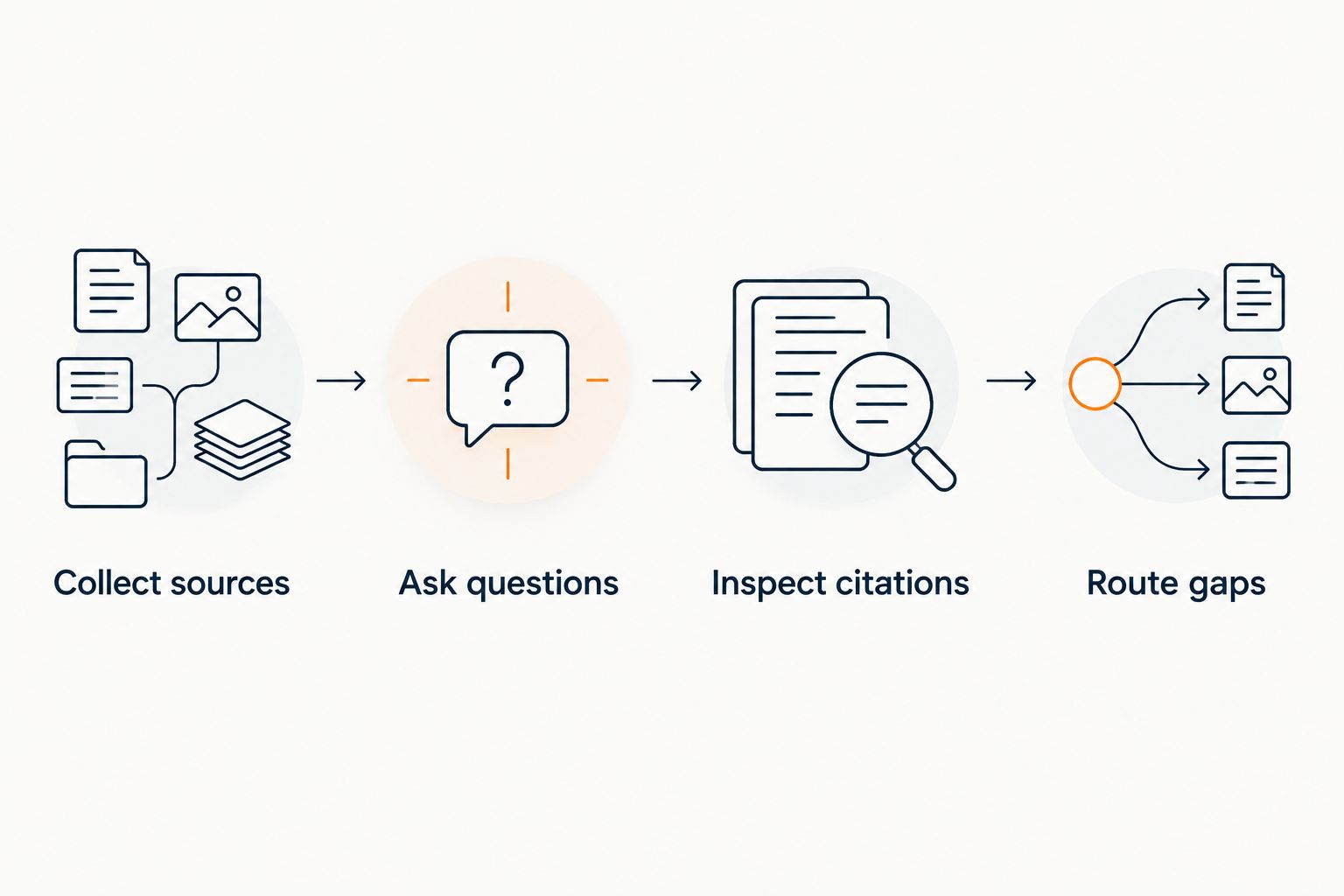
Keep a simple pass-or-fail record for each question. Reject an answer that invents an offer even if the wording sounds helpful. No invented discounts, no refund exceptions, and no income promises.
Which Chatbase alternative should you choose?
HelpShelf is the best fit here for course creators who need cited answers from their own content and lead capture. Choose a broader platform only when you also need its broader workflow.
Intercom belongs on your shortlist for shared messaging. Zendesk belongs there for tracked support cases. Help Scout suits personal email replies, while Tidio suits website live chat with a defined staffing plan.
Keep Chatbase in your comparison if it already handles your required workflow. A replacement should fix a named failure—unsupported answers, unclear follow-up, or the wrong support process—not merely give you another dashboard.
For a 2026 decision, write that failure down before starting a trial. Then use the same questions and acceptance criteria across every candidate.
FAQ
What's the best Chatbase alternative for course creators?
Choose a content-grounded widget when your main requirement is answering questions from your own course material with citations. Choose a messaging platform or help desk when shared conversations or tracked support cases are the bigger problem.
Is a help desk better than a chatbot for course support?
A help desk is better for tracking unresolved cases; a chatbot serves a different role by answering questions. Separate curriculum questions from account-specific problems before choosing your main workflow.
Can a course chatbot answer refund questions?
A course chatbot should explain the published refund policy, not invent an exception. Requests outside that policy need a human decision.
Does serving Kajabi, Skool, or Whop creators mean a native integration exists?
No. Serving creators on a platform does not establish a native integration, permission model, or access to protected content. Verify the exact setup you intend to use.
Should I replace Chatbase just to get lead capture?
Replace Chatbase only if your current setup fails a defined requirement. Test how the candidate collects contact details and how someone follows up, rather than evaluating the form alone.
How do I compare chatbot accuracy in 2026?
Ask every candidate the same questions and inspect the supporting sources. Include missing information and policy-boundary questions so a plausible answer does not hide an unsupported claim.
Can I keep human support alongside an automated widget?
Yes, human support and automated answers can serve different parts of the workflow. Define which questions the widget handles and who owns unresolved or account-specific requests.
One last thing
The most useful test question is not always the hardest curriculum question. Ask for an unpublished discount, then ask whether the system can make an exception just this once.
Your acceptance standard should be a refusal such as: I can only quote what's published. That example is a testing standard, not a promise about any vendor's response. In 2026, a convincing answer is still the wrong answer when the source does not support it.


