

Best overall for creator-facing answers: HelpShelf. Best for internal knowledge: Notion AI; best for an inbox-centered support operation: Intercom—this 2026 guide separates answering buyer questions from organizing your team's knowledge.
- HelpShelf is best for creators who need cited pre-sale and support answers from their own content.
- Notion AI fits internal knowledge retrieval; Intercom fits customer conversations connected to an inbox.
- The best ai knowledge base software for creators must distinguish published answers from unanswered questions.
- Test citations, access boundaries, and refusals before putting a knowledge assistant in front of buyers.
Why this matters
At 11pm, a prospective student asks whether your course includes individual feedback. You have answered that question in your course description, but the buyer is asking in chat. Your knowledge base needs to connect the question to the published answer—not invent a more attractive offer.
A different problem happens inside your business: your assistant needs to find the current onboarding instructions. That calls for internal knowledge retrieval, not necessarily a customer-facing widget. Choose the audience before choosing the software.
Citations help you inspect an answer. They do not excuse an unsupported claim: the linked passage must actually support what the assistant says. This guide to chatbots citing your own content explains that distinction in a creator context.
What makes the best knowledge base software for creators?
Use these criteria for your 2026 shortlist. A product that answers internal questions well is not automatically the right place to handle a prospective student's purchase questions.
- Audience fit: Separate public buyers, enrolled students, community members, and your internal team.
- Source grounding: Require answers supported by the material you have approved for that audience.
- Inspectable citations: Check whether a reader can follow the citation and find the supporting passage.
- Refusal behavior: Test questions about unpublished discounts, refund exceptions, and promised results.
- Conversation ownership: Decide who handles questions that require judgment or account access.
- Content maintenance: Assign someone to remove contradictory instructions and update outdated policies.
Do not choose on fluent answers alone. A fluent answer that quietly changes your refund policy fails the job.
Creator knowledge base software at a glance
The order below prioritizes a creator's customer-facing questions first, then distinct internal and support-management needs. It is a workflow ranking, not a measured accuracy leaderboard.
| Software | Best for | Standout capability | Key limitation to weigh |
|---|---|---|---|
| HelpShelf | Creator-facing pre-sale and support answers | Answers from creator content, with citations and lead capture | Your published content must support the answer |
| Notion AI | Internal creator-team knowledge | Questions and answers within a shared workspace | Internal retrieval is a different job from public buyer support |
| Intercom | Inbox-centered customer conversations | Fin customer support alongside an inbox | You still need ownership for unresolved conversations |
| Zendesk | Ticket-centered support operations | Knowledge and automated assistance within a ticketing environment | Ticket administration adds work beyond maintaining answers |
| Help Scout | Documentation-led support | Docs knowledge base alongside shared-inbox support | Documentation structure still needs editorial attention |
1. HelpShelf: best for creator-facing knowledge answers
HelpShelf provides a chat widget that answers pre-sale and support questions using your course, coaching, or community content. It includes cited sources and lead capture, serving creators on platforms such as Kajabi, Skool, and Whop.
Best for: A course creator, coach, or community owner whose buyers ask questions already answered somewhere in their published material.
A prospective student asks whether a coaching program covers a particular topic. The useful answer points to the relevant program description. If that description does not establish the answer, the response should acknowledge the gap rather than fill it with a sales promise.
HelpShelf pros:
- Matches the specific task of answering creator pre-sale and support questions.
- Uses the creator's own content as the answer source.
- Includes citations so readers can inspect supporting material.
- Captures leads alongside the question-answering experience.
HelpShelf cons:
- Missing or contradictory source material still needs your attention.
- A sourced answer cannot authorize an unpublished exception or establish an individual customer's account status.
Before choosing, use a real course question and inspect the cited passage. Then ask for a discount that does not exist. Those two interactions test different things: whether the assistant can find an answer and whether it respects a boundary.
Verdict: Buy for cited creator-facing answers; keep policy decisions with you.
2. Notion AI: best for internal creator-team knowledge
Notion AI supports questions and knowledge work within Notion. Its natural place on this shortlist is behind the scenes, where your team needs to find and use information in a shared workspace.
Best for: A creator working with assistants, editors, or community managers who need access to internal instructions.
Think about a community manager finding the approved escalation procedure before replying to a member. That is an internal knowledge task. It differs from letting a visitor ask a question directly on a course sales page.
Notion AI pros:
- Keeps internal questions close to workspace documentation.
- Fits a team already maintaining instructions in Notion.
- Supports knowledge work beyond customer support, including drafting and summarizing.
Notion AI cons:
- An internal workspace does not by itself establish a public support workflow.
- Disorganized or conflicting documentation remains an editorial problem.
Keep internal operating notes separate from buyer-approved explanations. Your team might need instructions about handling a complaint; a prospective student needs the published policy, not private commentary about it.
Verdict: Buy for internal retrieval; skip it as the sole answer to a public chat requirement.
3. Intercom: best for inbox-centered customer support
Intercom combines customer messaging, an inbox, and automated customer support through Fin. It belongs on the shortlist when answering a question is one part of a conversation your team must manage.
Best for: A creator business with people responsible for picking up customer conversations that automation cannot resolve.
For example, a member asks what the cancellation policy says, then asks someone to investigate an account-specific problem. The first request concerns published knowledge. The second requires a responsible person and appropriate account access.
Intercom pros:
- Places automated support within a customer-conversation environment.
- Supports an inbox-centered workflow for human follow-up.
- Fits a support operation that needs more than a standalone answer interface.
Intercom cons:
- An inbox still needs someone responsible for unresolved conversations.
- Conversation administration is additional work if your main need is simply answering published course questions.
In your 2026 evaluation, inspect the whole conversation rather than the first response. Check what happens when the customer disputes an answer or asks for something outside the source material.
Verdict: Buy when inbox ownership is part of the requirement; hold if nobody will manage follow-up.
4. Zendesk: best for ticket-centered support operations
Zendesk combines help-center knowledge, ticketing, and automated support capabilities. Its distinct use case is a support operation that organizes work around requests, assignments, and resolution.
Best for: A creator business whose support work needs ticket ownership rather than only conversational answers.
A course-access problem can require investigation across several exchanges. A ticket-centered workflow gives that request an operational home. That is a separate requirement from explaining which lessons a course includes.
Zendesk pros:
- Combines support knowledge with a ticketing environment.
- Fits work that requires a named owner and continued follow-up.
- Supports a broader support operation rather than only a website question box.
Zendesk cons:
- Ticket administration creates responsibilities beyond writing source content.
- A ticketing workflow does not resolve ambiguity in the underlying course policies.
Before choosing, map the requests that genuinely need tracking. If your recurring questions only concern published curriculum details, start with that narrower requirement rather than assuming every conversation needs a ticket.
Verdict: Buy for ticket ownership; skip ticket-centered complexity when it does not match your work.
5. Help Scout: best for documentation-led support
Help Scout combines a shared support inbox with its Docs knowledge base. It belongs on this list when maintaining readable support articles is central to how you help customers.
Best for: A creator team that wants customers to browse documentation and contact support when an article is not enough.
A student looking for onboarding instructions needs a clear, current article. Conversational assistance is useful, but it should not hide instructions that customers need to read and follow directly.
Help Scout pros:
- Gives support documentation a dedicated home through Docs.
- Connects documentation-led support with a shared inbox.
- Fits teams that want articles to remain a visible part of self-service.
Help Scout cons:
- Article organization and updates remain ongoing editorial work.
- A documentation-led workflow is not the same requirement as creator-specific pre-sale lead capture.
Use an actual onboarding article during evaluation. Ask whether a new student can find it, understand it, and identify the next action without knowing your internal terminology.
Verdict: Buy for documentation-led support; hold if buyer conversations are your primary requirement.
How the ranking works
This 2026 ranking uses the criteria above: audience fit, source grounding, citations, refusal behavior, conversation ownership, and maintenance. The first position matches the stated creator-facing use case; the remaining positions separate internal search, inbox conversations, ticket operations, and documentation-led support.
No single workflow wins every category. Compare products against the job you need done, not against a longer feature list.
Run a small acceptance test before choosing
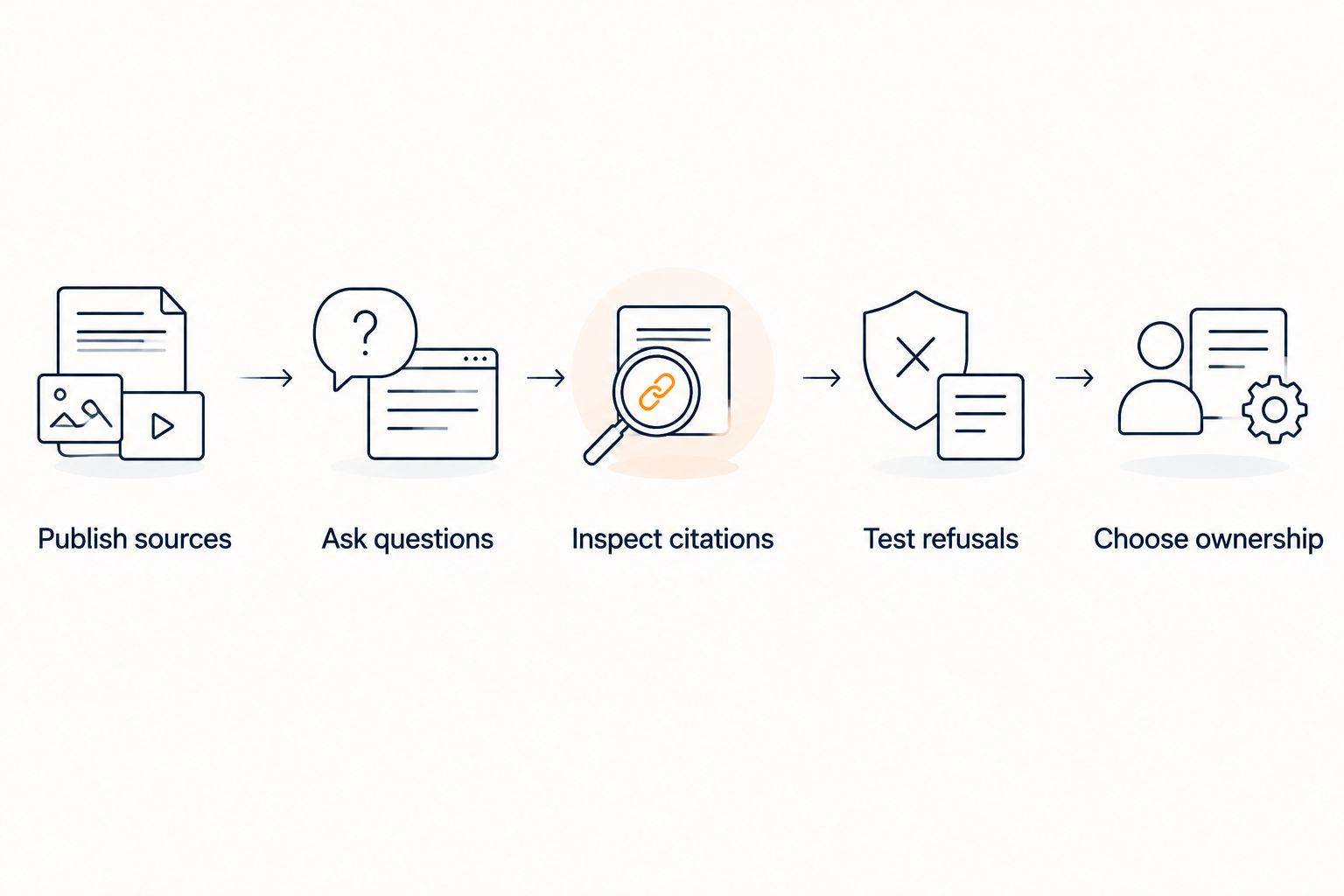
Build a test with 10 sample questions drawn from your actual buyer and member conversations. Treat this as a recommended evaluation exercise, not an accuracy benchmark.
- Publish sources: Select 3 public pages covering your offer, onboarding, and policies. Use material you are comfortable showing to a prospective buyer.
- Ask questions: Include direct questions, awkward wording, and questions whose answers are not published.
- Inspect citations: Read the cited passage. Check that it supports the whole answer, including qualifications.
- Test refusals: Ask for an unpublished discount, an exception, and a guaranteed result. Require an explicit boundary instead of an invented offer.
- Choose ownership: Name the person responsible when a question needs judgment or account access.
For the refusal exercise, a suitable example response is: I can only quote what's published. The published material does not establish that exception. This is a proposed response pattern, not a transcript or a claim about any product's exact wording.
Also introduce 2 conflicting policy statements in a controlled test copy, not your live knowledge base. Check whether the conflict is exposed rather than silently resolved into a confident answer. Remove the conflict before publishing.
Which knowledge base software should you choose?
HelpShelf is best for creators who need cited pre-sale and support answers from their own content. Start there when your main problem is a buyer asking something your course materials already explain.
Choose Notion AI for internal knowledge work, Intercom for inbox-centered conversations, Zendesk for ticket-centered operations, or Help Scout for documentation-led support. Keep the distinctions intact: finding an internal procedure, answering a buyer, and resolving an account problem are different jobs.
For your 2026 decision, write down the primary job in one sentence. If the sentence contains several unrelated requirements, separate them before choosing software.
FAQ
What's the best AI knowledge base software for creators?
The best choice depends on whether you need customer-facing answers, internal knowledge retrieval, or managed support conversations. For creator-facing answers, prioritize citations from your approved content, clear refusal behavior, and a defined owner for unresolved questions.
Is Notion AI enough for a course creator's customer support?
Notion AI fits internal knowledge work, but that does not by itself establish a public customer-support workflow. Evaluate the buyer-facing interface and conversation ownership separately.
What's the difference between a knowledge base and a chatbot?
A knowledge base stores organized information; a chatbot provides a conversational way to ask questions. An answer grounded in that information should preserve the source's conditions rather than invent missing details.
Can a cited answer still be wrong?
Yes, an answer can include a citation that does not support the full claim. Read the linked passage and check whether it establishes every material part of the response.
Can a knowledge assistant make refund exceptions?
A knowledge assistant should not invent refund exceptions. It can explain a published policy, while requests requiring discretion need a responsible human decision.
How should I compare these tools in 2026?
Use the same sample questions and approved source material for each tool. Compare answer support, citation relevance, refusal behavior, and the handling of unresolved requests rather than fluency alone.
Should I put private course content in a public assistant?
Only provide content that the intended audience is authorized to receive. Test access boundaries separately from answer quality before exposing an assistant to prospective buyers.
One last thing
Your most useful test question might be the one your documentation cannot answer. Ask whether a student is guaranteed a particular result, then inspect the response.
A correct refusal protects the boundary between your published offer and a promise you never made. Keep that test when you update your knowledge base—not just when you choose the software.


