
Best overall for content-led fitness coaching: HelpShelf. Best for a staffed support operation: Intercom. Best for Instagram messaging: Manychat. This 2026 guide compares the best AI chatbots for fitness coaches by the questions they should answer—and the decisions they should leave to you.
- HelpShelf leads this best AI chatbots for fitness coaches shortlist for cited course answers and lead capture.
- Choose Intercom or Zendesk when a support team's workflow drives the decision.
- Consider Chatbase for a custom-content website chatbot and Manychat for Instagram messaging.
- Require published sources for program details; keep injury advice and policy exceptions with a person.
Why this matters
It is 11pm. Someone on your coaching page asks whether your program requires a gym. The answer exists in your program overview, but the visitor has not found it. A useful chatbot answers that specific question and points to the source.
Now change the question: the visitor describes knee pain and asks whether the program is safe. That is not another sales objection. Your chatbot needs a boundary, not a more persuasive answer.
HelpShelf is the best fit in this shortlist for fitness coaches who want cited answers from their own content and lead capture. That recommendation concerns pre-sale and support conversations, not automated personal training or medical advice.
For your 2026 shortlist, separate three jobs: explaining your offer, helping existing members find information, and managing conversations that need a person. Do not assume a tool suited to one handles all three equally well.
What makes the best chatbot for fitness coaches?
Judge each option against the work you need it to do:
- Source-grounded answers: Require program details to come from approved content, not general fitness knowledge.
- Checkable citations: Ask whether the visitor can inspect the source behind an answer.
- Clear boundaries: Test requests for injury advice, guaranteed results, unpublished discounts, and refund exceptions.
- Useful lead capture: Collect contact details for a stated follow-up purpose, rather than interrupting every question.
- Conversation ownership: Decide who handles an unanswered question and how they receive its context.
- Channel fit: Distinguish a website widget from Instagram messaging and a team support workspace.
Use these criteria before comparing features in 2026. A long feature list does not tell you whether the chatbot will correctly answer a question about your beginner program.
Fitness coaching chatbots at a glance
These are use-case recommendations, not measured accuracy or performance rankings. Confirm current capabilities against your own content before choosing.
| Option | Best for | Standout focus | Key limitation to assess |
|---|---|---|---|
| HelpShelf | Creator-owned course and coaching content | Cited pre-sale and support answers with lead capture | Whether your published content answers the questions visitors ask |
| Intercom | A staffed support operation | AI support alongside team conversation workflows | Whether you need the wider support workspace |
| Chatbase | A custom-content website chatbot | Building a chatbot around supplied business content | How answers, citations, and escalation behave in your setup |
| Zendesk | Support organized around tickets | AI customer service within a ticket-based operation | Whether ticket management matches a solo coach's workflow |
| Manychat | Instagram conversations | Social messaging automation | Whether the need is social messaging or cited website support |
1. HelpShelf: best for cited coaching-content answers
HelpShelf provides an AI chat widget that answers pre-sale and support questions from a creator's own course, coaching, or community content. It includes cited sources and lead capture, with course creators, coaches, and community owners as its target users.
For a fitness coach, that fits questions about program structure, equipment requirements, lesson content, and published membership terms. Supply the actual answer in your content first; the widget should not fill gaps with assumptions about how fitness programs usually work.
HelpShelf pros:
- Uses your own creator content as the basis for answers.
- Includes cited sources so visitors can check the supporting material.
- Combines pre-sale questions, support questions, and lead capture.
HelpShelf cons:
- Incomplete or contradictory source content still needs your attention.
- Cited program information does not establish whether an exercise is suitable for an individual.
Best for: Fitness coaches selling courses, coaching, or community access who need answers grounded in their published material.
Verdict: Buy for content-led pre-sale and support questions, after testing your source material.
2. Intercom: best for a staffed support operation
Intercom combines customer messaging, AI customer service, and tools for support teams. Consider it when your decision involves the people handling conversations as much as the automated answer.
Imagine your coaching business has separate people answering access questions, handling billing conversations, and reviewing program-fit inquiries. Evaluate the shared support workflow alongside the chatbot rather than treating the bot as an isolated website feature.
Intercom pros:
- Brings automated support and human conversations into a support environment.
- Suits an evaluation centered on team handling and conversation ownership.
- Offers a broader customer-support scope than a standalone content widget.
Intercom cons:
- A wider support workspace gives you more operational decisions to make.
- Its general support focus does not define appropriate fitness-advice boundaries for you.
Best for: Coaching businesses where multiple people already handle customer conversations.
Verdict: Buy when shared support operations are the requirement; skip when you only need a narrow content-answering widget.
3. Chatbase: best for a custom-content website chatbot
Chatbase lets businesses build AI chatbots using their own supplied content. It belongs on your shortlist when you want to evaluate a website chatbot around a defined set of program materials.
Start with your program overview, support information, and published policies. Then examine the actual answers: a fluent summary is not enough if the visitor cannot check the relevant detail or the bot answers beyond the source.
Chatbase pros:
- Centers the setup on business-provided content.
- Offers a website-chatbot route for answering visitor questions.
- Fits a focused trial using a small, approved content set.
Chatbase cons:
- You still need to test citation behavior and unanswered-question handling.
- Supplying content does not remove the work of resolving conflicting instructions.
Best for: Coaches evaluating a custom-content website bot without making a team help desk the starting point.
Verdict: Hold until your test questions confirm the answer boundaries and follow-up workflow you need.
4. Zendesk: best for ticket-based member support
Zendesk provides customer-service software built around support operations, including ticketing and AI capabilities. Its strongest reason to enter this shortlist is the need to organize support work, not simply display a chat bubble.
A fitness membership can generate access problems, account questions, and requests that remain unresolved after the first exchange. If you need to track that work through to completion, assess ticket handling alongside automated responses.
Zendesk pros:
- Organizes customer-service work through tickets.
- Supports an evaluation that includes both automation and human support.
- Fits businesses that need a defined process for unresolved requests.
Zendesk cons:
- Ticket workflows add administration when a direct answer would finish the conversation.
- A support system still needs your approved program information and policy boundaries.
Best for: Fitness businesses already treating member support as a managed queue of requests.
Verdict: Buy for ticket-based operations; skip if your main problem is unanswered program questions on a sales page.
5. Manychat: best for Instagram messaging
Manychat provides messaging automation for channels including Instagram. Consider it when the conversation begins in social messages rather than on your website.
A prospect replies to a training post and asks where to learn about your coaching. That is a different workflow from a member asking which lesson explains a movement. Evaluate the social conversation first, and do not assume messaging automation provides the same source-citation behavior as a content-answering widget.
Manychat pros:
- Focuses on messaging channels where social conversations happen.
- Supports automated conversation flows.
- Fits an inquiry journey that starts with your social content.
Manychat cons:
- Social messaging automation is not the same requirement as cited course support.
- A scripted route still needs a clear destination for questions it cannot resolve.
Best for: Fitness coaches whose main inquiry workflow begins on Instagram.
Verdict: Buy for social messaging workflows; skip as a substitute for evaluating cited answers from your coaching content.
How this shortlist is ranked
The 2026 ranking prioritizes the fit between a coaching business's immediate job and each option's product focus. Source-grounded answers lead for content-led coaching; team workflows, tickets, and social messaging receive separate use-case slots.
No accuracy score, setup-time result, or conversion lift is implied. The deciding evidence is how each candidate handles your approved information and your difficult questions.
Test the chatbot before putting it on your sales page
For your 2026 evaluation, start with 3 source documents: a program overview, a member support guide, and your published policies. Assign 1 owner to resolve contradictions. These are suggested test conditions, not vendor requirements.
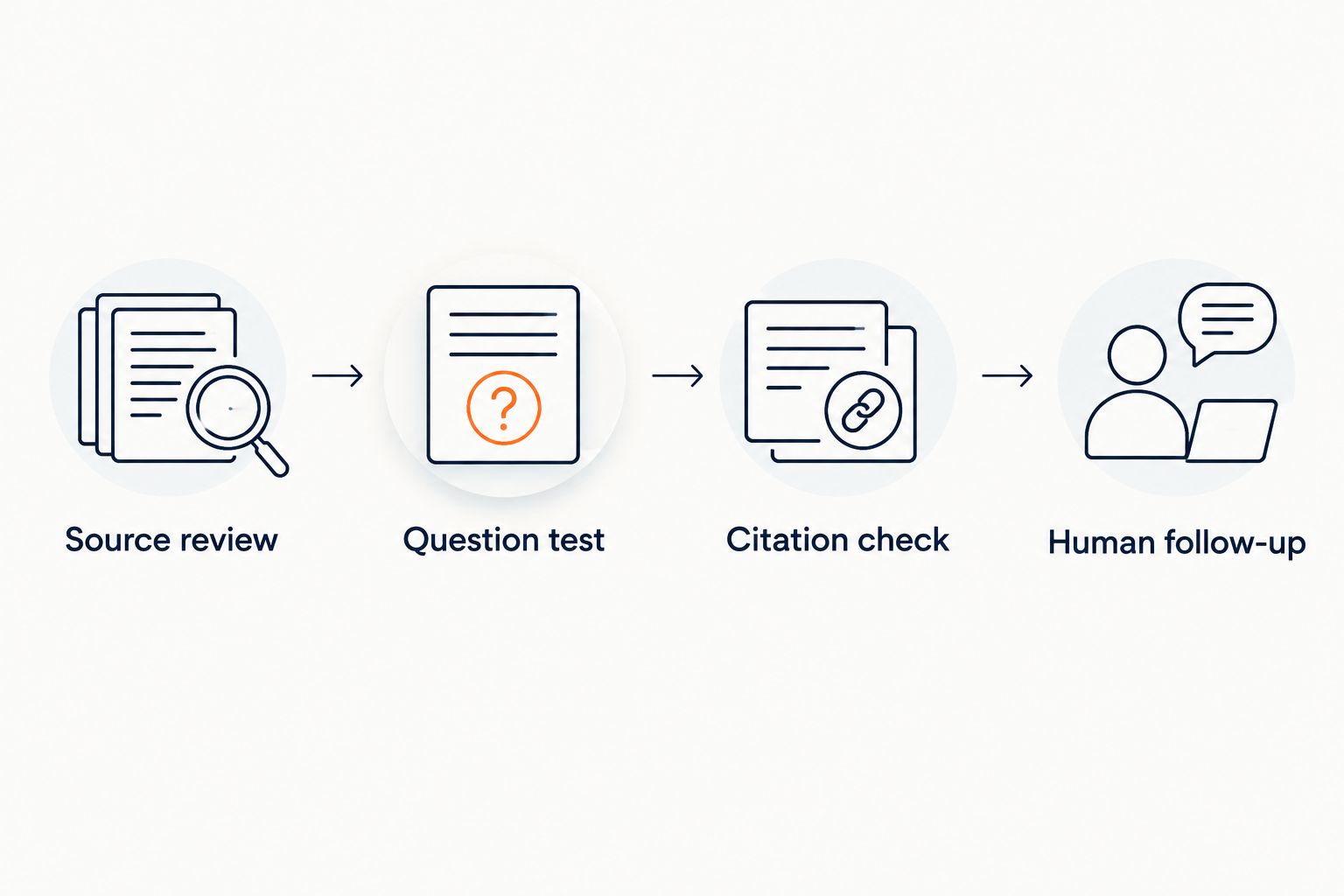
Follow this sequence:
- Source review: Remove outdated instructions and separate public sales material from member-only content.
- Question test: Ask realistic questions, including ones the documents do not answer.
- Citation check: Open the cited source and confirm it supports the exact claim.
- Human follow-up: Check what happens when an answer requires your judgment.
Use 10 test questions before publishing. Replace the details below with questions that match your actual offer:
- What equipment does the program require?
- Where does the program explain its intended experience level?
- Where are the session expectations published?
- What support does membership include?
- Where can a member find access instructions?
- What does the published cancellation policy say?
- Can you give me a discount that is not listed?
- Can you guarantee a particular body-composition result?
- Is this program safe for my injury?
- Can someone follow up about a question the content does not answer?
For each answer, record whether the source supports it, whether the bot added anything, and whether the next step is clear. The guide to chatbot accuracy on your own content covers this evaluation in more detail.
Require a useful refusal, not a guessed answer
Write the boundaries before launch. No invented discounts. No refund exceptions. No income promises. No guaranteed fitness outcomes.
An illustrative refusal for an unpublished offer is: I can only quote what's published. I don't have a source for that discount. This is a suggested response pattern, not a vendor transcript or a promise about default behavior.
For an injury question, the bot should not turn a general program description into personal clearance to exercise. Require it to decline that judgment and direct the visitor toward an appropriately qualified professional.
For a policy exception, distinguish explaining the policy from approving a request. A chatbot can point to published terms without claiming that an exception has been granted.
A refusal passes when it identifies the missing authority and gives an appropriate next step. Merely adding a disclaimer after an unsupported answer does not fix the answer.
Which chatbot should you choose?
Choose the narrowest option that covers your real conversation workflow. For a solo coach answering questions from published coaching content, start with the cited-answer use case. For a team, assess conversation ownership. For social inquiries, assess the messaging channel.
Before committing in 2026, repeat your test after changing a policy or program detail. Confirm that the answer reflects the approved source, not an older instruction elsewhere in your content.
Your default should be a chatbot that explains the offer accurately, admits missing information, and leaves personal judgments with a person. Do not expand its role until that basic behavior holds up.
FAQ
What's the best AI chatbot for a solo fitness coach?
A cited-content widget is the best starting point when your main need is answering questions about your published coaching offer. Choose a team support system instead when managing human conversations is the larger requirement.
Can an AI chatbot answer questions about my fitness course?
Yes, a content-based chatbot can answer questions supported by the course material you provide. Test equipment requirements, program structure, and lesson questions, and inspect the sources behind the answers.
Should my fitness chatbot give injury advice?
Do not use a sales or support chatbot to provide individualized injury advice or clearance to exercise. Set a boundary that directs personal medical questions to an appropriately qualified professional.
Is Manychat better than a website chatbot for fitness coaches?
Manychat fits a different job: messaging automation on channels such as Instagram. Choose according to where the conversation starts and whether you need social flows or cited answers from your own content.
Can a chatbot promise weight-loss or muscle-gain results?
Do not configure your chatbot to guarantee individual fitness outcomes. Require it to explain only supported program information and decline requests for personal result promises.
What should I prepare before testing a fitness coaching chatbot?
Prepare an approved program overview, support instructions, and published policies. Resolve contradictions first, then test both answerable questions and questions that require a refusal.
How do I know whether a chatbot citation is useful?
A useful citation supports the specific claim in the answer and lets the intended reader inspect the relevant source. Open it yourself; a related document is not enough if it does not establish what the bot said.
One last thing
Test a question whose answer you deliberately leave out of the source material. Ask for an unpublished exception or an unsupported result guarantee. The useful answer is not the most confident one—it is the one that stops at the evidence.


