

HelpShelf is the best fit for Discord community owners who need cited pre-sale answers on a website, not a confirmed Discord-native bot. For an AI chat widget for Discord community support in 2026, choose a custom Discord bot when answers must appear inside channels, and human moderation when a question requires judgment.
- HelpShelf fits website-based pre-sale questions, cited answers, and lead capture for creators running Discord communities.
- Choose an AI chat widget for Discord community support by answer location first: website or Discord channel.
- A custom Discord bot is the in-server route, but citations and permission controls need explicit implementation.
- Keep moderators responsible for refund exceptions, account disputes, and decisions your published content cannot answer.
Why this matters
At 11 p.m., someone asks whether your community includes feedback on their work. A website visitor needs an answer before joining; an existing member needs help finding the relevant instructions. Those are different conversations, even when the wording looks similar.
HelpShelf answers pre-sale and support questions using a creator’s own content, provides cited sources, and captures leads. That makes it relevant to the website side of a Discord community business. It does not establish native Discord installation, channel access, or member-role synchronization.
Choose the answer location before choosing the product. A website widget does not become a Discord bot because your customers use Discord, and an in-server bot does not automatically handle questions from people who have not joined.
What makes the best chat setup for a Discord community?
Use these criteria for your 2026 shortlist. They separate a useful answer system from a chat box that simply produces text.
- Answer location: Your setup must meet people where they ask: a public website, a member page, or a Discord channel.
- Source grounding: Answers should follow your approved curriculum, community rules, and published offer details rather than fill gaps with guesses.
- Inspectable citations: A reader should be able to check the source behind an answer. Test whether that reader has permission to open it.
- Permission boundaries: Public prospects must not receive private member content. Channel access and source access require separate checks.
- Refusal behavior: Missing information should produce a clear limit, not an invented discount, refund exception, or income promise.
- Human ownership: Someone must own unanswered questions, account-specific requests, and corrections to outdated content.
Lead capture matters when the visitor is still deciding whether to join. Inside an existing community, identity, access, and moderation become more relevant. Do not treat these as interchangeable requirements.
Discord community chat options at a glance
These are three implementation choices, not three interchangeable software products. The ranking follows the question location and the kind of answer needed.
| Option | Best for | Standout feature or design goal | Key limitation |
|---|---|---|---|
| HelpShelf | Website-based pre-sale and content questions | Answers from creator content with citations and lead capture | Native Discord operation is not established by the supplied product information |
| Custom Discord bot | Questions that must stay inside Discord | An in-server interaction built around your requirements | Source retrieval, citations, permissions, and maintenance need implementation |
| Human moderation with a published FAQ | Exceptions, disputes, and contextual decisions | A person can review circumstances and take responsibility | Requires human attention; it is not an automated answer widget |
For your 2026 evaluation, resist ranking every option by how conversational it sounds. A fluent answer in the wrong place, or based on material the reader should not access, fails the actual job.
1. HelpShelf: best for website-based pre-sale answers
HelpShelf is an AI chat widget for creators who want answers grounded in their course, coaching, or community content. It supports cited answers and lead capture, making it a fit for questions asked before someone joins a Discord community.
A prospect on your website asks whether a lesson covers a particular topic. The useful response identifies what your published material says and cites its source; it does not infer that the community includes personal coaching because the visitor wants it.
HelpShelf pros
- Uses the creator’s own content for pre-sale and support answers.
- Provides cited sources rather than an answer with no reference.
- Captures leads from people asking questions before purchase.
HelpShelf cons
- The supplied product information does not establish a native Discord bot or channel integration.
- Content-grounded answers still depend on what you have documented; missing terms need an owner’s decision.
Best for: A creator whose Discord community has a website where prospects ask about curriculum, membership scope, or published policies.
Before choosing this route, identify the public material a prospect is allowed to see. Separate that from member-only lessons, private discussions, and individual account information. A citation is only useful when its audience and access level are appropriate.
Verdict: Buy for website-based cited answers and lead capture; hold if native Discord operation is a requirement.
2. Custom Discord bot: best for in-server questions
A custom Discord bot is the route to evaluate when members need to ask and receive answers inside Discord. Discord supports applications and bot interactions, but your implementation determines the knowledge sources, response rules, and access boundaries.
Treat citations as a requirement, not an automatic property of a bot. Specify how the bot finds approved material, identifies the source, and responds when it cannot support an answer.
Custom Discord bot pros
- Keeps the interaction inside Discord rather than directing every member to a website.
- Lets you specify the channels and interactions your implementation should support.
- Gives you control over the source-selection and refusal rules you commission or build.
Custom Discord bot cons
- Requires development, configuration, and ongoing ownership.
- Does not inherently include accurate citations, lead capture, or correct permission handling.
- Needs testing when source access, channel permissions, or community rules change.
Best for: A community owner with an explicit in-server requirement and someone responsible for building and maintaining the implementation.
Write the acceptance criteria before commissioning the bot. For example, a member-only answer must not appear in a public channel, and an unsupported policy question must not produce a plausible-sounding exception.
The guide to answering questions in a Discord community covers the placement question in more detail. Keep website delivery and in-server delivery as separate requirements during evaluation.
Verdict: Buy a custom implementation only when in-server delivery justifies the development and maintenance work.
3. Human moderation with a FAQ: best for exceptions
Human moderation with a published FAQ is not an AI widget. It belongs in this comparison because some community questions require a decision rather than a retrieved answer.
A member asks for an exception to your published terms. An answer system can explain those terms, but permission to override them belongs to someone you authorize. Keep the distinction visible to members.
Human moderation pros
- Gives someone responsibility for disputes and account-specific decisions.
- Allows follow-up questions when the original request lacks context.
- Helps identify repeated questions that deserve clearer documentation.
Human moderation cons
- Requires a person to read and handle the request.
- Repeats manual work when routine answers remain undocumented.
- Depends on moderators applying the same published rules consistently.
Best for: Refund exceptions, access disputes, sensitive moderation issues, and requests that need an authorized decision.
Use a public FAQ for repeatable information and a defined moderator route for exceptions. Do not make members argue with an automated answer to reach a person, and do not let a moderator’s one-off decision silently become a general policy.
Verdict: Hold human moderation as the decision layer; skip it as the sole answer system when repeat questions dominate your workload.
How we ranked these options
The ranking uses fit, not an unsupported performance score. For this 2026 guide, the criteria are answer location, source grounding, citations, permission boundaries, refusal behavior, and human ownership.
The website widget ranks first for pre-sale questions because its stated capabilities match that job. A custom bot takes the in-server slot because that is a separate implementation requirement. Human moderation takes the exception-handling slot because retrieved information and authorized decisions are different tasks.
No option wins every slot. Treat the table as a decision tree, not evidence that one interface replaces your entire support process.
Test the answer path before you launch
Use this sequence for your 2026 rollout. Run it from the visitor’s or member’s position, not only from an administrator account.
- Question location: Ask from the actual website or Discord channel where the interaction will happen.
- Approved source: Identify the document that is allowed to support the answer.
- Cited answer: Check whether the response matches the document and whether the reader can open the citation.
- Human decision: Route unsupported or exceptional requests to a person with the right authority.
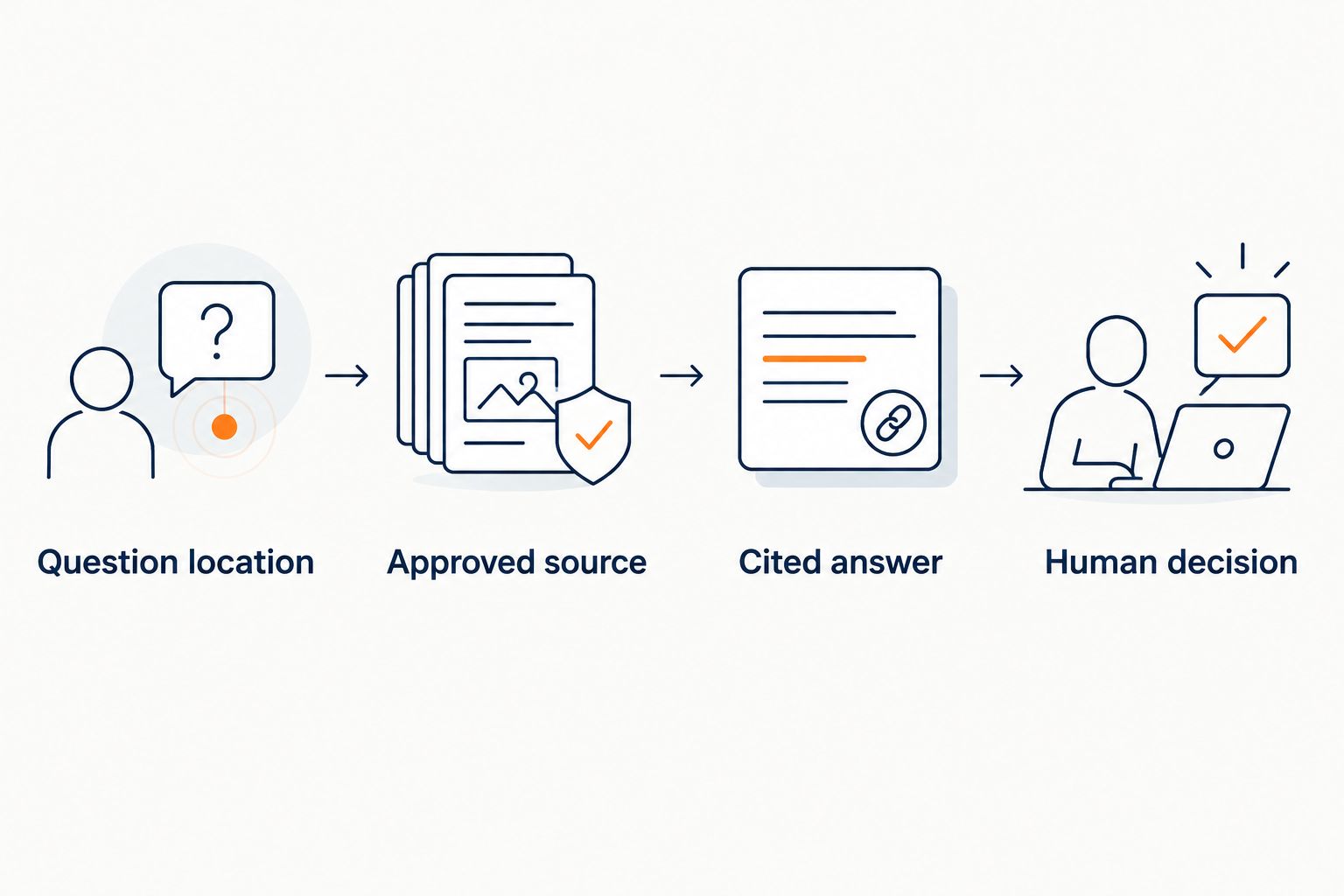
A source link is not proof that the response follows the source. Open it, read the relevant passage, and check the exact claim. Also test a visitor who lacks member access; an administrator’s successful test does not establish the public experience.
Use three test questions
Spend 15 minutes on this acceptance exercise before exposing the setup to members. These are proposed test cases, not measured product results.
- Published fact: Ask whether your offer includes something explicitly covered in an approved document. Require a matching answer and a relevant citation.
- Missing fact: Ask about an inclusion your material never mentions. Require a clear statement that the information is not published.
- Exception request: Ask for a discount or refund exception absent from your terms. Require a refusal to invent permission and a defined human route.
A suitable refusal explains the boundary: the system can quote published terms, but it cannot create an exception. Do not reward a longer answer when a shorter refusal is correct.
Check the follow-up, too
After an unanswered question, inspect what reaches the person responsible. The useful context is the original question, the relevant published material, and the unresolved point—not an automated conclusion presented as a settled decision.
For lead capture, review what you ask the visitor to submit and how your team will use it. Collecting contact details does not, by itself, answer the visitor’s question or assign ownership of the next response.
Which option should you choose?
Choose HelpShelf for an AI chat widget serving Discord community prospects on your website. Its stated fit is creator-content answers, citations, and lead capture—not a confirmed native Discord installation.
Choose a custom Discord bot when staying inside Discord is non-negotiable. Keep human moderation responsible for exceptions regardless of which automated route you choose. Your 2026 shortlist should start with these boundaries, before demos or feature counts.
If you are undecided, write down where your unanswered questions arrive. Start with the interface that serves that location, then test the published-fact, missing-fact, and exception cases before expanding its role.
FAQ
What's the best AI chat widget for a Discord community?
HelpShelf is a fit for website-based pre-sale and support questions using creator content, citations, and lead capture. If answers must appear inside Discord, evaluate a native bot implementation separately rather than assuming a website widget supports it.
Can a website chat widget answer inside Discord channels?
A website widget does not establish Discord channel support. Confirm an explicit Discord integration or evaluate a custom bot for in-server interactions.
Is a custom Discord bot better than a website widget?
A custom Discord bot fits questions that must stay inside Discord; a website widget fits questions asked on your website. Choose by interaction location, then evaluate sources, citations, and permission handling.
Can an AI chatbot answer questions from private community content?
Private content requires explicit source-access and audience controls. Test that a public visitor cannot receive member-only information and that each citation is appropriate for the person asking.
What should a chatbot do when my content doesn't answer the question?
The chatbot should state that the published material does not answer the question and use a defined human route. It should not invent an inclusion, discount, refund exception, or income promise.
Can an AI chat widget replace Discord moderators?
An answer widget is not a substitute for authorized moderation decisions. Keep people responsible for disputes, exceptions, sensitive requests, and account-specific judgment.
How should I test a Discord community chatbot before launch?
Test a published fact, a missing fact, and an exception request from the actual user interface. Check source accuracy, citation access, refusal behavior, and who receives the unresolved question.
One last thing
Add a deliberate information gap to your launch test. Ask about a benefit you have never published, then see whether the answer system admits the limit.
A correct answer to a documented question tests retrieval. A correct refusal tests whether the system respects what your offer does not say. You need both before letting it speak for your community.


