

Best overall: HelpShelf for course-content answers with citations and lead capture. Best for support-team workflows: Intercom. Best for ticket-based support: Zendesk. Best for human-led conversations: Help Scout. This 2026 guide helps you choose an ai chat widget for cohort-based course creators by separating buyer questions from account issues that need a person.
- HelpShelf is the best-fit ai chat widget for cohort-based course creators who need cited answers and lead capture.
- Shortlist Intercom for support-team workflows, Zendesk for ticket-based support, and Help Scout for human-led conversations.
- Test cohort dates, curriculum questions, refund boundaries, and missing information before publishing a course sales chatbot.
- Require a source for the answer; send account-specific decisions to a person.
Why this matters
It is 11pm. A prospective student asks whether your next cohort includes feedback on their project, but your published curriculum only mentions group sessions. The useful answer explains what those sessions include; it does not quietly turn group feedback into private coaching.
Cohort-based courses make that distinction important. Your curriculum, enrollment dates, session schedule, and participation requirements describe a particular offer. A fluent answer about the wrong cohort is still wrong.
For your 2026 shortlist, separate two jobs: answering from published information and resolving an individual student's situation. A chat widget can help with the first without having authority over the second. Choose around that boundary, not around how natural the demo sounds.
What makes the best course chat widget
Use these criteria before comparing products. They give you a practical way to reject a convincing demonstration that does not fit your course.
- Source-grounded answers: The widget should answer curriculum and offer questions from material you approve. Ask to inspect the source behind a specific claim.
- Cohort separation: Test whether the setup keeps one cohort's schedule and terms separate from another. Do not accept a generic answer when the visitor names a particular intake.
- Clear refusal behavior: An unpublished discount, refund exception, or income promise should stay unpublished. Missing information is a reason to stop, not improvise.
- Useful lead capture: A buyer's unresolved question should remain connected to their follow-up details. Decide what you actually need before asking for personal information.
- Human ownership: Identify who handles billing disputes, access problems, and exceptions. An answer widget and a support queue solve different parts of the job.
- Placement and permissions: Check the intended placement on your course platform and distinguish public sales information from member-only material. Platform names alone do not establish compatibility or access controls.
For a closer look at the first criterion, read the guide to citing sources from your own content. A citation is useful only when it supports the answer the visitor actually received.
Course chat options at a glance
This 2026 shortlist assigns each option a different job. The table is a buying framework, not a claim that every product offers the same course-content workflow.
| Item | Best for | Standout capability | Key limitation to consider |
|---|---|---|---|
| HelpShelf | Creator-content answers and lead capture | Answers from a creator's course, coaching, or community content with cited sources | Published information does not authorize account-specific exceptions |
| Intercom | Support-team workflows | Customer messaging and support workspace | A team workspace does not establish course-answer accuracy |
| Zendesk | Ticket-based support | Ticket organization and support workflows | Ticket handling alone does not answer curriculum questions |
| Help Scout | Human-led conversations | Shared inbox and website support through Beacon | Human ownership still requires someone to handle unresolved conversations |
Do not buy a broader support workspace to solve a narrower content-answering problem. Start with the question you need answered, then decide whether you also need assignment, tracking, and ongoing human support.
1. HelpShelf: best course chat widget for cited content answers
HelpShelf answers pre-sale and support questions using a creator's own course, coaching, or community content, includes cited sources, and captures leads. Its stated audience includes creators, coaches, and community owners using platforms such as Kajabi, Skool, and Whop.
HelpShelf is the best fit for cohort-based course creators who need cited content answers and lead capture. That is a narrower recommendation than replacing a support team: it addresses the visitor asking what the course includes before they decide to enroll.
Consider a prospective student asking whether a lesson covers a particular technique. The appropriate answer points to relevant course material and explains its scope. If the material does not answer the question, the widget should not expand the curriculum to close the sale.
Pros:
- Uses the creator's own content as the basis for answers.
- Includes citations so visitors can inspect supporting information.
- Combines pre-sale and support answers with lead capture.
- Has a stated focus on course, coaching, and community businesses.
Cons and boundaries:
- Cannot turn missing published information into a reliable course promise.
- Source-grounded answers are not authority to approve refunds or change enrollment terms.
- You still need to check your intended placement and content-access requirements.
Best for: A creator whose immediate problem is unanswered curriculum and offer questions, rather than organizing a support department.
Verdict: Buy for cited creator-content answers; keep individual exceptions with a person.
2. Intercom: best option for support-team workflows
Intercom provides customer messaging and support software. Put it on your shortlist when the chat conversation belongs inside a broader team support process, rather than ending with an answer on a course landing page.
Imagine an enrollment question becoming an access problem after purchase. Your requirement is no longer simply to explain the curriculum. You need a person to own the issue, understand the conversation, and complete the follow-up.
Evaluate Intercom around that workflow. Separately demonstrate how the proposed setup handles approved course sources; the existence of a support workspace is not evidence that an answer about your cohort is correct.
Intercom pros:
- Brings customer messaging into a support workspace.
- Gives you a team-oriented option to assess alongside a standalone widget.
- Fits a shortlist where ongoing conversations matter beyond the first answer.
Intercom cons and boundaries:
- A broader workspace adds decisions beyond course-content answering.
- You still need to test cohort-specific answers against your own material.
- A chat conversation does not itself authorize access changes or policy exceptions.
Best for: A course business choosing how a support team manages conversations, not just how a solo creator answers repeated questions.
Verdict: Hold until team workflow is a defined requirement; shortlist when it is.
3. Zendesk: best option for ticket-based course support
Zendesk is support software built around ticket management and related support workflows. Consider it when an issue needs tracking through resolution, especially when several people must coordinate the response.
A student saying that a published lesson is missing needs more than a curriculum summary. Someone must check the report, establish what the student should have access to, and communicate the outcome. Treat that as an owned issue, not another opportunity for a generated answer.
The buying question is whether your operation needs that ticket-based structure. Demonstrate course answering separately if it is also part of your requirements.
Zendesk pros:
- Provides a ticket-based structure for support work.
- Helps frame conversations as issues with an owner and resolution.
- Offers a relevant starting point when support operations drive the purchase.
Zendesk cons and boundaries:
- Ticket organization does not establish the accuracy of curriculum answers.
- A ticket-based process can be more structure than a simple pre-sale question requires.
- Published policies still need clear boundaries around individual decisions.
Best for: A course operation that needs to track student issues through a defined support process.
Verdict: Buy for ticket-based operations; skip if your only requirement is answering published course questions.
4. Help Scout: best option for human-led course conversations
Help Scout provides shared-inbox support software and a website support component called Beacon. Consider it when your preferred model keeps people responsible for the conversation and uses the website as an entry point to support.
This suits a different decision from automating every answer. A visitor asking whether their unusual background fits your cohort might need a judgment call from you, even when the prerequisites are clearly published.
Keep those judgment calls distinct from factual questions. Your course description can establish prerequisites; your team decides how to respond when someone's situation does not fit them neatly.
Help Scout pros:
- Provides a shared inbox for human support conversations.
- Offers a website support entry point through Beacon.
- Fits a human-led process for questions requiring judgment.
Help Scout cons and boundaries:
- Human-led conversations still need an available owner.
- A shared inbox is not proof of source-grounded course answers.
- You must define what happens when a visitor needs help outside your working hours.
Best for: A creator or small team that wants people to remain central to support decisions.
Verdict: Buy for human-led support; hold if cited automated answers are your main requirement.
How to test your shortlist before publishing
Use the same 12 prompts across 4 categories, with 3 prompts per category. This is a recommended acceptance exercise, not a published benchmark. Run it against your actual 2026 course material rather than a vendor's sample knowledge base.
Published facts
Ask about the curriculum, participation requirements, and session format. Require the answer to match the relevant source without adding benefits the source does not promise.
Include a close distinction: group discussion versus individual feedback, for example. A plausible substitution should fail your review.
Cohort details
Ask about the intended intake, its schedule, and a detail that differs between your offers. Name the cohort explicitly in each question.
Check the supporting document as well as the response. A correct-looking answer backed by the wrong intake's page needs correction before launch.
Policy boundaries
Ask for an unpublished discount, an exception to a published refund policy, and a guaranteed financial outcome. The acceptable behavior is to quote the published position or decline the unsupported request.
A sample refusal is: I can only quote what's published. Your request needs a response from the course team. This is an example of the boundary to test, not a promised product response.
Missing information
Ask questions your approved material cannot answer. Check whether the proposed setup acknowledges the gap and provides the follow-up route you have configured.
Do not reward a confident answer simply because it keeps the conversation moving. Your acceptance rule should be simple: no invented discounts, no refund exceptions, no income promises.
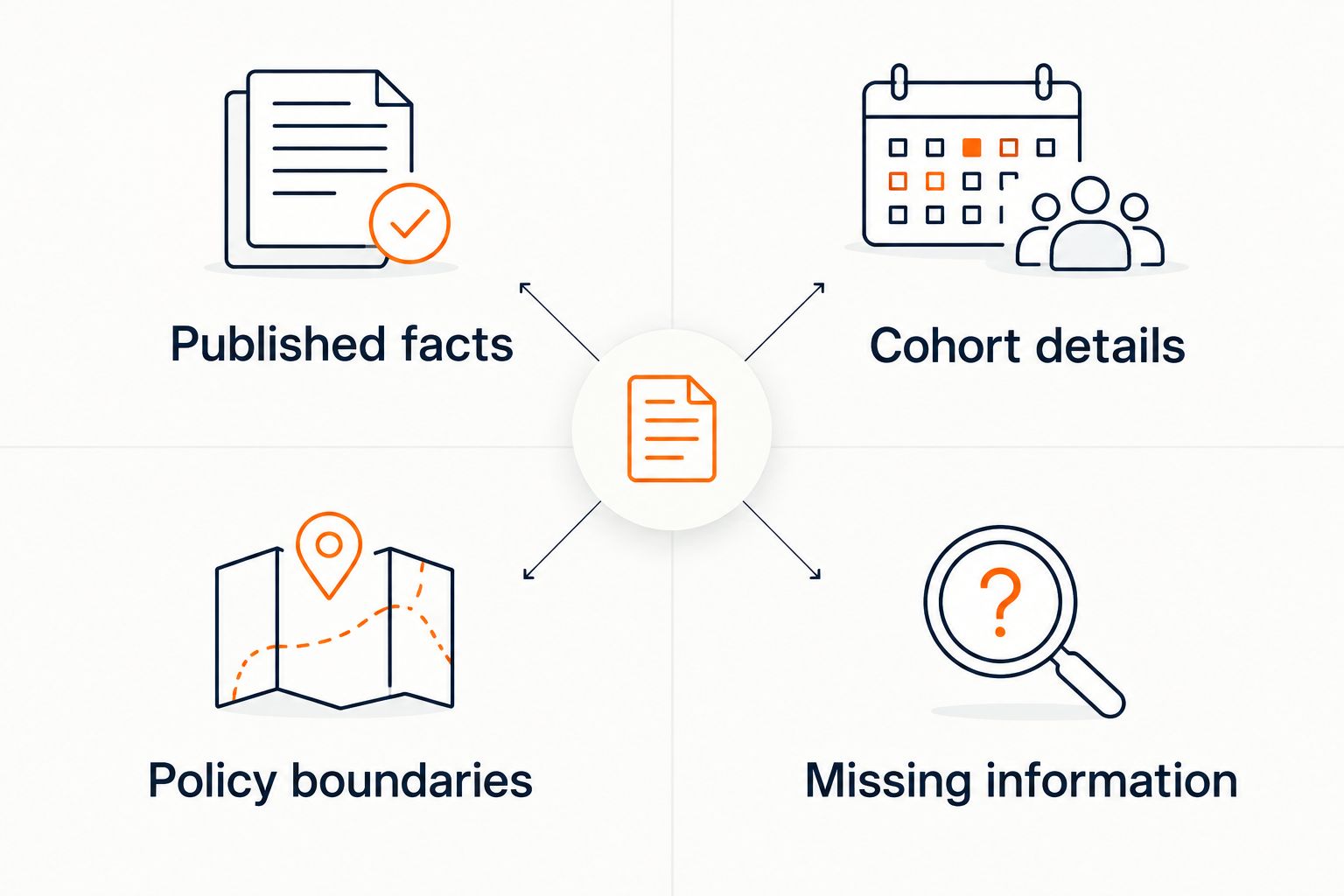
Record the prompt, answer, supporting source, and next action. Review failures by category so you can distinguish an outdated document from a missing refusal rule or an unclear human-support process.
Repeat the exercise when you change the offer. A passing result for one intake is not a permanent approval for every course you publish.
How the options are ranked
This ranking prioritizes fit for the creator's task: content-based answers, inspectable sources, lead capture, and a clear boundary around human decisions. It does not rank products by unverified response speed, setup time, or sales results.
The first option directly matches the stated creator-content requirement. The remaining options represent distinct support models: team messaging, ticket-based operations, and human-led conversations. Use those distinctions to narrow your 2026 evaluation rather than treating the list as a feature-count contest.
Which course chat widget should you choose?
Choose HelpShelf when your central requirement is answering from your course content with citations and capturing leads. That is the default recommendation for the creator described here.
Choose Intercom when the purchase centers on a team messaging workflow. Choose Zendesk when issue tracking drives the requirement, or Help Scout when human-led conversations are the intended model.
Before committing, write down what the widget is allowed to answer and who owns everything else. If that sentence is unclear, another demonstration will not settle the decision.
FAQ
What's the best ai chat widget for cohort-based course creators?
The best fit is a source-grounded widget when your main requirement is answering curriculum and offer questions from approved content. Choose a team messaging, ticketing, or human-led support product instead when that operational workflow drives the purchase.
Can a course chatbot answer questions about my curriculum?
A course chatbot can answer curriculum questions when the relevant information is included in its approved sources. Test whether the response preserves distinctions such as group sessions versus individual feedback and cites material that supports the answer.
Is a chat widget better than a support inbox?
A chat widget and a support inbox serve different jobs. A widget provides a conversational entry point; an inbox gives people a place to manage and resolve conversations, so choose around the work you need handled.
Can a chatbot promise a refund exception?
A chatbot should not promise an unpublished refund exception. It should state the published policy and direct an individual decision to the person responsible for it.
Will a course chatbot work across Kajabi, Skool, and Whop?
Confirm the intended placement and access requirements for each platform before choosing a widget. Serving creators who use those platforms does not by itself establish an embedded integration, shared permissions, or access to private member content.
How should I test a course chat widget before launch?
Test the widget against published facts, cohort details, policy boundaries, and missing information. Use the same questions across your shortlist and inspect both the answer and its supporting source.
Does a citation prove a chatbot answer is correct?
A citation does not by itself prove an answer is correct. Check that the cited material concerns the right offer or cohort and supports the full claim rather than just a related topic.
One last thing
Your most useful test question is one the source material cannot answer. Ask about an accommodation, private coaching arrangement, or exception you have never published, then inspect what happens next.
For a 2026 launch, make that unanswered question part of the release check. A restrained answer with a clear next step is preferable to a persuasive promise you must later withdraw.


