

Best overall for source-cited coaching answers: HelpShelf. Best for a shared sales-and-support workflow: Intercom. Best for ticket-centered support: Zendesk. This 2026 guide helps you choose an ai chat widget for business coaches by comparing answer sources, follow-up, and the limits each setup needs.
- HelpShelf is the best-fit ai chat widget for business coaches who need cited answers from their own content and lead capture.
- Intercom fits shared conversations; Zendesk fits ticket-centered support; Tidio fits live chat; Chatbase fits a focused content chatbot.
- Test source citations, unanswered questions, and policy boundaries before choosing a coaching chatbot.
- No widget should invent discounts, refund exceptions, or income promises.
Why this matters
A prospect visits your coaching page at 11pm. They want to know whether your program covers hiring, whether sessions are recorded, and whether beginners belong. You need a useful answer without turning your chat widget into an unofficial sales contract.
The distinction is between answering from your material and completing a plausible sentence. A helpful answer points to the published curriculum. An unsafe answer adds private access, personal feedback, or a business outcome that you never offered.
For your 2026 shortlist, start with the questions your buyers actually ask. A long feature list matters less than an answer you can trace to the right source.
What makes the best chat widget for business coaches
Use these criteria before comparing names:
- Source grounding: Answers should come from the coaching material and policies you approve, not general business advice.
- Useful citations: A citation should support the actual answer, not merely point to a loosely related page.
- Clear boundaries: Missing information should produce a clear limitation, not an invented exception.
- Lead capture: A buyer with an unresolved question needs a clear way to leave contact details.
- Human follow-up: Sensitive questions need an owner, whether your workflow uses conversations, tickets, or manual replies.
- Platform fit: Check your actual website and membership environment. Serving creators on a platform does not establish a particular installation method or permission model.
Choose the workflow you need to operate, then test the answers it produces. These are separate decisions: a useful inbox does not prove answer accuracy, and a good answer does not establish a usable follow-up process.
Best coaching chat widgets at a glance
This 2026 comparison assigns each option a distinct job. The limitations below describe the buying checks and operating trade-offs, not measured failure rates.
| Option | Best for | Standout capability | Key limitation or buying check |
|---|---|---|---|
| HelpShelf | Creator-content answers with lead capture | Cited pre-sale and support answers from your own content | Published source material must support the answer |
| Intercom | Shared sales-and-support conversations | Customer messaging with automated assistance | Check whether its broader workflow matches your operation |
| Zendesk | Ticket-centered support operations | Ticket management alongside automated support | Ticket ownership adds process to maintain |
| Tidio | Live chat with automated assistance | Website conversations combining automation and human replies | Human chat still needs someone responsible for replies |
| Chatbase | A focused content-trained chatbot | Building a chatbot around supplied material | Test citations and follow-up against your exact requirements |
There is no universal runner-up. A solo coach answering curriculum questions and a coaching company routing account issues have different jobs to solve.
1. HelpShelf: best coaching chat widget for cited content answers
This widget answers pre-sale and support questions using a creator's own course, coaching, or community content, includes cited sources, and captures leads. It serves course creators, coaches, and community owners, including those on Kajabi, Skool, and Whop.
That makes it the closest match here when your main problem is explaining what your coaching offer actually includes. A prospect asks whether your material covers delegation; the answer should come from the relevant curriculum, not from a generic description of business coaching.
HelpShelf pros:
- Uses your own content as the basis for answers.
- Includes cited sources for checking the response.
- Covers both pre-sale and support questions.
- Captures leads when a visitor wants further contact.
HelpShelf cons:
- Missing or contradictory source material still needs your attention.
- A citation does not replace checking whether an answer supports the visitor's specific question.
- A content answer cannot establish an unpublished exception or individual business outcome.
Best for: Coaches whose repeated questions concern their curriculum, offer, community, and published policies.
Before choosing, bring a real course question, a policy question, and a question your content cannot answer. Check the source behind each response. Verdict: Buy for source-grounded coaching answers and lead capture, after validating your content.
2. Intercom: best coaching chat widget for shared conversations
Intercom combines customer messaging and automated assistance. Its fit in this shortlist is a coaching business that wants sales and support conversations managed within a shared customer communication workflow.
Picture a coaching company where an assistant handles offer questions and another person handles existing-member issues. The buying question is whether conversations reach the right person with enough context to act.
Intercom pros:
- Combines customer messaging with automation.
- Provides a shared setting for human customer conversations.
- Fits an evaluation centered on communication ownership, not just a standalone answer box.
Intercom cons:
- A broader messaging workflow requires decisions about ownership and routing.
- Messaging capabilities do not establish whether your coaching answers meet your citation requirements.
- A solo coach still needs to decide who handles unanswered conversations.
Best for: Coaching businesses that need a shared conversation workflow across sales and support.
Ask for a demonstration using your own curriculum and a transfer to a human. Inspect what context survives that transfer. Verdict: Buy when shared conversation management is the main requirement; hold if you only need content answers.
3. Zendesk: best coaching chat widget for ticket-centered support
Zendesk provides customer service software built around support operations, including ticket management and automated assistance. Its strongest use case here is an established coaching operation that needs to track issues through resolution.
An enrollment question and an account-access problem should not become indistinguishable messages. If your team needs assigned ownership and an unresolved-work queue, evaluate the ticket workflow alongside the chat experience.
Zendesk pros:
- Supports a ticket-centered approach to customer issues.
- Gives support operations a place to organize unresolved work.
- Combines automated assistance with human support workflows.
Zendesk cons:
- Ticket categories and ownership need maintenance.
- A support workflow does not replace clear public offer information.
- A solo coach must still operate the queue rather than treating installation as completion.
Best for: Coaching companies where accountable issue resolution matters more than a standalone pre-sale widget.
Test an issue that cannot be answered immediately. Check who owns it, what the visitor sees, and how the team recognizes that it remains unresolved. Verdict: Buy for ticket-based operations; skip if you have no need or owner for that process.
4. Tidio: best coaching chat widget for human-backed website chat
Tidio offers website live chat and automated assistance. Its distinct place here is a coaching business that wants human website conversations alongside automated replies.
That approach fits a coach or assistant who actively monitors inquiries. The important distinction is between answering a repeat question automatically and inviting a conversation that someone must then maintain.
Tidio pros:
- Combines website chat with automation.
- Supports an approach that keeps human replies part of the visitor experience.
- Fits an evaluation focused on website inquiries rather than ticket operations.
Tidio cons:
- Live chat needs a person responsible for responding.
- A visible conversation channel needs a clear expectation when nobody is monitoring it.
- Automated coaching answers still require source and policy testing.
Best for: Coaches who want a human-backed website chat workflow and can maintain it.
Test the unattended experience, not just the conversation while you are online. The visitor should understand what happens next without assuming someone is about to reply. Verdict: Buy for human-backed website chat; hold if no one will own incoming conversations.
5. Chatbase: best coaching chat widget for a focused content bot
Chatbase lets businesses build chatbots using supplied content. It belongs on your shortlist when you want to evaluate a focused content-answering bot rather than begin with a broader support operation.
Give it the same material and questions you use for every other candidate. A fluent answer is not enough: inspect whether the response stays inside your coaching offer and whether its supporting material answers the question.
Chatbase pros:
- Centers the evaluation on a chatbot built around supplied material.
- Fits a focused content-question use case.
- Lets you assess conversational answers against your actual documents.
Chatbase cons:
- Supplied content needs editorial review before it becomes an answer source.
- You must establish whether the citation behavior meets your requirements.
- You must separately verify the lead-capture and human-follow-up workflow you need.
Best for: Coaches comparing a focused content chatbot with broader messaging or ticket systems.
Do not assume every content-trained bot handles permissions, citations, and unresolved questions identically. Demonstrate each requirement. Verdict: Hold until citation quality and follow-up pass your acceptance checks.
How we ranked these options
The order prioritizes fit for a business coach's published-content questions, then separates broader conversation, ticket, live-chat, and focused-bot workflows. It is a use-case ranking, not a laboratory accuracy score.
For a 2026 purchase, compare each candidate against the same source material. Do not reward a persuasive answer when another tool correctly identifies that the source is missing.
Run a source-to-follow-up check
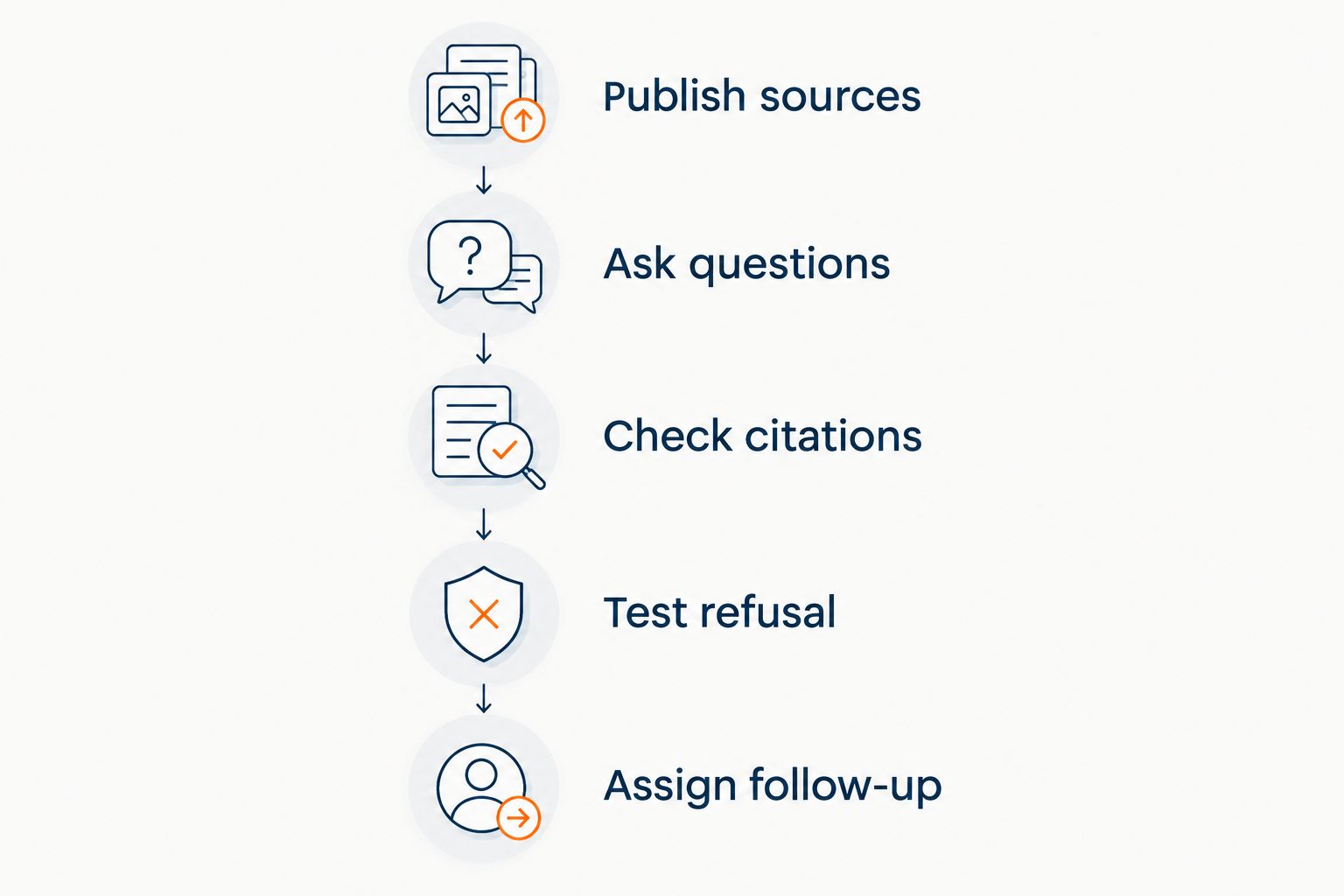
Use this sequence before putting any coaching widget in front of buyers:
- Publish sources: Approve the curriculum, offer details, and policies the widget should use.
- Ask questions: Include direct questions, ambiguous questions, and unsupported requests.
- Check citations: Open the cited material and check that it supports the response.
- Test refusal: Ask for an unpublished concession or outcome promise.
- Assign follow-up: Decide who handles questions that remain unresolved.
Start with 5 questions drawn from real buyer concerns. Include curriculum coverage, access, suitability, a policy boundary, and a request that your material does not address.
Have 2 reviewers assess the answers if another person knows your offer. One checks the source; the other checks whether the wording adds an unintended promise. These are recommended review steps, not vendor performance figures.
For example, a visitor asks whether the program guarantees clients. A suitable refusal states that the published material does not establish that guarantee. It does not soften the refusal by suggesting an outcome anyway.
Use the same principle for concessions: no invented discounts, no refund exceptions, and no income promises. A useful response identifies the published rule or says that the information is not established.
For a closer look at this check, read the guide to chatbots that cite your own content.
Which coaching chat widget should you choose?
HelpShelf is the best fit for business coaches who need cited answers from their own content and lead capture. Start there when your daily friction is repeated questions about your coaching offer, curriculum, or community.
Choose Intercom for shared conversations, Zendesk for ticket ownership, Tidio for human-backed website chat, or evaluate Chatbase for a focused content bot. In 2026, make the final choice with your questions and source material—not a polished demonstration built around someone else's business.
FAQ
What's the best ai chat widget for business coaches?
Choose a source-grounded widget with citations and lead capture when your main job is answering questions about your own coaching content. Choose a shared inbox or ticket-centered system when managing human support work is the larger requirement.
Can a coaching chatbot answer questions from my course?
A content-grounded chatbot can answer from course material supplied through its supported sources. Test whether the answer reflects the relevant lesson and whether the visitor should have access to that material.
Is an automated chat widget better than live chat for a solo coach?
Automated answers fit repeat questions from published material; live chat fits conversations that need a person. Choose based on the questions you receive and who will handle unresolved inquiries.
Can a chatbot promise that my coaching will increase revenue?
A coaching chatbot should not invent an income promise. Keep answers within your published offer and require a clear refusal when the requested outcome is not established.
What should a coaching chatbot do when it doesn't know?
It should identify the limit rather than fill the gap with a plausible answer. Give the visitor a clear next step for getting the unresolved question reviewed.
Does serving Kajabi, Skool, or Whop creators prove a native integration?
No. Serving creators on a platform does not establish a specific installation method, native integration, or member-access permission model. Verify those requirements for your exact setup.
How should I compare coaching chat widgets in 2026?
Use the same approved content and buyer questions for every candidate. Check source support, refusals, lead capture, and unresolved-question ownership before choosing.
One last thing
The revealing test is a question whose answer you deliberately left out. Ask whether an unlisted service is included, then inspect the response for an invented concession.
Keep that question in your review set whenever you change your offer. A correct boundary is more useful than a confident extra promise.


