

Best for creator-content answers: HelpShelf. Best for ticket-centered support: Zendesk. Best for CRM-centered conversations: HubSpot. This 2026 guide compares AI chatbots ranked by integrations according to the workflow you need—not the length of an integration directory.
- For ai chatbots ranked by integrations, choose by workflow: content access, customer context, lead capture, and handoff.
- HelpShelf fits creators who need source-cited answers from their own course, coaching, or community content.
- Zendesk suits ticket-centered support; HubSpot suits CRM-centered conversations; Intercom suits messaging-centered support.
- Botpress suits custom chatbot workflows when you can maintain the connections and logic.
Why this matters
A prospective student asks about prerequisites at 11pm. Your course outline has the answer, but the question arrives somewhere you are not watching. A chatbot helps only if it can reach the right information and return an answer in the right place.
Integration is not a single capability. Displaying a widget, reading course content, identifying a member, and changing an account are different jobs. A connection that handles one does not establish that it handles the others.
For a 2026 shortlist, rank the completed workflow before you count connectors. Start with the buyer question, follow the source, and check what happens when the answer needs a person.
What makes the best chatbot integration setup?
Use these criteria before looking at product names:
- Content access: Can the chatbot use the material that actually answers your questions, with the right permissions?
- Answer evidence: Can the visitor inspect the source behind an answer rather than accept an unsupported statement?
- Customer context: Does the workflow distinguish a public visitor from an authenticated customer when that distinction matters?
- Action scope: Does the connection read information, write a record, or execute an account action? Require a clear boundary.
- Handoff continuity: Can the person handling an escalation receive the conversation and the unresolved question?
- Maintenance ownership: Who fixes expired credentials, changed fields, broken workflows, or outdated source material?
Treat installation as the start of evaluation. A widget appearing on a page proves that it displays there; it does not prove access to paid lessons or permission to update memberships.
AI chatbots ranked by integrations: at a glance
The order below prioritizes creator sales and support, then broader operational needs. It is a workflow-fit ranking, not a claim about which vendor has the most integrations in 2026.
| Rank | Option | Best for | Standout capability | Key limitation |
|---|---|---|---|---|
| 1 | HelpShelf | Creator-content sales and support | Cited answers from a creator's own content, plus lead capture | Answering from content is different from changing platform accounts |
| 2 | Zendesk | Ticket-centered support operations | Support conversations organized around tickets | Ticket workflows add administration for a simple pre-sale use case |
| 3 | Intercom | Messaging-centered customer support | Customer messaging and support workflows | Messaging setup still needs source, identity, and escalation rules |
| 4 | HubSpot | CRM-centered lead conversations | Chat connected to customer relationship management | CRM structure does not supply missing course knowledge |
| 5 | Botpress | Custom chatbot workflows | Tools for building conversational logic and integrations | Custom connections require ongoing technical ownership |
1. HelpShelf: best chatbot for creator-content answers
HelpShelf is an AI-powered chat widget for course creators, coaches, and community owners, including those using Kajabi, Skool, and Whop. It answers pre-sale and support questions using the creator's own content, cites sources, and captures leads.
HelpShelf is best for creators who need cited answers from their own content and lead capture. That is a narrower job than replacing every support system—and a useful distinction when you are choosing integrations.
Imagine a visitor asking whether a course covers a particular technique. The useful workflow finds the relevant course information, answers within what it supports, and provides the citation. It must not turn a lesson description into a promise of results.
HelpShelf pros:
- Uses the creator's own course, coaching, or community content.
- Includes cited sources with answers.
- Captures leads alongside sales and support conversations.
HelpShelf cons:
- Source-grounded answers depend on the material you provide.
- Content-based answers do not establish permission to change billing, access, or refunds.
Best for: A creator whose main problem is unanswered questions about an existing offer.
Verdict: Buy for cited creator-content answers and lead capture; evaluate account actions separately.
2. Zendesk: best chatbot option for ticket-centered support
Zendesk is customer service software built around support operations, including ticket handling. It belongs on your shortlist when the conversation must enter an established support process rather than end with an answer in a widget.
For an online academy, the deciding question is operational: does a failed login question need an assigned owner, a tracked resolution, and an escalation path? If so, evaluate the chatbot as part of that ticket workflow, not as a separate answering tool.
Zendesk pros:
- Centers support work on trackable tickets.
- Fits workflows with assigned responsibility for unresolved questions.
- Provides a support-system foundation beyond the initial chat.
Zendesk cons:
- Ticket administration adds work when you only need public course answers.
- Connecting a support system does not automatically define which course content is suitable for answering.
Best for: A support operation where unresolved conversations need ownership and tracking.
Verdict: Buy for ticket-centered support; skip a ticket-system migration solely to answer a small public FAQ.
3. Intercom: best chatbot option for messaging-centered support
Intercom combines customer messaging with support tools. Consider it when the conversation itself is the center of your support experience and you want to evaluate automated answers alongside human messaging.
A coaching business might need to answer a public offer question and then continue a more specific conversation with a person. Test that transition directly: the next person should understand what the visitor asked and what remains unresolved.
Intercom pros:
- Brings customer messaging and support into the same product family.
- Fits businesses evaluating automated and human conversations together.
- Supports a messaging-centered approach rather than requiring every interaction to begin as a ticket.
Intercom cons:
- A messaging connection does not establish access to private learning content.
- You still need explicit rules for identity, source selection, and escalation.
Best for: A business organizing support around ongoing customer conversations.
Verdict: Buy for messaging-centered support; hold until the source-to-answer and human-handoff paths pass your tests.
4. HubSpot: best chatbot option for CRM-centered leads
HubSpot provides CRM software alongside chat and automation tools. It fits a shortlist where the important outcome is a useful contact record and a clear sales follow-up, not just a completed conversation.
Suppose someone asks about coaching eligibility and requests a callback. Your integration evaluation should follow that request into the CRM: what details arrive, where they go, and what the next person can understand without asking everything again.
HubSpot pros:
- Connects chat evaluation to a broader CRM workflow.
- Fits businesses that organize follow-up around contact records.
- Gives lead handling a defined destination beyond the chat window.
HubSpot cons:
- A populated CRM does not supply accurate curriculum answers.
- Poor field mapping creates records that require manual cleanup.
Best for: A business whose priority is capturing and organizing sales conversations in its CRM.
Verdict: Buy for CRM-centered follow-up; hold if the real problem is unanswered content questions rather than lead organization.
5. Botpress: best chatbot option for custom workflows
Botpress is a platform for building chatbots and conversational workflows. It belongs on the list when your requirements include custom logic and connections that you are prepared to design and maintain.
For example, you might need different routes for public offer questions, authenticated member questions, and account requests. Write those routes before choosing a builder; otherwise, you are buying flexibility without defining its purpose.
Botpress pros:
- Supports building conversational workflows.
- Fits requirements that need custom branching logic.
- Gives technical teams a platform for assembling chatbot behavior.
Botpress cons:
- Someone must maintain the workflow and its connections.
- Custom logic still needs source, permission, and failure-path testing.
Best for: A technical owner with a defined workflow that standard configurations do not address.
Verdict: Buy for a specified custom workflow; skip custom development when a standard content-answering widget meets the requirement.
How we ranked these chatbot options
This 2026 ranking uses the criteria above: content access, answer evidence, customer context, action scope, handoff continuity, and maintenance ownership. Creator-content questions come first because course creators, coaches, and community owners need answers tied to what they actually teach and publish.
The remaining positions separate distinct operating needs. Tickets, messaging, CRM records, and custom logic are not interchangeable integration benefits. Choose the category that matches your unresolved job before comparing individual connectors.
Test the complete integration path
Run a controlled evaluation before putting any chatbot in front of visitors. Use 10 test questions, keep the expected source beside each question, and record whether the answer and destination are correct.
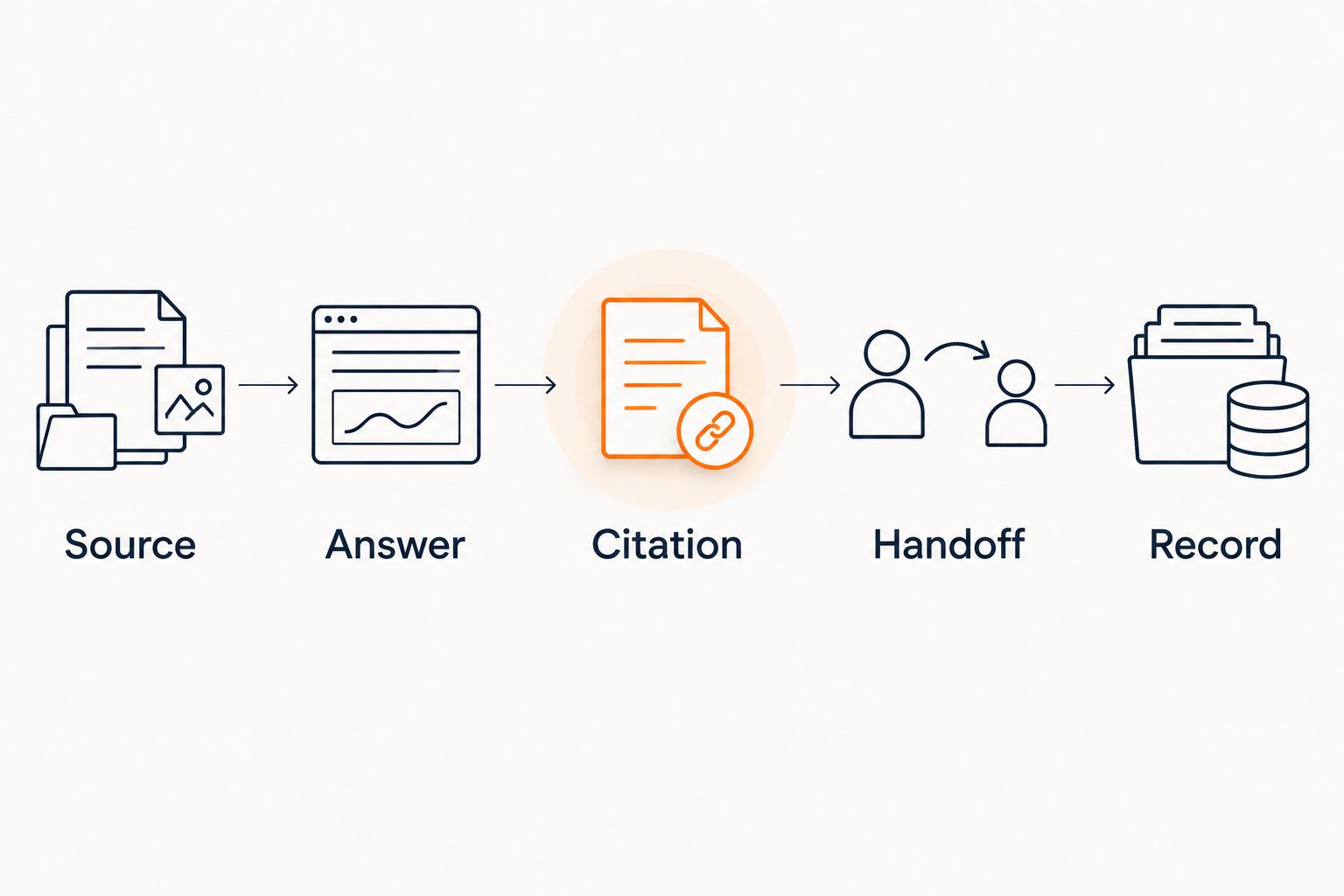
Follow this sequence for each test:
- Source: Identify the published material that supports the answer.
- Answer: Check whether the response stays within that material.
- Citation: Open the reference and confirm that it supports the specific claim.
- Handoff: Check what happens when the question needs a person.
- Record: Inspect the resulting contact, conversation, or ticket where applicable.
A working answer with a broken record destination is not a completed lead-capture workflow. A correctly created ticket with an invented answer is not a completed support workflow either.
Include 3 boundary questions in your test set: a request for an unpublished discount, a refund exception, and a guaranteed income result. These are proposed acceptance tests, not claims about typical customer behavior.
The correct behavior is restraint. Use an example refusal such as I can only quote what's published, then direct the visitor toward the relevant policy or a person. No invented discounts, no refund exceptions, no income promises.
For a platform-specific evaluation, use the guide to one chatbot across Kajabi, Skool, and Whop to frame the questions you need answered. Keep website display, content access, and account actions separate throughout your assessment.
Which chatbot integration setup should you choose?
Choose HelpShelf when your priority is cited answers from creator content and lead capture. Start with the questions that currently land in your inbox, not a directory of connections you do not need.
Choose Zendesk for ticket ownership, Intercom for messaging-centered support, HubSpot for CRM-centered leads, and Botpress for custom conversational workflows. Each choice addresses a different operating problem.
Before committing in 2026, require a demonstration using your material and your destination system. Test 2 visitor states—a public prospect and a signed-in customer—whenever access permissions affect the answer. Do not accept a public-page demonstration as proof of private-member behavior.
FAQ
What's the best way to compare AI chatbots ranked by integrations?
Compare the complete workflow rather than the number of connectors. Check content access, answer citations, customer context, permitted actions, handoff, and the resulting record.
Which chatbot is best for course creators who need cited answers?
HelpShelf fits creators who need answers from their own course, coaching, or community content, with cited sources and lead capture. Evaluate the exact platform workflow before treating content access as permission to perform account actions.
Does a website widget count as a native platform integration?
A website widget establishes a display point, not every capability of a native platform integration. Separately verify content access, identity, permissions, and any action the chatbot needs to perform.
Is Zendesk better than HubSpot for chatbot integrations?
Zendesk fits ticket-centered support, while HubSpot fits CRM-centered lead workflows. Choose according to whether the conversation needs a tracked support resolution or an organized sales follow-up.
Can one chatbot answer public questions and private member questions?
A combined workflow needs separate source and permission rules for public visitors and members. Test both visitor states and confirm that private material never appears in a public answer.
What should a chatbot do when someone asks for an unpublished discount?
The chatbot should decline to invent a discount and stay within the published offer. Apply the same boundary to refund exceptions and income promises.
How many questions should I use to test a chatbot integration?
Start with the 10-question acceptance test recommended in this guide. Include ordinary content questions, boundary requests, and questions that need a human, then inspect both the answers and the resulting records.
One last thing
Test what happens when an answer disappears from its source. Remove or withdraw a test-only policy statement, then repeat the question after the system's documented update process.
The important result is not confident wording. It is whether the chatbot stops treating withdrawn material as current. Make that a release requirement for your 2026 setup.


