

YouTube course creators’ AI chat widget is a website chat tool that answers questions from approved course material with the aim of helping viewers assess a course and students find support. This 2026 guide explains how to separate public answers from paid lessons, test citations, and keep questions about exceptions with you rather than letting a bot decide.
- Choose an AI chat widget for YouTube course creators that cites approved sources and refuses unsupported promises.
- HelpShelf fits creators who want course-content answers with citations and lead capture.
- Keep public course-sales answers separate from private student material.
- Test curriculum questions, unsupported claims, and follow-up before publishing your widget.
Why chat widgets matter for YouTube course creators
A viewer watches your tutorial at 11pm, opens your course page, and asks whether the course assumes prior experience. Your answer needs to distinguish what the free video teaches from what the paid curriculum covers. A friendly answer that confuses those two creates the wrong expectation.
The same boundary matters after enrollment. A student asking where to find an exercise needs a source they can follow, not another sales pitch. Start with the distinction explained in answering pre-sale questions from your content.
For your 2026 setup, treat the widget as a publishing surface. You remain responsible for the curriculum descriptions, policies, and instructions it uses. The first job is to make published answers easier to find—not to give the bot authority to make new commitments.
How to set up your course chat workflow
1. Map questions to the viewer’s next decision
Start manually with a document of questions from your comments, messages, and support inbox. Record the wording people use. A question about whether a course is suitable for beginners is different from a request to locate a lesson, even when both mention the same topic.
Sort the questions by the decision behind them: assess the course, understand enrollment, find learning material, or resolve an account issue. You do not need software to do this. You need a clear distinction between information you can publish and an action only you can approve.
Best for a first setup: one course with a clearly defined audience. Adding every offer at once makes it harder to identify which source should answer a question. Expand after you can reliably distinguish similar course names and overlapping topics.
- Collect questions without copying private student details.
- Mark each question as pre-sale or student support.
- Name the course each question concerns.
- Identify questions requiring an account check.
- Assign unanswered questions to a person.
2. Publish the answers before automating them
Write a plain FAQ first. Describe the intended audience, prerequisites, curriculum, and support boundaries using information you have approved. If your sales page and lesson introduction disagree, resolve the disagreement before using either as a chat source.
A public tutorial is not automatically evidence that your paid course includes the same material. Likewise, an informal comment about a future lesson is not a published curriculum commitment. Keep a record of which document governs each topic.
For your 2026 source review, check whether each answer remains true for the current course. A publication date helps you find material to review, but a recent date does not make a statement correct. Read the actual content.
Your manual FAQ remains useful even if you never add a widget. It also gives you a reference against which to judge generated answers.
- Publish clear prerequisite statements.
- Distinguish included lessons from related free videos.
- Remove conflicting descriptions of course scope.
- Keep policies separate from promotional copy.
- Name an owner for each source document.
3. Choose a widget around sources and boundaries
Use the manual FAQ as your baseline. Then evaluate whether a widget can answer the same questions accurately, show supporting sources, and collect details when someone needs a reply. A conversational answer is useful only when it preserves the meaning of the source.
HelpShelf is best for YouTube course creators who want cited answers from their own content and lead capture. HelpShelf provides an AI chat widget for pre-sale and support questions using course, coaching, or community content. That fits a creator who wants those answers available through chat without writing each reply manually.
The limitation is the source material. HelpShelf cannot make an unpublished course promise true; you still need to supply accurate information. Treat access controls, installation details, and account-specific actions as requirements to verify rather than assumptions.
Use the HelpShelf overview to assess that fit against your question list. A widget should earn its place by handling your actual examples, not by producing an impressive unrelated demonstration.
- Ask for an answer supported by a specific source.
- Check whether the citation supports the whole answer.
- Test questions that your sources cannot answer.
- Verify installation requirements for your destination page.
- Confirm how you will receive captured lead details.
4. Separate public answers from student-only material
Make two source lists manually: material suitable for prospective buyers and material intended for enrolled students. A course outline can explain what someone will learn without exposing the exercise answers or private discussion that accompany it.
Do not confuse a citation with permission. An answer can cite a source accurately and still reveal material to the wrong visitor. Before publishing, verify how the chosen setup controls access to content and whether the visitor’s identity is established where needed.
For a public course page, prefer public curriculum descriptions and approved FAQs. For student support, assess the authenticated environment separately. Do not assume that installing a widget on a page automatically gives it your learning platform’s permission rules.
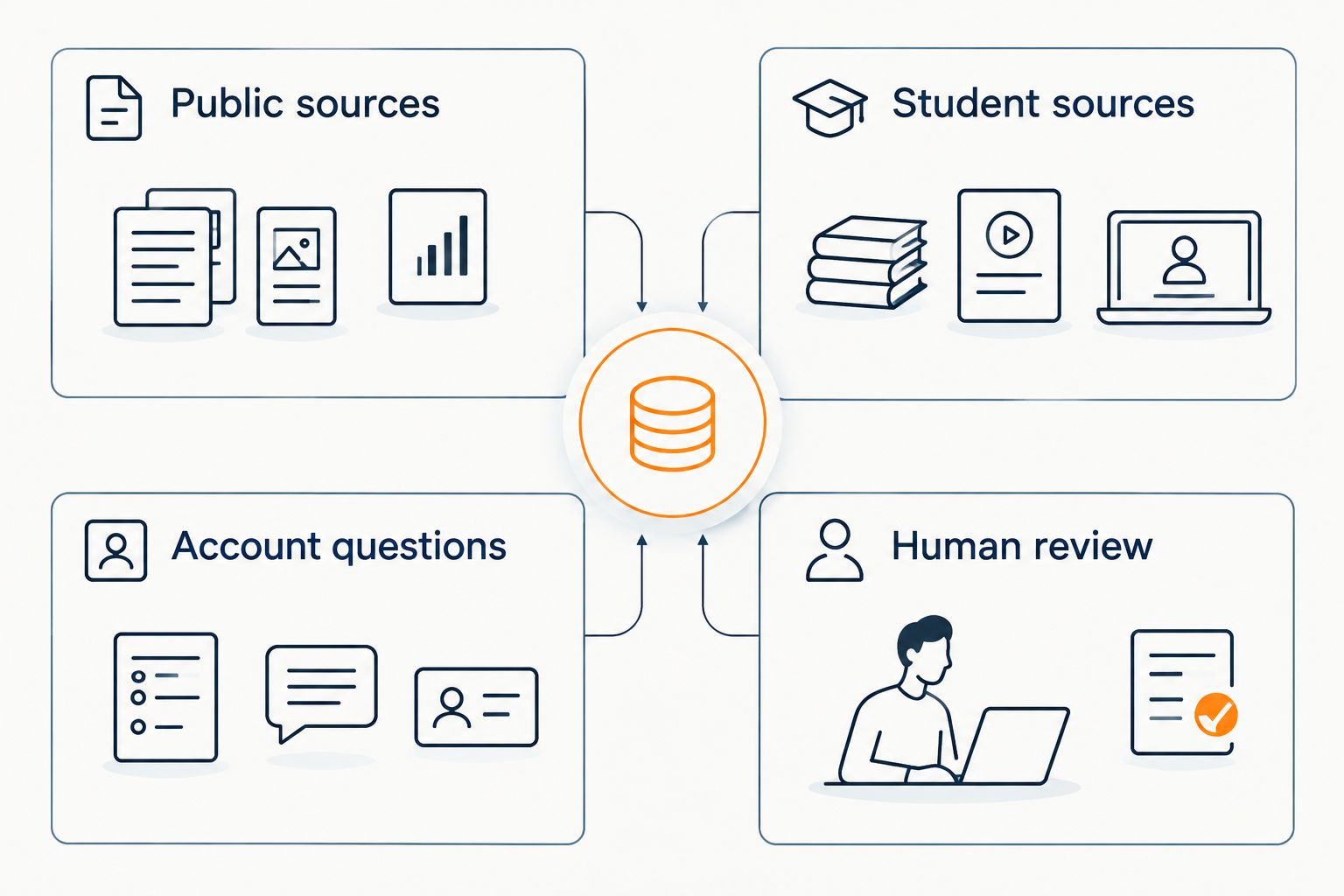
Use these four boundaries when deciding where a question belongs:
- Public sources: approved information for prospective buyers.
- Student sources: learning material restricted to enrolled students.
- Account questions: requests needing identity or account checks.
- Human review: exceptions and decisions requiring your approval.
5. Write refusal and follow-up rules
Draft difficult replies yourself before asking a widget to handle them. The aim is not a longer disclaimer. It is a short answer that states what the source supports and what still needs your decision.
For example, when a viewer asks about an unpublished exception, a safe response pattern is: I can only quote what’s published. This request needs the course owner’s review. This is a suggested response, not a statement of any creator’s policy.
Apply the same discipline to requests for invented discounts, refund exceptions, and income promises. A source describing course topics does not establish what an individual buyer will earn. A published policy does not authorize the bot to negotiate it.
For follow-up, ask for contact details and the unresolved question without implying that submitting them guarantees a particular decision. Tell the visitor what information they are sending and why it is needed.
- State which published information answers the question.
- Refuse to invent missing terms or promises.
- Separate explaining a policy from approving an exception.
- Request only details needed for the follow-up.
- Avoid promising a response deadline you have not established.
6. Test the answers against a written checklist
Create a test set of 12 questions: 4 curriculum questions, 4 support questions, and 4 boundary questions. These are recommended test counts, not a performance benchmark. Write the expected source and acceptable answer before you run each test.
Curriculum tests should include prerequisites and whether a topic is included. Support tests should include locating approved instructions. Boundary tests should ask for something deliberately unsupported, such as an unpublished promise or access to restricted content.
Record the answer, citation, and next action. A citation is not a pass by itself: open it and check whether it supports the claim. A polite refusal also fails if it leaves a straightforward published question unanswered.
For your 2026 launch review, include the mobile journey from video to course page. Test the page where the widget will actually appear, not just a separate demonstration.
- Check the course name in every answer.
- Open and read each cited source.
- Test contradictory and missing source material.
- Verify that restricted information stays restricted.
- Submit a test lead and inspect the received details.
- Assign every failed test a specific correction.
7. Review unresolved questions before expanding
You can begin with a spreadsheet and a manual inbox review. Record the question, the answer given, and the reason a person needed to intervene. Distinguish missing documentation from an incorrect answer; they require different fixes.
Schedule a 7-day review window after launch as an initial operating routine, not a promised time to results. Look for repeated questions that deserve clearer public explanations. Do not publish a new answer until you have verified the underlying course information.
Lead capture through HelpShelf can collect details for follow-up, but a captured lead is not an enrollment. Keep those records separate when judging whether the workflow helps your business. Likewise, fewer messages in your inbox do not prove that students found the right answers.
Your 2026 review should prioritize answer quality before expanding to another course or audience. Fix a recurring source problem once, then repeat the affected tests.
- Record unsupported answers separately from missing sources.
- Review unresolved curriculum questions with the course owner.
- Track captured inquiries separately from confirmed enrollments.
- Update approved material when the course changes.
- Repeat failed tests after each correction.
Compare your course-support options
Choose by the work you need handled. A public FAQ, manual replies, and a source-grounded widget solve different parts of the viewer-to-student journey. Keep a human route for decisions that published information cannot settle.
| Option | Best for | Strength | Key limitation |
|---|---|---|---|
| Public FAQ | Creators building their first reliable answer set | Gives visitors a direct reference you control | Visitors must find the relevant section themselves |
| Manual email or messages | Account questions and individual exceptions | Lets you inspect context before deciding | Requires someone to read and answer each request |
| Staffed live chat | Conversations that need immediate human judgment | Supports clarification during the conversation | Depends on someone being present to respond |
| HelpShelf AI chat widget | Cited course-content answers and lead capture | Answers pre-sale and support questions from your content | Depends on accurate sources; account authority and access requirements still need checking |
You do not need to replace every channel. Keep published information consistent across them. If a person routinely corrects the widget with information absent from the sources, add an approved explanation rather than relying on that correction to happen again.
Common mistakes YouTube course creators make
Treating video transcripts as approved course promises
A transcript can contain a spontaneous example, an outdated instruction, or a reference to another offer. Review it before using it as an answer source. Keep the public course description authoritative for what enrollment includes.
Expecting a website widget to answer YouTube comments
Plan the destination where the visitor will use chat. Do not assume that a website widget also operates inside YouTube comments or messages. Make the move from video to course information clear, then test that journey yourself.
Mixing similarly named courses
A question about an introductory course should not receive prerequisites from an advanced course. Give each source a clear course label, and test ambiguous questions that require clarification before an answer.
Treating a cited answer as an approved action
Explaining a published policy is different from changing an account or authorizing an exception. Keep those decisions with an authorized person. A source link does not grant operational permission.
FAQ
What is an AI chat widget for YouTube course creators?
An AI chat widget for YouTube course creators answers questions on a website using approved course information. It can help prospective buyers understand the curriculum and help students locate support material, provided the sources and access boundaries are appropriate.
Can I put a course chat widget directly inside YouTube comments?
Do not assume a website chat widget can operate inside YouTube comments. Plan the chat experience on a supported destination page and verify any separate channel capabilities before relying on them.
What is HelpShelf best for if I sell a course through YouTube?
HelpShelf is best for creators who want pre-sale and support answers grounded in their own content, with citations and lead capture. You still need approved sources and a human route for questions requiring individual decisions.
Do I need to give the chatbot all my paid lessons?
No. Start with approved public curriculum descriptions and FAQs for a public sales widget. Use student-only material only after verifying the access controls for the intended student-support setup.
Can a chatbot promise that students will earn money?
A course chatbot should not invent income promises. It should explain the published curriculum without turning a topic, example, or testimonial into a prediction about an individual buyer’s results.
How do I check whether a chatbot citation is accurate?
Open the cited source and verify that it supports the actual answer. Check the course, context, and current wording, not just whether a source link appears.
Is a chat widget better than a FAQ page for course sales?
A chat widget serves conversational questions, while a FAQ page provides a direct published reference. Start with reliable answers; add chat when conversation and follow-up serve a clear need, rather than treating chat as a replacement for documentation.
One last thing
Your most useful test is a question you know the sources cannot answer. Ask whether the course includes something you have never published. The correct response should preserve that uncertainty instead of filling the gap with a plausible promise.
Run the same check yourself before installing anything: find the sentence that supports your intended answer. If you cannot find it, fix the source or keep the decision with a person. That is a useful boundary for both manual replies and automated chat.


