
Instead of manually answering the same Discord lead questions every evening, connect HelpShelf to Discord through a linked website page where visitors can ask questions, read cited answers, and leave their contact details. This workflow keeps the chat on your website; it does not install a bot that reads or replies inside Discord.
- To connect HelpShelf to Discord, link members to a website page containing the chat widget.
- HelpShelf fits creators who want source-grounded answers and lead capture outside Discord conversations.
- Keep public sales information separate from private course and member content.
- Test citations, unsupported questions, and contact capture before sharing the page.
Why this matters
Someone asks about your coaching program at 11pm. The answer is already in your published material, but the person has posted in Discord rather than found that material. A moderator now has another question to answer.
HelpShelf provides a chat widget that answers pre-sale and support questions from your content, includes cited sources, and captures leads. The connection described here is a navigation path: Discord message, website page, question, then contact capture when the visitor wants follow-up.
HelpShelf is best for creators who want cited answers and lead capture on a website linked from Discord. The trade-off is explicit: visitors leave the Discord conversation to use the widget.
For your 2026 setup, define that boundary before configuring anything. Posting a link is not the same as installing an in-channel assistant, importing server history, or sending captured leads back into a channel.
Before you start
- Website access: Have access to the website page where your chat widget will run, plus the account and installation materials needed to publish it. Use the current installation instructions supplied with your account rather than copying an unrelated embed example.
- Discord access: Have permission to post in the intended server channel. If you want a persistent pinned message, arrange for a moderator with permission to pin it.
- An audience-safe source set: Prepare published course descriptions, prerequisites, community rules, and other approved answers. The gotcha is access: a public lead should not receive private lesson content simply because the question started in your server.
Write down the destination page before you begin. Choose 1 page for the initial workflow so you can test the complete journey without wondering which version a visitor opened.
If your requirement is automatic replies inside Discord, contact the team to establish the supported connection and permissions before proceeding. Do not build around an assumed Discord connector, webhook, or message trigger.
Choose the connection boundary
There are two useful link-based workflows. Both send people from Discord to a website widget, but the source material and follow-up differ.
| Workflow | Best for | Advantage | Limitation |
|---|---|---|---|
| Public question page | Prospective buyers asking about fit or prerequisites | Keeps answers tied to approved public material | Visitors must open a separate page |
| Member support page | Existing members asking about course or community material | Gives members a defined place to ask content questions | Requires appropriate page access and source permissions |
Start with the public question page when your goal is lead capture. Keep account-specific questions, private member information, and unpublished exceptions out of that source set.
A Discord role is not evidence that an external website has authenticated the visitor. Test the destination page's access controls independently; do not assume the link carries server membership or identity with it.
Public question page
Prepare the sources
- Collect the material you authorize prospective buyers to read. Include the published description, prerequisites, scope, and current policies relevant to their questions.
- Remove superseded or conflicting versions before adding material through the source controls available in your account. Keep a clear owner for each policy.
- Separate factual answers from decisions that need a person. Published eligibility requirements belong in the source set; a request for an unpublished exception belongs with you.
- Test whether the cited material supports the entire answer, not merely a related topic. A citation about course content does not support a claim about a guaranteed outcome.
Expected result: You have a public-safe set of material that supports answers without exposing member-only information.
For example, a prospect asks whether beginners can join. The answer should reflect your published prerequisites. If those prerequisites do not settle the question, the next step is clarification or human follow-up—not an invented assurance.
Use the same discipline for 2026 cohort information. Keep dated material only when its date and audience remain clear; do not let a previous cohort's description stand in for your current offer.
Publish the destination
- Choose a page you control that prospective buyers can open without member access. Explain that the page answers questions using your published material.
- Install the widget using the current instructions supplied for your website and account. Do not paste website scripts into Discord messages; the destination website is where this workflow runs.
- Open the published page in a signed-out browser session. Confirm that the page loads and that you can start a conversation.
- Ask a factual question with an answer in your approved sources. Open the citation and check that a prospective buyer can actually read the supporting material.
- Test the available lead-capture flow with contact details you control. Confirm the captured information in the account's actual lead-management view before directing visitors there.
Expected result: A signed-out visitor can open the page, ask a question, inspect its source, and complete the available contact-capture flow.
Do not treat a successful answer as proof that contact capture also works. Test those actions separately. Likewise, entering an address does not prove that any external notification or follow-up automation exists.
Discord entry point
Publish the invitation
- Choose a channel where prospective buyers are allowed to ask questions. Keep the invitation near the questions it is intended to address rather than posting it across unrelated channels.
- Write a short message explaining what happens after someone opens the link. State that the question page opens on your website and uses your published content.
- Paste the destination page's actual address. Preview the message and open the link yourself before making it the channel's standard reference.
- Ask an authorized moderator to pin the invitation if that suits the channel. In Discord's desktop message menu, use Pin Message; the moderator needs permission to pin messages.
- Ask another person to follow the invitation using an ordinary member account. Check both the Discord channel permissions and the destination page independently.
Expected result: Someone who can access the channel can find the invitation and reach the working question page without moderator help.
Keep the wording literal. Describe the page as a place to ask about published program information, inspect sources, and leave contact details for follow-up. Do not describe it as a Discord bot or promise that a moderator receives an instant alert.
For a 2026 launch, check the pinned invitation against the page you actually published. An old pinned message can send people to the wrong cohort or the wrong audience even when the widget itself works.
Answer and lead checks
Test the full path
- Prepare 5 test questions: a published prerequisite, a curriculum question, a request for an unpublished discount, a request for a refund exception, and a request for an income promise.
- Submit each question through the page reached from Discord. Compare every factual answer with the cited material.
- Check the unsupported requests for restraint. The response should stay within published information rather than inventing an incentive, exception, or result.
- Complete contact capture with your own details, then inspect what was recorded. Check the relationship between the contact and the question rather than assuming the full conversation is attached.
- Assign a person to review the captured questions and handle the follow-up your page promises. Keep the initial process manual unless you have separately configured and tested automation.
Expected result: Supported questions receive supported answers, unsupported requests stay unresolved rather than fabricated, and your test lead reaches a reviewable destination.
A useful refusal follows the supplied rule: “I can only quote what's published.” Treat that as the intended boundary, not a claim that the widget will always produce that exact sentence.
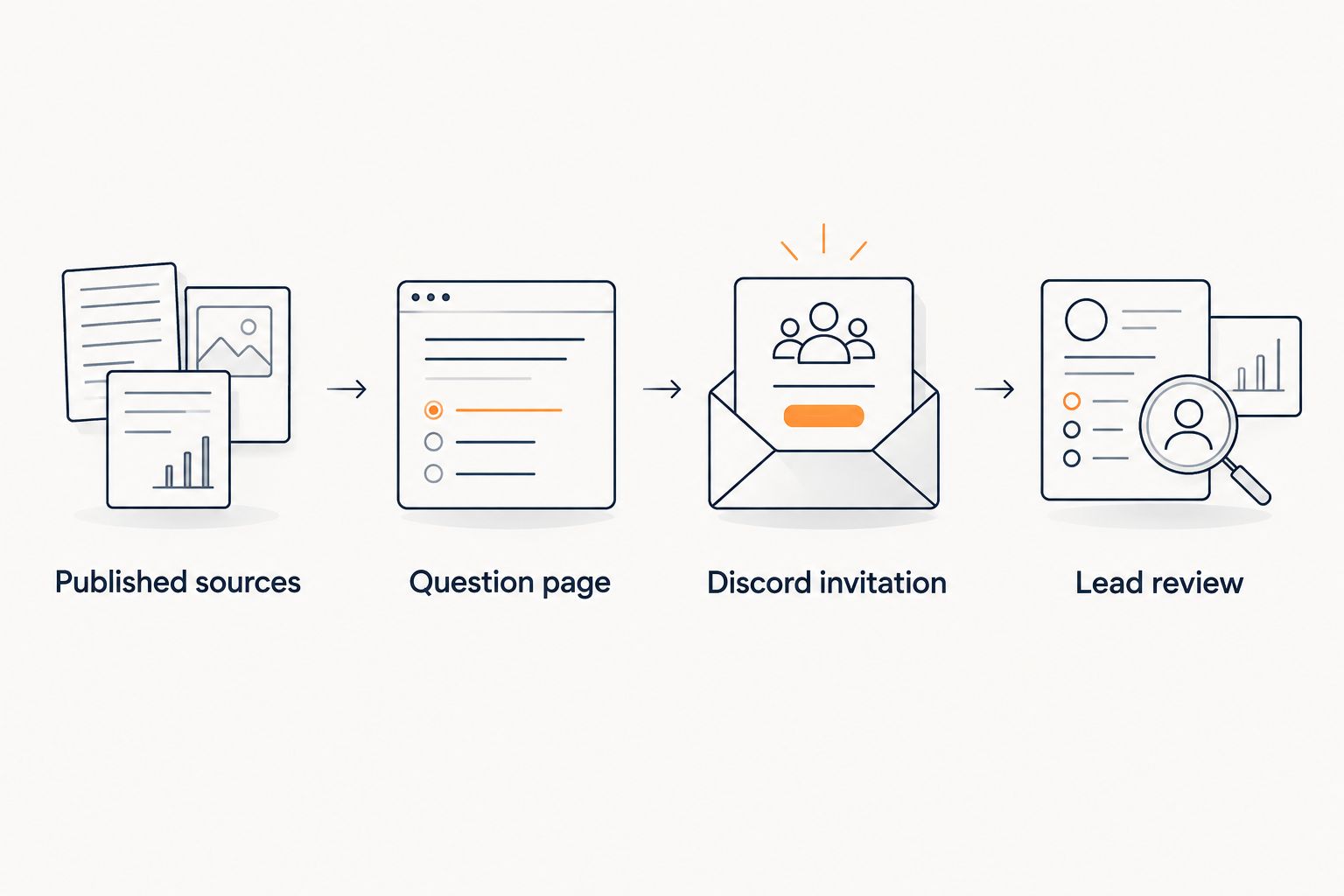
The workflow is: Published sources, Question page, Discord invitation, Lead review. Each part needs its own check; a working link does not validate the answer or the captured contact.
Add a member-support path
The adjacent workflow is a separate member-support page linked from a member channel. Use it when enrolled members need answers from material that does not belong in public pre-sale conversations.
Keep the public page unchanged. Create the member destination only after establishing how the page and its supporting material enforce access.
- Identify which material members are authorized to read and which material remains restricted even within the community.
- Establish the source and access separation your account and website support. Do not combine public and private content unless that separation is confirmed and tested.
- Post the member destination in an appropriate member channel. Describe its scope so members know when to use the page and when to contact a person.
- Test with both a member session and a signed-out session. Verify the page, answers, and citations—not just the presence of a login screen.
Expected result: Members have a defined support route, while public visitors remain limited to public material.
HelpShelf's chat widget answers from supplied content; it should not be presented as granting account access or changing membership status. Route those requests to the person responsible for the account.
Troubleshooting
The page opens, but the widget does not appear
Check the published page rather than only the website editor's preview. Confirm that you followed the current installation instructions and that the website retained the required installation code. Test in a clean browser session before changing unrelated settings.
The answer cites material visitors cannot open
Open the citation while signed out. If the source requires member access, replace it with public-safe supporting material for the lead workflow. Do not solve the problem by removing protection from private content.
The answer uses the wrong course or cohort
Inspect the source set for overlapping descriptions and superseded material. Remove or clearly distinguish conflicting content, then repeat the original question. Make the intended course explicit in the page introduction and test questions.
A visitor asks a question but no lead appears
Repeat the contact-capture step separately. A conversation alone is not proof that the visitor submitted contact details. Check the actual capture destination and any completion step before investigating an external notification.
Discord members cannot find or open the invitation
Check channel visibility with an ordinary member account. Confirm that the message remains available and that its destination has not changed. Pinning helps discovery, but it does not override channel permissions or website access controls.
Customize your workflow
Expand based on the questions people actually submit. Add approved explanations for recurring gaps, remove conflicting material, and keep a person responsible for requests the published content cannot resolve.
For your 2026 review, maintain a short record of the destination page, channel, source owner, and lead reviewer. Re-run the original tests after changing the page, sources, or access rules.
Keep follow-up specific to the question. A request about prerequisites needs an answer about prerequisites, not an unrelated sales sequence. Ask only for contact information you need for that follow-up.
FAQ
How do I connect HelpShelf to Discord?
Use a Discord message that links to a website page containing the HelpShelf chat widget. This guide covers that link-based workflow, not a native bot installation or automatic Discord replies.
Will the widget answer directly inside my Discord channel?
Not in the workflow described here. The visitor opens your website page and asks the question there; confirm any separate in-channel integration before planning around it.
Can this workflow capture questions from prospective buyers?
Yes, the website widget supports answering questions and capturing leads. Test the available capture flow and inspect what information is recorded before sending Discord visitors to it.
Should I add private course lessons to the public question page?
No. Keep the public lead workflow limited to material prospective buyers are authorized to read, and establish tested access separation before creating a member-support path.
Can I automatically send every captured lead back to Discord?
This guide does not configure automatic lead delivery to Discord. Review leads in the available account view unless you have separately established and tested a supported notification connection.
What should happen when someone asks for an unpublished discount?
The answer should not invent a discount. Keep the response within published information and route requests that require a decision to a person.
What should I test before sharing the Discord link?
Test the signed-out page, a supported answer, its citation, an unsupported request, and completed contact capture. Also check the invitation with an ordinary Discord member account.
One last thing
Test an unanswered question, not just a successful one. Your 2026 launch check should include a request that no published source can settle.
A useful question page knows where the published answer ends. No invented discounts, no refund exceptions, no income promises. When the content stops, make the human follow-up clear.


