

Instead of answering the same Circle member questions by hand, connect HelpShelf to Circle through a verified widget placement and an approved content collection so members can ask questions and check cited sources. Confirm the installation route and content permissions before publishing; a visible widget does not establish access to private community content.
- To connect HelpShelf to Circle, verify widget placement, approve source content, and test citations before publishing.
- HelpShelf is best for creators who want a member-support chat widget grounded in their own published content.
- Treat widget installation, content access, and member permissions as separate setup checks.
- Keep public buyer answers separate from private member material.
Why this matters
A member asks where to find a worksheet at 11 p.m. You answer the next morning with a lesson link. The useful workflow replaces that repeated lookup with an answer tied to an approved source—not an answer assembled from guesses.
HelpShelf provides a chat widget that answers pre-sale and support questions using a creator’s own content, with citations and lead capture. That makes the source collection part of the setup, not an afterthought.
For your 2026 rollout, separate three decisions: where the widget appears, what it can answer from, and who should see those answers. Installing a script does not prove the other two are correct.
Before you start
- Get the right access. Have an administrator available for your Circle community, access to your widget account, and someone authorized to approve changes to the intended web surface.
- Prepare approved materials. Collect current onboarding instructions, lesson references, community rules, and support policies. Record which materials are public and which belong behind membership access.
- Check the installation and permission boundary first. Confirm the supported placement for your Circle setup. Do not assume a native connector, automatic private-space import, member-aware answers, or identical behavior across browsers and community apps.
Use a staging or limited-access test surface where your setup supports one. Otherwise, coordinate a controlled publishing window and keep a record of the previous configuration so you can undo the change.
Member-support configuration
Installation route
- Choose the entry point. Identify the exact surface where members will ask questions: the community browser experience or a separate support page linked from the community. Keep this initial deployment narrow.
- Confirm the supported method. Ask the widget provider and your community administrator to confirm the installation route for that surface. Establish whether it accepts the supplied widget installation code or requires another supported approach.
- Obtain the current installation instructions. Use the instructions and code supplied for your account. Do not substitute a script found in an unrelated tutorial or reuse another workspace’s installation details.
- Apply only the confirmed configuration. Have the authorized administrator install the widget according to those instructions. Record the placement and the person responsible for removing it if testing fails.
- Open the member-facing surface. Check it outside the administrator’s editing session. Confirm that the widget opens and that the surrounding community navigation still works.
Expected result: The widget opens on the intended surface for the intended member. This verifies placement only; source access and answer quality still need testing.
For installation instructions specific to your account, contact the team before changing community settings. Confirm the exact configuration labels there rather than guessing from another platform’s interface.
Approved sources
- Build a source register. List each document or page, its owner, its audience, and whether it is current. Start with a small collection that answers repeated member questions.
- Remove conflicting material. Compare onboarding instructions, curriculum descriptions, and policy documents. Resolve contradictions before making them answer sources.
- Supply content through a supported method. Use the content-ingestion options available in your account. A Circle page address is not proof that an external service can read the page or should receive its contents.
- Separate audiences. Keep public enrollment material distinct from member-only lessons. Establish the supported controls for each audience before adding restricted content.
- Test a known question. Ask where a specific resource lives. Open the citation using an ordinary member account and check that the source supports the answer.
Expected result: An answer points to an approved source that the intended member can open. An administrator-only citation does not pass this check.
For the 2026 source register, identify the current version of each policy. A clearly written answer is still wrong when its source describes a retired rule.
Answer boundaries
- Define the permitted scope. Write down the questions the widget should handle, such as finding onboarding material or explaining published community rules. Keep account-specific decisions outside that scope unless an authorized workflow explicitly supports them.
- Document refusals. Include examples for missing information, conflicting sources, unpublished exceptions, and requests for personal account details. The correct response can be a boundary rather than an answer.
- Specify the human route. Give members an existing, approved way to reach your team when the source collection cannot resolve a question. Do not promise response times that your team has not established.
- Check follow-up behavior. If lead capture is part of the deployment, test its supported configuration separately. Make clear what details the visitor is submitting and why.
- Test an unsupported request. Ask for an unpublished discount, a refund exception, or an income guarantee. Reject any configuration that turns missing evidence into a promise.
Expected result: Published information produces a cited answer; unsupported requests stop at a clear boundary or move to your approved human route.
A suitable refusal example is: “I can only quote what’s published.” That sentence is a proposed response, not a claim about a default product setting. Configure and test the behavior before relying on it.
Release checks
- Prepare 10 test questions. Cover resource locations, onboarding, community rules, ambiguous wording, and questions the content does not answer. Include requests that should receive a refusal.
- Use 3 browser sessions. Check an administrator session, an ordinary member session, and a signed-out session. These are test identities, not a claim that the widget automatically recognizes membership permissions.
- Inspect both answer and citation. Confirm that each answer matches its source and that the source is appropriate for the person asking. Check for private information in the answer itself, not just the linked page.
- Test the human route. Follow the instructions exactly as a member would. Make sure the destination is usable without administrator access.
- Publish after the checks pass. Keep failed questions in a test list. Correct their sources or configuration and run them again before expanding the audience.
Expected result: The intended member gets a supported answer, a usable citation, or a clear next step. Signed-out visitors do not receive member-only information.
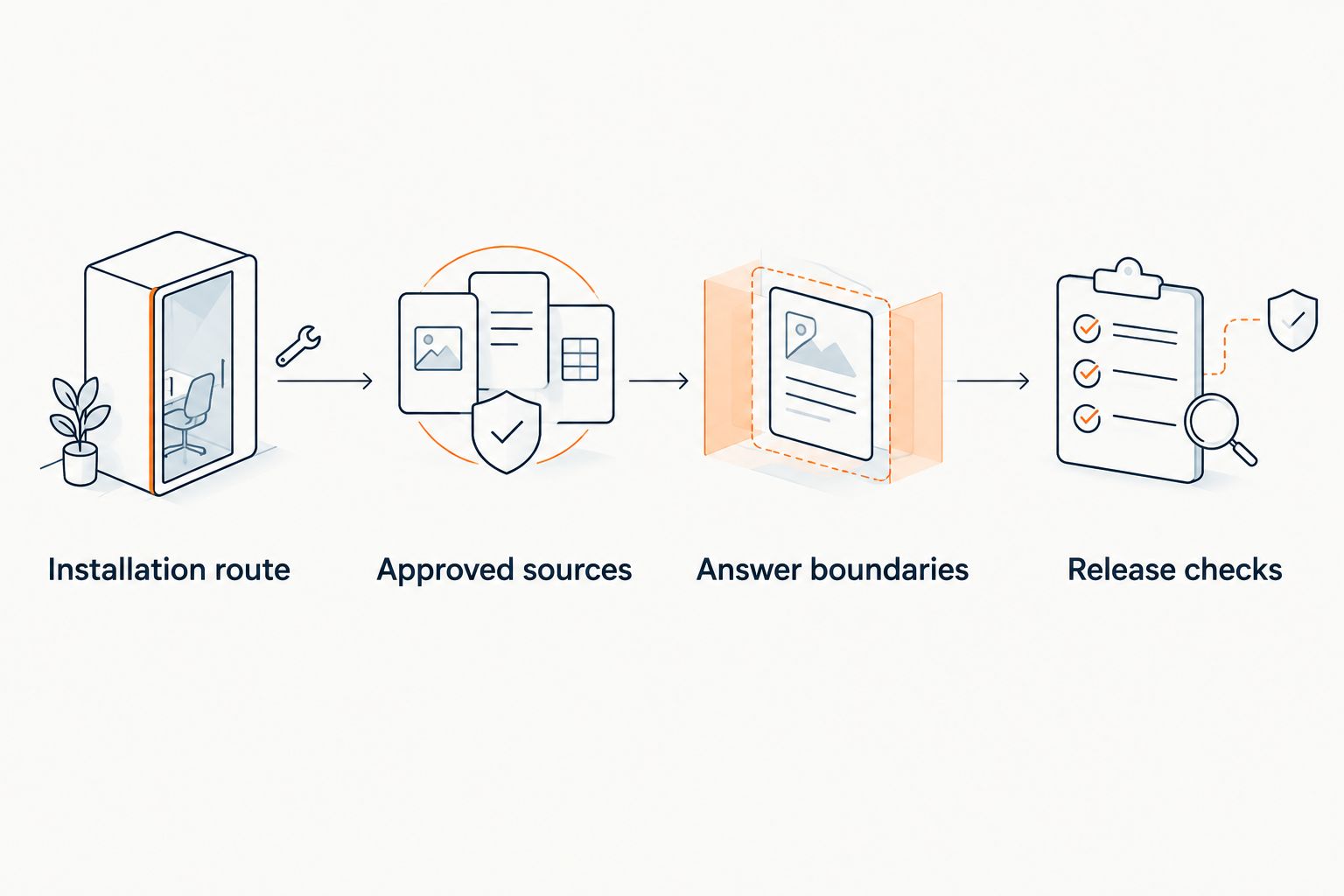
The release sequence is simple: confirm placement, approve sources, define boundaries, and test access. Keep those checks separate so a successful installation does not hide an unsafe answer configuration.
Second workflow: answer pre-sale questions separately
A prospective member asks whether your community covers a particular topic. An existing member asks where to find the corresponding lesson. These questions sound similar, but they do not justify exposing the same material.
For a 2026 launch, prepare 2 source sets: one approved for public questions and one approved for member support. Verify the available separation controls before connecting either set to a live experience.
| Workflow | Best for | Advantage | Limitation |
|---|---|---|---|
| Member-support widget | Existing members finding approved resources | Answers can point members toward relevant support material | Requires verified placement, source permissions, and citation access |
| Public pre-sale widget | Prospective members checking published program details | Keeps buyer questions tied to public descriptions | Must not disclose private lessons or invent enrollment terms |
To add the public workflow:
- Collect only public program descriptions, published curriculum summaries, and approved enrollment policies.
- Confirm a supported public placement and a source configuration separate from restricted member content.
- Ask about topic coverage and prerequisites, then compare each answer with the published description.
- Test requests for unpublished offers and guaranteed outcomes. The answer should not create either.
- Test lead capture separately from question answering, using the supported account configuration.
HelpShelf’s lead capture is not evidence of Circle membership synchronization. Treat capturing a visitor’s details and identifying an authorized community member as different requirements.
The public workflow broadens the support entry point. Its trade-off is another source collection to maintain and another audience boundary to test.
Troubleshooting
The widget does not appear for members
Confirm that the installation was applied to the surface members actually visit, not just an administrator preview. Check the supplied installation instructions and browser errors with the person responsible for the deployment.
Also test without browser extensions that block scripts. If the intended surface does not support the installation method, stop and confirm another supported placement rather than repeatedly pasting the same code.
Answers miss content that exists in Circle
Check whether the material was actually supplied through a supported ingestion method. A page being visible to you while signed in does not make it readable by an external service.
Use an approved copy only when you have permission to provide it. Then repeat the original question and inspect the citation; do not treat a plausible answer as proof that the right source was used.
Citations work for administrators but not members
Open the cited destination with an ordinary member account. Check the source’s audience and the member’s access to it.
Correct the destination or remove the source from that audience’s answer collection. Do not solve an access problem by making private material public.
Answers repeat an outdated rule
Find the source supporting the answer and compare it with the current policy. Remove superseded material from the approved collection and refresh the content through the supported process.
Repeat the failed question after the update is confirmed. Keep the old wording in your test list so a future change does not silently reintroduce it.
Public visitors receive member-only details
Stop public access to the affected configuration. Inspect the answer’s source collection, not just the visibility of the cited link: a private link does not undo disclosure in the answer text.
Separate the content or narrow the deployment until supported permission controls are verified. Test again while signed out before restoring public access.
Customize your workflow
Expand by question type before adding more content. Start with resource-finding questions, then add policy explanations after the relevant sources pass testing. Handle account actions separately from informational answers.
A support answer can explain a published billing policy. It should not imply that a charge was reversed or a membership changed unless an authorized system has actually completed that action.
Keep a 2026 change log recording the source changed, its owner, and the questions affected. Rerun those questions after each meaningful update. This turns a content edit into a checkable maintenance task rather than a silent change to member answers.
FAQ
How do I connect HelpShelf to Circle?
Confirm a supported widget placement, supply approved content through a supported ingestion method, and test answers with ordinary member and signed-out sessions. Verify the installation route for your account before changing community settings; do not assume a native connector.
Does adding a widget automatically import private Circle posts?
No—widget placement alone does not establish content ingestion or permission to read private posts. Confirm the supported content method and approve the materials separately.
Can the chat widget answer questions from member-only lessons?
Use member-only lessons only after confirming supported ingestion, permitted use, and audience controls. Test both the answer text and citation access with an ordinary member account and a signed-out session.
Will a browser installation also work inside the community app?
Treat browser and app placement as separate compatibility checks. Confirm support for each intended surface and test it directly before announcing access to members.
What should happen when the content does not answer a question?
The answer should state the limit and direct the member to your approved human support route. It should not invent a discount, refund exception, policy, or income promise.
Can I use the same content for buyers and existing members?
Use the same material only when it is approved for both audiences. Keep restricted lessons out of public buyer answers and verify the supported separation controls before publishing.
How do I maintain this workflow during 2026?
Keep an owner and current version for each approved source, then rerun affected test questions after changes. Remove superseded material and verify that citations still open for the intended audience.
One last thing
Test a question whose correct answer is a refusal. A request for an unpublished exception exposes a different failure from a missing lesson link: the widget can sound helpful while making a commitment your business never approved.
Keep that refusal test in your release checklist. A cited answer matters; knowing when not to answer matters too.


