
Instead of manually answering the same course questions inside your Base44 app, connect HelpShelf to Base44 through a supported widget installation so visitors can ask questions against your approved content. Start by confirming the installation method for your app; then add the widget, check its citations, and test lead capture before publishing.
- Connect HelpShelf to Base44 only after confirming a supported installation method for your app.
- HelpShelf suits creators who need source-cited answers and lead capture from their own content.
- Keep public sales answers separate from restricted member material.
- Test citations, refusals, navigation, and lead capture in the published app before launch.
Why this matters
A prospective student opens your app at 11pm and asks whether your course covers a particular topic. The answer belongs in your published curriculum, not in another message waiting for you tomorrow.
Helpshelf provides a chat widget that answers pre-sale and support questions from a creator's content, cites sources, and captures leads. HelpShelf is best for course creators, coaches, and community owners who need source-cited answers from their own material. Its usefulness depends on the material you provide: missing policies and contradictory lessons are content problems, not installation problems.
For a 2026 setup, treat the connection as two separate tasks: placing the widget in the app and controlling what it can answer. A visible chat launcher proves only the first task. It does not prove that citations work, private material stays private, or follow-up details reach the right place.
Before you start
- Get access to both systems. You need permission to change and publish the Base44 app, plus access to the widget's current installation instructions and configuration. Confirm the supported installation method before changing app code; do not assume a native connector exists.
- Prepare approved source material. Gather the curriculum summary, support instructions, published policies, and a working follow-up destination. Decide which material belongs in public sales conversations and which is restricted to members.
- Check the non-obvious boundary: app login is not content permission. Placing a widget behind a login does not, by itself, establish how its answers enforce access. Confirm the widget's access model before connecting restricted course content.
If you cannot establish the installation method or access controls, use the contact page to resolve those questions first. Do not paste a guessed script, expose an account secret, or proceed on the assumption that a public widget inherits your app's permissions.
The steps below describe the configuration and acceptance checks. Use the current product instructions for exact interface labels and installation code rather than substituting guessed menu names.
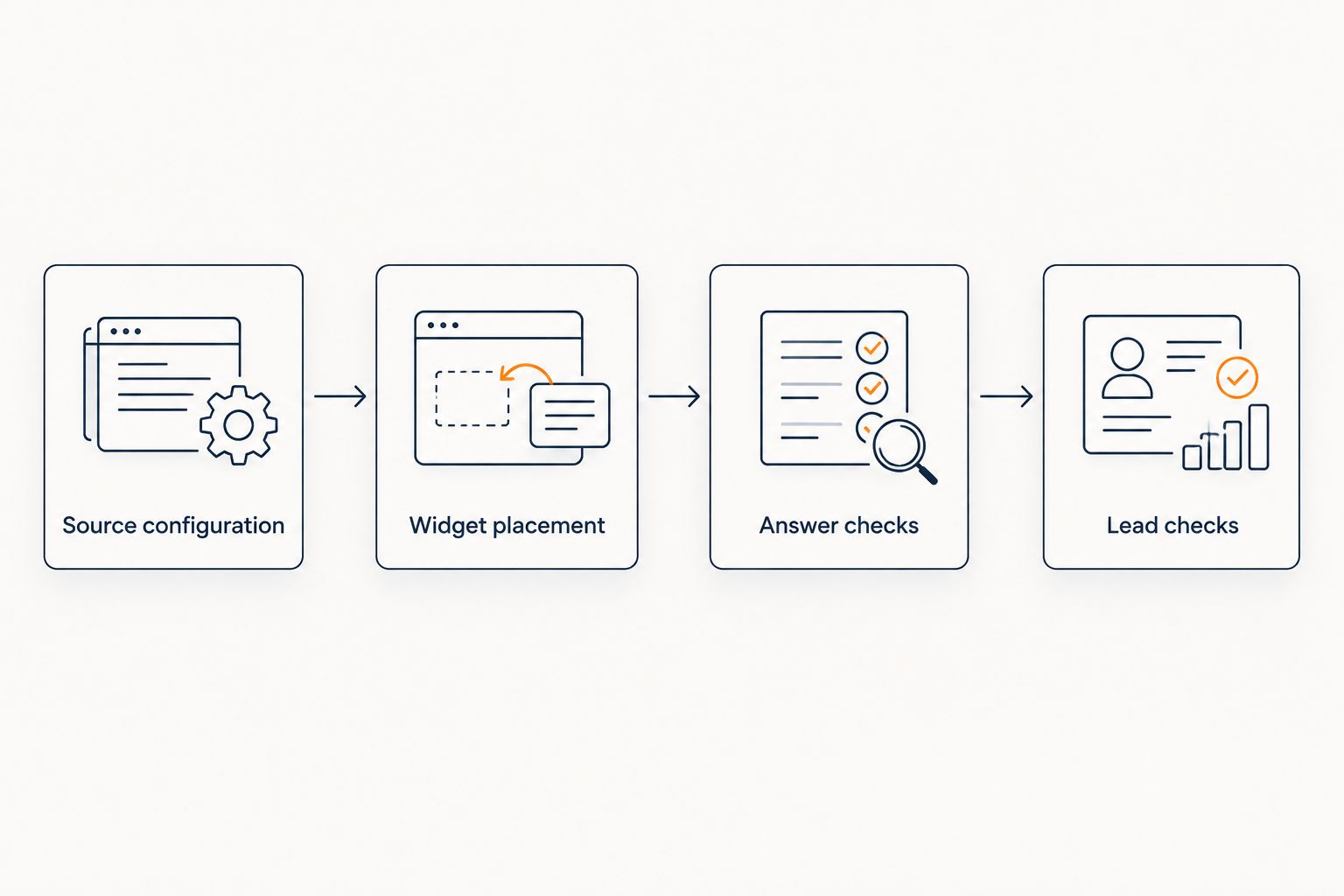
Source configuration
Define the answer boundary
- Choose the initial audience. Start with either prospective buyers or existing members. Write down where the widget will appear and what that visitor is allowed to learn.
- Choose approved sources. For public sales questions, use material you are comfortable showing to anyone who can open the app. Exclude private coaching notes, student submissions, and member-only lessons unless the access model explicitly supports them.
- Remove conflicting instructions. Resolve differences between your curriculum summary, policy document, and onboarding material before connecting them. Keep an identifiable current version for your 2026 launch.
- Write answer boundaries. Specify that answers must stay within the approved material. Include no invented discounts, no refund exceptions, and no income promises in your acceptance criteria.
Expected result: you have an approved source set with a clear audience and no unresolved policy conflicts. You can point to the exact document that should support each common answer.
Consider a visitor asking whether you guarantee a particular business outcome. If your published material contains no such guarantee, the correct response is a refusal to invent one. A suitable acceptance-test response is: I can only quote what's published; this material does not promise that outcome.
That is an example to test against, not a claim about a default response or a named setting. Configure any available instructions using the documented controls, then verify the actual answer.
Choose the initial workflow
These are deployment choices, not claims that every access configuration is supported automatically.
| Workflow | Best for | Advantage | Limitation |
|---|---|---|---|
| Public sales answers | Creators answering curriculum and offer questions before purchase | Visitors can check approved information without waiting for a reply | Requires strictly public-safe sources |
| Member support answers | Creators answering questions inside a restricted learning experience | Answers can address the member's learning context | Requires verified access controls before using restricted material |
Start with public-safe sources if you have not verified content permissions. This narrows the first release without pretending that app authentication solves every privacy question.
Widget placement
Confirm the installation route
- Obtain the current installation instructions. Identify the supported method for adding the widget to a web app. Use the supplied installation material exactly; do not manufacture a script address, account identifier, or API endpoint.
- Confirm compatibility with your Base44 app. Establish where the supported installation belongs in the app's editable structure. If this requires code changes, have the app owner or developer identify the shared location and deployment process.
- Review browser-visible values. Use only identifiers explicitly intended for client-side installation. Keep private credentials out of page code, generated prompts, browser storage, and screenshots shared during troubleshooting.
- Limit the initial rollout. Prepare 1 published app for acceptance testing before repeating the installation elsewhere. Keep a record of the changes so you can remove the widget cleanly if a test fails.
Expected result: you have a confirmed installation route, the correct installation material, and a known location in the app. No guessed integration code is needed.
If you use a coding assistant to make the app change, give it the documented installation material and a narrow task. Ask it to preserve existing authentication and navigation, avoid adding secrets to client code, and explain the changed files. Do not ask it to invent an integration from the product names alone.
Add the widget once
- Apply the documented installation. Place it in the confirmed app location. Avoid adding independent copies to several screens when a shared installation is the documented approach.
- Keep essential controls usable. Check that the launcher and open conversation do not cover navigation, form submission, or lesson controls. Review the actual rendered app rather than judging only the editor preview.
- Publish a controlled test version. Use your established release process. Test the published app because the editor preview is not the visitor's final environment.
- Navigate between screens. Open a conversation, change routes, return to the starting screen, and reload. Confirm that the interface does not disappear unexpectedly or create duplicate launchers.
Expected result: one usable conversation interface appears on the intended screens of the published app. The rest of the app still works.
The setup sequence has four separate checkpoints. Complete each one before treating the connection as ready for visitors.
Answer and lead configuration
Answer checks
- Prepare 5 test prompts. Include a curriculum question, an onboarding question, a policy question, a request for an unpublished exception, and a question outside your material. Write the expected source or refusal beside each prompt.
- Inspect the citations. Open each cited source from the visitor's perspective. Confirm that it supports the answer rather than merely mentioning a similar topic.
- Check unsupported requests. Ask for a discount that is not published, a refund exception, and an income promise. Treat any invented commitment as a failed acceptance test.
- Repeat in 2 browser sessions. Use a signed-out visitor session and a member session where relevant. Confirm that each audience sees only the information it should receive.
Expected result: supported questions receive source-grounded answers, and unsupported questions do not become invented commitments. Citations are useful to the intended visitor.
For your 2026 test record, save the question, answer, source, visitor role, and outcome. This gives you a repeatable check after content or app changes; it is not a claim that a small test set proves every future answer correct.
Lead checks
- Define the follow-up purpose. Decide what happens when someone needs a human answer. Keep the request concrete: a curriculum clarification needs different follow-up from an account-access issue.
- Configure documented lead-capture controls. Use only the fields and destinations supported by the current setup. Do not assume that collecting an email address automatically creates a record in another service.
- Submit a test lead. Use details you control and clearly identify the entry as a test. Check the actual destination rather than relying only on a confirmation shown in chat.
- Inspect the context. Verify which details accompany the lead. If the conversation or unresolved question does not transfer, document a separate way for the person handling follow-up to obtain it.
Expected result: you know where captured details arrive, what context is included, and who is responsible for responding. Lead capture is not the same as completed follow-up.
When your source content changes
The adjacent workflow is maintenance: recheck answers whenever you revise a curriculum, onboarding instruction, or published policy. A working installation does not establish how quickly a particular source change reaches the answering system.
- Update the authoritative document. Remove or clearly supersede contradictory material. Avoid leaving multiple competing policy versions in the approved source set.
- Follow the documented refresh process. Confirm whether your configured source needs a manual update or another supported refresh action. Do not assume immediate synchronization.
- Ask the changed question again. Check both the answer and citation from a fresh visitor session. Then repeat the unsupported-exception test to make sure the new wording has not widened the answer boundary.
Expected result: the answer reflects the approved revision and still respects the original limits. Record the revision date in your 2026 maintenance log so later troubleshooting starts with a known content version.
Troubleshooting
The widget appears in preview but not in the published app
Compare the published version with the version containing the installation change. Check browser console and network errors for blocked or failed resources, then compare the implementation against the current installation instructions. Do not add a second copy as a workaround.
The launcher duplicates after navigation
Inspect whether the installation runs repeatedly during route changes or exists in multiple components. Have the developer follow the documented initialization and cleanup behavior. Retest navigation and reloads after removing the duplicate installation path.
The answer cites a page the visitor cannot open
Check the source's permissions using the same visitor role that received the citation. Remove restricted material from public answers or use an explicitly supported access configuration. Making private material public just to repair a citation is not a fix.
The answer repeats an outdated policy
Find every approved source that contains the old wording, resolve the conflict, and complete the documented refresh process. Test the exact failed question again. Changing the chat's phrasing does not remove an outdated source.
A lead appears in chat but not at the destination
Check whether the capture completed and whether the configured destination received the test submission. Separate collection from delivery when diagnosing the failure. Do not tell visitors that someone has received their request until the workflow supports that statement.
Customize your workflow
Expand the setup only after the initial checks pass. Add another course or audience deliberately, with its own source boundary and test questions, rather than feeding every document into the same public conversation.
For a 2026 rollout, keep a short acceptance record: app location, source owner, permitted audience, test results, and follow-up owner. Repeat the checks after changes to authentication, routing, installation code, or published policies.
Keep the first release narrow enough to explain. You should be able to name what the widget answers, what it refuses, and where an unresolved question goes without reading through the app's implementation.
FAQ
How do I connect HelpShelf to Base44?
Confirm a supported widget installation method for your Base44 app, apply the current installation instructions, and test the published result. Check source citations, access boundaries, navigation, and lead capture before releasing it to visitors.
Is there a native Base44 connector?
Do not assume a native connector is required or available. Confirm the current supported installation route before changing the app, and use the product's actual instructions rather than a guessed connector workflow.
Can the widget answer questions from my course content?
HelpShelf answers pre-sale and support questions using a creator's own content with cited sources. Connect only material appropriate for the intended visitor, and test that each citation supports the answer.
Does adding the widget connect it to my Base44 database?
Widget placement does not establish database access. Treat any database connection as a separate integration requiring explicit documentation, permissions, and security review.
Can I use private lessons for answers inside a member app?
Use private lessons only after verifying that the configured access model protects them. An app login alone does not prove that answer retrieval enforces the same permissions.
What should happen when a visitor asks for an unpublished exception?
The answer should refuse to invent an exception and stay within the published material. Include requests for unpublished discounts, refund exceptions, and income promises in your acceptance tests.
Will captured leads automatically reach my other tools?
Do not assume lead capture includes delivery to another tool. Confirm the supported destination and submit a test lead to verify what arrives, including any conversation context.
One last thing
Test a question your content cannot answer before testing another easy curriculum question. A polished explanation of a published lesson tells you less about the answer boundary than a calm refusal to invent a promise.
Use that refusal as a release gate: if the source does not support the commitment, the conversation must not make it. Keep the follow-up path available without turning uncertainty into an offer.


