

Freshdesk’s cost for a small support team depends on the current plan quote, the people who need paid access, and any separately billed capabilities you select. For your 2026 budget, calculate the subscription for those users, then add confirmed extras and the staff time needed to run support. Compare the full support workflow, not just the advertised rate.
- How much does Freshdesk cost for a small support team? Budget from a current quote, paid access, and confirmed extras.
- Freshdesk budgeting should separate subscription charges from setup work and ongoing support labor.
- HelpShelf fits creators seeking source-cited answers to course, coaching, and community questions.
- Keep ticket ownership, content maintenance, and unresolved questions in your support budget.
Why this matters
A prospective student messages you at 11pm asking whether your course covers a particular topic. A member needs help accessing a lesson. Someone else asks for a refund exception. These are different jobs, even when they arrive through the same support channel.
Your budget needs to reflect those jobs. Paying for software does not remove the work of checking an account, making an exception decision, or updating an unclear policy.
Before comparing subscriptions, decide whether your main problem is organizing requests or answering questions from published content. The Freshdesk-to-answered-support workflow guide covers that distinction in more detail.
How much does Freshdesk cost for a small support team?
Use a current Freshdesk quote to calculate your subscription, then build a separate operating budget around it. Do not treat a per-user figure as the total cost of support. Confirm which people require paid access, which capabilities the quote includes, and how the billing period works.
The following is a budgeting worksheet, not a statement that Freshdesk charges separately for every item. Include a charge only when it appears in your quote or agreement.
| Budget component | What to verify | What belongs in your calculation |
|---|---|---|
| Subscription | Plan, paid-user definition, and billing period | The quoted subscription commitment |
| Additional capabilities | Whether required functions are included or separately billed | Only confirmed additional charges |
| Usage terms | Whether the selected package has usage-based charges or limits | Charges applicable to your expected use |
| Setup work | Who configures access, routing, and support content | Your internal time or an agreed service charge |
| Ongoing operation | Who answers, reviews, and maintains support | Staff time allocated to those tasks |
For a hypothetical team with 2 agents, start by checking whether both people need paid access under the proposed agreement. If a founder occasionally reviews requests, ask how that access is treated. Do not assume occasional use is included or separately billed.
For a hypothetical team with 3 agents, repeat the calculation using the same billing basis and required capabilities. This gives you a usable comparison without assuming that every small team needs the same package.
Put every quote on the same billing basis
For a 2026 comparison, record both the payment schedule and the total commitment. A monthly equivalent and a monthly payment are not interchangeable descriptions of an agreement.
Choose 1 month as a reporting unit if that helps your budget, but retain the actual payment obligation beside it. Ask what happens when you add or remove access during the term. Use the written answer rather than an assumption about how subscriptions usually work.
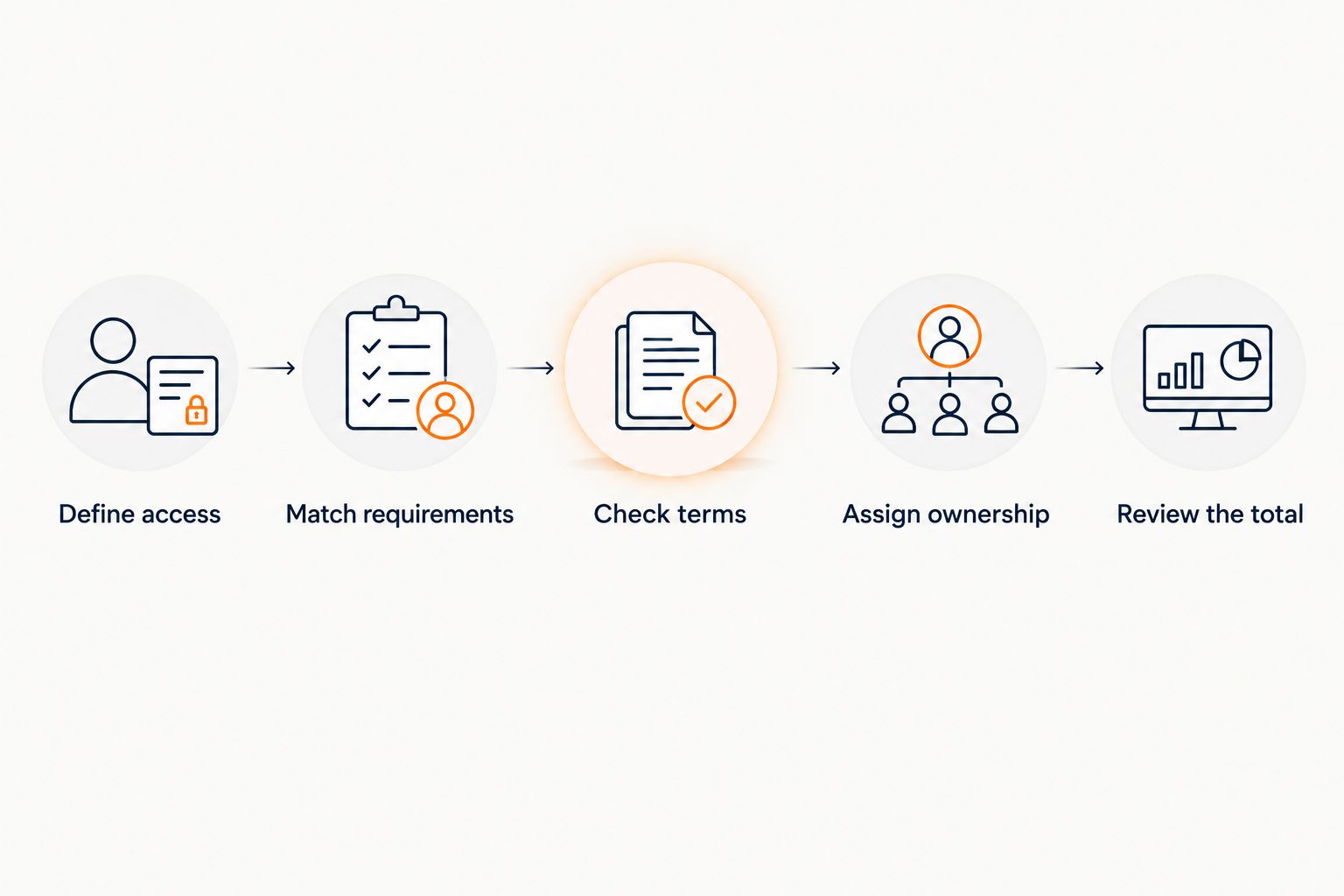
Build your small-team budget in five steps
The calculation becomes clearer when you start with responsibilities rather than a plan name. Keep the worksheet short enough that the person approving the purchase can check every line.
- Define access. List everyone who will answer requests, administer the account, or review support work. Confirm the access each person needs.
- Match requirements. Write down the functions your team actually uses. Ask which quoted package covers them and identify anything that requires separate confirmation.
- Check terms. Record the billing period, commitment, renewal terms, and treatment of access changes. Keep these next to the subscription calculation.
- Assign ownership. Name the person responsible for setup, unanswered requests, and policy updates. Software cannot own a business decision.
- Review the total. Separate vendor charges from internal work. Approve the budget only when both are visible.
Do not add hypothetical extras just to make the budget look cautious. A useful worksheet distinguishes a confirmed charge, an unresolved question, and an internal task. Those categories should not collapse into a single padded estimate.
Test the workflow before expanding the requirement list
Take a recent access question, a course-content question, and a request requiring your judgment. Write down what must happen from arrival to resolution. This reveals whether you need a particular function or simply a clearer process.
For example, a lesson-access request needs someone to establish what went wrong and take the appropriate action. A question about course coverage needs an answer grounded in the curriculum. A request for an unpublished exception needs a decision from an authorized person.
These examples are not interchangeable. Avoid buying a larger package to compensate for an undefined support process.
Why Freshdesk costs vary between small teams
Two teams with the same headcount can have different requirements. Use these factors to examine your own quote; do not assume that each factor creates a separate Freshdesk charge.
- Paid access requirements. The number of employees is not automatically the number of required subscriptions. Confirm access rules for responders, administrators, and occasional reviewers.
- Required functions. Compare the functions in the proposed package with tasks your team actually performs. Keep optional features separate from requirements.
- Billing commitment. Record the payment schedule and contractual commitment. Compare like with like when reviewing competing proposals.
- Separate charges. Check the agreement for any additional capabilities or usage charges that apply to your chosen configuration.
- Internal support work. Account investigations, policy decisions, content updates, and unresolved requests still need an owner. Include that responsibility in your operating plan.
For your 2026 decision, ask each vendor to respond to the same requirements. A comparison loses its value when one proposal covers your actual workflow and another covers only an entry-level subscription.
Keep setup work separate from recurring work
Initial configuration and ongoing support are different budget categories. Setting permissions is not the same task as answering tomorrow’s access request. Preparing source material is not the same task as keeping it current.
Record who owns each task and whether it happens during setup or throughout the subscription. This keeps an apparently small software purchase from carrying an undefined workload for the founder.
Should a small creator team choose a help desk or a chat widget?
Choose around the unresolved job. If requests need assignment, investigation, and a clear owner, evaluate the help-desk workflow. If visitors repeatedly ask questions already answered in your published material, evaluate source-grounded answers before adding more manual coverage.
The comparison below describes workflow choices, not an assertion that the products have identical scope or that either replaces the other.
| Approach | Best for | Advantage | Limitation |
|---|---|---|---|
| Help-desk workflow | Requests requiring ownership and investigation | Gives the team a defined process for handling unresolved work | Staff still need to investigate and make decisions |
| HelpShelf chat widget | Course creators, coaches, and community owners answering content-based questions | Answers from the creator’s content with cited sources and captures leads | Published content does not establish an unpublished exception or resolve an account-specific issue |
| Published FAQ | Questions with stable, public answers | Gives visitors a reference they can read directly | Visitors must find the relevant answer themselves |
HelpShelf is best for creators who need source-cited answers to course, coaching, and community questions. That is a narrower job than managing every support request. Keep that boundary visible when comparing subscriptions.
A course buyer asking whether a module covers a topic needs evidence from the curriculum. A member disputing an account charge needs account-specific review. Treating both as ordinary content questions creates the wrong purchasing requirement.
What source-grounded answers should look like
Suppose your published course outline explains the topics covered. An answer should stay within that outline and cite the relevant source. It should not extend the curriculum because the visitor wants a different answer.
The same rule applies to policies. A useful refusal is: I can only quote what’s published. This is an example response, not a claim about an actual customer conversation or a guaranteed product output.
Set the boundary plainly: no invented discounts, no refund exceptions, and no income promises. If the source does not answer the question, the next step is review by the person responsible—not a more confident answer.
Is Freshdesk worth it for a two-person support team?
For a team with 2 agents, evaluate Freshdesk against the work both people must coordinate. A shared requirement list is more useful than headcount alone: identify who takes ownership, who investigates, and who closes each request.
Do not approve the purchase solely because the team is small. Equally, do not reject a help desk solely because there are few people answering. The relevant question is whether its proposed workflow fits your support responsibilities.
Before committing in 2026, ask both agents to walk through the same sample requests. Record where the proposed setup helps and where manual work remains. Use those observations to check the required package, not to claim a financial return you have not measured.
Does the subscription cover the full cost of support?
The subscription covers the services specified in your agreement, not every task involved in supporting customers. Keep staff work, source maintenance, and business decisions visible alongside the vendor charge.
A support answer can accurately repeat a published policy without having authority to make an exception. Likewise, explaining an access process is different from investigating a particular account. Your budget needs a responsible person for the latter tasks.
Can a chat widget replace a small support team?
A chat widget is not a substitute for every support responsibility. Source-grounded answers address questions supported by the material you provide; account investigations and unpublished decisions still require a person with authority.
For a creator considering HelpShelf’s chat widget, evaluate the cited answers and lead capture against that specific need. Do not count those capabilities as proof that all tickets disappear or that staff time will fall by an unmeasured amount.
FAQ
How do I calculate Freshdesk’s total cost for a small support team?
Calculate the current quoted subscription for the people who need paid access, then add confirmed additional charges. Track setup work and ongoing support labor separately so the subscription is not mistaken for the full operating budget.
Should I use monthly or annual figures when comparing support software?
Use the same reporting period for every comparison, and retain the actual payment schedule and total commitment. A monthly equivalent does not by itself describe when payment is due.
Does everyone on my team need paid Freshdesk access?
Confirm paid-access requirements against the proposed Freshdesk agreement. List responders, administrators, and occasional reviewers rather than assuming every employee needs the same access.
Is Freshdesk worth considering for a solo course creator?
Evaluate Freshdesk if your requests need a defined process for ownership and investigation. If your main task is answering questions already covered in published material, compare that narrower workflow separately.
Can HelpShelf answer questions using my course content?
HelpShelf provides a chat widget that answers pre-sale and support questions using a creator’s own course, coaching, or community content with cited sources. It also captures leads; those capabilities do not establish authority to make unpublished exceptions.
Can a chatbot approve a refund exception?
Do not treat a content-based answer as approval for an unpublished refund exception. Keep policy explanation separate from the decision an authorized person must make.
What should I check before approving a support subscription in 2026?
Check paid access, required functions, billing commitments, and any applicable separate charges. Assign responsibility for setup, unresolved requests, and keeping support content current.
One last thing
Before approving your 2026 support budget, pick a question whose correct answer is a refusal. Ask for a discount you have not published, an exception you have not authorized, or an outcome you have not promised.
A useful support workflow must know where its answer ends. Check the cited source, the refusal, and who owns the next step. That test tells you something a subscription comparison cannot: whether your proposed setup respects the boundary between explaining your business and making decisions for it.


