

Instead of manually rewriting the same Freshdesk replies every day, build a freshdesk to ai chatbot workflow that answers published questions in your chat widget and keeps account-specific decisions with a person. This 2026 guide uses HelpShelf for cited answers from your creator content and Freshdesk for tickets that still need attention—not an assumed automatic connection between them.
- A freshdesk to ai chatbot workflow should separate published answers from account-specific decisions.
- HelpShelf is best for creators who want source-grounded support answers and pre-sale lead capture.
- Keep Freshdesk replies human-reviewed until your ticket integration and escalation rules are verified.
- Test citations, unanswered questions, and handoffs before expanding the workflow.
Why this matters
A learner asks where to find a worksheet. Another asks you to make an exception to a published policy. Both arrive as support questions, but they need different handling: the first needs a source; the second needs an authorized decision.
HelpShelf is best for course creators, coaches, and community owners who need cited answers from their own content. It answers pre-sale and support questions and captures leads. That does not make a cited answer permission to change an account, approve an exception, or promise an outcome.
For your 2026 setup, separate the answer layer from the action layer. The widget handles questions supported by approved content. Freshdesk remains the place where a person investigates individual cases and sends reviewed replies. This guide establishes that boundary before adding any automation.
Before you start
- Accounts and access: Have access to your Freshdesk tickets, your widget setup, and the website where you intend to place it. Confirm that you can change the relevant content and test the visitor experience.
- Approved materials: Prepare public course information, support instructions, and published policies. Assign an owner to each source so corrections reach the answer layer rather than staying in someone's inbox.
- The non-obvious gotcha: A private ticket reply is not automatically safe training content. Remove personal details and account-specific exceptions before turning recurring answers into reusable guidance. Treat a direct ticket connection as a separate implementation, not a prerequisite for this workflow.
Use a small launch scope: one course, coaching offer, or community. Mixing unrelated materials makes it harder to determine which policy supports an answer.
Choose the workflow boundary
These are complementary roles, not interchangeable products. Decide which questions belong in each before configuring the workflow.
| Component | Best for | What it contributes | Limitation to respect |
|---|---|---|---|
| HelpShelf chat widget | Published course, coaching, and community questions | Source-grounded answers with citations and lead capture | Its answers depend on your content; do not treat them as authority for unpublished exceptions |
| Freshdesk ticket queue | Individual support cases requiring investigation | A place for agents to review a case and send a reply | Keeping the ticket queue does not remove repetitive answering by itself |
| Human review | Policy exceptions, ambiguous requests, and account actions | An authorized decision before a consequential response | It still requires someone's attention |
Keep human review wherever the requested action goes beyond quoting published guidance. This constraint preserves a useful division of work without pretending every support question is an FAQ.
Approved source set
Start with content selection, not a ticket trigger. A trigger that sends questions to an unreliable source set only moves the problem faster.
- Group your materials under Course information, Support instructions, and Published policies. These are planning categories, not product interface labels.
- Select the current approved document for each topic. Where two documents disagree, resolve the disagreement before including either in the answer source set.
- Remove learner names, email addresses, private coaching notes, and individual accommodations from reusable material.
- For each recurring question, record the supporting passage. If there is no passage, mark the question for human handling rather than writing an answer from memory.
- Make the approved materials available through the content setup supported in your widget account. Keep public visitor content separate from materials intended only for authenticated members.
For example, a public course outline can support an answer about the subjects covered. It does not support a guarantee that the course will produce a particular income. A support article can explain how to request help without authorizing the widget to approve the request.
Expected result: Every in-scope question has an identifiable approved source. Questions without one have an explicit human-handling path.
Visitor answer path
Configure the visitor experience around a published answer or a clear next step. Do not design the successful path alone; test what happens when the source does not answer the question.
- Place the widget only where you have permission to publish it. Start on a page whose visitors match your selected course, coaching offer, or community.
- Ask a straightforward question that the source answers directly, such as which topics a course covers. Inspect the answer and its citation together.
- Ask the same question with different wording. Confirm that the answer still refers to the relevant source rather than an unrelated passage.
- Test a request for an unpublished exception. Use this refusal pattern when defining your response requirements: I can only quote what's published. Treat that as example wording, not a claim about a default product response.
- Provide a clear route for unanswered requests. If that route involves lead capture, tell the visitor what they are submitting and what follow-up to expect. Do not promise a response deadline that your team has not established.
At 11pm, a prospective learner might ask whether a course suits their experience level. The useful answer points to published prerequisites. If the outline never states those prerequisites, the useful next step is clarification—not invented reassurance.
Expected result: Visitors receive a supported answer with a relevant citation, or a clear route to a person. Neither outcome invents a policy.
Freshdesk review path
Use a reviewed ticket response as the initial connection between the answer layer and Freshdesk. This requires no assumption that HelpShelf supplies a native Freshdesk connector or automatically writes ticket replies.
- Open Tickets in Freshdesk and select a case that asks an in-scope, published-content question. Read the conversation before drafting anything.
- Ask the content question through your widget test experience without including the learner's private account details. Keep the test focused on the general guidance needed for the case.
- Open the cited source and compare the supporting passage with the proposed answer. Check that the answer addresses this ticket, not just a similar question.
- Select Reply in Freshdesk. Draft the response using the verified guidance and the context of the conversation. Include a source reference only when the recipient has permission to access it.
- Review the response for invented discounts, refund exceptions, and income promises. Remove any statement that lacks published support or an authorized decision.
- Send the reviewed reply using your normal ticket procedure. Do not close an unresolved case merely because the widget produced an answer.
Expected result: The customer receives a reviewed Freshdesk reply grounded in approved content. Your team retains responsibility for the individual case.
This is the safe starting point for a 2026 ticket workflow. If you later add a connector, preserve the same review boundary until you have tested exactly what it reads, writes, and sends.
Launch test set
A demo question proves very little. Use a deliberately mixed test set before exposing the workflow to your full audience.
- Prepare 10 test questions: four clearly answered by your sources, two answered only partially, two absent from the sources, and two requesting an exception. This is a suggested test design, not a performance benchmark.
- Record the expected source or expected human-handling outcome beside each question. Define success before looking at the response.
- Run 2 test passes: one in the visitor widget and one through your reviewed Freshdesk reply process. Check the citation, wording, access permissions, and next step in each pass.
- Correct the source or routing requirement when a test fails. Repeat the failed question before expanding the launch.
Expected result: You have a documented answer boundary, not just a collection of convincing responses.
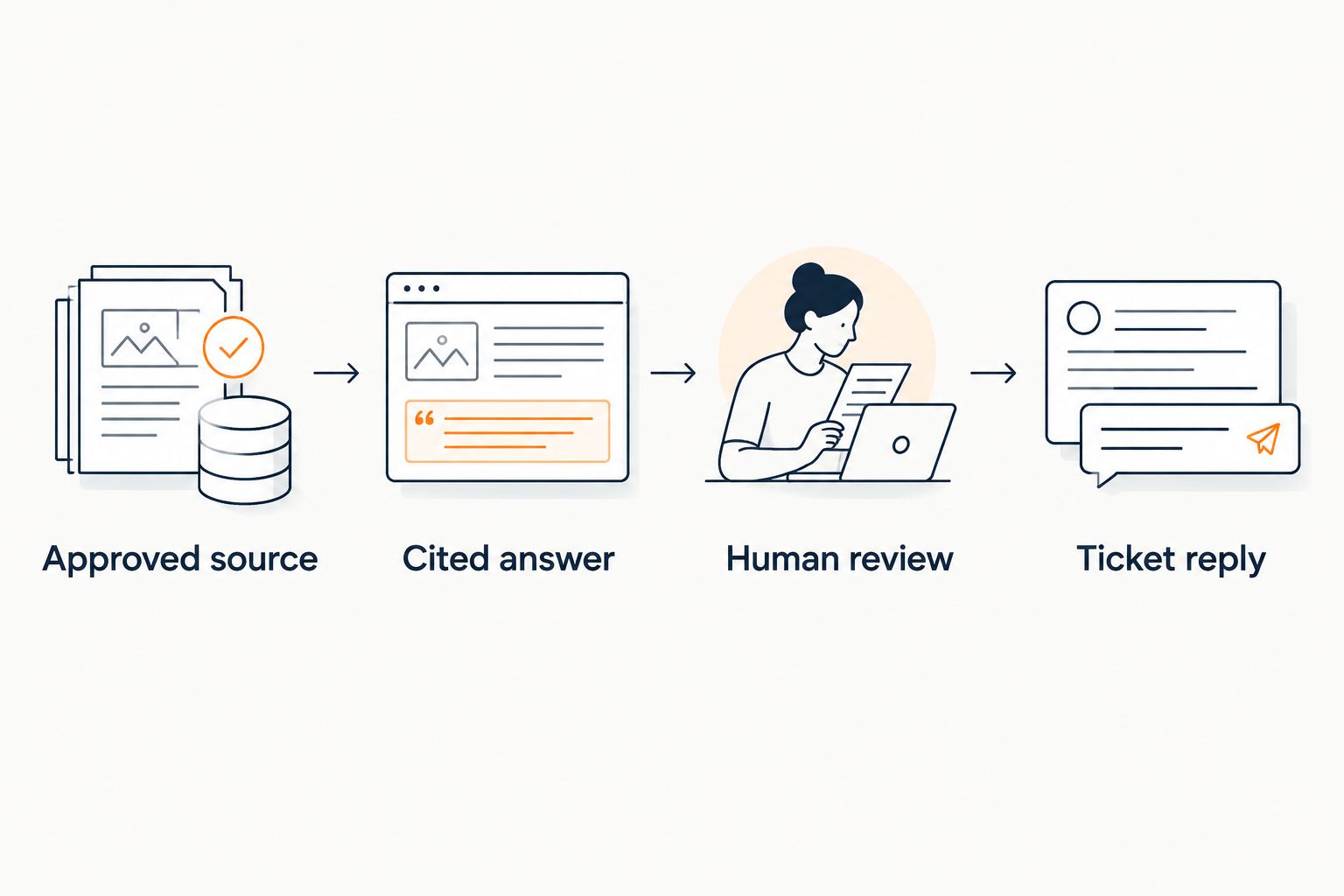
The sequence is simple: Approved source, Cited answer, Human review, Ticket reply. Keep that sequence visible in your 2026 operating notes so someone covering support can follow it.
Refresh answers whenever a source changes
A second useful workflow starts with a content update rather than a new support request. When you change an onboarding instruction or published policy, review the answers that depend on it.
- Update the authoritative source first. Avoid maintaining a corrected ticket template while leaving the underlying document unchanged.
- Refresh the answer source through the content-update method supported in your account. Do not assume an edit elsewhere has already reached the widget.
- Re-run the questions connected to that source. Check both the wording of the answer and the destination of the citation.
- Tell agents which guidance changed. Apply the new guidance to relevant open cases, but do not automatically resend replies to older tickets.
Expected result: The visitor answer path and the ticket review path use the same approved guidance.
For a cohort launch, this matters when onboarding materials change. The cohort-based course creator guide provides a related planning path for that audience. Keep the source-change workflow separate from the new-question workflow so a document edit does not become an unintended customer message.
Troubleshooting
The answer is fluent, but the citation does not support it
Open the cited passage and compare it with the actual claim. Narrow the source set or rewrite ambiguous source material, then repeat the question. Do not approve a reply because it sounds right. A citation must support the statement beside it.
A public visitor receives member-only guidance
Remove restricted material from the public answer scope and inspect how the source became available. Retest with a signed-out visitor session. A relevant answer is still unsuitable when the visitor lacks permission to see its source.
The widget invents an exception
Stop using that answer for customer replies. Check for conflicting source passages, then require a refusal or human review when the published policy does not authorize the exception. An example boundary is: No exception is published here; a person needs to review this request.
A content edit does not change the answer
Confirm which document the citation references and whether the revised material has reached the answer source set. Resolve duplicate or outdated documents before retesting. Editing one copy does not establish that every answer path uses it.
A proposed automation sends duplicate replies
Pause the sending step and inspect which event started each run. In a custom implementation, distinguish a customer message from an agent note or later ticket update, and record whether the event has already been handled. Keep sending under review until repeated events no longer produce repeated customer messages.
Customize your workflow
Expand by question type, not by enabling every ticket at once. After published-content questions pass your tests, add another approved topic and repeat the same checks.
For pre-sale questions, HelpShelf provides cited answers and lead capture. For existing learners, keep access problems and individual account changes in the human-handled lane. The same visitor can ask both kinds of question in one conversation; classify the request, not the person.
If you build a direct integration later, specify the permitted action before choosing the transport: prepare a draft, attach internal context, or send a reply. Those are different permissions. Start with a reviewed draft and verify field mapping, credential access, event handling, and failure recovery before allowing customer-facing sends.
Keep a simple 2026 maintenance record: source owner, current approved document, last review date, and questions that require human handling. The record is an operating aid, not a promise that every answer is correct.
The next move is to improve coverage without widening authority. More approved questions should not mean more permission to invent decisions.
FAQ
What's the safest freshdesk to ai chatbot workflow?
Start with cited answers from approved content and human-reviewed Freshdesk replies. Keep account changes and policy exceptions with an authorized person, then test any automation separately.
Does this workflow require a native HelpShelf Freshdesk integration?
No. The reviewed workflow uses the widget to check published guidance and an agent to prepare the Freshdesk reply; a direct connection is a separate implementation.
Can the chatbot answer every Freshdesk ticket automatically?
Do not configure every ticket for automatic answering. Published-content questions and requests requiring an individual decision need different handling, and sending should remain reviewed until the implementation is tested.
Should I use old support tickets as answer sources?
Use approved general guidance extracted from tickets, not raw private conversations. Remove personal information and individual exceptions before adding reusable material to the source set.
What should happen when there is no published answer?
The workflow should decline to invent an answer and provide a route to a person. Define that route before launch, including what information the visitor submits and what follow-up your team actually provides.
How do I check whether a citation is useful?
Open the cited passage and verify that it supports the answer's specific claim. Also confirm that the intended recipient can access the source without seeing restricted material.
Is HelpShelf a replacement for human support decisions?
No. HelpShelf provides source-grounded chat answers and lead capture for creators; an authorized person still needs to handle unpublished exceptions and individual decisions.
What should I retest after changing a policy in 2026?
Retest the questions that depend on the changed policy and verify their citations. Confirm that both the visitor answer path and the reviewed Freshdesk reply process use the updated source.
One last thing
A citation can point to the right document and still fail to support the answer. Check the passage, not just the presence of a source link.
Before expanding your 2026 workflow, deliberately ask a question your content does not answer. A useful refusal is a launch requirement. If the workflow invents an exception instead, keep that question in the human-handled lane and correct the source or response boundary before trying again.


