

Instead of manually copying the same course details into Gorgias replies, build a gorgias to ai chatbot workflow that answers published pre-sale questions with citations and sends unresolved requests to a person. Use Helpshelf for the source-grounded chat layer, while keeping ticket transfer manual until you have verified a working connection.
- A gorgias to ai chatbot workflow should separate cited pre-sale answers from requests needing human decisions.
- Helpshelf is best for creators who need source-grounded pre-sale answers and lead capture.
- Start with published course information, clear refusal rules, and a tested manual handoff.
- Do not treat lead capture as proof that a Gorgias ticket was created.
Why this matters
A prospective student asks whether your course covers their situation. You have already answered that question in your curriculum, but someone still has to find the passage and write the reply. The useful change is not a longer automated conversation. It is an answer tied to the right source.
For your 2026 workflow, separate information from decisions. Published prerequisites belong in an answer; an exception to an enrollment rule belongs with a person. Helpshelf is best for course creators, coaches, and community owners who need cited pre-sale answers and lead capture.
The boundary matters just as much as the answer. A chat widget should not turn a missing policy into permission, or a question about results into an income promise. Your workflow needs an explicit stopping point before you publish it.
Before you start
- Gather access: Have your existing Gorgias workspace, the chat-widget account, and permission to edit the intended website or page. Assign a person responsible for unresolved conversations.
- Prepare sources: Start with 3 source documents: the offer description, the curriculum or service scope, and the published policies. Keep private student conversations out of the public-answer source set.
- Check the handoff boundary: A captured lead and a created helpdesk ticket are different events. Verify the transfer separately; do not assume the widget submits tickets or synchronizes Gorgias conversations.
Also check whether prospective buyers can open the material you intend to cite. A member-only lesson can contain a useful answer without being an appropriate public source. Prepare a public summary of the relevant facts instead of exposing restricted content.
This guide uses a manual handoff as the starting configuration. That keeps the process usable without depending on an unverified connector, field mapping, or background synchronization.
Source shelf
The source shelf is the material your chat answers should draw from. Build it around questions prospective buyers ask, not around every document your business owns.
- Create a question inventory. Review existing pre-sale conversations in Gorgias and list recurring questions without copying names, email addresses, or personal circumstances into your source material.
- Assign an authoritative source. Match each question to a published passage covering curriculum, prerequisites, coaching scope, community access, or another stated offer detail.
- Resolve contradictions. If a sales page and a policy document disagree, have the responsible person correct the published information before using either as an answer source.
- Separate public and private material. Put public offer information in the pre-sale source set. Keep account-specific records and member-only discussions outside it.
- Add the approved material using the widget's documented source setup. Record which document governs each subject so you can review answers against the original text.
Expected result: Every answerable question has a source, and every unsupported question has a clear reason to stop. You can explain why a passage belongs in the shelf without referring to a past agent's improvisation.
For example, a visitor asks whether beginners can join. If your published prerequisites answer that question, the reply should state those prerequisites and cite them. If the page says nothing about prior experience, the correct next move is a human clarification—not an invented admission rule.
Use a simple worksheet with these headings: Question, Published source, Answer boundary, and Owner. These are your own worksheet labels, not product interface fields. They keep source review separate from software setup.
Answer boundaries
Configure the answer behavior around what your published material actually permits. A pleasant reply that changes the offer is still a wrong reply.
- Define the answerable subjects. Include published course content, prerequisites, service scope, and community details that you have approved for prospective buyers.
- Define the refusal subjects. Exclude unpublished concessions, refund exceptions, personal eligibility decisions, and outcome guarantees from automatic answers.
- Write refusal examples. Use short examples that identify the missing authority and offer a human next step. Treat these as proposed response rules, not as claims about default product behavior.
- Require source checks during testing. Open each citation and confirm that the cited passage supports the answer—not merely the general topic.
- Choose the unresolved-request destination. Decide who receives questions that require judgment before placing the widget in front of visitors.
Expected result: The chat can distinguish a published fact from a request for permission. It answers the first and routes the second without filling the gap.
A proposed refusal for an exception request is: “I can only quote what's published. Your request needs a person to review it.” For an outcome question, use: “The published material describes the course content; it does not establish your personal outcome.” These are sample responses to test, not quotations from the brand.
Keep the 2026 answer rules plain: no invented discounts, no refund exceptions, no income promises. A source citation does not authorize a promise that the source never makes.
The guide to chatbots for pre-sale questions gives you a related planning topic. For this workflow, the decision remains simple: answer supported facts, and stop at unsupported commitments.
Lead capture and human handoff
Lead capture provides contact information. Handoff gives a person enough context to respond. Design them as separate checks so a saved email address does not get mistaken for a completed support request.
- Choose the follow-up purpose. Tell the visitor that their contact information is for a response to the unresolved question. Keep the request specific to that conversation.
- Use the available lead-capture configuration. Review the actual fields in your account and request only the information needed for follow-up. Do not assume that a field exists because another tool has it.
- Prepare a handoff summary. Include the visitor's question, the answer already given, its source, the unresolved point, and contact details supplied for follow-up.
- Transfer the request manually into your existing Gorgias process. Follow your team's established ticket-creation procedure and verify that the request reaches the assigned owner.
- Confirm receipt internally. The responsible person should be able to find the request and understand it without asking the visitor to repeat everything.
Expected result: You have a readable human request, not just a lead record. The owner knows what the visitor asked and what the chat did not resolve.
Use the same sequence during setup and review: Published source, Cited answer, Unresolved question, Lead capture, Human review. An answerable conversation can end at the cited answer; an unresolved conversation continues through the remaining stages.
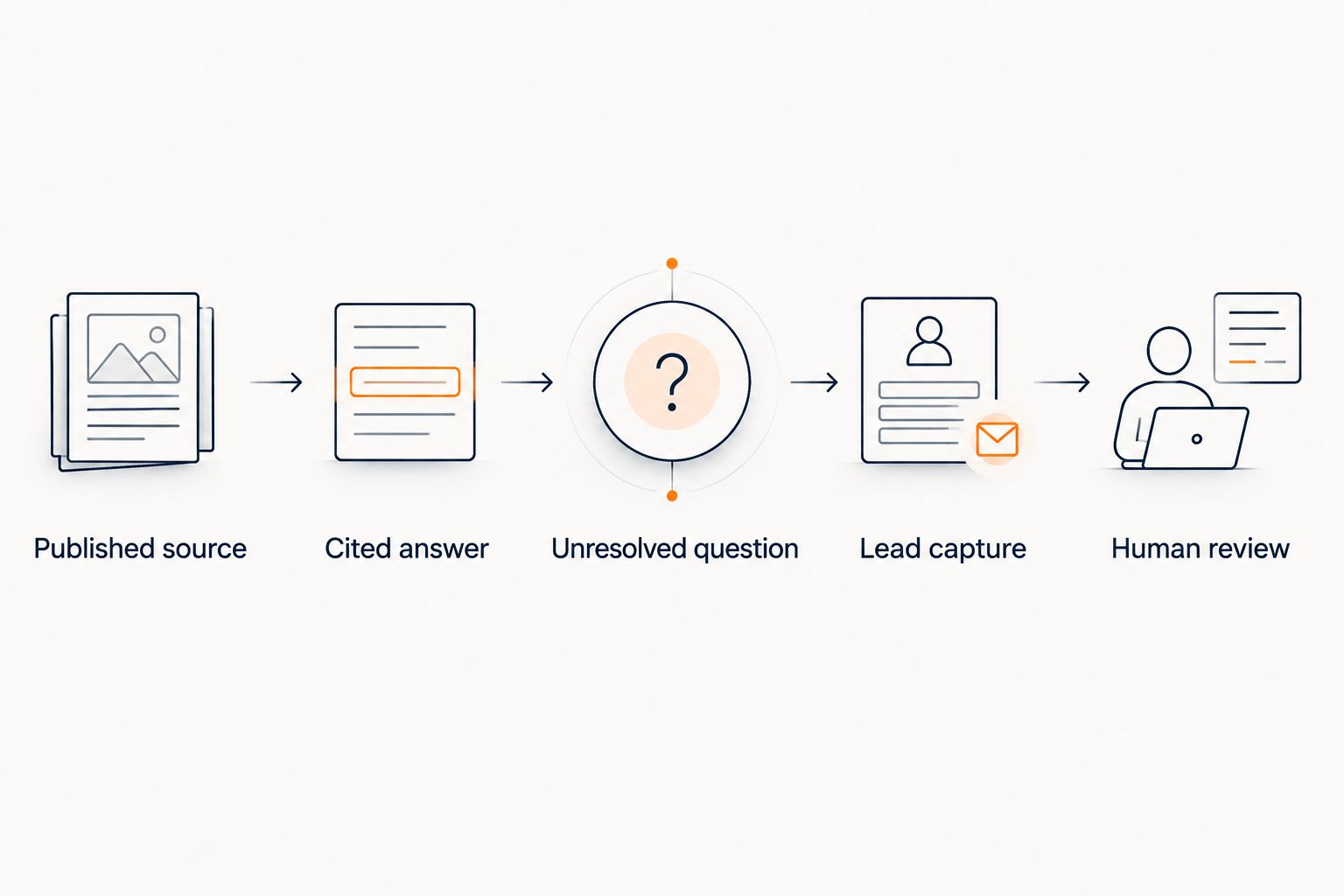
For the 2026 launch, use the route you can verify end to end. The table compares two operating choices, not two promised integration features.
| Operating route | Best for | Advantage | Limitation |
|---|---|---|---|
| Manual Gorgias handoff | Creators validating the process | You can inspect each transferred request and its context | Someone must move and assign the request |
| Separately verified automated transfer | Teams with a tested connection | Removes the manual transfer step when configured correctly | Requires mapping, delivery checks, and failure handling |
Do not describe a request as received by your support team until that event has happened. If the transfer fails, a reassuring chat message does not repair it.
Publication and acceptance checks
Publish only after the source, refusal, and handoff paths work together. A correct curriculum answer is not enough if the unresolved-request path loses the visitor's question.
- Place the widget using the documented installation method. Confirm that your chosen page permits the required installation before editing the live experience.
- Run 6 test conversations. Cover curriculum, prerequisites, an unpublished exception, an outcome promise, a source gap, and a follow-up request.
- Inspect the citations. Confirm that each supported answer points to material a prospective buyer can access and understand.
- Inspect the refusals. Check that unsupported requests stay unsupported even when the visitor repeats or rephrases them.
- Complete the handoff. Supply test contact details, transfer the unresolved request, and locate it in your existing Gorgias process.
- Record the result. Mark each conversation as passed or failed and correct failed paths before publishing.
Expected result: Your 2026 launch has evidence for both successful answers and controlled refusals. You have also followed a real request through to its human owner.
Helpshelf's pre-sale chat widget fits the cited-answer and lead-capture parts of this design. Its role does not remove the need to check source quality, page installation, or your separate helpdesk transfer.
A useful acceptance rule is stricter than “the answer sounds right”: the source must support the answer, and the handoff must arrive. Test both from the visitor's side, not just from an administrator's session.
Refresh answers when published content changes
A second workflow starts when you change the offer information rather than when a visitor asks a question. Use it whenever curriculum, prerequisites, coaching scope, or published policies change.
- Update the authoritative published material first.
- Refresh the corresponding answer source through the widget's documented process.
- Re-run the conversations affected by that change.
- Check both the new answer and any old answer that should no longer appear.
- Update the handoff worksheet if a different person now owns the subject.
Expected result: The chat reflects the approved publication, and a source change does not silently leave an old answer in use.
Do not promise automatic content synchronization unless you have verified it in your setup. A deliberate refresh is a valid workflow; an assumed refresh is not.
Keep a 2026 change log with the edited source, the responsible person, and the test result. This is an internal operating record, not evidence that the system updates itself.
Troubleshooting
The answer cites a source but adds an unsupported promise
Open the cited passage and compare it with every claim in the answer. Remove conflicting or vague source material, strengthen the refusal examples, and repeat the same test. A citation attached to a reply does not prove that all of the reply is supported.
The visitor cannot open the citation
Test the link while signed out of your member account. Replace restricted material with an approved public summary when the answer belongs in pre-sale chat. Keep private content private.
The lead exists, but nobody has the request
Check lead capture and ticket transfer separately. Locate the captured details, create the human request through your established process, and confirm the owner can find it. Repair the transfer before relying on it again.
Old offer information keeps appearing
Look for duplicate or conflicting sources before rewriting response instructions. Correct the authoritative document, refresh the source set, and repeat the affected question. Keep superseded material out of the active pre-sale shelf.
The widget is absent from the intended page
Check the page's installation permissions and the documented placement requirements. Test the published page in a clean browser session. Do not assume that visibility in an editor proves visitors can use it.
Customize your workflow
Expand by question type, not by adding every available document. Start with the subjects you can support cleanly, then add another subject only after its sources and refusal boundary are ready.
For coaching, distinguish published service scope from individual suitability. For communities, distinguish published membership information from a person's account access. For courses, distinguish curriculum coverage from a promise about what a student will achieve.
Keep the limits visible. Helpshelf uses a creator's content for cited answers and captures leads, but your published material still determines what a truthful answer can say. More sources help only when they are relevant, current, and appropriate for the visitor.
FAQ
What's the safest way to build a Gorgias to AI chatbot workflow?
Start with cited answers and a tested manual handoff into your existing Gorgias process. Verify source accuracy, refusal behavior, lead capture, and receipt by a human before adding automated transfer.
Does capturing a lead create a Gorgias ticket?
Lead capture does not establish that a Gorgias ticket exists. Treat contact capture and helpdesk delivery as separate events, and verify both in your setup.
Who is Helpshelf's pre-sale chatbot best for?
Helpshelf is best for course creators, coaches, and community owners who need answers grounded in their own content, with citations and lead capture. Requests requiring unpublished permissions or personal decisions still need human review.
Can I use past support conversations as chatbot sources?
Use past conversations to identify recurring questions, then answer those questions from approved published material. Do not copy private customer details or one-off concessions into public-answer sources.
What should the chatbot say when the policy does not answer a question?
The chatbot should identify the source gap and offer a human next step. A proposed response is: I can only quote what's published; this request needs a person to review it.
How do I update answers when my course changes?
Update the authoritative published content, refresh the corresponding answer source, and re-test affected questions. Do not assume automatic synchronization unless you have verified that behavior in your configuration.
What should I test before publishing the widget?
Test supported questions, unsupported exceptions, citations, lead capture, and the complete human handoff. A plausible answer is not a passing result if its source does not support it or its follow-up request never arrives.
One last thing
Test the question you least want the chat to answer confidently. Ask for an unpublished exception or a guaranteed personal outcome, then repeat the request in different words.
A source-grounded workflow earns its place by stopping as well as answering. Make that refusal part of your 2026 release check, not a problem you discover through a visitor.


