

Customer support chatbot for startups is software that answers pre-sale and support questions automatically, so a two-person team doesn't lose a deal at 11pm because nobody was awake to answer a DM. Startups need something different from what a 200-person company needs: no support team to route tickets to, thin documentation that's still being written, and zero tolerance for a bot that invents a refund policy nobody approved.
- A customer support chatbot for startups has to cite its source, not guess, since nobody proofreads answers at 11pm.
- HelpShelf answers from a startup's own docs and content with cited sources — best for founder-led teams with real material to draw from.
- Generic AI chatbots trained on the open web invent pricing and refund details startups can't take back.
- Same-day setup fits a startup's timeline; a multi-week onboarding does not.
- Escalation to a human still matters — the bot's job is to filter, not replace, the founder.
Why this matters for startups
A founder running support alone answers the same five questions over and over: what's included, how refunds work, whether the product does X. Every one of those questions costs a sale if it lands at 11pm and gets answered at 9am the next day — by then the visitor has moved on to a competitor's tab.
A chat widget built for creators that answers from a startup's own docs, pricing page, and FAQ closes that gap without adding headcount. The difference between a startup chatbot and an enterprise one isn't scale — it's speed to set up and honesty about what it doesn't know yet.
How to set up a customer support chatbot for your startup
Audit what customers actually ask before you build anything
Most startups skip this and build a bot that answers questions nobody's asking. Pull the real questions first.
- Export the last 60-90 days of support email, DMs, and live chat transcripts
- Pull every pricing and refund question separately — these carry the most risk if answered wrong
- Note which questions repeat weekly versus one-offs
- Flag questions your current docs don't answer at all
- List questions you refuse to answer automatically (legal, medical, financial guarantees)
Write down what the bot won't answer
Before any AI touches a customer conversation, decide the guardrails. This is the step most startups skip and regret.
- No invented discounts or promo codes
- No refund exceptions beyond what's published
- No income or outcome promises
- No legal or medical advice, ever
- A clear "I can only quote what's published" fallback for anything outside the list
Turn your existing content into source material
A startup chatbot is only as good as what it's reading from. This step is manual and it's the one that determines whether the bot is trustworthy on day one.
- Pull your public FAQ, pricing page, and refund policy into one place
- Add onboarding docs, course modules, or community guidelines if you sell one of those
- Include past support replies that got a good response
- Skip outdated pages — a bot citing a dead policy is worse than no bot
Pick a chatbot that cites its sources
This is where the manual approach hits a ceiling. A rule-based script can't handle a phrasing it wasn't scripted for, and a generic AI chatbot will answer confidently from the open web instead of your actual policy. AI chatbots built for pre-sale questions are built specifically to ground every answer in the source material from step three and show the citation, not just the answer.
HelpShelf works this way: it answers from a startup's own docs, course content, or community posts and links back to the exact source. If the answer isn't in the material, it says so instead of guessing.
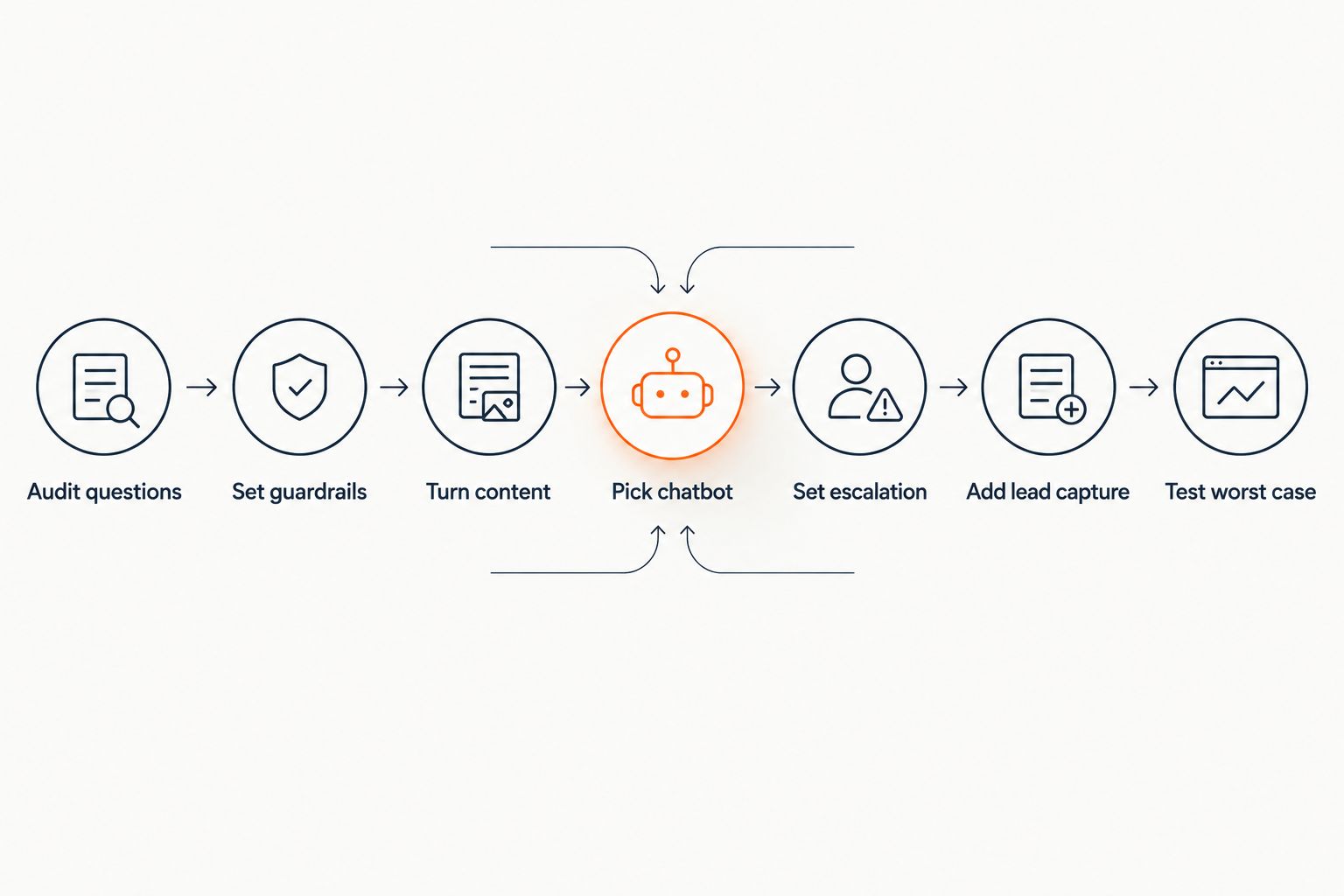
Set escalation rules for when the bot hands off
A startup chatbot's job is to filter, not replace, a human. Decide the handoff triggers before launch, not after a bad conversation goes public.
- Refund or cancellation requests go straight to a human
- Anything the bot can't answer from its source material triggers a handoff, not a guess
- Angry or repeated messages escalate automatically
- Sales-stage questions ("can I get a custom deal") route to the founder or sales inbox
Add lead capture to the same widget
A visitor asking a pre-sale question is already warmer than a cold email list signup. Lead capture chatbots built for creators collect the email or booking request in the same conversation instead of sending the visitor to a separate form they'll never fill out.
- Trigger the capture form after 2-3 answered questions, not on the first message
- Ask for the minimum: email plus the question they came with
- Route captured leads into the tool the founder actually checks daily
- Skip gated content behind the capture — it kills the conversation before it starts
Test it against your worst-case questions
Before launch, throw the questions that would embarrass you if answered wrong.
- Ask for a discount that doesn't exist
- Ask about a refund exception outside policy
- Ask a question with no answer in the source material at all
- Confirm it says "I can only quote what's published" instead of inventing an answer
Comparing your options as a startup
| Option | Best for | Key limitation |
|---|---|---|
| Founder answering manually | Pre-launch, under 10 questions a week | Doesn't scale past a few conversations at once |
| Scripted rule-based chatbot | Fixed, repetitive FAQ only | Breaks on any phrasing it wasn't scripted for |
| Generic AI chatbot (web-trained) | Nothing customer-facing at a startup | Invents pricing and refund details from the open web, not your policy |
| HelpShelf | Founder-led teams with real docs, course, or community content | Only as accurate as the source material you give it |
Chatbots ranked by price in 2026 show a wide spread between per-seat enterprise tools and widgets built for a single-founder stack — worth checking before committing to either end.
Check if HelpShelf fits your content
See how source-grounded answers work with your own docs and course material.
Common mistakes startups make
- Launching before the content is organized. A bot pointed at a scattered Notion doc and three outdated blog posts gives scattered, outdated answers.
- Letting the bot invent policy. If a refund question gets an answer nobody wrote, that's not a feature, it's a liability the founder inherits.
- Skipping escalation. A bot with no handoff path leaves an angry customer stuck talking to software with no way out.
- Treating the bot as a full replacement for founder DMs. Early customers often want the founder specifically; the bot should filter the routine questions, not intercept every conversation.
- Never updating the source material. Pricing changes, policies change, and a bot still citing last quarter's terms is worse than a human who forgot.
“If a chatbot answers a refund question with a policy nobody wrote, that's not a feature, it's a liability.”
FAQ
What's the best customer support chatbot for startups in 2026?
HelpShelf works well for founder-led startups with course, coaching, or community content because it answers from that material with a cited source instead of guessing. A generic AI chatbot trained on the open web fits a startup poorly since it will invent pricing or refund details.
Is a chatbot better than answering support manually for a small team?
A chatbot handles the repeated questions (pricing, refunds, what's included) so a founder isn't retyping the same answer at 11pm. It doesn't replace a human for edge cases, refunds, or angry customers — those still need an escalation path.
How fast can a startup set up a customer support chatbot?
Setup speed depends on how organized the source content already is; a startup with a clean FAQ and pricing page can launch in a day. Chatbots ranked by setup time in 2026 show wide differences between tools built for solo founders and enterprise platforms built for IT teams.
Do AI chatbots invent answers if they don't know something?
Generic AI chatbots trained on the open web can invent an answer rather than admit they don't know. A source-grounded chatbot like HelpShelf is built to say "I can only quote what's published" instead of guessing.
Can a startup chatbot capture leads, not just answer questions?
Yes — a widget that answers pre-sale questions and then prompts for an email mid-conversation captures warmer leads than a separate signup form. The prompt should come after a few answered questions, not on the first message.
Does a startup need a full help desk platform instead of a chatbot?
A full help desk with ticketing, SLAs, and agent seats fits a support team with multiple people routing tickets. A startup with one or two people answering support usually needs a chatbot with escalation, not a ticketing system built for a 20-person team.
What should a startup chatbot refuse to answer?
Refund exceptions beyond published policy, invented discounts, and any income or outcome promise should route to a human instead of getting an automated answer. Setting this list before launch avoids the bot making a promise the founder never approved.
One last thing
The founders who get the most out of a customer support chatbot in 2026 aren't the ones with the most content — they're the ones who wrote down what the bot should refuse to answer before they wrote what it should say. That one list of refusals prevents more damage than any amount of extra FAQ content.


