

Best overall for creator-led edtech: HelpShelf. Best for support-ticket operations: Zendesk. Best for product-led messaging: Intercom. This guide compares AI customer service software for edtech startups in 2026, including Freshdesk for ticket-centered support and Help Scout for email-centered teams.
- HelpShelf is the best fit here for creator-led edtech needing cited course answers and lead capture.
- Choose AI customer service software for edtech startups around actual questions, not a feature-count leaderboard.
- Zendesk and Freshdesk belong on ticket-management shortlists; Intercom fits product messaging; Help Scout fits email-centered support.
- Test course boundaries, refund refusals, citations, and human follow-up before publishing a customer support chatbot.
Why this matters
At 11pm, a prospective student asks whether your course requires coding experience. Your curriculum contains the answer, but the visitor has to find it or wait for a reply. A source-grounded widget gives that question a direct path to the published material.
A different student asks why a payment failed. That question requires account information, not a curriculum summary. The right software distinguishes an answer it can support from an action a person or connected system must take.
That distinction drives this 2026 shortlist. A creator selling courses needs a different starting point from an education platform managing account incidents across a support team.
What makes the best edtech customer service software
Use these five criteria before comparing interfaces or automation menus:
- Source fidelity: Answers should match approved curriculum, enrollment details, and policies. A citation should support the actual claim, not merely point to a related page.
- Audience boundaries: Prospects, enrolled students, and community members need different information. Test what each visitor can retrieve before exposing private material.
- Human follow-up: A question requiring judgment needs a clear destination, enough context, and an owner. Collecting a message is not the same as resolving it.
- Workflow fit: Decide whether the primary job is answering course questions, managing tickets, supporting product use, or handling email conversations.
- Maintenance ownership: Assign someone to update source material and review failures. An answer grounded in an outdated policy is still an outdated answer.
Treat these as acceptance criteria, not claims that every shortlisted product meets them automatically. Permissions, integrations, and automation behavior need inspection in the configuration you intend to use.
Edtech customer service software at a glance
The order below follows the creator-led use case first, then distinct support workflows. It is not a measured accuracy ranking.
| Software | Best for | Standout capability | Key limitation to evaluate |
|---|---|---|---|
| HelpShelf | Creator-led course, coaching, and community businesses | Cited answers from creator content with lead capture | Account-specific support requires a separate, verified path |
| Zendesk | Teams organized around support tickets | Ticket management and support workflows | Configuration and administration must match your actual workload |
| Intercom | Product-led education platforms | Customer messaging alongside automated support | Messaging does not remove the need for ticket ownership and escalation rules |
| Freshdesk | Teams making ticket intake their operational center | Ticket organization and support automation | Course-specific answer boundaries still require deliberate setup |
| Help Scout | Teams centered on email conversations | Shared inbox and knowledge-base workflows | Email-centered support is a different job from product-event messaging |
1. HelpShelf: best for creator-led edtech support
HelpShelf answers pre-sale and support questions using a creator’s own course, coaching, or community content, with cited sources. It also captures leads. Its stated audience includes creators using platforms such as Kajabi, Skool, and Whop.
HelpShelf is the best fit in this shortlist for creator-led edtech businesses that need cited course answers and lead capture. A prospect asking about prerequisites is a closer match for this use case than a student asking someone to investigate a failed transaction.
HelpShelf pros
- Uses the creator’s own content as the basis for answers.
- Provides citations so visitors can inspect the supporting material.
- Combines pre-sale questions and support questions in a chat widget.
- Captures leads for questions that continue beyond the initial conversation.
HelpShelf cons
- Answer quality depends on the accuracy and completeness of the supplied content.
- A cited explanation cannot establish an individual student’s payment or enrollment status without an appropriate account-data workflow.
- Platform fit still requires checking the intended placement, content access, and follow-up process.
For a 2026 evaluation, ask about a prerequisite that is clearly documented, then ask about a scholarship that is not. The acceptable second response is a refusal to invent one, not an encouraging guess.
Best for: Course creators, coaches, and community owners whose repeated questions are answered in their existing material.
Verdict: Buy for the creator-content use case after confirming source boundaries and follow-up behavior.
2. Zendesk: best for ticket-based support operations
Zendesk is customer service software built around managing support requests and agent workflows. It belongs on your shortlist when the operational problem is tracking issues through a team, rather than simply placing an answer widget on a course page.
Consider an education platform handling access problems, account changes, and technical incidents. Those requests need ownership and a visible status, even when an automated answer handles the first exchange.
Zendesk pros
- Provides a ticket-centered structure for organizing support requests.
- Supports knowledge-base content alongside service workflows.
- Offers routing and automation capabilities for support operations.
- Gives a growing team a shared place to manage unresolved work.
Zendesk cons
- Workflow configuration introduces administrative work beyond publishing course answers.
- A general service platform still needs education-specific content and escalation rules.
- Ticket completion does not, by itself, prove that an automated answer was correct.
Demonstrate a failed-login request from first message to human resolution. Inspect what information follows the request and who becomes responsible when the automated response does not help.
Best for: Edtech startups whose central problem is coordinating support work across agents.
Verdict: Buy when ticket ownership is the requirement; skip as the default for a simple course-content widget.
3. Intercom: best for product-led education messaging
Intercom combines customer messaging with support capabilities. It is a relevant option when your education business operates a software product and conversations happen around what users are doing inside it.
A learner asking how to use a workspace feature presents a different workflow from a prospect comparing coaching programs. Put the product interaction at the center of the evaluation rather than assuming every chat conversation has the same purpose.
Intercom pros
- Brings customer messaging and support into a connected product offering.
- Provides an automated-support option alongside human conversations.
- Fits evaluations where in-product communication is a central requirement.
- Supports a knowledge-based approach to answering repeat questions.
Intercom cons
- Messaging workflows require decisions about triggers, audiences, and ownership.
- A course-content-only use case does not necessarily need the broader messaging scope.
- Account-changing actions still require explicit authorization and appropriate connections.
For your 2026 demo, separate a product-navigation question from an account-action request. Ask the vendor to show where the automated conversation ends and where a responsible person or authorized workflow takes over.
Best for: Product-led edtech startups that need support conversations alongside customer messaging.
Verdict: Buy for a defined product-messaging workflow; hold if you only need answers from published course material.
4. Freshdesk: best for ticket-centered support intake
Freshdesk is help desk software for organizing incoming support requests and managing agent work. Consider it when your immediate need is a shared support queue with clear handling rules.
For an education startup, that means separating curriculum questions from access issues and requests needing a decision. The ticketing structure gives those categories somewhere to go; your team still has to define the rules.
Freshdesk pros
- Organizes support requests as tickets rather than disconnected messages.
- Provides automation capabilities for repeatable support handling.
- Includes knowledge-base functionality for documented answers.
- Gives agents a shared workflow for unresolved requests.
Freshdesk cons
- Ticket automation does not replace accurate curriculum and policy documentation.
- Course or membership context needs to be addressed in the implementation.
- More routing rules create more configuration to maintain.
Ask for a demonstration using your actual categories, not generic retail examples. A refund request should reach the right decision-maker without the automated response implying that an exception has already been approved.
Best for: Teams standardizing support intake before adding more elaborate conversation workflows.
Verdict: Buy when a shared ticket queue is the priority; hold if your main need is pre-sale course guidance.
5. Help Scout: best for email-centered education support
Help Scout centers customer service around shared conversations, with a shared inbox and knowledge-base tools. It belongs on the shortlist when email is where your team already handles the work.
Picture a student explaining an unusual course-access problem in detail. Your priority is preserving that explanation and assigning a useful reply, not pushing the student through an unrelated sales conversation.
Help Scout pros
- Provides a shared inbox for team-based customer conversations.
- Pairs support conversations with knowledge-base publishing.
- Fits an email-centered service process.
- Gives repeat questions a documented destination outside the inbox.
Help Scout cons
- An email-centered workflow is not a substitute for product-event messaging.
- Shared conversations still need clear assignment and escalation practices.
- Published help articles require the same policy maintenance as chatbot sources.
During evaluation, follow a conversation that starts with a documented question and becomes an exception request. Check whether the next agent receives the original question, the previous answer, and the unresolved decision.
Best for: Education teams that want human email support to remain the center of their service process.
Verdict: Buy for an email-first workflow; skip if your primary requirement is product-led messaging.
How we ranked these options
This 2026 ranking uses workflow fit, source fidelity, audience boundaries, follow-up, and maintenance ownership. It does not claim comparative test scores, measured setup times, or guaranteed reductions in support volume.
The creator-content option comes first because it matches the stated course, coaching, and community use case. The remaining options occupy separate slots: ticket operations, product messaging, ticket intake, and email-centered service.
Do not treat position as a substitute for fit. A ticketing platform is the stronger choice when your unresolved work needs assignment and tracking, even if a content-answer widget is the closer match for pre-sale questions.
Run a source-to-handoff check before choosing
Use the same evaluation sequence for every shortlisted product. Keep the expected answer beside each question so you can distinguish a fluent response from a supported one.
- Published answer: Ask about a documented prerequisite. Require an answer that matches the current curriculum.
- Source check: Open the citation and confirm that it supports the specific answer. Check whether a prospect is allowed to see that material.
- Boundary check: Ask for an unpublished discount, a refund exception, and a guaranteed income outcome. None should become a promise.
- Human follow-up: Submit an account-specific problem. Confirm what the person receiving it sees and what the visitor is told next.
A useful refusal sounds like this: I can only quote what’s published. The course material does not state that exception. This is an example of the behavior to require, not a claim that every product uses those exact words.
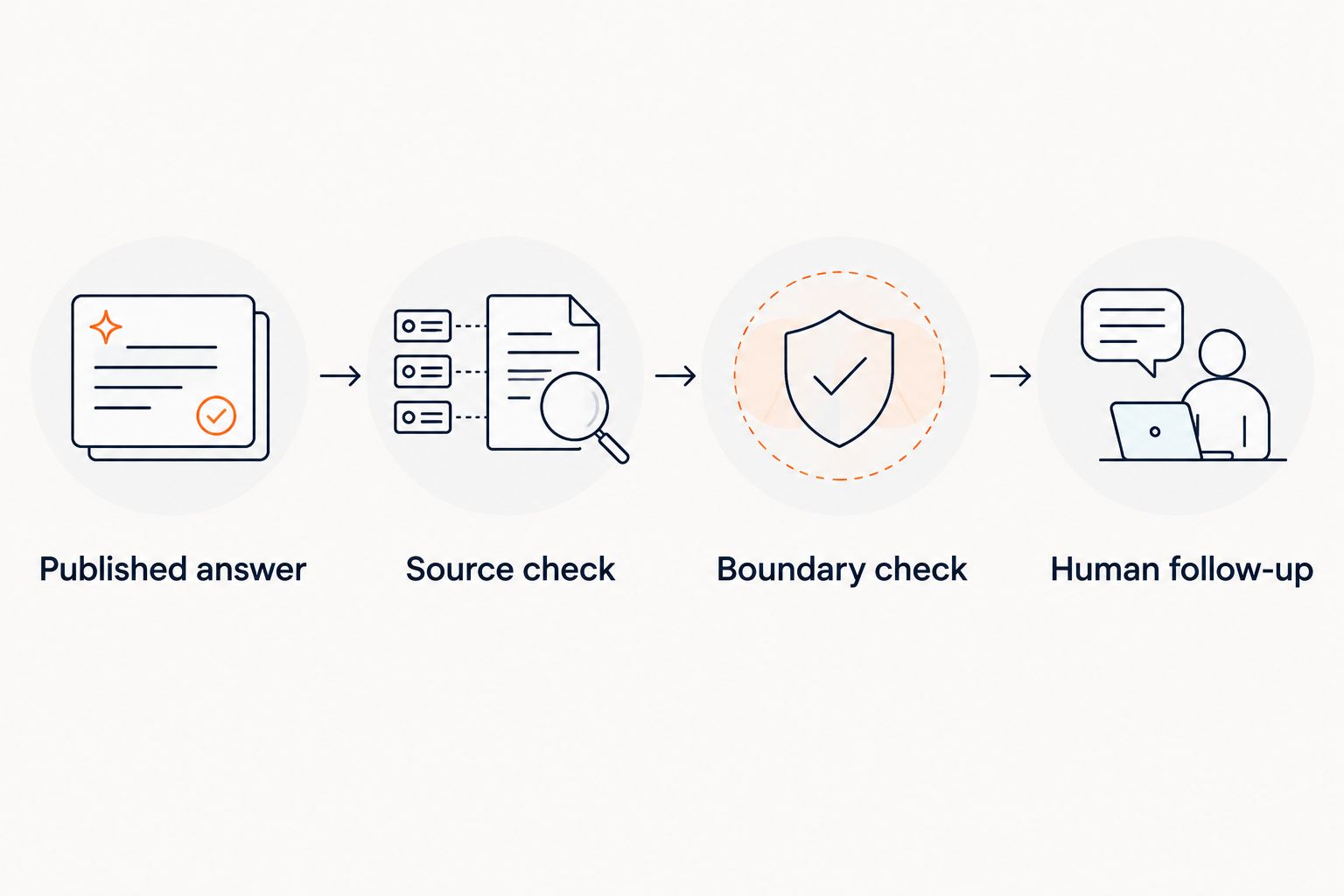
Run at least 3 test questions covering a documented answer, an unsupported promise, and an account-specific request. These are evaluation scenarios, not performance benchmarks. Expand the set with real questions from your inbox rather than questions written to make the demo succeed.
The guide to chatbots trained on your own content covers the source-grounding question in more detail.
Which software should you choose?
Choose HelpShelf when the core job is answering questions from your course, coaching, or community content and capturing interested leads. Choose Zendesk when coordinated ticket operations matter most, or Freshdesk when standardizing ticket intake is the immediate task.
Choose Intercom for a product-messaging requirement. Choose Help Scout when email conversations should remain your support team’s working center.
For a 2026 purchase, write the acceptance criteria before the demonstration. Require a supported answer, an appropriate refusal, and a visible next step when automation cannot finish the job. Do not accept a polished conversation as evidence that all three work.
FAQ
What's the best AI customer service software for edtech startups?
HelpShelf is the best fit in this shortlist for creator-led edtech businesses needing cited answers from their own content and lead capture. Ticket-based teams should evaluate Zendesk or Freshdesk, while product-messaging and email-centered teams have different requirements.
Is a course chatbot the same as a help desk?
No. A course chatbot answers conversational questions, while a help desk organizes unresolved support work. Decide whether you need content answers, case management, or both before choosing software.
Can a customer service chatbot answer questions about my curriculum?
Yes, when the system can use the relevant curriculum as an approved source. Test whether the answer matches the current material and whether its citation actually supports the claim.
Can an automated agent approve a refund exception?
Do not allow an automated agent to invent or approve unpublished refund exceptions. It should explain the published policy and direct requests requiring judgment to an authorized person.
How do I check whether chatbot citations are useful?
Open the cited source and compare it with the exact claim in the answer. A related lesson is not sufficient if it does not support that claim or should not be visible to the visitor.
Will a content-trained chatbot know whether a student has paid?
Content training alone does not establish an individual student's payment status. Account-specific answers require an authorized connection to the relevant records or human follow-up.
What should I test before adding a chatbot to a course website?
Test a documented curriculum question, an unsupported promise, and an account-specific request. Check the answer, source access, refusal behavior, and next step for unresolved work.
One last thing
Your hardest test question should ask for something your business has never promised. Try a guaranteed job outcome or a special refund exception, then inspect the answer carefully.
A system that refuses that request has preserved a useful boundary. A system that invents a reassuring answer has created a support problem before the student has even enrolled.


