

Best for course creators: HelpShelf. Best for ticket-led teams: Zendesk. Best for product-led conversations: Intercom. This 2026 guide compares the best AI customer service software by the work you need it to do, including structured support queues and human-led email support.
- HelpShelf is the best AI customer service software fit here for creators needing cited answers and lead capture.
- Zendesk and Freshdesk belong on your shortlist when ticket management is the main requirement.
- Intercom fits product conversations; Help Scout fits teams organizing support around a shared inbox.
- Test source citations, missing information, and human escalation before accepting a convincing demo.
Why this matters
It is 11 p.m. A prospective student asks whether your course covers the tool they use. The answer exists in your curriculum, but you are offline. A member then asks for a refund exception. That question needs a different response, not a more persuasive answer.
Your software needs to separate published information from decisions only you can make. Answering a curriculum question, collecting a lead, assigning a ticket, and approving a refund are different jobs. Choose around that distinction, not around how natural the demo sounds.
What makes the best AI customer service software?
Use these criteria for your 2026 shortlist. A polished reply does not compensate for an unsupported policy claim.
- Source grounding: The answer should reflect approved material, not a plausible guess about your business.
- Visible evidence: A citation should support the actual claim and be accessible to the intended reader.
- Clear boundaries: Missing information should produce a limitation or escalation, not an invented answer.
- Workflow fit: A creator answering course questions needs a different setup from a team assigning support tickets.
- Human continuity: Check what context a person receives when automation stops.
- Content maintenance: Establish who updates source material when your curriculum, offer, or policy changes.
Treat these as acceptance criteria. Ask each vendor to demonstrate the work with your own questions rather than accepting a tour of unrelated features.
AI customer service software at a glance
The table ranks fit for the stated use case, not universal performance. It does not treat every customer support product as interchangeable.
| Software | Best for | Standout focus | Key limitation to evaluate |
|---|---|---|---|
| HelpShelf | Course, coaching, and community questions | Answers from your content with cited sources and lead capture | Source-grounded answers still depend on the content you provide |
| Zendesk | Teams organizing support through tickets | Ticket-centered customer service operations | Ticket management is a different requirement from a creator-facing answer widget |
| Intercom | Product-led customer conversations | Messenger-centered support and customer communication | Conversational support does not remove the need to test policy boundaries |
| Freshdesk | Teams standardizing incoming support requests | Help desk ticket organization | Organizing requests does not by itself establish answer accuracy |
| Help Scout | Human-led teams working from a shared inbox | Collaborative email support | A shared inbox alone does not answer unattended buyer questions |
Do not read the limitations as missing-feature declarations. They identify the question each option must answer in your evaluation. Confirm current capabilities and account requirements directly before committing.
1. HelpShelf: best AI customer service software for creators
HelpShelf provides an AI-powered chat widget that answers pre-sale and support questions from a creator's own course, coaching, or community content. Answers include cited sources, and the widget captures leads. Its stated audience includes creators using Kajabi, Skool, and Whop.
That makes the starting point concrete: your curriculum, published offer, and support material. A prospective student asks whether a topic is covered; the useful response identifies the relevant content rather than inventing a promise about what they will achieve.
HelpShelf pros:
- Uses the creator's own content as the basis for answers.
- Includes cited sources with answers.
- Captures leads alongside pre-sale and support conversations.
HelpShelf cons:
- Unpublished information gives source-grounded answers nothing to cite.
- Course content does not establish permission to make policy exceptions or account-specific decisions.
Best for: Course creators, coaches, and community owners whose recurring questions already have answers in their content.
In your evaluation, include a question whose answer is absent. An appropriate response acknowledges the gap rather than filling it. Verdict: Buy for the creator-focused use case only after your own content passes that test.
2. Zendesk: best AI customer service software for ticket-led teams
Zendesk is a customer service platform built around support operations, including ticket management. Put it on your shortlist when assigning, tracking, and resolving requests is central to the job.
For example, a support manager needs to know who owns a learner's unresolved access issue. A correct informational answer is useful, but ownership and resolution still matter.
Zendesk pros:
- Ticket management matches work that needs an assigned owner.
- A support-operations focus suits teams handling ongoing cases.
- Provides a relevant evaluation starting point when you already work through tickets.
Zendesk cons:
- A ticket-centered evaluation can distract from a simpler pre-sale answering requirement.
- Published policy answers and account-specific actions still need separate acceptance tests.
Best for: Teams whose main requirement is managing support cases across people.
Ask for a demonstration that begins with an unresolved case and ends with a clear owner. Then test the automated answer separately. Verdict: Buy for ticket-led operations; skip a ticket-first selection process if your only requirement is answering course questions.
3. Intercom: best AI customer service software for product conversations
Intercom centers customer communication around a messenger and support workflows. Evaluate it when conversations inside or around a software product are the starting point for service.
A product user asking how a feature works has a different context from a prospective coaching client asking about a curriculum. Your demonstration should reflect that difference instead of treating both as generic chat messages.
Intercom pros:
- Messenger-centered communication fits conversational product support.
- Gives product teams a relevant alternative to an email-first evaluation.
- Supports a shortlist organized around the customer conversation rather than only the ticket.
Intercom cons:
- A conversational interface does not prove an answer is supported by your documentation.
- Product-support requirements can add evaluation work unrelated to a creator's narrower needs.
Best for: Product teams that organize support around customer conversations.
Bring a documentation question, an unresolved issue, and an unsupported request to the demonstration. Inspect what happens after each reply, not just the wording. Verdict: Buy for a messenger-led product workflow after checking answer boundaries and human continuity.
4. Freshdesk: best AI customer service software for structured queues
Freshdesk is a help desk product with ticket-management workflows. Evaluate it when you need incoming requests organized into a repeatable support process.
An online education team, for example, can distinguish curriculum questions from access problems before choosing how to route them. Those categories are workflow requirements; they are not evidence that automated answers are accurate.
Freshdesk pros:
- A help desk structure fits requests that need tracking.
- Ticket workflows give you a concrete basis for evaluating support organization.
- Suits a shortlist focused on repeatable handling rather than chat alone.
Freshdesk cons:
- Queue organization does not demonstrate source-grounded answering.
- A help desk evaluation requires attention to ownership and routing as well as response quality.
Best for: Teams standardizing how incoming support requests are handled.
Use the same sample requests across competing demonstrations. Check whether the resulting workflow matches your actual responsibilities. Verdict: Buy for structured support queues, not merely because you want an automated website reply.
5. Help Scout: best customer service software for human-led email
Help Scout is a customer support platform associated with shared inbox workflows. Include it when people answering customer email remain the center of your service model.
A shared inbox addresses coordination: who replies, what has already been said, and what remains unresolved. Evaluate automated answering as a separate requirement rather than assuming inbox collaboration covers it.
Help Scout pros:
- A shared inbox fits teams working primarily through customer email.
- Human-led support suits questions that require judgment.
- Provides a distinct comparison point against messenger-first and ticket-first workflows.
Help Scout cons:
- Inbox collaboration alone does not establish unattended pre-sale answering.
- Human review remains a staffing decision, not something a shared inbox eliminates.
Best for: Small support teams that want email conversations to remain the main working surface.
Test an email thread that changes from a factual question to a request for an exception. Verdict: Buy for human-led email support; hold if unattended website answers are your main requirement.
How this ranking works
This 2026 ranking prioritizes workflow fit, source grounding, and the boundary between answering and acting. It is a use-case shortlist, not a measured accuracy benchmark or a claim that every feature has been tested.
The creator-focused option comes first because this guide serves course creators, coaches, and community owners. Ticket-led, messenger-led, queue-led, and inbox-led options follow as distinct alternatives. Choose the job first; compare vendors within that job second.
Run a source-grounding test before choosing
For your 2026 evaluation, prepare 3 source documents: a curriculum outline, a published policy, and a product or membership description. Use approved material with clear access permissions. Do not upload private member conversations just to make a demonstration look realistic.
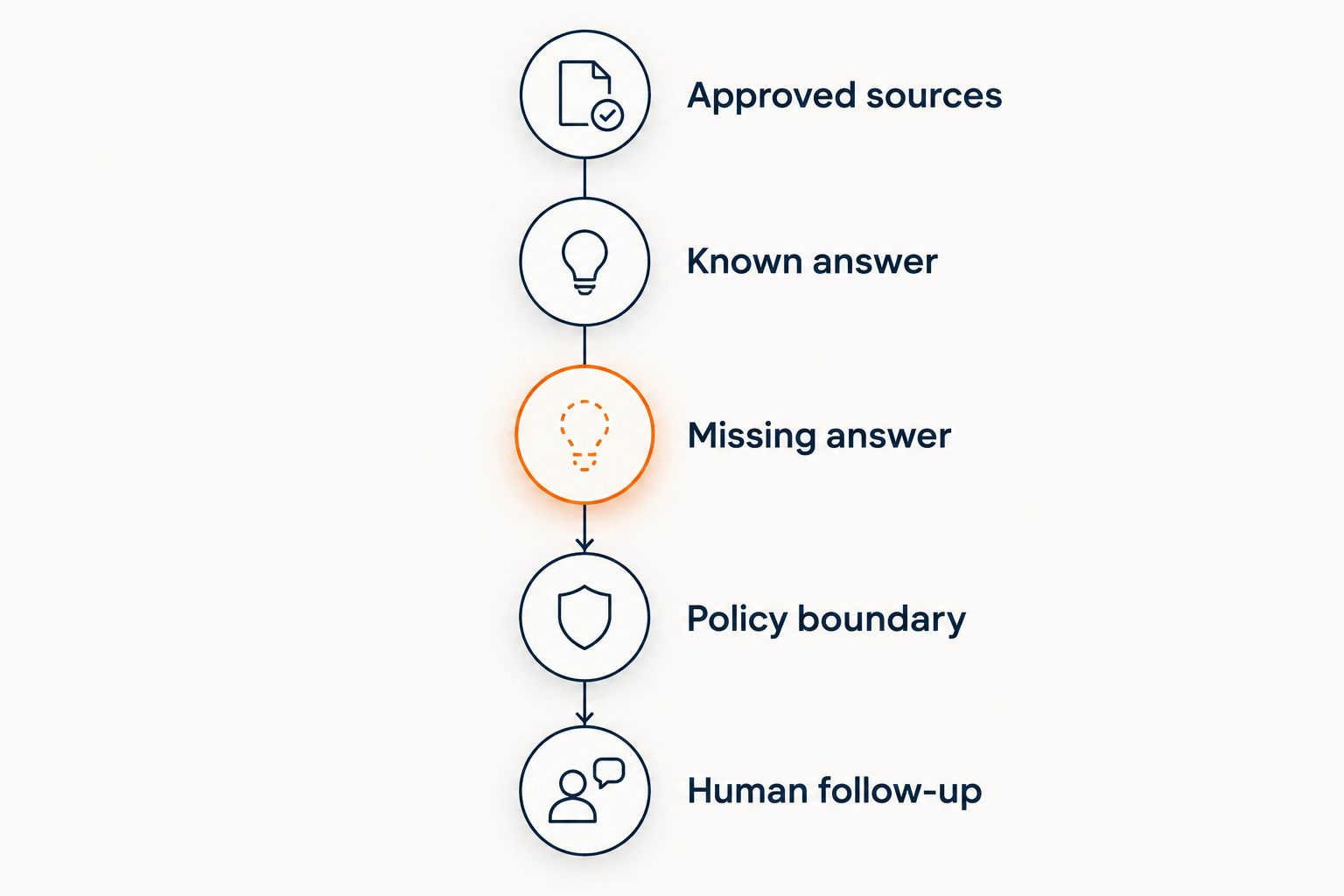
Follow this sequence:
- Approved sources: Identify which document supports each factual answer.
- Known answer: Ask a question answered explicitly in that material.
- Missing answer: Ask about a topic the documents do not cover.
- Policy boundary: Ask for an exception the published policy does not authorize.
- Human follow-up: Check how an unresolved request reaches a person.
The distinction between a citation and a supporting citation matters. A curriculum link beside an answer is not enough if the linked curriculum never mentions the claimed topic. The guide to chatbot accuracy with your own content explores that evaluation in more detail.
Build 10 test questions across that sequence. These are an evaluation exercise, not a statistical accuracy benchmark. Include paraphrased questions so your test does not depend on repeating the source document word for word.
Then complete 2 review passes: one for factual support and one for the next action. A reply can quote a policy correctly while still directing the visitor to the wrong person or asking for unnecessary personal information.
For a hypothetical refund-exception request, an acceptable boundary would be: I can only quote what's published. Your request needs review by the course team. This is an example to test for, not a claim about any product's exact response.
Which AI customer service software should you choose?
HelpShelf is the best fit here for creators who need cited answers from their own content and lead capture. Start there when unanswered course, coaching, or community questions are the problem you need to solve.
Choose Zendesk for ticket-led support operations, Intercom for product conversations, Freshdesk for structured support queues, or Help Scout for human-led email. Those are different operating choices, not interchangeable rankings of intelligence.
For a 2026 purchase, write your acceptance criteria before the demo. Do not buy until the software demonstrates the workflow you actually need, including what happens when the answer is unavailable.
FAQ
What's the best AI customer service software for a course creator?
Choose software that answers from your approved course content, supports its claims with citations, and handles unanswered questions without guessing. Include lead capture in your evaluation if prospective students need follow-up before enrolling.
Is Zendesk better than a creator-focused chat widget?
Zendesk fits a ticket-led support requirement; a creator-focused widget fits content-based pre-sale and support questions. Decide whether your main problem is managing cases or answering questions before comparing products.
Can an AI support tool promise a refund exception?
Do not authorize an automated tool to promise an unpublished refund exception. It should distinguish explaining the published policy from approving a decision that requires human review.
Does a citation mean a chatbot answer is correct?
No. The cited material must support the specific answer, and the visitor must have appropriate access to it. Open the source and check the claim during evaluation.
Can a chatbot replace my support team?
Do not treat a chatbot as a replacement for every support responsibility. Published answers, unresolved account issues, and discretionary decisions require different handling.
How should I compare AI customer service software in 2026?
Compare the products against the same approved documents, factual questions, missing-information questions, and policy-exception requests. Review both the answer and the next action, including how an unresolved conversation reaches a person.
One last thing
Test the answer you do not want the software to give. Ask whether it can guarantee an outcome your course never promises, then inspect the response and its citation.
A refusal can be the correct answer. For your 2026 launch, no invented discounts, no refund exceptions, and no income promises belong in the acceptance criteria—not in a cleanup plan after publication.


