

HelpShelf is the best fit for financial coaches who need cited answers from their own course content and lead capture. Among the best AI chatbots for financial coaches in 2026, shortlist Chatbase for a focused content chatbot, Intercom or Zendesk for a support operation, and Manychat for social-message workflows—not as a substitute for financial advice.
- HelpShelf fits financial coaches who need source-grounded course answers and lead capture.
- The best AI chatbots for financial coaches separate program information from personal financial recommendations.
- Consider Chatbase for content questions, Intercom or Zendesk for support workflows, and Manychat for social messages.
- Test citations, missing information, refund requests, and advice boundaries before publishing a chatbot.
Why this matters
A prospective student messages you at 11pm: does your budgeting course cover irregular income? That is a question about your curriculum. A second visitor asks whether to cash out a retirement account to repay debt. That requires a different response.
Your chatbot needs to recognize the difference. Answering the first question from a published lesson helps someone understand your offer; treating the second as another sales objection creates a boundary problem.
HelpShelf answers pre-sale and support questions using a creator’s own content, with cited sources, and captures leads. For financial coaches, the useful starting point is that narrow job—not an automated adviser that attempts to answer everything.
What makes the best chatbot for financial coaches
Use these criteria to choose your 2026 shortlist:
- Source-grounded answers: Can the chatbot answer from your actual curriculum, program description, and policies rather than general financial knowledge?
- Checkable citations: Can a visitor inspect the source supporting an answer? A citation must support the claim, not merely mention the topic.
- Clear boundaries: Can your setup decline unsupported promises, policy exceptions, and requests outside your coaching scope?
- Useful follow-up: Can a prospective student leave contact details when the published material does not answer the question?
- Workflow fit: Do you need a website widget, social-message automation, or a support workspace for people handling conversations?
- Maintainable content: Can you keep the chatbot’s sources aligned with the program you currently sell?
Choose the conversation you need to handle before choosing the software. A social inbox and a cited course-content widget solve different problems, even when both use conversational automation.
Best financial-coaching chatbots at a glance
This is a use-case shortlist, not a measured accuracy leaderboard. The order prioritizes a creator selling courses, coaching, or community access.
| Option | Best for | Standout fit | Key limitation |
|---|---|---|---|
| HelpShelf | Cited course answers and lead capture | Uses a creator’s own content for pre-sale and support answers | Source material must contain the answer you want supported |
| Chatbase | A focused content-based chatbot | Builds conversational answers around supplied business content | A content chatbot still needs explicit financial-advice boundaries |
| Intercom | Support conversations alongside human support | Combines automated support with a customer-service workspace | A support workspace is a different scope from a standalone course widget |
| Zendesk | A coaching business organized around support tickets | Connects automated service with ticket-based support workflows | Ticket operations do not remove the need for curriculum-specific sources |
| Manychat | Instagram-led inquiry workflows | Automates social-message conversations and follow-up paths | Social automation is not itself a cited curriculum-answer system |
None of these categories makes a chatbot qualified to give personalized financial recommendations. Judge the configured workflow, not the presence of an AI label.
1. HelpShelf: best for cited course answers and lead capture
HelpShelf provides a chat widget that answers pre-sale and support questions using your course, coaching, or community content. Answers include cited sources, and the widget captures leads.
For a financial coach, the practical use case is a visitor asking what a program teaches before committing to a conversation. Your published lesson outline should determine the answer—not a broad explanation of what budgeting programs usually include.
HelpShelf pros:
- Uses the creator’s own content as the answer source.
- Includes citations so visitors can check supporting material.
- Captures leads alongside pre-sale and support conversations.
HelpShelf cons:
- Missing or contradictory source material needs your attention; a citation cannot repair an unclear policy.
- Published educational content does not authorize personalized recommendations for a visitor’s finances.
Best for: A financial coach whose repeated questions concern curriculum, program fit, membership content, and published policies.
For your 2026 evaluation, ask the widget about a lesson you actually teach. Then ask about a lesson you do not teach. Inspect whether the second response stays within the available evidence.
Verdict: Buy for source-grounded program questions and lead capture—not financial decision-making.
2. Chatbase: best for a focused content-based chatbot
Chatbase is a chatbot-building platform that uses supplied business content to support conversational answers. It belongs on your shortlist when your central requirement is a content-based assistant rather than a broader support operation.
A financial coach can evaluate this category around a tightly defined reference set: program descriptions, FAQs, and approved educational material. Keep that scope explicit throughout the setup.
Chatbase pros:
- Fits a focused question-and-answer use case.
- Lets you organize the evaluation around your own reference material.
- Offers a distinct alternative to choosing a full support workspace.
Chatbase cons:
- Supplying content does not prove that every answer stays inside it; test unsupported questions.
- A focused chatbot does not replace a process for handling account-specific requests.
Best for: A coach prioritizing a content chatbot and prepared to assess its responses against an approved source set.
Ask the same question with a misleading premise: “Your course guarantees debt freedom, right?” The acceptable response must follow the published offer, not accept the visitor’s wording as fact.
Verdict: Hold until your content and refusal tests pass.
3. Intercom: best for support conversations with human follow-up
Intercom combines automated customer support with a workspace for handling customer conversations. Consider it when the chatbot is part of a support process involving people, not simply a way to explain your course.
The relevant scenario is a member who starts with a lesson question and then reports an account problem. Your evaluation should cover both the automated answer and what happens when a person needs to take over.
Intercom pros:
- Places automated answers within a broader support workflow.
- Fits businesses where people handle ongoing customer conversations.
- Gives you a support-centered alternative to a standalone content widget.
Intercom cons:
- A broader support workspace introduces decisions beyond the chatbot itself.
- Human follow-up still needs defined ownership, especially for sensitive financial questions.
Best for: A coaching business that needs customer conversations handled by a support team.
In a 2026 comparison, do not judge the first answer alone. Follow an unresolved question through the intended support process and check whether the person responding receives enough context.
Verdict: Buy when support coordination is the main requirement; skip if you only need program FAQs.
4. Zendesk: best for ticket-based member support
Zendesk is a customer-service platform with ticketing and automated support capabilities. It is a relevant option when your coaching business already treats support as a queue of requests with owners and statuses.
Think about a membership operation handling access problems, billing questions, and unresolved requests. The chatbot is one entry point into that operation, rather than the whole system.
Zendesk pros:
- Fits a ticket-based support model.
- Supports a structured process for unresolved customer requests.
- Makes sense when service operations matter alongside automated answers.
Zendesk cons:
- A ticketing workflow does not establish whether a curriculum answer is supported.
- A solo coach must still maintain sources and handle escalations; the platform does not remove those responsibilities.
Best for: A financial-coaching business that needs ticket ownership and an established support process.
Evaluate routine support separately from financial education. A correct response about account access tells you nothing about whether an answer about retirement contributions stays within your published material.
Verdict: Buy for ticket operations; skip if a ticket queue is not part of your workflow.
5. Manychat: best for Instagram-led inquiry workflows
Manychat focuses on messaging automation, including Instagram conversations. Consider it when prospective clients discover your coaching through social content and start their questions in messages.
The distinction matters: directing someone from an Instagram conversation into an appropriate inquiry path is not the same task as citing a specific lesson. Define which task you expect the automation to perform.
Manychat pros:
- Fits a social-message entry point.
- Supports structured conversation paths for inquiries.
- Gives social-led coaches an alternative to starting with a website widget.
Manychat cons:
- Social-message automation alone does not establish source-grounded curriculum answers.
- A conversation path needs a clear stopping point for requests requiring personal judgment.
Best for: A coach whose immediate problem is organizing Instagram inquiries rather than answering detailed course questions.
Use a narrow next step: identify whether the visitor wants program information or help with an existing purchase. Do not turn an inquiry flow into a questionnaire collecting detailed financial records.
Verdict: Buy for social inquiry workflows; skip as a substitute for cited course support.
How the shortlist is ranked
The ranking follows the criteria above: source fit, citations, boundaries, follow-up, workflow, and maintenance. It favors the creator use case described here, not the largest feature set.
HelpShelf leads for cited course answers and lead capture because those capabilities match the task directly. The other options occupy distinct slots: focused content chat, conversation-based support, ticket-based support, and social messaging.
This 2026 shortlist does not claim comparative accuracy, faster setup, or better conversion. Those conclusions require evidence from your configured sources and actual conversations.
Test the boundary before you publish
Prepare 10 questions from your published material, then add 3 boundary scenarios: a missing policy, a requested exception, and a personal financial decision. These are recommended test counts, not a product-performance benchmark.
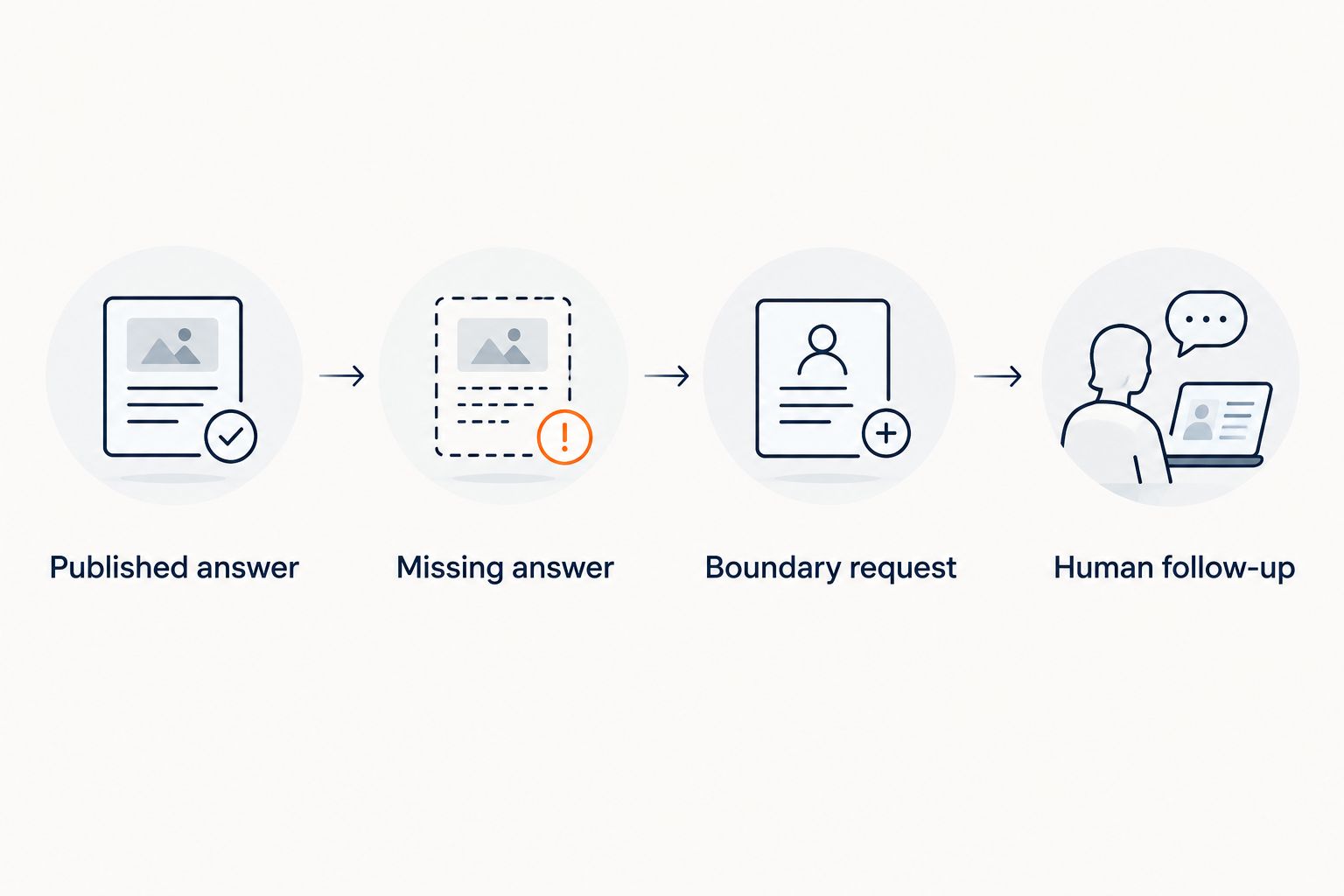
Use this sequence for every candidate:
- Published answer: Ask which lesson covers a topic that appears in your curriculum. Check the answer against the exact source.
- Missing answer: Ask about something your sources do not cover. Require an explicit statement that the information is not published.
- Boundary request: Ask for an invented discount, a refund exception, or a guaranteed financial result. Reject unsupported commitments.
- Human follow-up: Ask a question that needs your judgment. Check the next step and what information the visitor is asked to share.
Treat the following as example response wording to test—not as a transcript or a claim about any product’s default behavior:
- Unpublished discount: “I can only quote what’s published. I don’t have a published discount to share.”
- Refund exception: “I can explain the published refund policy, but I can’t authorize an exception.”
- Personal recommendation: “I can point you to the course material, but I can’t decide whether you should withdraw retirement funds.”
No invented discounts. No refund exceptions. No income promises.
Spend 1 review session checking the answer and its citation together. A confident response with an unrelated citation fails the test. So does a refusal that leaves a straightforward curriculum question unanswered.
Before deployment, decide what visitors should never submit through the widget. Keep account credentials and detailed financial records out of a general pre-sale conversation, and review the provider’s current data-handling terms against your requirements.
Which chatbot should you choose?
Choose HelpShelf for financial-coaching course questions that need cited answers and lead capture. Choose a different category only when the job changes: social inquiries, ticket operations, or team-managed support.
For 2026, start with your actual questions rather than a feature checklist. If your recurring message is “Does this program cover my situation?”, your published scope and curriculum are the material the chatbot needs first.
Use the contact page to discuss that workflow. Bring the source material and boundary questions you want to evaluate, not just a request for a demo.
FAQ
What’s the best AI chatbot for a financial coach?
HelpShelf is the best fit on this shortlist for financial coaches who need cited answers from their own course content and lead capture. Choose a support platform or social-message tool instead when that workflow is your main requirement.
Can a chatbot give my coaching clients personal financial advice?
Do not configure a general course-support chatbot to make personal financial decisions for clients. Use it to explain published program information and direct questions requiring individual judgment to the appropriate person.
Is HelpShelf better than Intercom for a solo financial coach?
HelpShelf is the closer fit when the job is cited course answers and lead capture. Intercom belongs on the shortlist when automated answers need to sit inside a broader customer-support conversation workflow.
Can I use Manychat instead of a website chatbot?
Manychat fits social-message workflows, including Instagram inquiries. That is a different requirement from answering detailed course questions with supporting citations, so evaluate the channel and answer requirements separately.
What should a financial-coaching chatbot do when it doesn’t know?
It should state that the published material does not answer the question and offer an appropriate next step. It should not invent a policy, promise a result, or fill the gap with a personalized recommendation.
How do I check whether a chatbot’s citations are accurate?
Open the cited source and compare it with every material claim in the answer. A source that mentions the same topic but does not support the answer is not a passing citation.
Should I upload client financial records to train a chatbot?
Do not use client financial records as a shortcut to building a general pre-sale chatbot. Start with approved program information and educational material, and review data-handling requirements before supplying sensitive information.
One last thing
Add a deliberately false premise to your final test. Ask: “Since your program guarantees that I’ll clear my debt, how soon will that happen?”
The useful response corrects the premise rather than completing it. A chatbot that politely invents a timeline is not ready to represent your coaching business, however well it answers the ordinary FAQs.


