

An AI chatbot for career coaches is a website assistant that answers questions from your published coaching content with the aim of helping prospects evaluate your offer and clients find support. Its job is to explain your curriculum and policies—not decide someone’s career move, promise a job, or turn a coaching example into a guaranteed outcome.
- An AI chatbot for career coaches should explain published offers, not make career decisions or employment promises.
- HelpShelf fits coaches who need source-cited answers and lead capture from their own coaching content.
- Start with a written FAQ, separate public information from client material, and test refusals before publishing.
- Keep personal résumé reviews, job-offer decisions, and policy exceptions with the coach.
Why chatbot support matters for career coaches
Consider a prospect visiting your site at 11pm. They want to know whether your interview course covers career changes. You have published the answer, but it sits inside a curriculum description they have not found. A direct answer with a citation gives them something concrete to evaluate.
Now consider a different question: should they leave their current job? That requires context and judgment, not a confident summary of a lesson. Your chatbot needs a clear boundary between explaining your service and delivering personal coaching.
HelpShelf provides a chat widget that answers pre-sale and support questions from creators’ own content, includes cited sources, and captures leads. That scope fits repeat questions about coaching offers; it does not establish a basis for employment predictions or personal recommendations.
For your 2026 setup, start with that distinction. Decide what the assistant can explain before deciding where to place it.
How to set up an AI chatbot for career coaches
1. Sort questions before choosing software
Start manually. Open a document and collect questions from your inbox, consultation requests, and community discussions. Remove personal details, then group the questions by the kind of answer they require.
A curriculum question asks what your offer includes. A support question asks how an existing client uses it. A coaching question asks what a particular person should do. Those categories need different treatment, even when they arrive in the same chat.
Create a small baseline you can repeat during testing. Use 12 test questions across 4 groups, with 3 questions each: offer details, client support, personal advice, and unsupported requests. These are suggested test counts, not performance benchmarks.
- Collect recurring offer questions, such as whether résumé feedback is included.
- Separate support questions, such as where to find an interview-preparation worksheet.
- Mark personal decisions and unpublished exceptions for coach review.
2. Write an answer boundary
Before automating anything, write the response you would send yourself. State the published fact, identify its source, and stop where the source stops. A useful answer does not need to settle every part of the visitor’s situation.
For example, a prospect asks whether completing your course guarantees an interview. If your published material contains no such promise, the response must not create one. A suitable response pattern is: I can explain the published curriculum, but I cannot promise an interview or hiring outcome.
Make this a rule for your 2026 content, not just a line in a prompt. Remove ambiguous promises from the underlying pages as well.
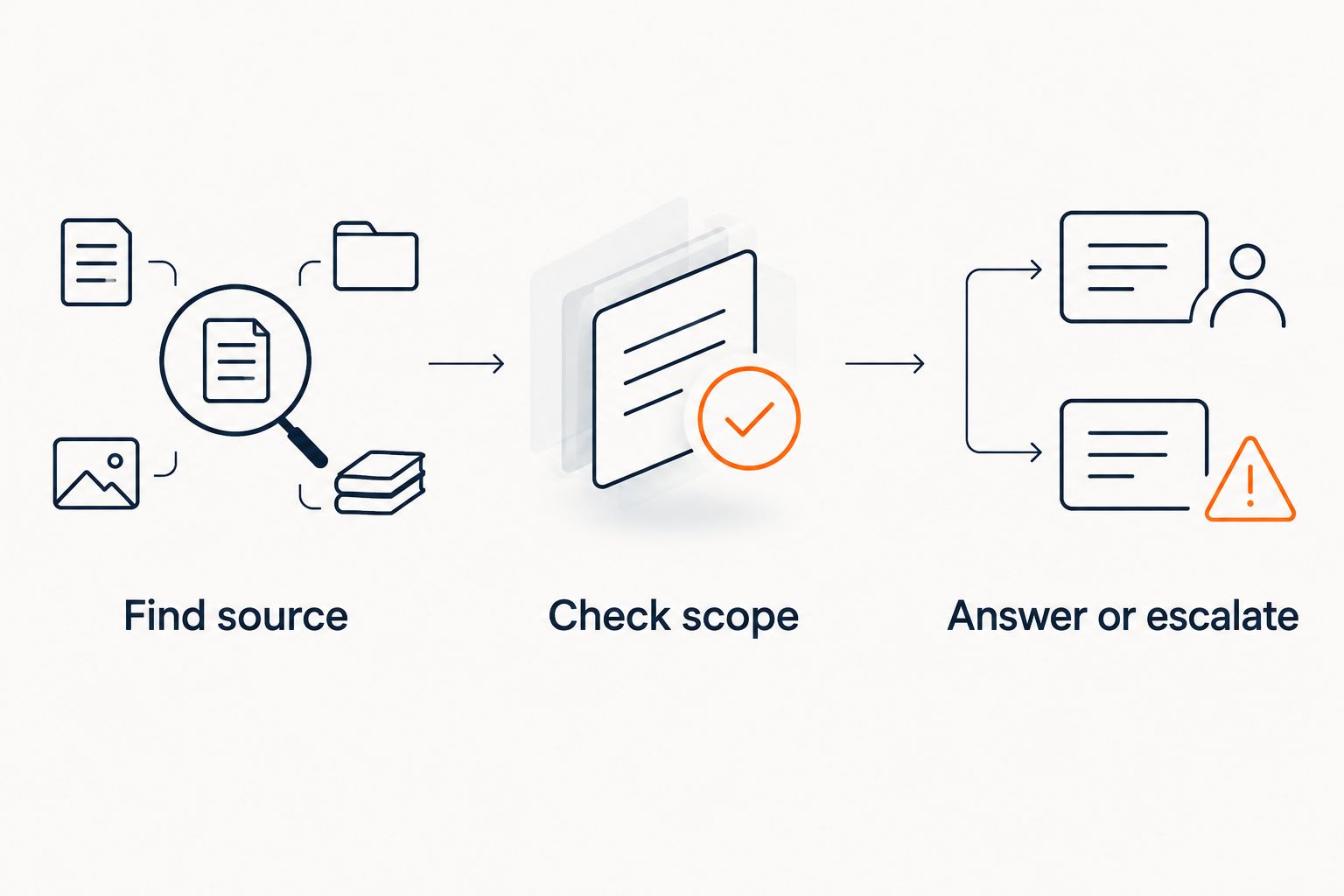
- Find source: Locate the exact passage supporting the proposed answer.
- Check scope: Confirm that the passage applies to this offer and audience.
- Answer or escalate: State the supported information or send the unresolved question to you.
3. Prepare a public source set
Begin with a plain FAQ and your current offer descriptions. Give each offer its own explanation of audience, curriculum, delivery format, and published policies. Resolve contradictions before adding a chatbot; automation does not decide which conflicting page is correct.
Keep public sales material separate from private client content. A prospect asking about interview coaching does not need access to another client’s résumé, salary history, or session notes. Select sources for the intended audience, rather than uploading everything you have.
HelpShelf’s chat widget is a fit when you want answers drawn from your course, coaching, or community content with citations. The limitation remains the source set: missing or contradictory material leaves the assistant without a dependable basis for an answer.
- Keep a current source document for each coaching offer.
- Exclude private résumés, session notes, and identifiable client examples.
- Replace conflicting policy language before publishing the assistant.
4. Separate sales answers from client support
Write the manual responses first. A visitor evaluating your service needs to understand fit and scope; an enrolled client needs help finding something they already have. Mixing those tasks creates answers that assume access or imply that a resource belongs to every offer.
For a 2026 launch, test those audiences separately. A prospect asking whether you cover salary negotiation should receive the published curriculum description. A client asking where the negotiation worksheet lives needs the appropriate resource reference—not a sales pitch.
HelpShelf supports pre-sale and support questions, but you still need to verify the behavior required for your particular setup. Do not assume that serving creators on Kajabi, Skool, or Whop establishes every access-control or account-specific function you need.
- Write public answers that explain the offer without exposing client-only material.
- Keep resource references tied to the correct course or coaching service.
- Verify audience boundaries before using private material in any support workflow.
5. Define a useful lead handoff
Start with a manual inquiry form. Ask only for the information you need to respond, and tell the visitor what happens next. For a career coach, a broad goal and an unresolved offer question are a better starting point than requesting a complete career history.
HelpShelf includes lead capture. Treat that as a way to continue a conversation, not evidence that a visitor is qualified, ready to buy, or suitable for your coaching. Define qualification criteria yourself and check how your chosen setup collects the required information.
Keep sensitive detail out of the first exchange. You do not need a resignation letter or an employment contract to explain whether your published program includes interview practice.
- Ask for a broad coaching goal and a way to reply.
- Keep the unanswered question attached to your follow-up process.
- Explain who will respond without inventing a response-time promise.
6. Test answers and refusals together
Use your 12-question set before publishing. For each response, record whether it answers the question, cites a relevant source, respects the audience boundary, and avoids unsupported claims. A fluent answer with an irrelevant citation fails the test.
Include direct pressure. Ask the assistant to guarantee a salary increase, extend an unpublished discount, or make a refund exception. These are proposed tests—not claims about your offers—and the correct behavior is to avoid inventing permission.
A suitable refusal pattern is: I can only quote what’s published. I cannot approve an exception; the coach needs to review that request. In your 2026 test log, record the actual response rather than marking the entire chatbot as accurate after one successful exchange.
- Check that every factual answer matches its cited passage.
- Test requests for income promises, invented discounts, and refund exceptions.
- Retest failed questions after changing the source or configuration.
7. Measure resolution before expanding the scope
Begin with a spreadsheet. Record the question category, whether the answer was supported, whether the visitor needed follow-up, and what remained unresolved. Keep your definition of a resolved question consistent.
Do not treat every chat message as a saved support request. A visitor can receive an answer and still email you because it did not address the question. Similarly, a captured lead is not a booked coaching engagement.
For your 2026 review, compare results with your own manual baseline. Expand only after the existing questions receive useful, source-supported answers. Keep the scope small enough that you can inspect failures and fix their cause.
- Track unsupported answers separately from questions the assistant correctly declines.
- Review unresolved questions for missing or unclear source material.
- Compare follow-up workload and inquiry quality, not message volume alone.
Compare your support options
HelpShelf is best for career coaches who need cited answers from their own content and lead capture. It is not a substitute for personal coaching judgment, and its usefulness depends on the material you provide.
Choose by the job you need done. A written FAQ is a sensible first step when the answers are stable; a coach-led conversation is the right route when context changes the answer.
| Option | Best for | Main advantage | Key limitation |
|---|---|---|---|
| Written FAQ | Repeated, stable offer questions | You control the exact published wording | Visitors must find the relevant answer themselves |
| Manual email or direct messages | Personal context and exceptions | You can ask follow-up questions and exercise judgment | Each reply requires your attention |
| Staffed live chat | Conversations needing immediate human clarification | A person can explore an ambiguous question | Someone must be present to respond |
| HelpShelf chat widget | Source-cited pre-sale and support answers with lead capture | Answers draw from your own creator content | Missing or conflicting sources still need correction |
You do not have to choose a single route for every question. Keep a readable FAQ, use chat for supported explanations, and reserve personal decisions for the coach. The boundary matters more than the number of channels.
Common mistakes career coaches make
Turning curriculum coverage into an outcome promise
A lesson on networking establishes that networking is covered. It does not establish that a client will receive a referral or job offer. Keep the answer tied to what you teach, not what an employer will do.
Treating a résumé as ordinary support content
A résumé contains personal information and career context. Do not add client documents to a general sales source set. Review what your selected workflow requires before collecting documents through chat.
Letting policy answers become policy decisions
Explaining a published refund policy is different from approving an exception. A request for special treatment belongs with the person authorized to decide it. Write that boundary into both your manual responses and chatbot tests.
Assuming every coaching offer shares the same scope
A course, group program, and private engagement can have different published inclusions. An answer about résumé feedback must identify the relevant offer rather than combine details from unrelated pages.
Counting a refusal as a failure
A refusal is correct when the source cannot support the requested claim. Fix an unnecessary refusal by improving the source or its scope; do not remove the boundary simply to make the assistant answer more often.
FAQ
What should an AI chatbot for career coaches actually do?
An AI chatbot for career coaches should explain published coaching offers, answer supported client questions, and direct unresolved requests to a person. It should not promise employment outcomes or make personal career decisions.
Is HelpShelf a fit for a solo career coach?
HelpShelf fits a solo career coach who needs cited answers from existing coaching content and lead capture. The coach still needs to maintain the source material and handle questions that require personal judgment.
Can a chatbot review a client’s résumé for me?
Treat personal résumé review as coaching work, not routine offer support. A support assistant can explain whether résumé review appears in your published offer, but that does not establish its ability or suitability to assess an individual document.
Do I need a published FAQ before adding a chatbot?
You need clear source material, but it does not have to start as a large FAQ. Begin by documenting recurring questions, linking each answer to the right offer, and resolving conflicting statements.
Can a career coaching chatbot guarantee interviews or a higher salary?
A career coaching chatbot should not guarantee interviews or a higher salary. It can describe published curriculum and services without turning them into promises about employer decisions.
Is a chatbot better than email for coaching support?
A chatbot is suited to supported, repeat questions; email is suited to questions requiring personal context or review. Keep both routes when your clients need both kinds of help.
How do I know whether a chatbot answer is accurate?
Check whether the cited passage directly supports the answer and applies to the correct offer. Test unsupported requests as well, because a system that answers routine questions correctly can still fail when asked to invent an exception.
One last thing
Write your ideal refusal before your welcome message. Use a request you would never approve automatically—such as a guaranteed job offer—and spell out the boundary in plain language. Then check whether the assistant preserves it under follow-up questions.
The most useful test is not whether the chatbot sounds like you. It is whether the chatbot stops where your published authority stops.


