

Instead of manually answering the same course-access and enrollment questions from Zendesk tickets and late-night DMs, prepare approved source content for a HelpShelf chat widget so visitors can get cited pre-sale answers while you keep ticket support for issues that need a person. This 2026 zendesk to ai chatbot migration workflow moves answers first, tests them against real questions, and leaves ticket history where your team can still use it.
- For a zendesk to ai chatbot migration, move approved answers before changing how tickets are handled.
- HelpShelf is best for creators who need cited pre-sale answers from their own course, coaching, or community content.
- Keep Zendesk for issues that require account-specific investigation; test unsupported questions before publishing the widget.
- Check citations, refusals, and lead capture with real visitor questions before expanding coverage.
Why this matters
A buyer asks at 11 pm whether a coaching program includes feedback on their work. Your published course page answers the question, but the buyer cannot find it. If they send a DM and wait, they still do not have an answer when they are deciding whether to enroll.
HelpShelf is best for course creators, coaches, and community owners who want a chat widget to answer pre-sale questions with citations to their own content. Zendesk remains useful when a request needs a person to inspect a ticket or an individual account. Replacing a ticket queue and making published answers easier to find are different jobs; this workflow does the second without assuming the first is finished.
| Option | Best for | Strength | Limit |
|---|---|---|---|
| Zendesk | Managing support requests that need human follow-up | Keeps a ticket-based process for investigation and replies | A buyer looking for a published answer can still end up waiting for a reply |
| HelpShelf chat widget | Answering creator pre-sale and support questions from supplied content | Gives source-grounded answers with citations and captures leads | Cannot establish a fact that is absent from the supplied content or resolve an account-specific issue from a public page |
For a creator in 2026, the useful dividing line is not pre-sale versus support. It is published answer versus individual investigation. An enrollment-policy question can have a published answer; a request to check one person's payment or access needs a different path.
Before you start
- Access to your existing answers: Identify the Zendesk questions you want to cover and the published course, coaching, or community material that contains the approved answers. Use ticket wording to find questions, not as proof that an old reply is current policy.
- Authority over the source content: Confirm which pages or materials you can use and whether visitors should be able to see their cited sources. A private lesson, a member discussion, and a public sales page do not have the same audience.
- A place to put the widget: Confirm who can edit the relevant site or platform page and who will handle questions that require a person. If you use Kajabi, start with the HelpShelf to Kajabi connection guide for that placement task.
The mid-setup trap is access mismatch. Do not feed an answer from members-only material into a public pre-sale workflow and assume a citation makes the disclosure appropriate. Decide what a prospective buyer is allowed to learn before you add the material.
Choose your source content
- List the questions you actually receive. Take 10 questions from recent Zendesk tickets or DMs, removing names and account details. Group them by topic: enrollment, course format, access, support, and policies. Ten questions are a starting test set, not a claim that you have covered every question.
- Find the approved answer for each question. Point to the current content that states it. If the answer lives only in an agent's memory or an old ticket, write or update an approved source before expecting the widget to answer it.
- Separate public facts from private cases. A published description of how coaching works belongs in the answer set. A buyer's payment status does not. Mark any question that requires identity checks, account access, or an exception as a human-follow-up case.
Expected result: Every question in your test set points either to approved content or to a human-follow-up decision. In 2026, that distinction matters more than copying a large archive of replies into a new tool.
A simple worksheet is enough: question, approved source, intended audience, and action when the source does not answer. Keep the question in the buyer's own words. People ask whether they can get feedback on an assignment, not whether the program has an instructional-feedback provision.
Check permissions and answer boundaries
- Review what each source says now. Read the actual passage you plan to rely on. Remove superseded wording before using it as an answer source; an old answer can sound confident and still be wrong for a new buyer.
- Write the boundary for unsupported claims. Test requests for a discount, a refund exception, or an income promise when no approved source supports one. The correct response is a refusal such as, I can only quote what's published, followed by a path to human follow-up where appropriate.
- Check citation usefulness. For each test question, verify that the cited material actually supports the answer and is suitable for that visitor to see. A citation to a broad page is not enough if the cited passage does not contain the claim.
Expected result: You have an answer set with visible limits. A cited answer should tell the buyer what the source establishes, not turn a vague page into a new policy.
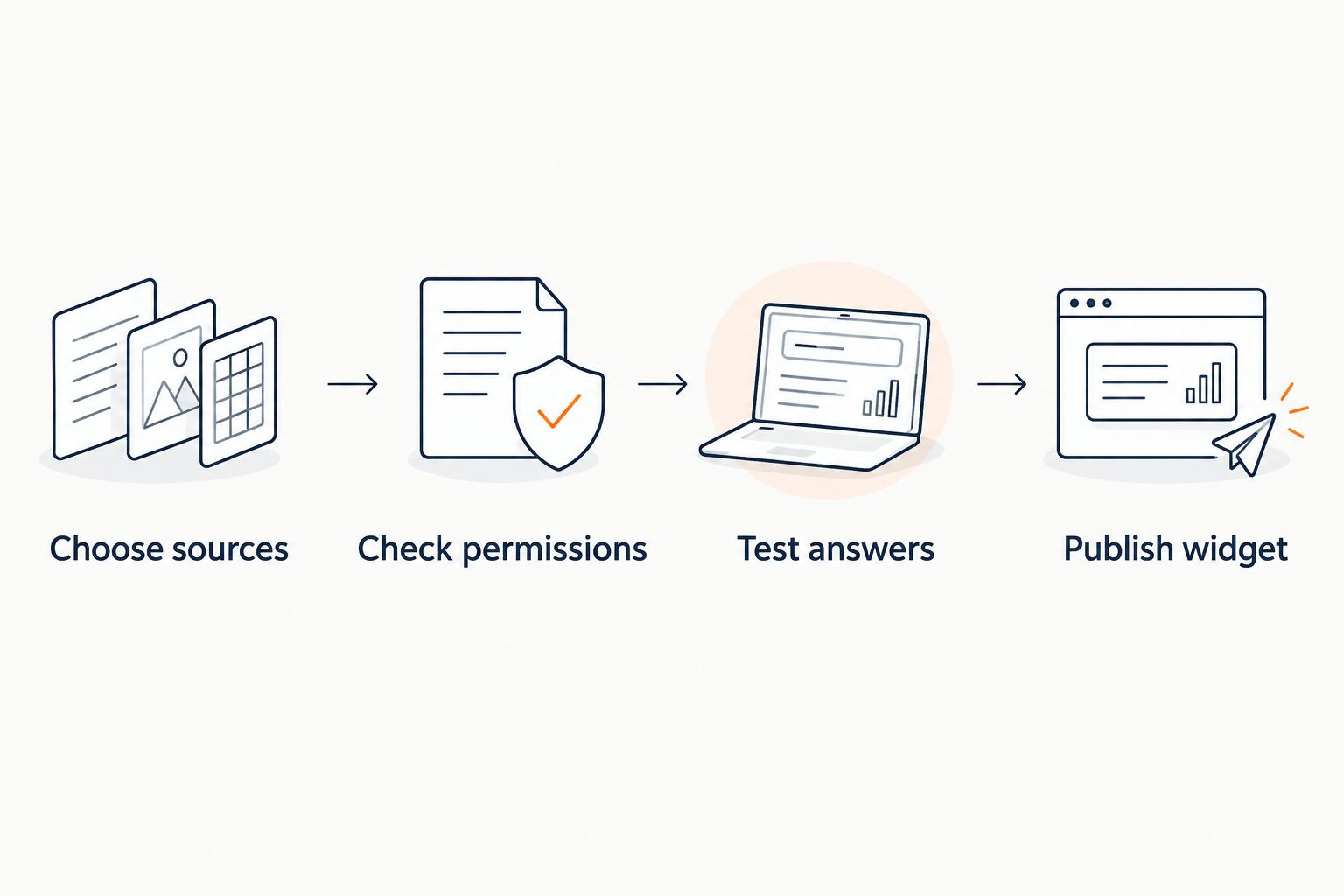
The diagram shows the order of the 2026 migration: prepare the sources, set the audience boundary, test the answer, then place the widget. Publishing first makes every later correction a visitor-facing correction.
Test answers against real questions
- Ask each question as a visitor would. Use the 10 questions you collected, including short versions and follow-ups. Ask where an answer came from; do not accept a plausible response without a supporting citation.
- Add boundary tests. Ask for an unpublished offer, an exception to the stated refund terms, and a result the course does not promise. If the content does not establish the answer, the widget should not invent one. Revise the source or keep the question with a person rather than trying to make an unsupported response sound better.
- Test the handoff decision. Submit an account-specific question, such as why one student's access is missing. Confirm your team has a way to take that case outside the public answer flow. Do not treat lead capture as a substitute for resolving an existing customer's issue.
Expected result: You can show an approved source for each answer you intend to publish, and you know which questions still need human review. Record the question, response, citation, and your pass-or-fix decision so a later content change has a clear retest list.
Set aside 15 minutes to read the responses as a buyer rather than as the person who wrote the course page. A citation is useful only when the reader can see why it answers their question. If the answer requires knowledge of another page, improve the approved content and test again.
Publish the widget without closing the ticket path
- Place the widget on the page where the question arises. For pre-sale questions, begin with the relevant public-facing page rather than every page you control. Follow your site's installation instructions and verify the widget as a visitor; no shared Zendesk-to-widget button is assumed in this process.
- Run the same test set on the live page. Check the answer, citation, and lead-capture path in the actual visitor experience. A working draft is not proof that the published page presents the same experience.
- Keep ticket handling available. Leave a clear human route for billing, access, and other individual cases. For the first 48 hours after publication, review the questions the widget does not answer and correct the source material where an approved answer exists.
Expected result: A prospective buyer can ask a published-content question and inspect its source. Someone with an account problem still has a route to a person. That is a staged 2026 migration, not a claim that a chat widget has taken over the help desk.
Variant: answer community questions without exposing private content
A course creator's public enrollment page and a member community have different answer boundaries. If your questions come from Skool as well as Zendesk, treat the community as a separate placement and source-review task; the HelpShelf to Skool guide covers that platform-specific workflow.
Start with questions that repeat inside the community: where a lesson lives, what a published instruction says, or how to find an existing resource. Check who can view both the answer and its citation. A public visitor should not receive a member-only excerpt simply because the same question appears in a pre-sale conversation.
Use a separate test set for this variant. Ask a member question, verify that the cited material fits the member audience, then ask an account-specific question that needs a person. The verdict stays the same: use the widget for answers grounded in suitable content; retain human support for individual investigations. That split lets you expand coverage in 2026 without treating all creator content as public sales copy.
Troubleshooting
The answer cites a page but not the supporting passage
Open the cited source and find the sentence that supports the claim. If it is not there, do not publish that answer as verified. Edit the approved source so the answer is explicit, then repeat the same question and check the new response.
An old Zendesk reply conflicts with the current course page
Use the current approved page as the source of truth, then resolve the disagreement with whoever owns the policy. Do not merge the two into a compromise answer. An old ticket shows what someone said at the time; it does not establish what you offer now.
The widget answers a private-account question in general terms
A general explanation does not resolve a specific access or payment case. Make the human route clear and test the question again. Do not ask the visitor to treat a cited public policy as confirmation of their personal account status.
A visitor asks for a discount or refund exception
Check whether approved content states the exact offer or exception. If it does not, the answer is no invented discount and no invented exception. A refusal that names the limit is more useful than a confident sentence that your team later has to retract.
The widget is visible but the citation is not useful
Test on the published page, not just in a draft. Check whether the source is accessible to that visitor and whether it contains the relevant answer. If either check fails, change the source selection or keep that question out of the public answer set.
Customize your workflow
Once the initial questions pass, expand by question type rather than by importing more material at once. Add a small set of repeated pre-sale questions, identify the approved passages, and run the same citation and refusal checks. Keep the previous test set: a new page can change an answer that used to be correct.
Use a plain review log with four fields: visitor question, approved source, answer boundary, and owner for exceptions. That makes a policy change actionable. When the course page changes, the person responsible knows which question to retest instead of waiting for a buyer to report a contradiction.
Lead capture belongs after a useful answer or a clear handoff, not in place of either. Decide what your team needs to follow up, and avoid asking a visitor to submit account details into a public pre-sale conversation. For a 2026 zendesk to ai chatbot migration, the next move is to increase the share of questions with an approved, citable answer while keeping individual cases in a human queue.
FAQ
What is the first step in a Zendesk to AI chatbot migration?
Start by matching real Zendesk questions to current, approved source content. An old ticket can reveal what visitors ask, but it is not automatically a current policy source.
Does HelpShelf replace Zendesk for every support case?
No. HelpShelf answers questions from supplied creator content with citations and captures leads; individual billing or account investigations still need a human support path.
Can I use past Zendesk tickets as chatbot answers?
Use past tickets to identify questions, then verify each answer against approved, current content. Remove personal details and do not treat a past exception as a standing policy.
What should the widget say when a discount is not published?
It should not invent a discount. Keep the response within the published information and offer human follow-up when the visitor needs an answer beyond that source.
How do I check whether a cited pre-sale answer is correct?
Ask the question as a visitor, open the cited material, and confirm that it supports the specific claim. If the passage does not establish the answer, revise the source or keep the question with a person.
Should private course material answer public pre-sale questions?
No, not without a deliberate decision that the answer and its cited source are suitable for public visitors. Test public and member-facing placements against their own access boundaries.
When can I expand beyond the first set of questions?
Expand after the initial answers, citations, refusals, and human route work on the live page. Add questions in small groups and retest earlier answers when source content changes.
One last thing
The most useful item to move from Zendesk is often the question, not the agent's reply. A ticket tells you how a buyer phrased the problem; your current, approved content determines what the answer is. Keep those jobs separate in 2026, especially when a past reply included a one-off exception.


