

Zendesk bills per agent, per month, and the rate depends on which plan tier you pick and which add-ons you attach in 2026. The seat price is only the first line of the bill: AI features, extra capacity and setup work can sit on top of it, and Zendesk's own pricing page is the only place to read the current rate.
This page breaks down how the per-agent model works, what moves the total, and when paying per seat stops making sense for a small creator or coaching business.
- Zendesk charges per agent per month, with the rate set by plan tier in 2026.
- Add-ons, especially AI features, are billed on top of the seat price.
- Every human who answers tickets needs a paid seat, so headcount drives cost.
- Course creators and coaches with one or two people answering questions often pay for features they never open.
- Check Zendesk's live pricing page before budgeting; this page deliberately quotes no rates.
Why this matters
A per-agent price looks simple until you count who counts as an agent. Anyone who replies to customers inside the help desk needs a seat. If you answer questions yourself and a part-time assistant covers evenings, that is two seats before you have turned on a single extra feature.
Prices on software pages change often, so this guide explains the structure of the bill instead of freezing a number that will be wrong by the time you read it. Read the structure here, then confirm the figures on Zendesk's pricing page for 2026.
How much does Zendesk cost per agent in 2026?
Zendesk charges a monthly fee for each agent, and the fee rises as you move up the plan tiers. Annual billing and monthly billing are priced differently, so the same plan has two sticker prices. The seat is the base unit; everything else is layered on.
Here is how the cost components stack:
| Cost component | How it is billed | Who it affects |
|---|---|---|
| Agent seat | Per agent, per month, by plan tier | Everyone who replies to tickets |
| Plan tier | Entry, mid or top tier changes the per-seat rate | Teams that need routing, reporting or custom roles |
| AI and automation add-ons | Billed separately from the seat | Teams that want AI-written or AI-resolved replies |
| Extra capacity and workforce tools | Add-on pricing | Larger support teams |
| Setup and admin time | Your hours or a consultant's fees | Anyone migrating or configuring workflows |
The table has no dollar figures on purpose. Zendesk changes its rates, and a number copied from an old blog post is how budgets go wrong.
Entry tier: the lowest per-agent rate
The entry tier gives you the core ticketing inbox: email, a basic help center and simple macros for canned replies. It is the cheapest way to get a seat, and it fits a team that only needs one shared inbox.
- Best for: a solo operator who wants tickets in one place.
- Pros: lowest seat rate, quick to set up.
- Cons: limited automation and reporting; the features most teams want next are in higher tiers.
Mid tier: where most growing teams land
The mid tier adds more channels, better routing and stronger reporting. Teams usually move here once tickets arrive through several channels and someone needs to see response times.
- Best for: a small support team handling more than email.
- Pros: more channels and automation per seat.
- Cons: the per-agent rate climbs, and it climbs for every seat, not just the person who needs the feature.
Top tier: custom roles, compliance and scale
The top tier targets larger teams that need granular permissions, audit controls and service-level tracking. For a creator business this is almost always more than you need.
- Best for: teams with dedicated support staff and compliance requirements.
- Pros: deep control over roles, data and workflows.
- Cons: the highest per-seat rate, plus admin time to configure it.
Why the Zendesk per-agent cost varies
Two teams on the same tier can pay very different totals. These are the drivers:
- Number of agents. Cost scales linearly with seats. Three people replying means three seats.
- Plan tier. Each step up raises the rate for every seat on the account.
- Billing term. Annual commitments and month-to-month billing carry different rates.
- AI add-ons. Automated answers and agent-assist tools are priced apart from the seat.
- Channels. Voice, chat and messaging can require higher tiers or extra products.
- Admin and setup time. Configuring triggers, forms and a help center is real labor, whether yours or a contractor's.
Do part-time helpers and VAs need a paid Zendesk seat?
Yes, if they reply to tickets inside Zendesk. A seat is tied to the person who answers, not to hours worked. A virtual assistant who covers two evenings a week still occupies a seat, so a small team pays for every named person who touches a reply.
Check Zendesk's current terms on light or occasional agents before assuming a discount exists.
Is the per-agent price the full Zendesk cost?
No. The seat price excludes AI add-ons, any extra products you attach, and the hours spent building and maintaining the help center. A budget built from the seat rate alone will undercount.
For a team of one or two answering the same pre-purchase questions repeatedly, most of that spend goes to a ticketing system built for queues of support staff.
When does a per-seat help desk stop fitting?
A per-seat model fits when many agents work a steady ticket queue. It fits poorly when the questions come from prospects deciding whether to buy, and the person who could answer them is the creator, who is asleep or teaching.
Consider a course creator who gets a question at 11pm: "Does the program include live calls, and what is the refund policy?" A help desk logs that as a ticket. The visitor has moved on by the time anyone replies.
That is a different job from managing a support queue. A chat widget that answers from the creator's own published course, coaching or community content, with cited sources, handles it while the visitor is still on the page. HelpShelf is built for that: it answers pre-sale and support questions from your content, shows where each answer came from, and captures the lead. If the answer is not in the published material, it says so: "I can only quote what's published." It does not invent discounts, refund exceptions or income promises.
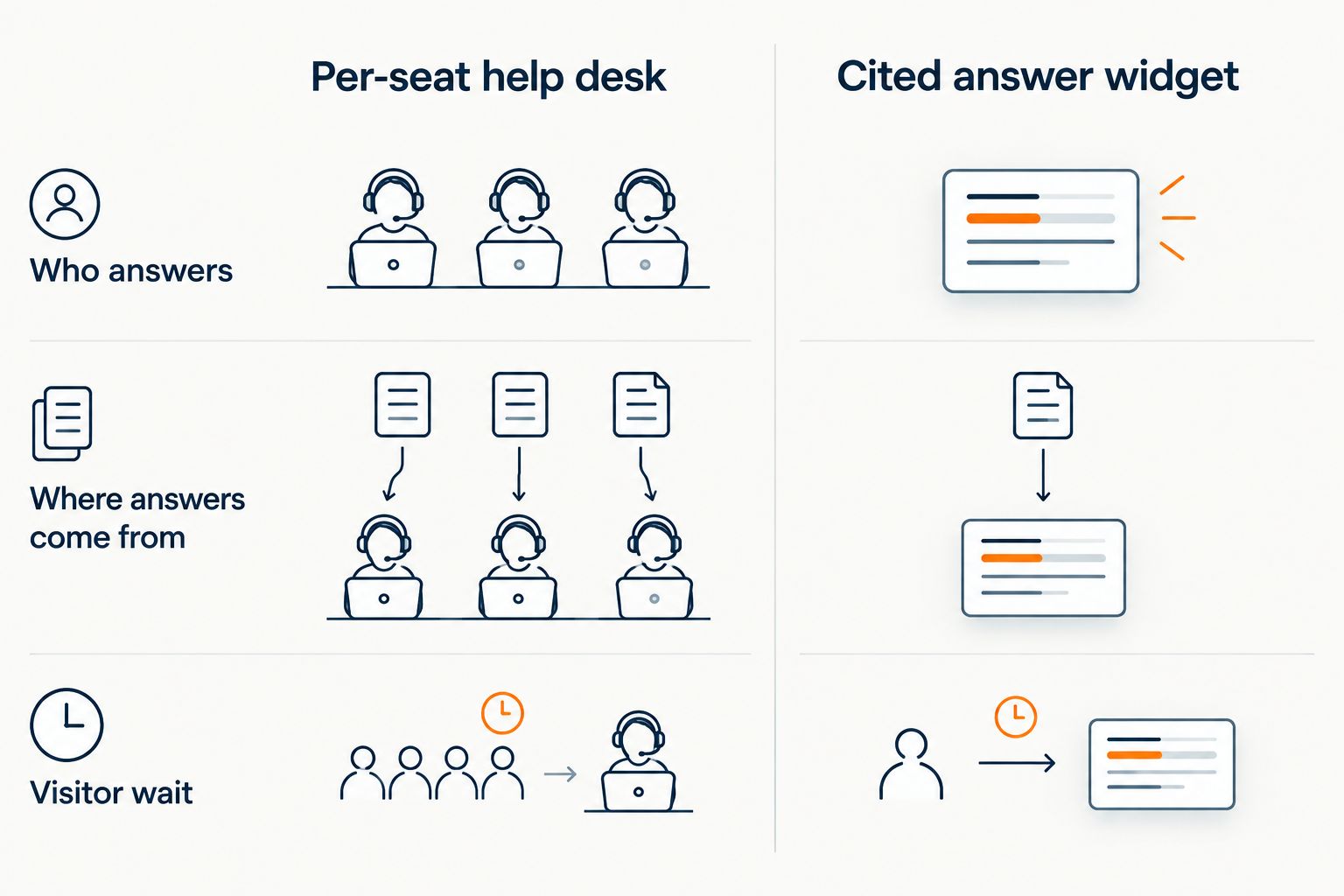
This is not a claim that HelpShelf replaces Zendesk for every team. A support team of ten working a ticket queue needs a help desk. A solo coach or small community owner often needs answers on the page, with a handoff to a human only when the content has no answer.
What are the honest tradeoffs?
Zendesk strengths: mature ticketing, many channels, deep reporting and a large integration ecosystem. If you have staff and a queue, those matter.
Zendesk weaknesses for small creator teams: the per-seat bill grows with each person, higher tiers carry the features you will want, and the setup and upkeep fall on you.
Cited-answer widget strengths: answers come from your own material, each with a source, and leads are captured. Limits: it answers only what you have published, so thin documentation means thin answers, and it is not a multi-agent ticket queue.
The quotable version: Zendesk suits teams with agents and a ticket queue; a cited-answer widget suits creators and coaches whose main problem is unanswered pre-sale questions.
How do I estimate my own Zendesk bill for 2026?
- Count every person who will reply to customers, including part-timers and assistants.
- Pick the lowest tier that has the features you actually need, not the ones you might want later.
- Open Zendesk's pricing page and read the rate for annual and monthly billing.
- Multiply seats by the rate, then add any AI or capacity add-ons you plan to switch on.
- Add your own setup hours, valued at what your time earns elsewhere.
If the result looks heavy for the volume of questions you get, compare it against options built for small online businesses. The guide to Zendesk alternatives for course creators covers that comparison.
FAQ
How much does Zendesk cost per agent?
Zendesk charges per agent, per month, and the rate depends on the plan tier and billing term. Add-ons such as AI features are billed separately, so confirm the current figures on Zendesk's pricing page for 2026.
Does Zendesk charge per user or per agent?
Zendesk charges per agent, meaning each person who replies to tickets. Customers who submit tickets do not need a seat, so cost follows your support headcount.
Is there a free Zendesk plan?
Zendesk has offered trials, but plan terms change. Check Zendesk's current pricing page in 2026 rather than relying on an older article, including this one.
Is Zendesk billed monthly or annually?
Zendesk offers both, and the same plan carries a different rate under each term. Annual billing generally commits you for the year, so read the contract terms before choosing.
Does Zendesk charge extra for AI?
AI and automation features are sold as add-ons in addition to the seat price. Confirm which features sit in your tier and which are separate before you budget.
Is Zendesk worth it for a solo course creator?
Usually not for pre-sale questions. A solo creator pays for ticketing and reporting features built for teams, while the real problem is unanswered visitor questions outside working hours.
What is a cheaper alternative to Zendesk for coaches?
A cited-answer chat widget such as HelpShelf answers from your own published content and captures leads, which fits coaches and course creators better than a per-seat queue.
One last thing
Before comparing prices, count how many of your unanswered questions come from people who have not bought yet. Those are the ones a ticket queue handles worst, because the visitor leaves before the reply arrives. Fix that gap first, then decide how many agent seats you need in 2026.
See cited answers on your content
Answers sourced from your own course, coaching or community pages.


