

SaaS companies’ AI chat widget is a website or in-app chat interface that answers documented questions with the aim of helping visitors get an answer or reach the right person. In 2026, a question about a plan, integration, or account policy calls for a current source, not a plausible-sounding guess. The first decision is whether you need a widget for a general software product or for a creator business selling courses, coaching, or community access.
- An AI chat widget for SaaS companies should cite current sources and refuse questions those sources cannot answer.
- HelpShelf is best for course creators, coaches, and community owners who need cited answers and lead capture.
- A static FAQ is easier to control; human live chat handles account-specific questions but requires someone to reply.
- In 2026, test invented discounts, refund exceptions, and income promises before publishing a chat widget.
Why an AI chat widget matters for SaaS companies
A visitor asks whether a feature is included in a plan. If the answer exists on your site, sending that visitor to a contact form adds a step. If the answer does not exist, letting a widget invent one creates a different problem. The useful middle ground is a chat interface that finds the published answer, shows where it came from, and stops when the source runs out.
That distinction matters especially when the visitor is deciding whether to buy. HelpShelf provides a chat widget that answers pre-sale and support questions from a creator’s own course, coaching, or community content, with cited sources and lead capture. Its stated audience is not every SaaS company: it is course creators, coaches, and community owners, including people using Kajabi, Skool, and Whop. If you sell general-purpose software, use the evaluation steps below without assuming that a creator-focused widget fits your support operation.
How to choose and set up a widget in 2026
Work from the content outward: audit source content, define answer boundaries, check cited answers, plan lead handoff, and review transcripts. A widget cannot repair a missing policy or decide an account exception for you. Those decisions belong in your published material or with a person.
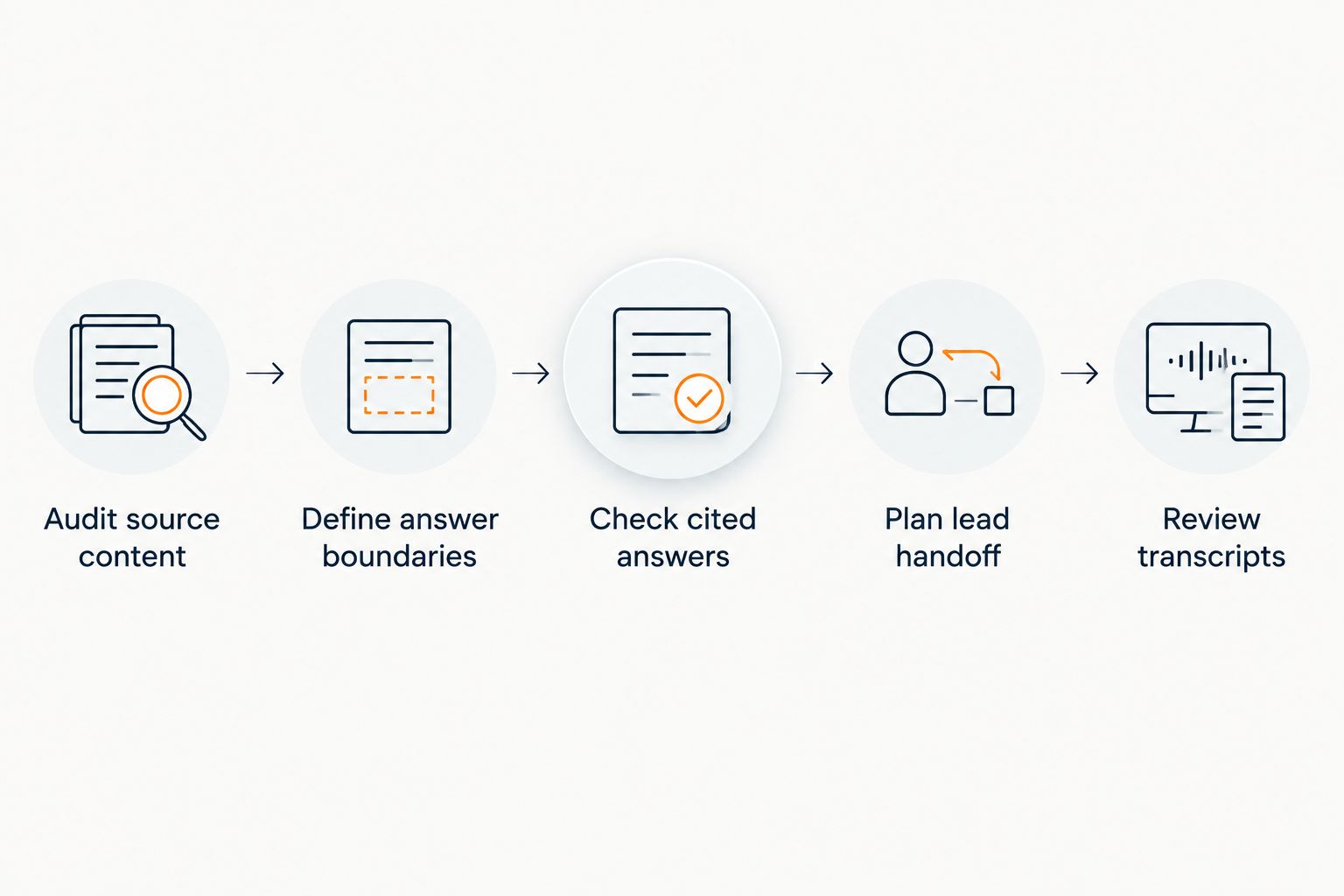
Audit source content
Start without software. Open the pages a visitor can read, then compare them with the material your team uses to answer questions. A sales page that describes an offer differently from a support article gives any widget conflicting instructions. Choose which page governs the answer and update or remove the other one before connecting either source.
For a general SaaS product, the source set might include feature descriptions, plan terms, public documentation, and support articles. For a creator business, it might include published course details, community descriptions, and support content. Only include material you have the right to show visitors. A private coaching note is not a public policy simply because it exists in a document.
- List the public pages that answer pre-sale and support questions.
- Mark content that conflicts with another page or has an unclear owner.
- Separate public material from private, account-specific, or internal notes.
- Write down 3 sample questions for each major content category.
Define answer boundaries
Write the refusal rules before testing a reply. A question about a published feature can have a cited answer. A request for an unpublished discount, a refund exception, or an income promise cannot be answered by turning up the widget’s confidence. Give the visitor a clear limit: I can only quote what’s published. Then identify where the conversation should go next.
This boundary protects the reader as much as your team. A visitor needs to know whether a statement is a published term or a decision someone still has to make. Keep the rule short enough to inspect in a transcript; a long disclaimer followed by a made-up answer is still a failure.
- Name the subjects that require a human decision, such as individual account terms.
- Define what counts as an acceptable cited answer for each subject.
- Draft a brief refusal for information absent from the approved sources.
- Identify 1 handoff destination for questions the widget cannot resolve.
Check cited answers
Now evaluate the tool against the questions you wrote, using the public pages as the answer key. HelpShelf’s relevant capability is source-grounded answers with citations from a creator’s own content. That is a fit to investigate when your buyers ask about a course, coaching offer, or community. It is not evidence that a widget can answer an undocumented question about a different SaaS product.
In 2026, check the cited passage itself, not just the wording in the chat bubble. A citation to a page that does not support the claim is not a verified answer. If you change the source, repeat the test before relying on that answer again. Record what the widget said, which source it cited, and what the source actually permits you to say.
- Ask each sample question using the wording a visitor would use.
- Open the cited page and locate the passage that supports the reply.
- Flag replies that stretch a narrow source into a broader promise.
- Ask an unsupported question and confirm the widget refuses it.
Separate question types
A pre-sale question and a support request do not always need the same next step. Someone comparing what an offer includes might need a link to a published description and an opportunity to leave contact details. Someone asking about their own access needs an account-specific review. Label those paths before you configure any workflow so the widget does not treat every visitor as a lead.
You can map this manually in a short document. Put example visitor questions in one column, the approved source or response in another, and the appropriate destination in a third. If you cannot agree on the destination, fix the process before automating it. The distinction is particularly useful for a creator who answers both buyer questions and member questions from the same inbox.
- Group examples into pre-sale, documented support, and account-specific support.
- Match each group to an approved source or an explicit refusal.
- Keep questions about an individual account out of generic published answers.
- Check that a sales question does not become a support handoff by default.
Plan lead handoff
Lead capture should follow a useful answer, not interrupt the question. If a visitor asks whether a community covers a topic, show what the published content says first. If they still need a person, give them a way to continue the conversation. HelpShelf includes lead capture, but you still need to decide what your team does with a captured question.
Make the handoff concrete. Decide who receives it, what context they need, and which questions should not request contact details at all. Avoid promising a reply time unless your team has published and can meet that commitment. In 2026, the goal is a visitor who knows what was answered and what remains open, not an inbox full of context-free contact details.
- Specify when to ask for contact details and when not to.
- Pass along the visitor’s question and the answer already shown.
- Assign a person or team to handle unresolved pre-sale questions.
- Check that the handoff does not claim an exception was approved.
Test refusals
Do not stop at easy questions whose answers appear verbatim on a page. Try to make the widget say something your business has not published. Ask for a special discount, a refund outside the stated policy, or a guaranteed outcome. A correct response identifies the limit and, when appropriate, sends the question to a person. It does not fill the gap with a familiar-sounding policy.
Repeat those tests when source material changes. A new sales page can conflict with an older help article, while a removed page can leave an answer without a valid citation. Treat refusal testing as part of publishing content, not a one-time launch task.
- Ask for an unpublished discount and inspect the reply.
- Ask for a refund exception without supplying an approved policy.
- Ask for an income promise the source material does not make.
- Retest after changing a page the widget uses as a source.
Review transcripts
Once the widget is live, read actual conversations alongside the pages they cite. Count a useful answer as one that addresses the question and rests on the cited source. A conversation that ends quickly because the visitor gives up is not proof of success. Equally, a handoff can be the correct result when the question needs account access or a human decision.
Start with a manageable review habit instead of inventing a success threshold before you have evidence. Look for repeated questions with no published answer; those are candidates for better documentation. Keep the source owner involved so a transcript finding leads to a corrected page, not just a change in chat wording.
- Review 5 conversations each week and open their cited pages.
- Mark unsupported claims separately from correct refusals.
- Note recurring questions that need a new or clearer public answer.
- Retest the widget after the underlying page is corrected.
Compare the options for SaaS companies
Choose by the question you need answered, not by the presence of a chat bubble. The options below solve different parts of the same job. None replaces a current source of truth, and only a person can decide an unpublished exception. No starting price is listed because this guide is about fit and answer quality, not a changing price comparison.
| Option | Best for | Advantage | Key limitation |
|---|---|---|---|
| Static FAQ | Teams with a small set of stable, public questions | You control each published answer directly | Visitors must find the relevant answer themselves |
| Human live chat | Account-specific requests and decisions requiring judgment | A person can examine context and make an authorized decision | Someone must be available to respond |
| General AI chat widget | Teams evaluating conversational answers across their own content | Can address questions phrased in different ways | Require a citation and refusal test before trusting its replies |
| HelpShelf | Course creators, coaches, and community owners seeking cited answers and lead capture | Answers from the creator’s own content with cited sources | Its stated audience is creators, not every general SaaS support team |
HelpShelf is best for course creators, coaches, and community owners who want cited pre-sale and support answers from their own content. If your main requirement is an account-specific decision, keep a human route. If the question is already answered in a short, stable FAQ, publishing that FAQ first gives the widget a better source later.
Common mistakes SaaS companies make
- Publishing the widget before resolving conflicting pages. If a sales page and support article describe the same policy differently, decide which one is authoritative. Do not ask the widget to choose on your behalf.
- Mistaking a citation for proof. Open the linked source. A page title that sounds relevant does not establish that the quoted passage supports the answer.
- Turning a refusal into a sales pitch. When the answer is unpublished, say so. Do not replace the missing fact with a promise about an exception or outcome.
- Capturing contact details without preserving the question. A person handling the lead needs to know what the visitor asked and what the widget already answered.
- Using one path for every conversation. A buyer asking about an offer and a member asking about their own account need different sources and different next steps.
These checks matter in 2026 because adding a new page or changing an existing one changes what the widget has to interpret. Content maintenance is part of chat maintenance. Give someone ownership of the published answer before you judge the quality of the automated one.
FAQ
What is an AI chat widget for SaaS companies?
It is a website or in-app chat interface that answers visitor questions and can route unresolved questions to a person. Evaluate whether its replies are supported by your current published content.
Who is HelpShelf best for?
HelpShelf is best for course creators, coaches, and community owners who want cited answers from their own content and lead capture. Its stated audience includes creators using Kajabi, Skool, and Whop.
Can a chat widget answer questions about unpublished discounts?
No answer about an unpublished discount should be presented as an approved offer. Set a refusal rule and direct the visitor to a person who can handle the request.
Is live chat better than an AI chat widget for account questions?
Human live chat is the better route when a question needs access to an individual account or an authorized exception. A source-grounded widget can still answer the related published policy question.
How do I check whether a chat answer is accurate?
Open the cited source and find the passage that supports the exact claim. If the passage is missing, outdated, or narrower than the reply, treat the answer as unverified.
Should I connect private course or member material to a chat widget?
Connect material only when its permitted audience matches the people who can use the widget. A public visitor should not receive an answer drawn from private content simply because that content is available to your team.
What should a SaaS chat widget do when it cannot answer?
It should state the limit without inventing a policy and offer the appropriate handoff. A short refusal gives the visitor a clearer next step than a plausible but unsupported answer.
One last thing
In 2026, the most useful test question is often one your published content cannot answer. If the widget admits the limit, you have a path to a human decision or a better source page. If it invents an answer, changing the chat wording alone will not fix the missing boundary.


